
Canva AI Complete Guide helps you understand how Canva uses artificial intelligence to make graphic design faster, easier, and more creative. Whether you are a beginner, student, teacher, blogger, marketer, or business owner, Canva AI offers powerful tools to create professional designs with minimal effort.
Canva AI combines the simplicity of Canva with advanced AI features such as Magic Studio, Magic Design, Magic Write, AI image generation, background removal, and smart editing tools. Instead of starting from a blank canvas, users can generate presentations, social media posts, videos, documents, and graphics within minutes using AI.
In this guide, you will learn how Canva AI works, who created Canva, its history, AI features, pricing, real-world applications, advantages, limitations, and practical tips to get the best results from one of the world’s most popular AI-powered design platforms.
What Is Canva AI?
Canva AI is a collection of artificial intelligence tools built into the Canva design platform to help users create professional-quality graphics, presentations, videos, social media posts, documents, and marketing materials with minimal effort. Instead of designing everything manually, users can generate ideas, write content, edit images, and create complete designs using simple text prompts.
Canva introduced its AI-powered features to make graphic design faster, easier, and more accessible for everyone. Today, Canva AI includes tools such as Magic Studio, Magic Design, Magic Write, Magic Media, Magic Edit, Magic Eraser, Background Remover, and several other AI-powered features that simplify the creative process.
Unlike traditional design software that requires advanced skills, Canva AI allows beginners and professionals alike to create high-quality visual content within minutes. Whether you are designing a presentation, creating a YouTube thumbnail, writing social media posts, or generating AI images, Canva AI helps transform ideas into polished designs quickly and efficiently.
Today, millions of individuals, educators, businesses, marketers, and content creators use Canva AI to improve productivity, save time, and produce visually appealing content without requiring professional graphic design experience.
💡 Did You Know?
Canva serves millions of users across more than 190 countries, making it one of the world’s most widely used online design platforms. The addition of AI has further expanded its capabilities by enabling users to create content using simple natural-language prompts.
History of Canva AI
The story of Canva AI begins with the success of Canva, one of the world’s most popular online graphic design platforms. Canva was founded in 2013 by Melanie Perkins, Cliff Obrecht, and Cameron Adams in Sydney, Australia. Their vision was simple: make graphic design easy and accessible for everyone, regardless of technical or design experience.
For several years, Canva focused on simplifying design through drag-and-drop editing, ready-made templates, icons, fonts, and collaboration tools. As artificial intelligence rapidly advanced, the company expanded its platform by integrating AI-powered features that could generate content, edit images, and automate creative tasks.
A major milestone came in 2023 with the launch of Magic Studio, Canva’s comprehensive AI suite. It introduced powerful tools such as Magic Design, Magic Write, Magic Edit, Magic Eraser, Magic Expand, Magic Grab, Magic Media, and AI-powered translation, helping users create professional-quality designs with simple text prompts.
Today, Canva AI continues to evolve by combining artificial intelligence with an easy-to-use design platform. Instead of replacing human creativity, Canva AI is designed to assist users by speeding up repetitive tasks, generating ideas, and making professional design accessible to students, educators, businesses, marketers, and content creators worldwide.
🌍 Global AI Fact
Canva has grown from an Australian startup into one of the world’s leading visual communication platforms, serving users in more than 190 countries. The introduction of Canva AI has transformed the platform from a graphic design tool into a complete AI-powered creative workspace.
Canva AI Complete Guide: Key Features
One of the biggest reasons behind the popularity of Canva AI is its wide range of AI-powered design tools. Instead of relying on multiple applications, users can write content, generate images, edit photos, create presentations, and design marketing materials from a single platform.
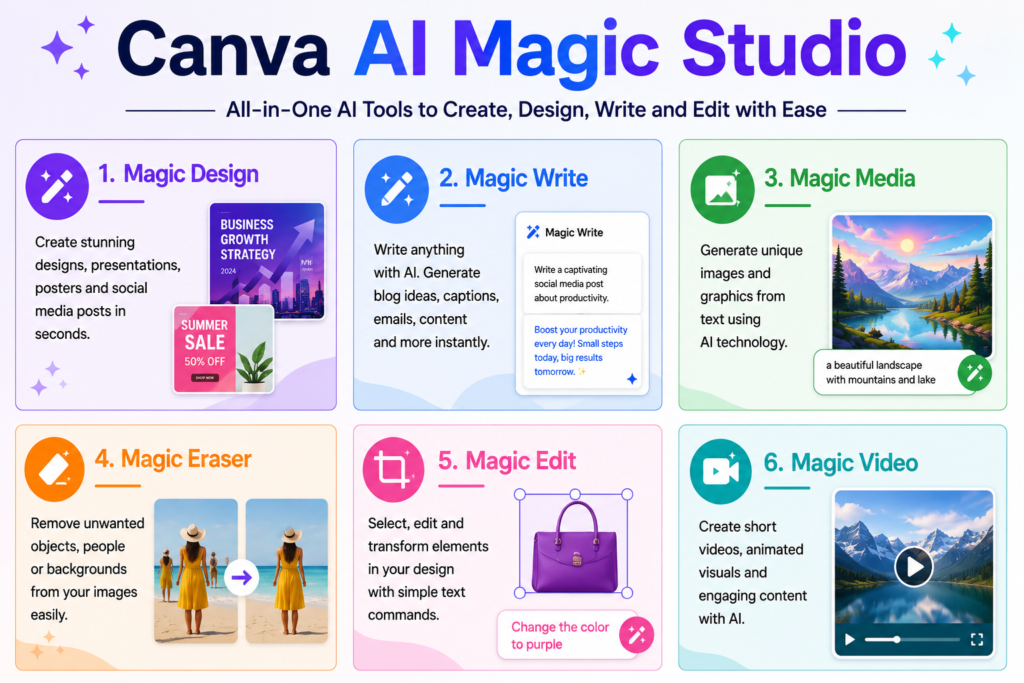
Some of the most useful Canva AI features include:
- Magic Studio – A complete suite of AI-powered creative tools.
- Magic Design – Generates professional designs from text prompts or uploaded media.
- Magic Write – Creates articles, captions, emails, and marketing copy using AI.
- Magic Media – Generates AI images and graphics from text descriptions.
- Magic Edit – Replaces or modifies selected objects inside an image.
- Magic Eraser – Removes unwanted objects from photos with a single click.
- Magic Expand – Extends images beyond their original borders using AI.
- Background Remover – Instantly removes image backgrounds for professional editing.
- Translate – Converts designs into multiple languages while preserving the layout.
- AI Presentation Maker – Creates presentation slides from simple prompts.
Together, these tools make Canva AI one of the most comprehensive AI-powered design platforms for students, teachers, marketers, content creators, entrepreneurs, and businesses.
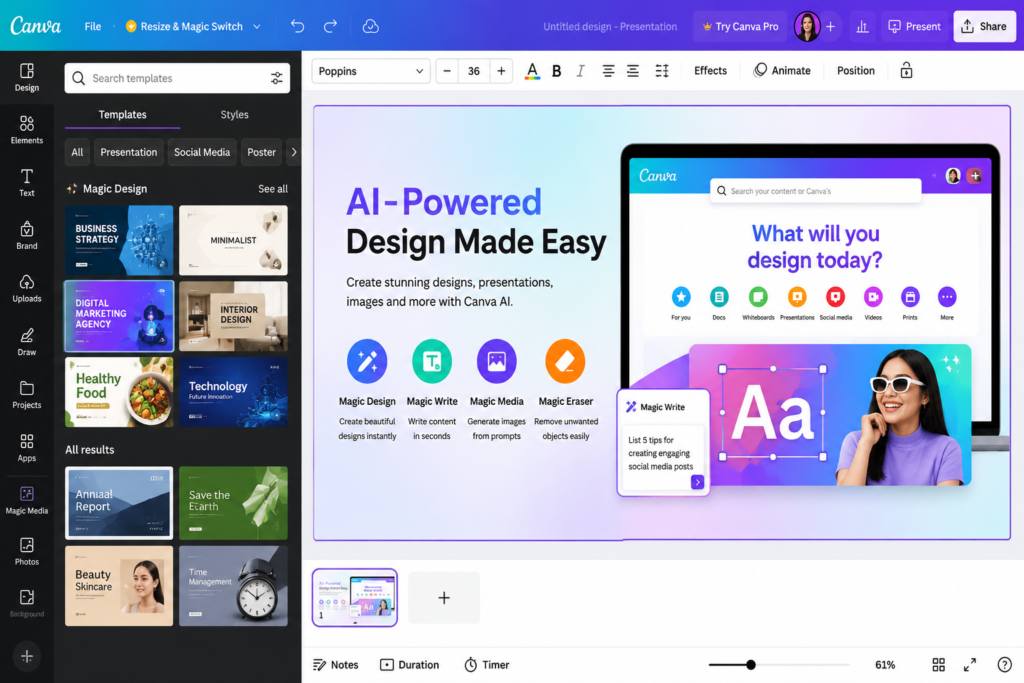
🚀 AI in Real Life
A small business owner can use Canva AI to generate a logo, design a social media campaign, create product posters, write promotional content, and prepare a presentation—all within a single platform, significantly reducing both design time and costs.
How Does Canva AI Work?
Canva AI combines artificial intelligence, machine learning, and natural language processing to help users create professional designs with simple text prompts. Instead of starting with a blank canvas, users describe what they need, and Canva AI automatically generates layouts, images, text, or design suggestions within seconds.
When a user enters a prompt, Canva AI first analyzes the request to understand its intent. It then selects suitable templates, fonts, colors, graphics, and AI tools such as Magic Design, Magic Write, or Magic Media to generate the most relevant results. Users can further customize the generated design using Canva’s drag-and-drop editor.
Unlike traditional graphic design software that requires advanced skills, Canva AI simplifies the creative process by combining automation with human creativity. Users remain in full control and can edit every element before downloading or publishing their work.
How Canva AI Creates Designs
- Enter a text prompt describing your idea.
- Analyze the prompt using AI.
- Generate layouts, images, text, or templates.
- Customize colors, fonts, graphics, and branding.
- Download or publish the final design.
This workflow enables beginners and professionals to create presentations, social media posts, logos, posters, resumes, videos, documents, and marketing materials much faster than traditional design methods.
🧠 Research Insight
Studies on AI-assisted design tools suggest that generative AI can significantly reduce repetitive design tasks, allowing creators to spend more time on creativity, branding, and content quality instead of manual editing.
Canva AI Complete Guide: Pricing Plans
Canva AI is available through both free and paid plans, allowing users to choose the option that best fits their creative and professional needs. While the free plan includes several AI-powered features, advanced capabilities are available with Canva Pro and Canva Teams.
| Plan | Best For | AI Features |
|---|---|---|
| Canva Free | Beginners, students, and casual users | Limited access to Magic Studio, templates, AI writing, and image editing |
| Canva Pro | Freelancers, content creators, teachers, and marketers | Premium templates, Brand Kit, Background Remover, Magic Resize, expanded AI credits, and advanced Magic Studio features |
| Canva Teams | Businesses and organizations | Team collaboration, shared brand assets, AI-powered workflows, approval tools, and centralized design management |
The Free Plan is sufficient for learning Canva AI and creating everyday designs. However, users who regularly create professional content, presentations, marketing materials, or social media graphics will benefit from the additional AI features included in Canva Pro.
Before choosing a paid plan, compare your design requirements, collaboration needs, and monthly AI usage. For many beginners, the free version provides an excellent starting point, while professionals and businesses often find the Pro subscription a worthwhile investment.
💼 Business Tip
If you create content daily for clients or your own brand, Canva Pro can significantly reduce design time by combining premium templates with AI-powered creative tools, making it a cost-effective investment for long-term productivity.
Canva AI Complete Guide: Who Should Use Canva AI?
One of the biggest strengths of Canva AI is its versatility. Whether you are creating educational content, marketing campaigns, business presentations, or social media graphics, Canva AI provides tools that simplify the entire creative process.
Students
Students can use Canva AI to create presentations, project reports, resumes, posters, infographics, mind maps, and study materials within minutes. AI-powered writing and design suggestions also help improve the quality of assignments.
Teachers and Educators
Teachers can prepare classroom presentations, worksheets, lesson plans, certificates, quizzes, and educational posters more efficiently. Canva AI also helps create visually engaging learning materials that improve student participation.
Bloggers and Content Creators
Bloggers, YouTubers, and influencers can design blog graphics, YouTube thumbnails, Pinterest pins, Instagram posts, Facebook banners, and promotional materials without advanced graphic design skills.
Business Professionals
Businesses can create brand presentations, marketing materials, product catalogs, advertisements, proposals, business reports, and social media campaigns while maintaining consistent branding through AI-powered design assistance.
Freelancers and Graphic Designers
Freelancers can complete client projects more quickly by using Canva AI for brainstorming, layout generation, image editing, content writing, and presentation design. Instead of replacing professional designers, Canva AI helps automate repetitive tasks and increases productivity.
Overall, Canva AI is suitable for beginners as well as experienced professionals who want to save time while creating high-quality visual content.
🎓 Student Tip
Instead of using Canva AI to generate complete assignments, use it to organize ideas, improve design quality, and present your work more professionally. Combining your own knowledge with AI-assisted design leads to better learning and more original results.
Canva AI Complete Guide: Advantages and Limitations
Like every AI-powered platform, Canva AI offers numerous advantages while also having a few limitations. Understanding both helps users decide when Canva AI is the right choice for their creative projects.
Advantages
- Easy to use even for beginners with no graphic design experience.
- Creates professional designs quickly using AI-powered tools and templates.
- Combines multiple AI tools such as Magic Write, Magic Design, Magic Media, Magic Edit, and Magic Eraser in one platform.
- Supports team collaboration, making it ideal for businesses and educational institutions.
- Works on web, desktop, and mobile devices, allowing users to design from anywhere.
- Saves time by automating repetitive design and content creation tasks.
- Offers thousands of templates, icons, fonts, photos, and design elements for various industries.
Limitations
- Some AI features require a Canva Pro subscription.
- AI-generated content may need manual editing for accuracy, branding, or creativity.
- Advanced professional editing is still better handled by specialized software for highly complex projects.
- Internet access is required for most AI-powered features.
- AI image generation credits may vary depending on the subscription plan.
Despite these limitations, Canva AI remains one of the most beginner-friendly and feature-rich AI design platforms available today. It is an excellent choice for anyone who wants to create attractive visual content quickly without investing years in graphic design training.
🔍 Quick Summary
Canva AI combines artificial intelligence with an intuitive drag-and-drop editor, making professional design accessible to everyone. From presentations and social media graphics to videos, documents, and marketing materials, it enables users to create high-quality content faster while keeping the creative process simple and efficient.
Canva AI Complete Guide: Canva AI vs Microsoft Designer
Both Canva AI and Microsoft Designer use artificial intelligence to simplify graphic design, but they are built for different types of users and creative workflows.
| Feature | Canva AI | Microsoft Designer |
|---|---|---|
| Best For | Complete graphic design, presentations, branding, and marketing | Quick social media graphics and AI-generated designs |
| Ease of Use | Excellent for beginners and professionals | Very beginner-friendly |
| AI Writing | Magic Write | Microsoft Copilot integration |
| AI Image Generation | Magic Media | DALL·E-powered image generation |
| Presentation Design | Advanced presentation tools | Basic presentation support |
| Brand Kit | Available in Canva Pro | Limited branding options |
| Templates | Thousands of professional templates | Smaller template library |
| Team Collaboration | Strong collaboration features | Basic collaboration |
| Platform Support | Web, Desktop, Android, iOS | Web and Microsoft ecosystem |
If your primary goal is to create presentations, marketing materials, social media graphics, business documents, or educational content, Canva AI offers a more comprehensive creative platform. On the other hand, Microsoft Designer is ideal for users who need fast AI-generated graphics and already work within the Microsoft ecosystem.
✅ Pro Tip
Choose Canva AI if you regularly create presentations, posters, resumes, YouTube thumbnails, or social media content. Choose Microsoft Designer if your workflow is centered around Microsoft 365 and you primarily need quick AI-assisted graphic creation.
Canva AI Complete Guide: Best Prompts for Canva AI
The quality of AI-generated designs depends on the quality of your prompts. Instead of giving short or vague instructions, describe your goal, style, audience, colors, and purpose. Clear prompts help Canva AI create more accurate and visually appealing results.
Here are some practical prompts you can use with Canva AI:
- Design a modern YouTube thumbnail for an AI tutorial with bold typography and blue-purple colors.
- Create a professional business presentation with 10 slides about artificial intelligence.
- Generate an Instagram post promoting a digital marketing service using a clean and minimalist style.
- Design a resume for a computer operator with a modern blue and white theme.
- Create a printable educational infographic explaining machine learning in simple language.
- Generate a logo for a technology startup using a futuristic style and gradient colors.
- Design a restaurant menu with elegant typography and premium food illustrations.
- Create a Facebook cover banner for an AI education website with a modern technology theme.
The more specific your prompt, the better Canva AI understands your requirements and produces professional-quality designs with fewer revisions.
✅ Pro Tip
Include details such as purpose, audience, color scheme, design style, dimensions, and output format in your prompt. A well-structured prompt allows Canva AI to generate more accurate, creative, and production-ready designs.
Canva AI Complete Guide: Is Canva AI Worth It?
Whether Canva AI is worth using depends on your creative needs. If you regularly design presentations, social media posts, marketing materials, resumes, posters, videos, or educational content, Canva AI can significantly improve your productivity while reducing the time required to create professional-quality designs.
The free version is an excellent starting point for beginners, students, and casual users. It includes several AI-powered tools and thousands of templates that are sufficient for everyday design tasks. Users who require advanced AI features, premium templates, Brand Kit, team collaboration, and higher AI usage limits may benefit from upgrading to Canva Pro.
Unlike many AI design tools that focus only on image generation, Canva AI combines writing assistance, graphic design, presentation creation, image editing, video editing, and brand management into a single platform. This all-in-one approach makes it one of the most practical AI-powered creative tools available today.
💼 Business Tip
Businesses can save both time and design costs by using Canva AI to create presentations, advertisements, product catalogs, social media campaigns, and marketing materials without hiring a full-time design team.
Canva AI Complete Guide: Final Verdict
Canva AI has transformed the way people create visual content by making professional design accessible to everyone. By combining artificial intelligence with Canva’s intuitive drag-and-drop editor, users can generate graphics, presentations, videos, documents, social media posts, and marketing materials in just a few minutes.
Whether you are a student, teacher, blogger, YouTuber, freelancer, marketer, entrepreneur, or business professional, Canva AI offers practical tools that simplify creative work without requiring advanced graphic design skills. From Magic Studio and Magic Design to Magic Write and AI-powered image editing, Canva AI continues to evolve into a complete creative workspace.
If you are looking for an AI-powered design platform that balances simplicity, creativity, and productivity, Canva AI is one of the best choices available today for both beginners and professionals.
🎯 Final Thought
Artificial intelligence is changing the future of design, but creativity still begins with human ideas. Canva AI works best as a creative partner that helps transform imagination into professional-quality visual content faster, smarter, and more efficiently.
To expand your knowledge of artificial intelligence, you can also explore our ChatGPT Complete Guide, Claude AI Complete Guide, Perplexity AI Complete Guide, AI Glossary, and Best AI Image Generators. These guides will help you understand AI chatbots, AI-powered search, essential AI concepts, and the best tools available for creating high-quality images and visual content.
What is Canva AI?
Canva AI is a collection of artificial intelligence tools integrated into Canva that helps users create graphics, presentations, videos, documents, and other visual content using simple text prompts and smart design features.
Who founded Canva?
Canva was founded in 2013 by Melanie Perkins, Cliff Obrecht, and Cameron Adams in Sydney, Australia. Their goal was to make professional graphic design simple and accessible for everyone.
Who is the CEO of Canva?
Melanie Perkins is the co-founder and Chief Executive Officer (CEO) of Canva. She has played a leading role in transforming Canva into one of the world’s most popular online design platforms.
When was Canva launched?
Canva was officially launched in 2013. Over the years, it has evolved from a simple online design platform into a comprehensive visual communication and AI-powered creative workspace.
Where is Canva headquartered?
Canva is headquartered in Sydney, New South Wales, Australia, while also operating offices in several countries to support its global user base.
Which country owns Canva?
Canva is an Australian technology company founded and headquartered in Sydney, Australia. Today, it serves millions of users across more than 190 countries.
Is Canva AI free to use?
Yes. Canva AI offers several free AI-powered features through the Canva Free plan. Advanced AI tools, premium templates, and additional AI credits are available with Canva Pro and Canva Teams.
What is Canva Magic Studio?
Canva Magic Studio is Canva’s AI-powered creative suite that includes tools such as Magic Design, Magic Write, Magic Media, Magic Edit, Magic Eraser, and other intelligent features for faster content creation and design.
Can Canva AI generate images?
Yes. Canva AI can generate images from text prompts using Magic Media. Users can create illustrations, digital artwork, marketing graphics, social media visuals, and concept images by simply describing what they want.
Can Canva AI create presentations?
Yes. Canva AI can generate professional presentations from simple prompts. It suggests layouts, writes content, creates visuals, and helps users build presentation slides much faster than traditional methods.
Can Canva AI write content?
Yes. Magic Write, one of Canva AI’s most popular tools, can generate articles, blog outlines, social media captions, emails, product descriptions, and marketing copy from simple text prompts.
Is Canva AI safe to use?
Yes. Canva AI is generally considered safe for personal, educational, and business use. However, users should avoid uploading confidential information and should always review AI-generated content before publishing.
Is Canva AI better than Microsoft Designer?
Canva AI offers a broader range of design, presentation, branding, and collaboration features, while Microsoft Designer focuses on quick AI-assisted graphic creation. The better choice depends on your workflow and creative requirements.
Who should use Canva AI?
Canva AI is ideal for students, teachers, bloggers, YouTubers, marketers, freelancers, business owners, educators, and anyone who wants to create professional-quality visual content quickly without advanced graphic design skills.
Is Canva Pro worth buying?
Canva Pro is worth buying for users who create designs regularly and need premium templates, Brand Kit, advanced AI features, team collaboration, and higher productivity. Casual users can start with the free plan and upgrade when needed.
Can Canva AI replace professional graphic designers?
No. Canva AI is designed to assist and speed up the design process rather than replace professional designers. While it automates repetitive tasks and generates creative ideas, human creativity, branding expertise, and advanced design skills remain essential for complex projects.