
Introduction
ChatGPT has become one of the most influential technologies of the 21st century. Since its public launch in November 2022, it has transformed how people learn, write, research, code, communicate, and solve problems. Millions of students, teachers, professionals, entrepreneurs, and content creators now use ChatGPT daily to improve productivity and access information more efficiently.
But despite its popularity, many people still ask important questions: What exactly is ChatGPT? How does it work? What can it do? Is it free? Can it replace Google? What are its limitations? Understanding these questions is essential for anyone who wants to use artificial intelligence effectively.
In simple terms, ChatGPT is an AI-powered conversational assistant developed by OpenAI that can understand and generate human-like text. It can answer questions, write content, explain concepts, summarize information, generate ideas, assist with coding, and perform hundreds of other tasks through natural language conversations.
Today, ChatGPT is much more than a chatbot. It represents a major step toward intelligent digital assistants capable of helping people in education, business, research, creativity, and everyday life.
In this ChatGPT Complete Guide for Beginners, you will learn everything from the history of GPT models and how ChatGPT works to practical applications, prompt engineering techniques, advanced features, limitations, career opportunities, and the future of AI assistants.
What Is ChatGPT?
ChatGPT is an artificial intelligence chatbot developed by OpenAI that uses Large Language Models (LLMs) to understand and generate human-like text. Instead of relying on predefined responses, it predicts and generates words based on patterns learned from vast amounts of data.
The name ChatGPT consists of two parts:
- Chat refers to its conversational interface.
- GPT stands for Generative Pre-trained Transformer, the AI architecture that powers the system.
Unlike traditional search engines that provide links to websites, ChatGPT can generate direct responses, explanations, summaries, stories, emails, code, lesson plans, and many other forms of content within seconds.
Simple Explanation
Imagine having a highly knowledgeable digital assistant that can discuss almost any topic, explain difficult concepts, help write documents, generate ideas, and answer questions in natural language. That is the role ChatGPT aims to perform.
However, ChatGPT is not a human and does not truly understand information the way people do. It predicts responses based on patterns learned during training, which means it can occasionally make mistakes or provide inaccurate information.
Key Characteristics of ChatGPT
- Generates human-like text responses.
- Understands conversational context.
- Assists with writing, learning, coding, and research.
- Supports multiple languages.
- Can analyze uploaded files and images in supported versions.
- Continuously improves through newer GPT models.
Who Created ChatGPT?
ChatGPT was developed by OpenAI, an artificial intelligence research organization founded in 2015.
Several key figures played important roles in OpenAI’s development:
- Sam Altman – CEO and public leader of OpenAI.
- Ilya Sutskever – Co-founder and leading AI researcher.
- Greg Brockman – Co-founder and technology leader.
- John Schulman – Key contributor to reinforcement learning research.
- Andrej Karpathy – Former AI research scientist known for contributions to deep learning and neural networks.
Their collective work helped create the GPT family of models that eventually led to ChatGPT.
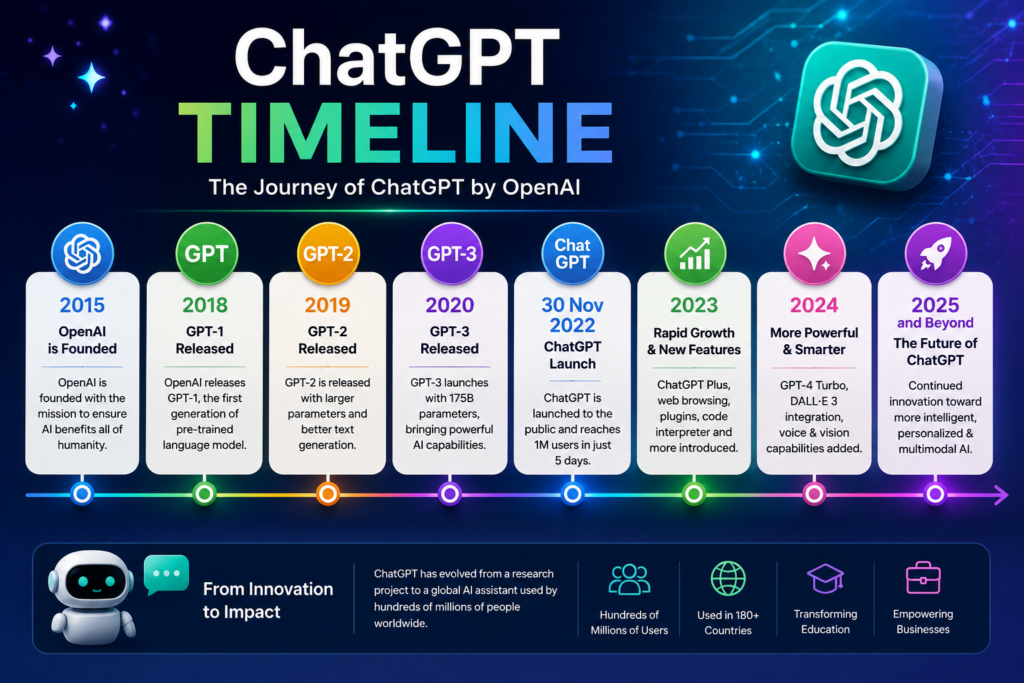
The History and Evolution of ChatGPT
The story of ChatGPT is closely connected to the development of the GPT (Generative Pre-trained Transformer) family of artificial intelligence models created by OpenAI. Over the years, each new version introduced significant improvements in language understanding, reasoning, creativity, and problem-solving abilities.
What began as a research project eventually evolved into one of the most widely used AI tools in the world.
GPT-1: The Beginning of Generative AI (2018)
OpenAI introduced GPT-1 in 2018 as the first model in the GPT series. It demonstrated that a neural network could learn language patterns from large amounts of text and generate meaningful responses.
Although GPT-1 was relatively small compared to modern AI models, it proved that the Transformer architecture could be used to create powerful language systems.
Key Achievements of GPT-1
- Introduced the GPT architecture.
- Demonstrated unsupervised pre-training.
- Showed strong potential for language generation.
- Laid the foundation for future GPT models.
💡 GPT-1 marked the beginning of a new era in artificial intelligence research.
GPT-2: A Major Leap in Language Generation (2019)
In 2019, OpenAI released GPT-2, which was significantly larger and more capable than GPT-1. The model could generate surprisingly coherent paragraphs, stories, and articles.
Because of concerns about misuse, OpenAI initially decided not to release the complete model to the public. This decision attracted worldwide attention and highlighted both the opportunities and risks of advanced AI systems.
Key Improvements in GPT-2
- Better text generation quality.
- Improved contextual understanding.
- More natural conversations.
- Enhanced creative writing capabilities.
🌍 Global AI Fact
GPT-2 was one of the first AI models to generate content realistic enough to raise concerns about misinformation and synthetic media.
GPT-3: The AI Revolution (2020)
The launch of GPT-3 in 2020 transformed the AI industry. With approximately 175 billion parameters, GPT-3 became one of the largest language models ever created at that time.
Its ability to answer questions, write essays, generate code, summarize content, and perform various language tasks amazed researchers and businesses alike.
Why GPT-3 Was Revolutionary
- Massive increase in model size.
- Strong zero-shot and few-shot learning abilities.
- High-quality content generation.
- Commercial adoption across multiple industries.
🧠 Research Insight
GPT-3 demonstrated that scaling AI models could dramatically improve performance across a wide range of tasks without task-specific training.
GPT-3.5: The Launch of ChatGPT (2022)
In November 2022, OpenAI released ChatGPT, powered by GPT-3.5. This launch became one of the fastest-growing technology adoptions in history.
Unlike previous GPT models, ChatGPT was specifically optimized for conversation. It allowed users to interact with AI through a simple chat interface, making advanced artificial intelligence accessible to everyone.
Major Milestones
- Public launch of ChatGPT.
- Rapid global adoption.
- Millions of users within weeks.
- Mainstream awareness of generative AI.
🚀 AI in Real Life
Students, teachers, programmers, marketers, and business owners began using ChatGPT for everyday tasks ranging from learning and research to content creation and coding.
GPT-4: Smarter and More Capable AI (2023)
In 2023, OpenAI introduced GPT-4, a more advanced model with stronger reasoning, improved accuracy, and better problem-solving abilities.
Compared to GPT-3.5, GPT-4 could handle more complex instructions, generate higher-quality responses, and perform better on professional and academic tasks.
Key Improvements in GPT-4
- Better reasoning capabilities.
- Improved factual accuracy.
- Enhanced creativity.
- Stronger performance in coding and research tasks.
- More reliable responses.
GPT-4o: The Era of Multimodal Intelligence (2024)
OpenAI launched GPT-4o in 2024, introducing a new level of interaction between humans and AI.
The letter “o” stands for omni, reflecting the model’s ability to understand and process multiple types of information, including text, images, and voice.
GPT-4o enables more natural conversations and significantly faster responses compared to earlier models.
Key Features of GPT-4o
- Text understanding and generation.
- Image analysis capabilities.
- Real-time voice interaction.
- Faster performance.
- Improved user experience.
The Future of GPT Models
The evolution of GPT models is far from complete. Future versions are expected to become more capable, personalized, and efficient.
Experts predict future GPT systems may include:
- Advanced AI agents.
- Better long-term memory.
- Improved reasoning abilities.
- More personalized assistance.
- Enhanced multimodal intelligence.
- Deeper integration into education, business, and everyday life.
The journey from GPT-1 to GPT-4o demonstrates one of the fastest technological advancements in human history. Understanding this evolution helps us appreciate not only how ChatGPT works today but also where artificial intelligence may be heading in the future.
How ChatGPT Works
Many people use ChatGPT every day, but few understand what happens behind the scenes when they type a question and receive an answer. While the technology is highly advanced, its core concepts can be explained in simple language.
At its foundation, ChatGPT is powered by a Large Language Model (LLM) that has been trained on vast amounts of text data. During training, the model learns patterns, relationships, grammar, facts, and language structures from books, articles, websites, and other publicly available sources.
Rather than searching the internet for every answer, ChatGPT predicts the most likely sequence of words based on the context provided by the user.
Understanding Large Language Models (LLMs)
A Large Language Model (LLM) is a type of artificial intelligence system designed to understand and generate human language.
The word “Large” refers to the enormous amount of training data and computational resources used during development.
The word “Language” refers to its ability to process and generate text.
The word “Model” refers to the mathematical system that learns patterns from data.
💡 Did You Know?
Modern language models are trained using trillions of words and require massive computing infrastructure involving thousands of advanced processors.
The Transformer Architecture
The breakthrough behind ChatGPT is the Transformer architecture, introduced by researchers in 2017.
Before Transformers, AI systems struggled to understand long sentences and maintain context over extended conversations. Transformers solved this problem by allowing models to focus on the most important parts of a sentence simultaneously.
This innovation became the foundation for GPT, Gemini, Claude, and many other modern AI systems.
What Are Tokens?
ChatGPT does not read language exactly the way humans do.
Instead, it breaks text into smaller units called tokens.
For example:
Artificial Intelligence is transforming education.
may be divided into several tokens that the model processes individually before generating a response.
Tokens help the model analyze language efficiently and understand relationships between words and phrases.
Training Data and Learning Patterns
ChatGPT learns from enormous datasets during training.
The model studies:
- Language structures
- Writing styles
- Grammar rules
- Question-and-answer patterns
- Reasoning examples
- Problem-solving approaches
It is important to understand that ChatGPT does not memorize every sentence from its training data. Instead, it learns patterns and relationships that help generate new responses.
🌍 Global AI Fact
Training advanced AI models requires enormous computational resources and can take months using powerful data centers around the world.
Neural Networks: The Brain Behind ChatGPT
ChatGPT is built using artificial neural networks, which are inspired by the structure of the human brain.
Neural networks contain layers of interconnected mathematical units that process information and learn complex patterns.
As information moves through these layers, the model gradually develops the ability to recognize language structures, relationships, and meaning.
While neural networks are inspired by the brain, they do not think or understand information in the same way humans do.
Reinforcement Learning from Human Feedback (RLHF)
One of the reasons ChatGPT feels conversational is a technique known as Reinforcement Learning from Human Feedback (RLHF).
During this process:
- The model generates responses.
- Human reviewers evaluate the quality of those responses.
- The system learns which responses are more helpful.
- Future outputs are adjusted accordingly.
This process helps improve accuracy, safety, and usefulness.
🧠 Research Insight
RLHF played a crucial role in transforming GPT models from research systems into practical conversational assistants used by millions of people worldwide.
How ChatGPT Generates Responses
When you enter a prompt, ChatGPT follows a sequence of steps:
- It analyzes your input.
- It identifies relevant patterns from training.
- It predicts the most likely next words.
- It generates a complete response.
- It adjusts future responses based on conversation context.
This process happens in a matter of seconds, creating the impression of a natural conversation.
Why ChatGPT Sometimes Makes Mistakes
Despite its impressive abilities, ChatGPT is not perfect.
Common reasons for errors include:
- Incomplete information.
- Ambiguous prompts.
- Incorrect pattern predictions.
- Lack of real-time knowledge in some situations.
- Hallucinations (confident but incorrect answers).
Because of these limitations, important information should always be verified using reliable sources.
Key Takeaway
ChatGPT combines Large Language Models, Transformer architecture, neural networks, tokens, and Reinforcement Learning from Human Feedback to generate human-like responses. Understanding these concepts helps users use ChatGPT more effectively and recognize both its strengths and limitations.
Free vs Paid ChatGPT: What’s the Difference?
One of the most common questions new users ask is whether the free version of ChatGPT is sufficient or if upgrading to a paid plan is worth the investment. The answer depends on how frequently you use ChatGPT and the type of tasks you want to perform.
For casual users, students, and beginners, the free version provides access to powerful AI capabilities. However, professionals, researchers, content creators, and businesses often benefit from the additional features available in paid plans.
ChatGPT Free vs ChatGPT Plus
| Feature | Free Version | ChatGPT Plus |
|---|---|---|
| Access to ChatGPT | Yes | Yes |
| Faster Response Speed | Limited | Yes |
| Priority Access During High Demand | No | Yes |
| Advanced AI Models | Limited | Yes |
| Better Performance | Standard | Enhanced |
| Advanced Tools and Features | Limited | More Available |
| File Upload Capabilities | Limited | Enhanced |
| Image Understanding | Limited | Enhanced |
| Voice Features | Basic | Advanced |
💡 Did You Know?
Millions of users around the world rely entirely on the free version of ChatGPT for learning, research, writing, and productivity tasks.
What Can You Do With the Free Version?
The free version of ChatGPT is surprisingly capable and can help users with many everyday tasks.
You can use it to:
- Answer questions.
- Explain difficult concepts.
- Summarize articles.
- Generate ideas.
- Improve writing.
- Draft emails.
- Learn new skills.
- Practice languages.
- Create study notes.
For many users, the free version is more than enough for daily productivity and learning.
Benefits of ChatGPT Plus
ChatGPT Plus is designed for users who require faster performance, greater reliability, and access to more advanced AI capabilities.
Benefits may include:
- Faster response times.
- Better reasoning abilities.
- More advanced model access.
- Enhanced productivity tools.
- Improved multimodal features.
- Better performance during peak usage periods.
🧠 Research Insight
Professional users often value consistency and speed more than occasional feature upgrades. For many businesses, saving time is the primary reason for choosing a paid AI subscription.
Who Should Use the Free Version?
The free plan is ideal for:
- Students
- Teachers
- Beginners
- Casual users
- Hobbyists
- Everyday learners
If your goal is to learn AI, explore prompts, or improve productivity, the free version can provide significant value.
Who Should Consider ChatGPT Plus?
The paid plan may be worthwhile for:
- Content creators
- Bloggers
- Researchers
- Developers
- Freelancers
- Business professionals
- Marketing teams
These users often rely on AI for mission-critical tasks where speed, reliability, and advanced capabilities can improve efficiency.
Is ChatGPT Plus Worth It?
The value of ChatGPT Plus depends entirely on how often you use the platform.
If you use ChatGPT occasionally for basic tasks, the free version is usually sufficient.
However, if ChatGPT has become a daily productivity tool for writing, research, coding, learning, business operations, or content creation, the paid plan can provide meaningful advantages.
🚀 AI in Real Life
Many freelancers and content creators report saving several hours each week by using ChatGPT for brainstorming, drafting content, research assistance, and workflow automation.
Key Takeaway
Both the free and paid versions of ChatGPT offer powerful AI capabilities. Beginners should start with the free version and explore its features. As usage grows and requirements become more advanced, upgrading to a paid plan may provide additional value and productivity benefits.
ChatGPT Complete Guide: How to Create and Set Up a ChatGPT Account
Getting started with ChatGPT is simple and requires only a few minutes. Whether you are a student, teacher, professional, researcher, or content creator, creating an account allows you to access one of the most powerful AI tools available today.
Step 1: Visit the Official OpenAI Website
To begin, visit the official OpenAI website and navigate to the ChatGPT platform.
🌍 Global AI Fact
Since its launch, ChatGPT has attracted hundreds of millions of users worldwide, making it one of the fastest-growing consumer technologies in history.
Step 2: Create Your Account
You can register using:
- Email address
- Google account
- Microsoft account
- Apple account (where available)
Choose the method most convenient for you and complete the registration process.
Step 3: Verify Your Account
After registration, OpenAI may ask you to verify your email address or confirm your identity through basic verification steps.
Once verification is complete, you can immediately begin using ChatGPT.
Step 4: Explore the Dashboard
After logging in, you will see the main ChatGPT interface.
Important areas include:
- New Chat
- Chat History
- Settings
- Account Management
- GPT Models
- File Upload Features
- Voice Features
Understanding these options will help you use ChatGPT more effectively.
Step 5: Configure Important Settings
Before starting your first conversation, review the available settings.
Important settings may include:
- Theme preferences
- Language preferences
- Memory options
- Privacy settings
- Notification preferences
These settings can improve your overall experience and personalize how ChatGPT responds to you.
Understanding ChatGPT Memory
One of the most useful modern features is Memory.
When enabled, ChatGPT can remember selected preferences and details from previous conversations, allowing for a more personalized experience over time.
💡 Did You Know?
Memory allows ChatGPT to provide more relevant responses based on information that users choose to share and save.
Common Beginner Mistakes
New users often make several avoidable mistakes:
- Using vague prompts.
- Asking multiple unrelated questions in one prompt.
- Trusting every answer without verification.
- Ignoring privacy considerations.
- Not providing enough context.
Avoiding these mistakes can dramatically improve the quality of responses.
First Prompt Recommendations
Try simple prompts such as:
- Explain artificial intelligence in simple language.
- Create a weekly study plan.
- Summarize this article.
- Generate blog post ideas.
- Explain a difficult concept step by step.
These examples help new users understand the capabilities of ChatGPT while learning how to communicate effectively with AI systems.
🚀 AI in Real Life
Many first-time users discover that providing clear instructions and context often produces significantly better results than short or incomplete prompts.
Key Takeaway
Creating a ChatGPT account is straightforward, but learning how to use the platform effectively is what unlocks its true value. The more specific and structured your prompts become, the more useful ChatGPT can be in education, business, research, and everyday productivity.
Understanding the ChatGPT Interface
A major reason behind the success of ChatGPT is its simple and user-friendly interface. Even people with no technical background can start using ChatGPT within minutes.
As you continue through this ChatGPT Complete Guide, understanding the interface will help you use the platform more efficiently and unlock many of its advanced capabilities.
The Main Chat Window
The central area of ChatGPT is the chat window, where conversations take place.
Users can:
- Ask questions.
- Generate content.
- Upload files.
- Request explanations.
- Brainstorm ideas.
- Solve problems.
The conversation-based design makes ChatGPT feel more like an intelligent assistant than a traditional software application.
New Chat
The New Chat button allows users to start a fresh conversation.
This is useful when:
- Beginning a new project.
- Asking unrelated questions.
- Testing different prompts.
- Organizing conversations.
Many experienced users create separate chats for different purposes such as learning, research, writing, coding, and business tasks.
Chat History
The sidebar stores previous conversations.
Benefits include:
- Accessing old discussions.
- Continuing unfinished work.
- Reviewing earlier responses.
- Reusing successful prompts.
For regular users, chat history becomes a valuable knowledge archive over time.
GPT Models
Depending on your plan, ChatGPT may provide access to different GPT models.
Each model offers varying levels of:
- Reasoning ability.
- Response quality.
- Speed.
- Multimodal capabilities.
Understanding model selection is an important part of using ChatGPT effectively.
💡 Did You Know?
Different GPT models are optimized for different tasks, which means choosing the right model can significantly improve results.
File Upload Features
Modern versions of ChatGPT allow users to upload files for analysis.
Common use cases include:
- PDF summaries.
- Research analysis.
- Spreadsheet interpretation.
- Document reviews.
- Data extraction.
This feature transforms ChatGPT from a simple chatbot into a practical productivity assistant.
Voice Features
Voice interaction allows users to speak naturally with ChatGPT instead of typing.
Benefits include:
- Faster communication.
- Hands-free usage.
- Language practice.
- Accessibility improvements.
Voice AI continues to become more natural and realistic with each new generation of GPT models.
Memory Features
One of the most interesting developments in ChatGPT is its memory capability.
When enabled, memory helps ChatGPT remember selected preferences and information across conversations.
Examples include:
- Preferred writing style.
- Professional background.
- Ongoing projects.
- Learning goals.
This creates a more personalized user experience.
Custom GPTs
Advanced users can create specialized versions of ChatGPT known as Custom GPTs.
These can be designed for:
- Customer support.
- Education.
- Research.
- Content creation.
- Business workflows.
🧠 Research Insight
Custom GPTs represent an important shift from general-purpose AI toward task-specific intelligent assistants.
Settings and Personalization
Users should periodically review their settings to customize the platform.
Important settings include:
- Theme preferences.
- Language settings.
- Memory controls.
- Privacy options.
- Notification settings.
Proper configuration can improve both usability and productivity.
Why Understanding the Interface Matters
Many beginners focus only on asking questions, but experienced users understand that productivity often depends on knowing how to use the platform’s features effectively.
The more familiar you become with the interface, the more value you can extract from ChatGPT for learning, research, writing, business, and everyday problem-solving.
Key Takeaway
Mastering the interface is an important step in this ChatGPT Complete Guide. Features such as chat history, file uploads, voice interaction, memory, and Custom GPTs can dramatically improve how efficiently users interact with artificial intelligence tools.
ChatGPT Complete Guide: Key Features of ChatGPT
The growing popularity of ChatGPT is largely driven by its powerful features. As you continue through this ChatGPT Complete Guide, understanding these capabilities will help you use the platform more effectively and discover ways to improve learning, productivity, creativity, and problem-solving.
Natural Language Conversations
One of the most impressive features of ChatGPT is its ability to communicate in natural language.
Users can ask questions in a conversational manner without needing technical commands or special syntax.
Examples include:
- Explaining complex concepts.
- Answering questions.
- Providing recommendations.
- Generating ideas.
- Assisting with decision-making.
This makes ChatGPT accessible to people of all backgrounds.
Content Creation and Writing Assistance
ChatGPT can generate various forms of written content, including:
- Blog posts.
- Articles.
- Emails.
- Reports.
- Social media content.
- Product descriptions.
- Marketing copy.
For writers and content creators, ChatGPT can significantly reduce the time required for brainstorming and drafting.
Learning and Education Support
Students and lifelong learners use ChatGPT to:
- Understand difficult topics.
- Summarize information.
- Generate study notes.
- Create revision materials.
- Learn new skills.
💡 Did You Know?
Many students use ChatGPT as a personal learning assistant that can explain the same concept in multiple ways until it becomes easier to understand.
Research and Information Analysis
ChatGPT can assist with:
- Literature reviews.
- Topic exploration.
- Research summaries.
- Information organization.
- Concept explanations.
When combined with critical thinking and verification, it becomes a valuable research companion.
Coding and Technical Assistance
Developers frequently use ChatGPT for:
- Writing code.
- Debugging errors.
- Learning programming languages.
- Understanding algorithms.
- Explaining technical concepts.
Even beginners can use ChatGPT to accelerate their learning journey in software development.
Brainstorming and Creativity
Creative professionals often use ChatGPT for:
- Idea generation.
- Story development.
- Content planning.
- Script writing.
- Naming products and brands.
The ability to quickly generate multiple perspectives makes ChatGPT a useful creativity partner.
Multilingual Communication
ChatGPT supports many languages and can assist with:
- Translation.
- Language learning.
- Grammar correction.
- Writing improvement.
- Cross-cultural communication.
This feature has expanded its usefulness across different regions of the world.
File Analysis and Document Understanding
Modern versions of ChatGPT can analyze uploaded files and help users:
- Summarize PDFs.
- Review reports.
- Extract key information.
- Analyze spreadsheets.
- Interpret documents.
This capability saves considerable time for students, researchers, and professionals.
Voice and Multimodal Features
Recent GPT models introduced advanced multimodal capabilities.
Users can interact using:
- Text.
- Images.
- Voice.
These features create a more natural and interactive experience.
🧠 Research Insight
The combination of text, image, and voice capabilities is one of the major reasons why modern AI assistants are becoming increasingly useful in everyday life.
Personal Productivity Enhancement
Many users rely on ChatGPT to:
- Plan projects.
- Organize tasks.
- Draft communications.
- Create schedules.
- Improve workflow efficiency.
For professionals, this can translate into significant time savings.
Why These Features Matter
The true value of ChatGPT lies not in any single feature but in the combination of capabilities working together. Writing assistance, learning support, research help, coding guidance, creativity tools, and productivity features make ChatGPT one of the most versatile AI platforms available today.
Key Takeaway
Understanding these features is an essential part of this ChatGPT Complete Guide. The more familiar users become with ChatGPT’s capabilities, the more effectively they can apply artificial intelligence to education, business, research, creativity, and everyday productivity.
ChatGPT Complete Guide: Best Uses of ChatGPT in Everyday Life
One of the reasons behind the massive success of ChatGPT is its practical usefulness in daily life. As this ChatGPT Complete Guide demonstrates, ChatGPT is not limited to technology experts or programmers. People from almost every profession can use it to save time, improve productivity, learn faster, and solve problems more efficiently.
Whether you are a student, teacher, freelancer, business owner, researcher, or content creator, ChatGPT can become a valuable digital assistant.
Learning New Skills
Many people use ChatGPT as a personal tutor.
It can help users learn:
- Programming languages.
- Digital marketing.
- Graphic design.
- Public speaking.
- Foreign languages.
- Academic subjects.
Unlike traditional learning resources, ChatGPT provides personalized explanations and can adapt its responses to different knowledge levels.
💡 Did You Know?
Many learners use ChatGPT to create customized study plans and practice exercises tailored to their goals.
Writing and Communication
One of the most popular applications covered in this ChatGPT Complete Guide is writing assistance.
ChatGPT can help users:
- Draft emails.
- Write reports.
- Improve grammar.
- Rewrite content.
- Generate professional documents.
- Create presentations.
This makes communication faster and more effective in both personal and professional environments.
Research and Information Gathering
Students, researchers, and professionals often use ChatGPT to:
- Explore new topics.
- Understand complex concepts.
- Summarize information.
- Organize research notes.
- Generate questions for further study.
When combined with proper fact-checking, ChatGPT becomes a highly effective research companion.
Productivity and Time Management
ChatGPT can assist with:
- Daily planning.
- Goal setting.
- Task prioritization.
- Meeting preparation.
- Project management.
- Workflow optimization.
Many professionals use ChatGPT to reduce repetitive work and focus on higher-value activities.
🚀 AI in Real Life
Freelancers frequently use ChatGPT to create proposals, organize projects, draft client communications, and automate routine tasks.
Content Creation
Content creators use ChatGPT for:
- Blog ideas.
- Article outlines.
- Video scripts.
- Social media content.
- Podcast planning.
- Newsletter creation.
Instead of replacing human creativity, ChatGPT often acts as a brainstorming partner that accelerates the creative process.
Education and Teaching
Teachers and educators can use ChatGPT to:
- Create lesson plans.
- Generate quizzes.
- Design assignments.
- Develop learning materials.
- Explain difficult concepts.
The educational applications of ChatGPT continue to expand as schools and institutions explore new ways of integrating Artificial Intelligence into learning environments.
Business and Professional Work
Businesses increasingly use ChatGPT for:
- Customer communication.
- Market research.
- Internal documentation.
- Process improvement.
- Team productivity.
- Idea generation.
From startups to large enterprises, AI-powered assistants are becoming part of everyday operations.
Personal Development
ChatGPT can also support personal growth by helping users:
- Build habits.
- Improve communication skills.
- Develop learning strategies.
- Set career goals.
- Practice interviews.
- Explore new interests.
Many users view ChatGPT as a tool for continuous learning and self-improvement.
Travel and Everyday Planning
ChatGPT can assist with:
- Travel itineraries.
- Budget planning.
- Event organization.
- Shopping lists.
- Meal planning.
- Daily schedules.
These practical uses demonstrate how AI can simplify everyday decision-making.
Why Everyday Applications Matter
The true power of ChatGPT becomes clear when it is applied to real-world situations. Small improvements in learning, communication, organization, and productivity can create significant long-term benefits for individuals and organizations alike.
🧠 Research Insight
The widespread adoption of ChatGPT shows that the most successful technologies are often those that solve everyday problems in simple and accessible ways.
Key Takeaway
A major lesson from this ChatGPT Complete Guide is that ChatGPT is not just an AI chatbot. It is a versatile digital assistant that can support learning, research, productivity, business operations, creativity, and personal development. The more effectively users understand its capabilities, the greater value they can obtain from the platform.
ChatGPT for Students
Students are among the biggest beneficiaries of artificial intelligence tools. As highlighted throughout this ChatGPT Complete Guide, ChatGPT can serve as a study assistant, learning companion, research helper, and productivity tool.
When used responsibly, ChatGPT can help students learn more efficiently, save time, and develop a deeper understanding of complex subjects.
Understanding Difficult Concepts
One of the most valuable uses of ChatGPT for students is simplifying difficult topics.
Students can ask ChatGPT to explain:
- Mathematics concepts.
- Science theories.
- Historical events.
- Programming topics.
- Economic principles.
- Technical terminology.
Unlike textbooks, ChatGPT can provide explanations at different difficulty levels based on the student’s needs.
💡 Did You Know?
Students can ask ChatGPT to explain the same topic as if they were a beginner, high school student, college student, or subject expert.
Creating Study Notes
Many students spend hours preparing notes from textbooks and lectures.
ChatGPT can help by:
- Summarizing chapters.
- Creating concise notes.
- Extracting key points.
- Organizing information.
- Generating revision summaries.
This allows students to focus more on understanding and less on repetitive note-making tasks.
Exam Preparation
ChatGPT can support exam preparation in several ways.
Students can use it to:
- Create practice questions.
- Generate mock tests.
- Build flashcards.
- Review important topics.
- Test their understanding.
This interactive approach often makes studying more engaging and effective.
Research Assistance
Research projects become easier when students use ChatGPT to:
- Explore new topics.
- Generate research questions.
- Understand background concepts.
- Organize information.
- Develop project ideas.
However, students should always verify important facts using reliable academic sources.
🧠 Research Insight
Students who combine AI tools with critical thinking generally achieve better learning outcomes than those who rely entirely on AI-generated answers.
Writing and Assignment Support
ChatGPT can assist students with:
- Essay planning.
- Report outlines.
- Presentation preparation.
- Grammar improvement.
- Writing structure.
- Idea development.
The goal should be to improve learning and writing skills rather than simply generating complete assignments without understanding the content.
Learning Programming and Technology
For students interested in technology, ChatGPT can function as a coding tutor.
It can help with:
- Learning programming languages.
- Understanding algorithms.
- Debugging code.
- Explaining technical concepts.
- Building simple projects.
Many beginners use ChatGPT as a step-by-step guide while learning software development.
Language Learning
Students studying foreign languages can use ChatGPT to:
- Practice conversations.
- Improve grammar.
- Learn vocabulary.
- Correct writing mistakes.
- Understand sentence structures.
Because ChatGPT provides instant feedback, it becomes a useful language-learning partner.
Time Management and Productivity
Academic success often depends on effective time management.
ChatGPT can help students:
- Create study schedules.
- Plan projects.
- Organize assignments.
- Set learning goals.
- Prioritize tasks.
These productivity benefits can reduce stress and improve academic performance.
Responsible Use of ChatGPT
Students should remember that ChatGPT is a learning aid, not a replacement for independent thinking.
Best practices include:
- Verifying information.
- Understanding concepts before submission.
- Avoiding plagiarism.
- Using AI ethically.
- Developing original ideas.
Responsible use leads to stronger learning outcomes and better long-term skills.
🚀 AI in Real Life
Many university students use ChatGPT to convert lengthy lecture notes into concise summaries, helping them review key concepts more efficiently before exams.
Key Takeaway
A major lesson from this ChatGPT Complete Guide is that ChatGPT can be an extremely valuable educational tool when used correctly. From learning difficult concepts and preparing for exams to improving writing and productivity, ChatGPT offers students numerous opportunities to enhance their academic journey while developing important future-ready skills.
ChatGPT for Teachers and Educators
Teachers and educators are increasingly using artificial intelligence tools to improve teaching efficiency, enhance student engagement, and reduce administrative workload. Throughout this ChatGPT Complete Guide, one theme remains clear: ChatGPT is not designed to replace teachers but to help them become more effective educators.
When used responsibly, ChatGPT can support lesson planning, content creation, assessment design, and personalized learning experiences.
Creating Lesson Plans
One of the most valuable applications of ChatGPT for educators is lesson planning.
Teachers can use ChatGPT to:
- Create structured lesson plans.
- Generate learning objectives.
- Design classroom activities.
- Develop discussion topics.
- Prepare teaching materials.
This can save significant preparation time while allowing teachers to focus more on student interaction and learning outcomes.
💡 Did You Know?
Many educators use ChatGPT to generate multiple lesson plan variations for different student skill levels within minutes.
Developing Learning Materials
Creating educational resources often requires substantial time and effort.
ChatGPT can assist with:
- Worksheets.
- Study guides.
- Handouts.
- Classroom exercises.
- Reading comprehension activities.
- Learning summaries.
These resources can then be customized to meet specific curriculum requirements.
Generating Quizzes and Assessments
Assessment preparation becomes easier with ChatGPT.
Teachers can generate:
- Multiple-choice questions.
- Short-answer questions.
- Essay prompts.
- Practice tests.
- Revision exercises.
This helps educators quickly create evaluation materials while maintaining variety and engagement.
Personalized Learning Support
Every classroom contains students with different learning styles and abilities.
ChatGPT can help educators:
- Simplify difficult concepts.
- Create differentiated assignments.
- Adapt content for various skill levels.
- Generate additional explanations.
- Provide alternative examples.
This supports a more personalized learning experience for students.
Classroom Communication
Teachers spend a considerable amount of time communicating with students, parents, and administrators.
ChatGPT can assist in drafting:
- Parent notifications.
- Student instructions.
- School announcements.
- Academic reports.
- Professional emails.
This improves efficiency while maintaining clear and professional communication.
Supporting Online and Hybrid Learning
As digital education continues to expand, ChatGPT can support:
- Virtual classrooms.
- Online course content.
- Discussion questions.
- Learning modules.
- Interactive activities.
Educators can use these capabilities to create more engaging online learning experiences.
🧠 Research Insight
Studies consistently show that technology is most effective in education when it supports teachers rather than attempting to replace them. AI tools work best when combined with human expertise, guidance, and critical thinking.
Administrative Productivity
Teachers often spend many hours on administrative tasks.
ChatGPT can assist with:
- Meeting summaries.
- Report preparation.
- Documentation.
- Planning schedules.
- Organizing educational resources.
Reducing repetitive administrative work allows educators to dedicate more time to teaching and mentoring students.
Ethical Use in Education
Educators should encourage responsible AI usage by teaching students how to:
- Verify information.
- Avoid plagiarism.
- Cite sources properly.
- Think critically.
- Use AI as a learning tool rather than a shortcut.
Responsible AI literacy is becoming an increasingly important skill in modern education.
Challenges Teachers Should Consider
Although ChatGPT offers many benefits, educators should remain aware of potential limitations:
- Inaccurate responses.
- Hallucinated information.
- Bias in generated content.
- Overreliance by students.
- Privacy considerations.
Human review remains essential when using AI-generated educational materials.
🚀 AI in Real Life
Many educators now use ChatGPT to convert lengthy curriculum documents into concise teaching plans, helping them spend less time on preparation and more time supporting student learning.
Key Takeaway
A key lesson from this ChatGPT Complete Guide is that ChatGPT can be a powerful educational assistant for teachers and educators. From lesson planning and assessment creation to communication and personalized learning support, ChatGPT offers practical tools that can enhance teaching effectiveness while preserving the essential role of human educators.
ChatGPT for Content Creators and Bloggers
Content creators and bloggers were among the earliest professional groups to adopt ChatGPT. As discussed throughout this ChatGPT Complete Guide, the platform has become a valuable productivity tool for brainstorming, content planning, research, and writing assistance.
However, the most successful creators use ChatGPT as a creative partner rather than a replacement for human expertise and originality.
Content Ideation and Brainstorming
One of the biggest challenges creators face is generating fresh content ideas consistently.
ChatGPT can help by:
- Generating blog topics.
- Suggesting video ideas.
- Identifying content gaps.
- Creating content calendars.
- Brainstorming new angles for existing topics.
This makes it easier to maintain a regular publishing schedule.
Creating Content Outlines
Before writing an article or recording a video, creators can use ChatGPT to develop structured outlines.
Benefits include:
- Better organization.
- Clearer content flow.
- Faster writing.
- Improved coverage of important topics.
A well-designed outline often reduces editing time and improves overall content quality.
Research Assistance
Content creators frequently use ChatGPT to:
- Understand unfamiliar topics.
- Summarize information.
- Explore new perspectives.
- Generate research questions.
- Organize notes.
While ChatGPT can accelerate research, factual information should always be verified through trusted sources.
Writing Support
ChatGPT can assist with:
- Blog introductions.
- Article drafts.
- Social media captions.
- Newsletter content.
- Video scripts.
- Email campaigns.
Many creators use AI-generated drafts as a starting point and then refine the content using their own expertise and voice.
💡 Did You Know?
Many successful bloggers use ChatGPT primarily for outlining and research rather than publishing AI-generated content without modification.
SEO Content Assistance
For bloggers, ChatGPT can help with:
- Keyword brainstorming.
- Content structure planning.
- Meta description ideas.
- FAQ generation.
- Topic clustering.
When combined with proper SEO tools and human review, ChatGPT can improve content planning efficiency.
Social Media Content Creation
ChatGPT can generate:
- Instagram captions.
- LinkedIn posts.
- Facebook updates.
- X (Twitter) content.
- YouTube descriptions.
This helps creators repurpose content across multiple platforms.
Video and YouTube Support
Video creators often use ChatGPT for:
- Script writing.
- Video outlines.
- Thumbnail text ideas.
- Audience engagement questions.
- Content planning.
These applications help streamline the production process.
Maintaining Authenticity
The biggest mistake content creators make is relying entirely on AI-generated content.
Successful creators use ChatGPT to:
- Save time.
- Improve productivity.
- Generate ideas.
- Enhance research.
But they still contribute personal experience, expertise, storytelling, and original insights.
🧠 Research Insight
Audiences continue to value authenticity, expertise, and personal experience. AI can assist content creation, but human creativity remains the key differentiator.
Key Takeaway
A major lesson from this ChatGPT Complete Guide is that ChatGPT works best as a content creation assistant rather than a content replacement system. Creators who combine AI efficiency with human expertise can often produce higher-quality content while significantly reducing research and planning time.
ChatGPT for Businesses and Professionals
The business world has rapidly embraced artificial intelligence, and ChatGPT has emerged as one of the most widely adopted productivity tools. As explained throughout this ChatGPT Complete Guide, organizations are using ChatGPT to improve efficiency, automate repetitive tasks, enhance communication, and support decision-making.
From small startups to large enterprises, professionals across industries are discovering practical ways to integrate ChatGPT into their daily workflows.
Improving Workplace Productivity
One of the primary reasons businesses adopt ChatGPT is productivity improvement.
Professionals use ChatGPT to:
- Draft emails.
- Create reports.
- Summarize meetings.
- Generate presentations.
- Organize project information.
- Prepare documentation.
These tasks can often be completed significantly faster with AI assistance.
Business Communication
Clear communication is essential for success in any organization.
ChatGPT can assist professionals in creating:
- Client emails.
- Business proposals.
- Internal communications.
- Meeting agendas.
- Executive summaries.
- Professional correspondence.
This helps maintain consistency while reducing writing time.
Market Research and Analysis
Businesses frequently use ChatGPT to:
- Explore market trends.
- Analyze competitors.
- Generate customer personas.
- Identify business opportunities.
- Organize research findings.
While AI-generated insights should always be verified, ChatGPT can accelerate the research process considerably.
💡 Did You Know?
Many businesses use ChatGPT during brainstorming sessions to generate alternative solutions, creative ideas, and strategic perspectives that teams may not have initially considered.
Customer Support Assistance
Customer service teams can use ChatGPT to:
- Draft responses.
- Create knowledge-base articles.
- Generate support documentation.
- Improve response consistency.
- Handle common inquiries more efficiently.
This allows support staff to focus on more complex customer issues.
Marketing and Content Strategy
Marketing professionals use ChatGPT for:
- Campaign planning.
- Content ideation.
- Audience research.
- Ad copy creation.
- Social media strategy.
- Email marketing assistance.
Many organizations now include AI tools as part of their standard marketing workflow.
Project Management Support
ChatGPT can assist project managers by helping them:
- Create project plans.
- Develop timelines.
- Prepare status reports.
- Organize meeting notes.
- Identify potential risks.
These capabilities improve organization and communication throughout a project lifecycle.
Professional Skill Development
Professionals often use ChatGPT to:
- Learn new technologies.
- Improve leadership skills.
- Practice interviews.
- Enhance communication abilities.
- Develop industry knowledge.
Continuous learning has become increasingly important in a rapidly changing business environment.
Responsible Business Use
Although ChatGPT offers significant advantages, organizations should establish clear guidelines regarding:
- Data privacy.
- Confidential information.
- AI-generated content review.
- Compliance requirements.
- Ethical AI usage.
Human oversight remains essential for business-critical decisions.
🧠 Research Insight
Organizations that combine AI tools with human expertise typically achieve the best outcomes. AI improves efficiency, while humans provide judgment, creativity, ethics, and strategic thinking.
Why Businesses Are Investing in AI
The growing adoption of AI is driven by several factors:
- Increased productivity.
- Reduced repetitive work.
- Faster information processing.
- Improved operational efficiency.
- Enhanced employee support.
Businesses that learn to use AI effectively may gain a significant competitive advantage in the coming years.
Key Takeaway
An important lesson from this ChatGPT Complete Guide is that ChatGPT is not simply a chatbot for answering questions. It is a versatile business productivity tool capable of supporting communication, research, planning, customer service, marketing, and professional development. Organizations that use ChatGPT strategically can often improve efficiency while allowing employees to focus on higher-value work.
ChatGPT Complete Guide: Prompt Engineering Basics
One of the most important skills in the age of artificial intelligence is Prompt Engineering. No matter how powerful ChatGPT becomes, the quality of its responses largely depends on the quality of the instructions provided by the user.
A simple prompt may generate a basic answer, while a well-structured prompt can produce highly detailed, accurate, and useful results. This is why prompt engineering has become an essential skill for students, professionals, researchers, content creators, and business users.
What Is a Prompt?
A prompt is the instruction, question, or request that a user gives to ChatGPT.
Examples of simple prompts:
- Explain artificial intelligence.
- Write a professional email.
- Create a study schedule.
- Summarize this article.
ChatGPT analyzes the prompt and generates a response based on the information provided.
Why Prompt Quality Matters
Consider the following example:
Weak Prompt
Tell me about marketing.
Better Prompt
Explain digital marketing for beginners, including SEO, social media marketing, email marketing, and content marketing with real-world examples.
The second prompt provides more context, resulting in a more useful response.
💡 Did You Know?
In many cases, improving a prompt can increase response quality more effectively than switching to a more advanced AI model.
The Formula for Effective Prompts
A practical formula for creating better prompts is:
Role + Task + Context + Format + Goal
Example:
Act as a digital marketing expert. Explain SEO for beginners using simple language. Include examples and provide a step-by-step learning roadmap.
This structure gives ChatGPT clear instructions and improves response quality.
Key Elements of Strong Prompts
Be Specific
Specific prompts generally produce better results.
Instead of:
Write an article.
Use:
Write a 1,500-word beginner-friendly article about email marketing. Include examples, benefits, challenges, and FAQs.
Provide Context
Context helps ChatGPT understand your situation.
Example:
I am a college student preparing for a computer science exam. Explain machine learning in simple language with examples.
Define the Output Format
You can specify how you want information presented.
Examples:
- Table
- Bullet points
- Step-by-step guide
- Summary
- Checklist
- FAQ format
This often improves readability and usefulness.
Assign a Role
One of the most powerful prompt engineering techniques is role assignment.
Examples:
- Act as a teacher.
- Act as a software developer.
- Act as a business consultant.
- Act as an SEO expert.
- Act as a career counselor.
Role-based prompting often generates more focused and relevant responses.
Common Prompt Engineering Mistakes
Many users make avoidable mistakes, including:
- Asking vague questions.
- Providing insufficient context.
- Combining unrelated requests.
- Expecting perfect answers without clarification.
- Not refining prompts after receiving results.
Learning to improve prompts is often the fastest way to improve AI output quality.
Advanced Prompting Techniques
Experienced users frequently apply techniques such as:
- Chain-of-thought prompting.
- Step-by-step reasoning.
- Few-shot prompting.
- Scenario-based prompting.
- Iterative refinement.
These methods can produce more accurate and detailed responses for complex tasks.
🧠 Research Insight
Prompt engineering has become one of the most valuable AI-related skills because it enables users to maximize the capabilities of modern language models without needing advanced programming knowledge.
Real-World Example
Instead of asking:
Create a business plan.
A professional prompt might be:
Act as a startup consultant. Create a business plan for an AI-powered educational platform targeting college students in India. Include market analysis, revenue model, marketing strategy, and growth opportunities.
The difference in output quality can be substantial.
Why Prompt Engineering Matters
As AI systems become more powerful, users who know how to communicate effectively with AI will gain a significant advantage.
Prompt engineering improves:
- Productivity.
- Accuracy.
- Creativity.
- Learning efficiency.
- Business outcomes.
- Research quality.
Key Takeaway
A major lesson from this ChatGPT Complete Guide is that successful AI usage depends not only on the technology itself but also on the user’s ability to provide clear instructions. Learning prompt engineering can dramatically improve the quality, accuracy, and usefulness of ChatGPT responses across education, business, research, and everyday life.
ChatGPT Complete Guide: 25 Useful ChatGPT Prompts Everyone Should Know
One of the biggest advantages of ChatGPT is that it can perform a wide variety of tasks when given clear instructions. As emphasized throughout this ChatGPT Complete Guide, the quality of your results often depends on the quality of your prompts.
The following prompts can help students, professionals, educators, content creators, researchers, and business users get better results from ChatGPT.
Learning and Education Prompts
1. Explain a Complex Topic
Explain [topic] in simple language as if you were teaching a beginner.
2. Create a Study Plan
Create a 30-day study plan for learning [subject].
3. Generate Practice Questions
Create 20 practice questions on [topic] with answers.
4. Summarize Content
Summarize this article in 10 key points.
5. Create Flashcards
Generate flashcards for learning [topic].
Productivity Prompts
6. Daily Planning Assistant
Create a productive schedule for my day based on these tasks.
7. Prioritize Tasks
Rank these tasks by importance and urgency.
8. Meeting Summary
Summarize these meeting notes and provide action items.
9. Goal Planning
Create a step-by-step roadmap to achieve [goal].
10. Decision Analysis
Analyze the pros and cons of this decision.
Writing and Content Creation Prompts
11. Blog Post Outline
Create a detailed blog outline about [topic].
12. Article Introduction
Write an engaging introduction for an article about [topic].
13. Social Media Content
Create five social media posts promoting [product/service].
14. Email Writing
Write a professional email regarding [topic].
15. Video Script
Create a YouTube video script about [topic].
Career and Professional Prompts
16. Resume Improvement
Improve my resume for a [job title] position.
17. Interview Preparation
Generate common interview questions for [job role].
18. Career Roadmap
Create a career roadmap for becoming a [profession].
19. Business Proposal
Draft a business proposal for [business idea].
20. Market Research
Conduct a basic market analysis for [industry].
Creative Thinking Prompts
21. Brainstorm Ideas
Generate 20 unique ideas related to [topic].
22. Story Writing
Write a short story based on this concept.
23. Problem Solving
Suggest innovative solutions to this problem.
24. Product Naming
Generate 30 creative names for my new business.
25. Future Predictions
Predict how [industry] may change over the next 10 years.
💡 Did You Know?
Many advanced users rarely use one-line prompts. Instead, they provide detailed context, objectives, and formatting instructions to obtain significantly better results.
How to Get Better Results from These Prompts
For maximum effectiveness:
- Provide clear context.
- Define your goal.
- Specify the output format.
- Include relevant details.
- Refine prompts based on responses.
The more information you provide, the more useful ChatGPT’s responses are likely to become.
Key Takeaway
A valuable lesson from this ChatGPT Complete Guide is that prompts are the bridge between users and AI capabilities. Learning how to write effective prompts can dramatically improve productivity, creativity, learning outcomes, and professional results. Even small improvements in prompt quality can lead to significantly better responses from ChatGPT.
ChatGPT Complete Guide: Common Mistakes When Using ChatGPT
Although ChatGPT is an incredibly powerful tool, many users fail to achieve the best results because of avoidable mistakes. One of the most important lessons from this ChatGPT Complete Guide is that the effectiveness of ChatGPT depends not only on the technology itself but also on how it is used.
Understanding these common mistakes can help users improve accuracy, productivity, and overall results.
Asking Vague Questions
One of the most common mistakes is providing unclear instructions.
For example:
Tell me about business.
This prompt is too broad and may produce a generic response.
A better prompt would be:
Explain how a small business can use AI tools to improve productivity and reduce operational costs.
The more specific the request, the better the output.
Providing Insufficient Context
ChatGPT performs best when it understands the user’s situation.
Instead of writing:
Create a study plan.
Provide additional context:
Create a 30-day study plan for a college student preparing for a computer science examination.
Context allows ChatGPT to generate more relevant and useful responses.
Believing Every Response Is Correct
Many beginners assume that AI-generated information is always accurate.
This is not true.
ChatGPT can occasionally:
- Misinterpret information.
- Generate incorrect facts.
- Present outdated information.
- Produce confident but inaccurate answers.
Important information should always be verified using trusted sources.
💡 Did You Know?
AI researchers often refer to confidently incorrect AI responses as “hallucinations.”
Using ChatGPT as a Search Engine Replacement
ChatGPT is an excellent learning and productivity tool, but it should not always replace traditional research.
For critical topics such as:
- Medical advice.
- Legal matters.
- Financial decisions.
- Academic research.
Users should consult reliable sources and professional experts whenever necessary.
Ignoring Follow-Up Questions
Many users ask one question and accept the first answer.
Experienced users often improve results by:
- Asking follow-up questions.
- Requesting clarification.
- Refining prompts.
- Exploring alternative perspectives.
ChatGPT is most powerful when used as an interactive conversation partner.
Expecting Perfect Results on the First Attempt
Another common mistake is expecting ideal results immediately.
Professional users frequently refine prompts several times before obtaining their desired output.
The process often involves:
- Initial prompt.
- Review response.
- Refine instructions.
- Request improvements.
- Finalize output.
This iterative approach generally produces much better results.
Overreliance on AI
ChatGPT is designed to assist human thinking, not replace it.
Users should continue to apply:
- Critical thinking.
- Creativity.
- Judgment.
- Expertise.
- Ethical decision-making.
Human intelligence remains essential in areas that require experience, values, and strategic reasoning.
Sharing Sensitive Information
Users should avoid entering highly sensitive or confidential information into AI systems.
Examples include:
- Passwords.
- Banking details.
- Personal identification information.
- Confidential business documents.
- Private client information.
Responsible AI usage includes protecting personal and organizational data.
Copying AI Content Without Review
Many users make the mistake of publishing AI-generated content without editing.
Before publishing, always:
- Verify facts.
- Improve readability.
- Add personal expertise.
- Include original insights.
- Check for accuracy.
Human review significantly improves quality and trustworthiness.
🧠 Research Insight
Organizations that use AI successfully typically combine AI-generated outputs with expert human review rather than relying entirely on automation.
Why Avoiding These Mistakes Matters
The difference between average and advanced ChatGPT users is often not the AI model itself but the quality of their prompting, verification, and review processes.
Small improvements in usage habits can lead to significantly better outcomes.
Key Takeaway
A critical lesson from this ChatGPT Complete Guide is that ChatGPT delivers the best results when users provide clear instructions, verify information, protect sensitive data, and apply critical thinking. Avoiding these common mistakes can dramatically improve both the quality and reliability of AI-assisted work.
ChatGPT Complete Guide: ChatGPT Limitations and Challenges
While ChatGPT is one of the most powerful AI tools available today, it is not perfect. A balanced ChatGPT Complete Guide must discuss both strengths and limitations so that users can make informed decisions about when and how to use the technology.
Understanding these limitations helps users avoid unrealistic expectations and use ChatGPT more effectively.
ChatGPT Can Make Mistakes
One of the most important limitations is that ChatGPT can generate incorrect information.
Although responses often appear confident and convincing, they are not always accurate.
Potential issues include:
- Incorrect facts.
- Misinterpretation of questions.
- Outdated information.
- Incomplete explanations.
- Logical inconsistencies.
For important decisions, information should always be verified through trusted sources.
Hallucinations
A well-known challenge in artificial intelligence is the phenomenon known as AI hallucination.
This occurs when ChatGPT generates information that sounds believable but is actually incorrect or completely fabricated.
Examples may include:
- Nonexistent references.
- Incorrect statistics.
- Invented quotations.
- False historical details.
Users should remain cautious when working with factual content.
💡 Did You Know?
AI researchers consider hallucinations one of the most significant challenges facing modern language models.
Limited Real-World Understanding
ChatGPT can process language exceptionally well, but it does not truly understand the world in the same way humans do.
Humans rely on:
- Experience.
- Emotions.
- Intuition.
- Contextual awareness.
- Real-world interactions.
ChatGPT relies on patterns learned from training data.
This distinction is important when evaluating AI-generated responses.
Bias in AI Systems
AI models learn from large datasets created by humans.
As a result, some forms of bias may occasionally appear in generated content.
Potential sources include:
- Historical bias.
- Cultural bias.
- Data imbalance.
- Representation issues.
AI developers continually work to reduce these problems, but eliminating bias entirely remains difficult.
Lack of Human Judgment
ChatGPT can provide suggestions and analysis, but it cannot replace human judgment.
Areas that still require human expertise include:
- Ethical decisions.
- Leadership choices.
- Medical diagnosis.
- Legal interpretation.
- Strategic business decisions.
Human oversight remains essential in high-stakes situations.
Privacy and Security Concerns
Users should exercise caution when sharing sensitive information.
Potential concerns include:
- Personal data exposure.
- Confidential business information.
- Proprietary documents.
- Financial information.
- Client records.
Organizations should establish clear AI usage policies to protect sensitive data.
Dependence on Prompt Quality
The quality of ChatGPT responses often depends on the quality of user prompts.
Poor prompts may result in:
- Generic answers.
- Incomplete information.
- Misunderstood requests.
- Reduced accuracy.
This is why prompt engineering has become an increasingly valuable skill.
Not a Replacement for Experts
ChatGPT is an excellent assistant, but it should not replace qualified professionals.
Users should consult experts when dealing with:
- Medical treatment.
- Legal matters.
- Financial planning.
- Engineering decisions.
- Regulatory compliance.
AI can support decision-making but should not be the sole authority in critical situations.
Challenges for Education and Society
The rapid adoption of AI raises broader societal questions.
These include:
- Academic integrity.
- Workforce transformation.
- Digital literacy.
- Misinformation risks.
- Responsible AI governance.
Governments, educators, businesses, and technology companies continue to debate the best approaches to these challenges.
🧠 Research Insight
Most AI researchers agree that the future success of AI will depend not only on technological progress but also on responsible development, regulation, and human oversight.
Why Understanding Limitations Matters
Users who understand both the strengths and weaknesses of ChatGPT are more likely to achieve positive outcomes.
Recognizing limitations helps people:
- Verify information.
- Make better decisions.
- Avoid overreliance.
- Use AI responsibly.
- Develop realistic expectations.
Key Takeaway
An important lesson from this ChatGPT Complete Guide is that ChatGPT should be viewed as a powerful assistant rather than an infallible source of truth. By understanding its limitations and challenges, users can maximize its benefits while minimizing potential risks.
ChatGPT Complete Guide: ChatGPT vs Gemini vs Claude
As artificial intelligence continues to evolve, users often compare the three most popular AI assistants available today: ChatGPT, Google Gemini, and Claude. Understanding their strengths and weaknesses is an important part of this ChatGPT Complete Guide because choosing the right AI assistant depends on your specific goals and requirements.
Each platform excels in different areas, and no single AI model is perfect for every situation.
Overview of the Three AI Assistants
ChatGPT
Developed by OpenAI, ChatGPT is widely recognized for its conversational abilities, versatility, and extensive ecosystem. It is used for education, content creation, research, coding, productivity, and business applications.
Google Gemini
Developed by Google, Gemini is deeply integrated with Google’s ecosystem and offers strong capabilities in search-related tasks, productivity, and multimodal interactions.
Claude
Developed by Anthropic, Claude is known for its strong writing abilities, thoughtful responses, long-context handling, and focus on AI safety.
Feature Comparison
| Feature | ChatGPT | Gemini | Claude |
|---|---|---|---|
| Conversational Quality | Excellent | Very Good | Excellent |
| Writing Assistance | Excellent | Good | Excellent |
| Coding Support | Excellent | Very Good | Very Good |
| Research Assistance | Excellent | Excellent | Very Good |
| Creativity | Excellent | Good | Excellent |
| Long Documents | Very Good | Good | Excellent |
| Ecosystem Integration | Good | Excellent | Good |
| Learning Support | Excellent | Very Good | Excellent |
Strengths of ChatGPT
ChatGPT is particularly strong in:
- Content creation.
- Learning assistance.
- Prompt engineering.
- Coding support.
- Productivity tasks.
- Business applications.
- Educational use cases.
One reason many users prefer ChatGPT is its flexibility across a wide range of tasks.
Strengths of Gemini
Gemini performs especially well when:
- Working within Google’s ecosystem.
- Using Google Workspace tools.
- Accessing search-related information.
- Managing productivity workflows.
- Handling multimodal content.
Users who rely heavily on Google services often find Gemini particularly useful.
Strengths of Claude
Claude is highly regarded for:
- Long-form writing.
- Document analysis.
- Detailed explanations.
- Large context windows.
- AI safety considerations.
Many professional writers and researchers appreciate Claude’s ability to process lengthy documents effectively.
💡 Did You Know?
Many advanced users do not rely on a single AI assistant. Instead, they use ChatGPT, Gemini, and Claude together depending on the task.
Which AI Assistant Is Best for Students?
For most students:
- ChatGPT excels at learning support and explanations.
- Gemini integrates well with Google-based workflows.
- Claude performs well with long reading materials.
The best choice often depends on personal preferences and study habits.
Which AI Assistant Is Best for Professionals?
Professionals frequently choose:
- ChatGPT for versatility.
- Gemini for productivity integration.
- Claude for detailed writing and document analysis.
Each platform offers unique advantages depending on the workflow.
The Future of AI Competition
Competition among AI companies is driving rapid innovation.
Benefits for users include:
- Better models.
- Faster performance.
- Improved accuracy.
- New capabilities.
- Lower costs.
- More specialized tools.
This competition is likely to accelerate AI development over the coming years.
🧠 Research Insight
Healthy competition among AI developers encourages innovation and often leads to better products, improved safety measures, and more options for users.
Final Verdict
There is no universal winner.
- Choose ChatGPT if you want the most versatile all-purpose AI assistant.
- Choose Gemini if you work extensively within Google’s ecosystem.
- Choose Claude if you prioritize long-form writing and document analysis.
Key Takeaway
A major conclusion of this ChatGPT Complete Guide is that ChatGPT, Gemini, and Claude are all powerful AI assistants with different strengths. The best choice depends on your goals, workflow, and preferred ecosystem. For most users seeking a balance of learning, productivity, creativity, and versatility, ChatGPT remains one of the strongest options available today.
ChatGPT Complete Guide: Privacy, Security, and Ethical Considerations
As artificial intelligence becomes a part of everyday life, concerns about privacy, security, and ethics are becoming increasingly important. A complete ChatGPT Complete Guide would be incomplete without discussing how users can protect their information and use AI responsibly.
While ChatGPT offers remarkable capabilities, responsible usage requires awareness of both its benefits and potential risks.
Why Privacy Matters
Whenever users interact with digital platforms, they share information.
This information may include:
- Personal details.
- Professional data.
- Educational content.
- Business documents.
- Research materials.
Understanding how to handle information responsibly is essential when using ChatGPT.
Avoid Sharing Sensitive Information
Users should avoid entering highly confidential information into AI systems.
Examples include:
- Passwords.
- Banking information.
- Government identification numbers.
- Medical records.
- Confidential business strategies.
- Private client data.
Protecting sensitive information should always be a priority.
💡 Did You Know?
Cybersecurity experts recommend treating AI platforms the same way you would treat any online service that processes information.
Security Best Practices
To improve security while using ChatGPT:
- Use strong account passwords.
- Enable available security features.
- Review privacy settings regularly.
- Avoid sharing confidential information.
- Verify important outputs before acting on them.
These simple practices can reduce potential risks.
Understanding AI-Generated Content
Although ChatGPT generates highly convincing responses, users should remember that AI-generated content may occasionally contain:
- Errors.
- Biases.
- Outdated information.
- Misinterpretations.
- Hallucinated facts.
Critical information should always be verified through reliable sources.
Ethical Use of ChatGPT
Responsible AI usage involves more than accuracy.
Ethical use includes:
- Respecting intellectual property.
- Avoiding plagiarism.
- Being transparent when appropriate.
- Using AI responsibly.
- Respecting privacy rights.
As AI becomes more powerful, ethical awareness becomes increasingly important.
AI in Education
Educational institutions continue to debate how students should use AI tools.
Responsible academic use includes:
- Learning concepts.
- Improving understanding.
- Receiving guidance.
- Practicing skills.
Students should avoid using AI to bypass learning or submit work without understanding the material.
AI in Business
Organizations using ChatGPT should establish clear policies regarding:
- Data protection.
- Confidential information.
- Employee usage guidelines.
- Regulatory compliance.
- Content review processes.
Strong governance helps organizations maximize benefits while reducing risks.
Bias and Fairness
Artificial intelligence systems learn from large datasets created by humans.
As a result, AI models may occasionally reflect:
- Historical bias.
- Cultural assumptions.
- Data limitations.
Researchers continue working to improve fairness, transparency, and accountability in AI systems.
🧠 Research Insight
Many AI experts believe that responsible governance and ethical standards will play a major role in determining how successfully artificial intelligence benefits society.
The Importance of Human Oversight
AI should assist human decision-making rather than replace it.
Humans remain responsible for:
- Final decisions.
- Ethical judgments.
- Strategic thinking.
- Accountability.
- Critical evaluation.
The most effective approach is often a partnership between human intelligence and artificial intelligence.
Key Takeaway
An important lesson from this ChatGPT Complete Guide is that privacy, security, and ethics should be considered whenever AI tools are used. By protecting sensitive information, verifying outputs, and applying responsible judgment, users can safely benefit from the tremendous capabilities that ChatGPT offers.
ChatGPT Complete Guide: Career Opportunities in the Age of ChatGPT
The rapid growth of artificial intelligence is transforming the global job market. As discussed throughout this ChatGPT Complete Guide, AI is not only changing how people work but also creating entirely new career opportunities.
Professionals who understand how to use AI tools effectively are likely to have a significant advantage in the future workplace.
Emerging AI-Related Careers
The rise of ChatGPT and other AI technologies has created demand for new roles, including:
- AI Content Specialist
- Prompt Engineer
- AI Trainer
- AI Research Analyst
- AI Consultant
- AI Product Manager
- AI Ethics Specialist
- AI Integration Expert
Many of these careers did not exist a few years ago.
Opportunities for Students
Students can benefit by developing skills such as:
- AI literacy
- Prompt engineering
- Research skills
- Content creation
- Data analysis
- Digital communication
These skills are becoming increasingly valuable across industries.
Opportunities for Professionals
Working professionals can use ChatGPT to:
- Improve productivity.
- Learn new skills.
- Automate repetitive tasks.
- Enhance decision-making.
- Expand career opportunities.
Those who adapt to AI technologies are often better positioned for future career growth.
Will AI Replace Jobs?
One of the most common concerns is whether AI will replace human workers.
In reality, AI is more likely to transform jobs than eliminate them entirely.
Tasks that are repetitive, predictable, and rule-based may become increasingly automated. However, human strengths such as creativity, leadership, emotional intelligence, ethics, and strategic thinking remain highly valuable.
Skills That Will Become More Important
As AI adoption grows, the following skills are expected to become increasingly important:
- Critical thinking
- Problem-solving
- Creativity
- Communication
- Leadership
- Adaptability
- AI collaboration skills
Professionals who combine these human abilities with AI tools will likely have the strongest career prospects.
💡 Did You Know?
Many employers now view AI literacy as a valuable professional skill, similar to computer literacy and internet skills in previous decades.
Key Takeaway
A major lesson from this ChatGPT Complete Guide is that AI should be viewed as an opportunity rather than a threat. Individuals who learn how to work alongside AI systems such as ChatGPT can improve productivity, develop valuable new skills, and prepare themselves for the future of work.
ChatGPT Complete Guide: The Future of ChatGPT
The future of ChatGPT is closely connected to the future of artificial intelligence itself. Over the past few years, ChatGPT has evolved from a simple conversational AI system into a powerful assistant capable of helping users with learning, research, content creation, coding, productivity, and business tasks.
As AI technology continues to advance, ChatGPT is expected to become even more capable, accurate, and integrated into everyday life.
Smarter AI Models
Future versions of ChatGPT are likely to offer:
- Improved reasoning abilities.
- Better factual accuracy.
- Reduced hallucinations.
- Stronger problem-solving skills.
- More reliable outputs.
Researchers and developers continue working to improve the overall intelligence and usefulness of AI systems.
Enhanced Personalization
One of the most significant future trends is personalization.
Future ChatGPT systems may become better at:
- Understanding user preferences.
- Remembering long-term goals.
- Adapting communication styles.
- Supporting individual learning paths.
- Providing personalized recommendations.
This could create a more natural and helpful user experience.
More Powerful Multimodal Capabilities
Modern AI systems already support text, images, documents, and voice interactions.
Future versions of ChatGPT may further improve:
- Real-time voice conversations.
- Image understanding.
- Video analysis.
- Document processing.
- Interactive learning experiences.
The boundaries between different types of digital interaction are expected to become increasingly seamless.
AI as a Daily Assistant
Many experts believe AI assistants will eventually become a standard part of daily life.
Future applications may include:
- Personal productivity management.
- Educational assistance.
- Healthcare support.
- Business operations.
- Research collaboration.
- Smart device integration.
AI assistants could become as common as smartphones and search engines are today.
Workplace Transformation
The future workplace is likely to include significant collaboration between humans and AI systems.
Professionals may increasingly use ChatGPT for:
- Research.
- Analysis.
- Communication.
- Planning.
- Automation.
- Decision support.
Rather than replacing human expertise, AI is expected to augment human capabilities.
Education and Learning
Education may experience some of the most dramatic changes.
Future educational applications could include:
- Personalized tutoring.
- Adaptive learning systems.
- Instant feedback.
- Customized study plans.
- Lifelong learning support.
AI has the potential to make high-quality learning resources more accessible to people around the world.
💡 Did You Know?
Many technology experts believe that future AI assistants will become increasingly proactive, helping users anticipate needs and solve problems before they are explicitly asked.
Challenges Ahead
Despite its promise, the future of ChatGPT will also involve important challenges.
These include:
- Privacy protection.
- Data security.
- Ethical AI development.
- Regulatory compliance.
- Bias reduction.
- Responsible deployment.
Addressing these challenges will be critical for ensuring that AI benefits society.
The Long-Term Vision
Many researchers envision a future in which AI systems act as trusted assistants that help people:
- Learn faster.
- Work smarter.
- Solve complex problems.
- Increase productivity.
- Enhance creativity.
The goal is not to replace human intelligence but to amplify it.
🧠 Research Insight
The most successful future AI systems will likely be those that combine advanced technology with strong ethical principles, transparency, safety measures, and human oversight.
Key Takeaway
A major conclusion from this ChatGPT Complete Guide is that the future of ChatGPT extends far beyond simple conversations. As artificial intelligence continues to evolve, ChatGPT is expected to become an increasingly powerful assistant for education, business, creativity, research, and everyday life. Users who learn to work effectively with AI today will be better prepared for the opportunities of tomorrow.
Conclusion: Is ChatGPT Worth Using in 2026 and Beyond?
Throughout this ChatGPT Complete Guide, we have explored how ChatGPT works, its history, features, applications, benefits, limitations, and future potential. What began as a conversational AI system has evolved into one of the most influential productivity and learning tools of the modern era.
Today, ChatGPT is being used by students, teachers, researchers, content creators, developers, freelancers, business professionals, and organizations around the world. From generating ideas and improving communication to supporting education, research, coding, and decision-making, ChatGPT has demonstrated its ability to assist users across a wide range of activities.
However, ChatGPT should not be viewed as a replacement for human intelligence, creativity, expertise, or judgment. The most effective approach is to use ChatGPT as an intelligent assistant that enhances human capabilities rather than replacing them. Users who combine AI tools with critical thinking, domain knowledge, and ethical responsibility are likely to achieve the best results.
As artificial intelligence continues to advance, future versions of ChatGPT are expected to become more accurate, personalized, multimodal, and deeply integrated into everyday life. The ability to work effectively with AI is rapidly becoming an essential skill for students, professionals, and lifelong learners.
The most important lesson from this ChatGPT Complete Guide is simple: learning how to use ChatGPT effectively is no longer just a technological advantage—it is becoming a valuable life and career skill. Whether your goal is learning, productivity, creativity, business growth, or professional development, ChatGPT offers powerful opportunities to work smarter, learn faster, and adapt to the future of the AI-powered world.
🎯 Final Thought
The future belongs not to those who compete against artificial intelligence, but to those who learn how to collaborate with it effectively.
ChatGPT Complete Guide Related Frequently Asked Questions (FAQs)
What is ChatGPT?
ChatGPT is an AI-powered conversational assistant developed by OpenAI that can answer questions, generate content, assist with learning, help with coding, perform research tasks, and support productivity across a wide range of applications.
Is ChatGPT free to use?
Yes. ChatGPT offers a free version that provides access to many useful AI capabilities. There are also paid plans that offer additional features, improved performance, and access to more advanced AI models.
How does ChatGPT work?
ChatGPT uses advanced Large Language Models (LLMs) trained on vast amounts of text data. It analyzes user prompts, identifies patterns, and generates human-like responses based on its training.
Can ChatGPT replace Google Search?
Not entirely. ChatGPT is excellent for explanations, brainstorming, learning, and content generation, while search engines remain important for finding the latest information, official sources, and real-time updates.
Is ChatGPT accurate?
ChatGPT is often highly useful and informative, but it is not always correct. Users should verify important information, especially for medical, legal, financial, academic, or business decisions.
Can students use ChatGPT for studying?
Yes. Students can use ChatGPT for learning concepts, creating study notes, preparing for exams, generating practice questions, improving writing skills, and developing better study plans.
Can ChatGPT help with coding?
Yes. ChatGPT can assist with programming by explaining concepts, generating code, debugging errors, suggesting improvements, and helping users learn programming languages.
What are the limitations of ChatGPT?
Some limitations include occasional factual errors, AI hallucinations, bias in generated content, dependence on prompt quality, limited human-like judgment, and privacy considerations.
What is Prompt Engineering?
Prompt Engineering is the practice of writing clear, structured, and effective instructions that help AI systems generate better responses. It is one of the most valuable skills for maximizing ChatGPT’s capabilities.
What is the future of ChatGPT?
The future of ChatGPT is expected to include improved reasoning, better personalization, stronger multimodal capabilities, enhanced productivity features, and deeper integration into education, business, research, and everyday life.