
Introduction
Google Gemini is Google’s most advanced family of artificial intelligence (AI) models, designed to help people work, learn, create, and solve problems more efficiently. Whether you want to write emails, summarize documents, generate images, analyze data, write code, or brainstorm ideas, Gemini can assist with all these tasks using natural language.
Unlike traditional AI chatbots that mainly process text, Google Gemini is a multimodal AI model capable of understanding and generating text, images, audio, video, and code. This makes it one of the most powerful AI assistants available today.
Originally introduced as Google Bard in March 2023, Google’s AI assistant evolved significantly before being officially rebranded as Google Gemini in February 2024. Since then, Google has rapidly integrated Gemini into its ecosystem, including Search, Gmail, Google Docs, Sheets, Slides, Drive, Android, Chrome, and Google Workspace, making AI accessible to billions of users worldwide.
Today, students use Gemini to understand complex topics, teachers create lesson plans in minutes, programmers generate and debug code, marketers develop campaigns, researchers analyze large amounts of information, and businesses automate daily workflows. Thanks to continuous improvements by Google DeepMind, Gemini is becoming an increasingly capable AI assistant for both personal and professional use.
In this Google Gemini Complete Guide, you’ll learn everything you need to know—from its history, creators, and underlying technology to its models, features, pricing, practical use cases, comparisons with ChatGPT and Claude, expert tips, limitations, and future developments. Whether you’re a beginner exploring AI for the first time or a professional looking to maximize productivity, this guide will help you use Google Gemini more effectively.
What Is Google Gemini?
Google Gemini is Google’s flagship generative artificial intelligence (AI) platform developed by Google DeepMind. It combines powerful large language models (LLMs) with multimodal capabilities, allowing users to interact naturally using text, images, voice, files, and code.
Unlike a traditional search engine that simply provides links, Gemini can understand your questions, reason through problems, generate detailed responses, summarize long documents, translate languages, write computer programs, analyze spreadsheets, create content ideas, and even assist with creative projects.
One of Gemini’s biggest strengths is its deep integration with Google’s ecosystem. Users can access Gemini across various Google services, making everyday tasks faster and more productive. For example, Gemini can help draft professional emails in Gmail, summarize documents in Google Docs, organize information in Sheets, and answer questions directly within Google Search experiences.
Google has also introduced multiple Gemini models optimized for different devices and workloads. Lightweight models run efficiently on smartphones, while larger models provide advanced reasoning and enterprise-grade performance in cloud environments.
As AI continues to evolve, Google Gemini is positioned as more than just a chatbot—it is becoming an intelligent digital assistant capable of supporting education, business, software development, research, content creation, and daily productivity across nearly every industry.
The History of Google Gemini
Google Gemini is the result of years of research and development in artificial intelligence by Google. The journey began long before Gemini was officially introduced, as Google had been investing in machine learning, natural language processing, and large language models for over a decade.
In March 2023, Google launched Bard, its first public conversational AI assistant powered by the LaMDA language model. Bard was introduced in response to the growing popularity of AI chatbots and gave users a new way to search, write, learn, and generate content using natural language.
As AI technology advanced, Google decided to develop a more capable multimodal model that could understand not only text but also images, audio, video, and programming code. This project became Gemini, developed by Google DeepMind, Google’s AI research division formed by merging Google Brain and DeepMind.
On December 6, 2023, Google officially announced the Gemini family of AI models. The launch introduced three versions—Gemini Nano, Gemini Pro, and Gemini Ultra—each designed for different devices and workloads. This marked one of Google’s biggest milestones in artificial intelligence.
A major transformation came in February 2024, when Google officially renamed Bard to Google Gemini. Along with the new name, Google introduced Gemini Advanced, powered by its most capable AI model, and expanded Gemini’s integration across Gmail, Google Docs, Sheets, Slides, Drive, Android, and other Google services.
Since then, Google has continued to release faster and more efficient Gemini models, including Gemini Flash and Gemini Flash Lite, while continuously improving reasoning, coding, multimodal understanding, and real-time conversation capabilities. Today, Google Gemini is one of the world’s leading AI platforms, serving millions of users across education, business, software development, research, and content creation.
Major Milestones and Timeline
| Year | Milestone |
|---|---|
| 2023 (March) | Google launched Bard, its first public AI chatbot. |
| 2023 (December 6) | Google introduced the Gemini family of multimodal AI models. |
| 2024 (February) | Bard was officially renamed Google Gemini. |
| 2024 | Gemini Advanced and Google Workspace integration were introduced. |
| 2024–Present | Google continues to launch faster, smarter, and more capable Gemini models with improved reasoning and multimodal abilities. |
💡 Did You Know?
The name “Gemini” represents Google’s vision of combining multiple AI capabilities—including text, images, audio, video, and code—into a single multimodal intelligence platform.
Who Created Google Gemini?
Google Gemini was developed by Google DeepMind, Google’s advanced artificial intelligence research division. The project combines years of research in machine learning, natural language processing, computer vision, and multimodal AI to create one of the world’s most capable AI systems.
Google DeepMind
Google DeepMind was formed in April 2023 after Google merged its two leading AI research teams—Google Brain and DeepMind. The goal was to accelerate AI innovation while developing safer and more capable artificial intelligence systems.
Today, Google DeepMind leads the research and development of Google Gemini Complete Guide technologies, including multimodal reasoning, advanced coding capabilities, AI agents, scientific research, and next-generation large language models.
Demis Hassabis and His Contribution
Demis Hassabis, co-founder and CEO of Google DeepMind, is one of the key visionaries behind Google Gemini. A neuroscientist, AI researcher, and entrepreneur, Hassabis has spent decades working toward the development of artificial general intelligence (AGI).
Under his leadership, Google DeepMind created groundbreaking AI systems such as AlphaGo, AlphaFold, and later the Gemini family of AI models. His vision for Gemini is to build AI that can reason, understand multiple types of information, and assist people in solving complex real-world problems.
Quote
“Our mission is to build AI responsibly to benefit humanity.” — Demis Hassabis
Sundar Pichai and Google’s AI Vision
Sundar Pichai, CEO of Google and Alphabet, has played a major role in making artificial intelligence a central part of Google’s long-term strategy. Under his leadership, Google has integrated Gemini across its products, including Search, Gmail, Google Docs, Android, Chrome, and Google Workspace.
Pichai has repeatedly emphasized that AI represents one of the biggest technological shifts in human history. His vision is to make advanced AI accessible to billions of users while ensuring responsible development and deployment.
Why Their Contributions Matter
The success of Google Gemini is the result of collaboration between world-class researchers, engineers, and product teams. While Demis Hassabis leads the scientific direction through Google DeepMind, Sundar Pichai drives Google’s global AI strategy, ensuring that Gemini reaches everyday users, developers, businesses, educators, and researchers around the world.
If you’re new to concepts such as large language models, multimodal AI, and generative AI, you can first explore The Complete AI Glossary: 100 Essential AI Terms to better understand the technologies that power Google Gemini.
How Google Gemini Works
Google Gemini is powered by advanced Large Language Models (LLMs) developed by Google DeepMind. These AI models are trained on enormous amounts of text, images, code, and other publicly available information to understand patterns, relationships, and human language. Instead of searching for pre-written answers, Gemini predicts the most relevant response based on the context of your prompt.
One of the biggest strengths of Google Gemini is its multimodal architecture. Unlike traditional AI models that mainly process text, Gemini can understand and generate multiple types of content, including text, images, audio, video, documents, and programming code. This allows users to interact with AI in a much more natural and intelligent way.
For example, you can upload a PDF and ask Gemini to summarize it, provide an image for analysis, request Python code to solve a problem, or ask it to explain a complex scientific concept. Gemini understands the relationships between different types of information and produces meaningful responses.
Google Gemini also uses context-aware reasoning, enabling it to remember the current conversation and provide answers that are more relevant to previous questions. This creates a smoother and more human-like interaction compared to traditional search engines.
Another important capability is tool integration. Gemini works seamlessly with Google services such as Gmail, Google Docs, Sheets, Drive, Maps, YouTube, and Workspace. Instead of switching between multiple applications, users can complete many tasks directly through Gemini, making it a powerful AI productivity assistant.
As Google continues to improve its AI models, Google Gemini is becoming faster, more accurate, and better at solving complex reasoning, coding, mathematics, research, and creative writing tasks.
💡 Did You Know?
Google Gemini was designed as a multimodal AI model from the beginning, meaning it was built to understand text, images, audio, video, and code together rather than adding these capabilities later.
Why Multimodal AI Matters
Traditional AI systems usually specialize in one type of information, such as text or images. Google Gemini combines multiple AI capabilities into a single model, allowing it to understand complex real-world scenarios more effectively.
For instance, a student can upload a handwritten mathematics assignment, ask Gemini to explain each step, generate a study summary, and create practice questions—all within the same conversation. This ability makes Google Gemini useful for education, business, software development, healthcare, research, and countless everyday tasks.
If you’d like to understand concepts such as Large Language Models (LLMs), Multimodal AI, Transformers, Tokens, and Generative AI, explore The Complete AI Glossary: 100 Essential AI Terms, where each concept is explained in simple language with practical examples.
Google Gemini Models Explained
Google has developed multiple Gemini models to serve different devices, workloads, and AI applications. Instead of using a single model for every task, Google Gemini offers specialized versions that balance speed, efficiency, reasoning ability, and computing power.
Whether you’re using an Android smartphone, developing AI applications, or solving complex business problems, there is a Gemini model designed for your specific needs.
Gemini Nano
Gemini Nano is the smallest and most lightweight model in the Gemini family. It is designed to run directly on supported Android devices without requiring continuous cloud processing.
Because it works on-device, Gemini Nano provides faster responses, improved privacy, and better offline capabilities. It can assist with writing, summarization, smart replies, note organization, and other everyday AI tasks while reducing dependence on an internet connection.
Best for:
- Mobile AI features
- Smart Reply
- Note summarization
- Offline assistance
- On-device processing
Gemini Flash
Gemini Flash is optimized for high speed and low latency. It delivers quick responses while maintaining strong reasoning and language understanding, making it ideal for everyday productivity tasks.
Developers and businesses often choose Gemini Flash when they need an AI model that can process large numbers of requests efficiently without sacrificing quality.
Best for:
- AI chat applications
- Customer support
- Content generation
- Fast document analysis
- Educational tools
Gemini Flash Lite
Gemini Flash Lite is an even more efficient version of Flash, designed for cost-effective AI deployment. It consumes fewer computing resources while still handling common AI tasks accurately.
This model is particularly useful for startups and organizations that require scalable AI solutions at a lower operational cost.
Best for:
- Budget-friendly AI applications
- Large-scale automation
- Educational platforms
- Frequently asked question (FAQ) systems
Gemini Pro
Gemini Pro is Google’s balanced general-purpose AI model. It offers stronger reasoning, deeper contextual understanding, and better performance across writing, coding, research, mathematics, and business workflows.
Many Google services and enterprise solutions use Gemini Pro because it provides an excellent balance between speed and intelligence.
Best for:
- Research
- Programming
- Professional writing
- Business productivity
- Data analysis
Gemini Ultra
Gemini Ultra is Google’s most advanced AI model, built for highly complex reasoning, scientific research, software engineering, and enterprise-level applications. It is capable of handling difficult multi-step problems and sophisticated analytical tasks.
Gemini Ultra powers many premium AI capabilities available through Google’s advanced services and continues to evolve with ongoing research by Google DeepMind.
Best for:
- Advanced reasoning
- Scientific research
- Enterprise AI
- Complex coding
- High-level decision support
🧠 Research Insight
Google designed the Gemini model family so that users don’t need the same AI system for every task. Lightweight models focus on speed and efficiency, while larger models prioritize reasoning, multimodal understanding, and advanced problem-solving.
Google Gemini Models Comparison
| Model | Best For | Key Advantage |
|---|---|---|
| Gemini Nano | Smartphones | On-device AI and privacy |
| Gemini Flash | Everyday productivity | Fast responses with low latency |
| Gemini Flash Lite | Cost-efficient AI | Lower computing cost |
| Gemini Pro | Professional work | Balanced performance and reasoning |
| Gemini Ultra | Enterprise and research | Highest intelligence and advanced reasoning |
If you’re interested in learning how these models compare with other leading AI assistants, continue reading the Google Gemini Complete Guide, where we’ll compare Gemini with ChatGPT, Claude, and Perplexity AI in detail.
Key Features of Google Gemini
Google Gemini offers a wide range of AI-powered features that help users work faster, learn more effectively, and improve productivity. Whether you’re a student, teacher, developer, business professional, or content creator, Google Gemini provides intelligent tools for everyday tasks as well as complex problem-solving.
Multimodal Understanding
One of the most powerful features highlighted throughout this Google Gemini Complete Guide is Gemini’s ability to understand multiple types of information at the same time. It can analyze text, images, PDFs, charts, audio, videos, and programming code within a single conversation, making interactions more natural and efficient.
Advanced Reasoning
Google Gemini is designed to solve complex problems by breaking them into logical steps. It performs well in mathematics, scientific reasoning, coding, research, and decision-making, helping users tackle tasks that require more than simple text generation.
Fast Content Creation
Gemini can generate high-quality content in seconds. Users can create blog posts, emails, reports, social media captions, presentations, lesson plans, product descriptions, and marketing copy with just a few prompts.
Coding Assistance
Developers can use Google Gemini to write code, debug errors, explain programming concepts, generate SQL queries, optimize algorithms, and learn new programming languages. It supports many popular languages, including Python, JavaScript, Java, C++, PHP, and SQL.
Document Analysis
Users can upload PDFs, Word documents, spreadsheets, and presentations to receive summaries, extract important points, answer questions, or simplify complex information. This feature is especially valuable for researchers, students, and business professionals.
Google Workspace Integration
One of Gemini’s biggest advantages is its deep integration with Google’s ecosystem. It works with Gmail, Google Docs, Sheets, Slides, Drive, Calendar, and other Workspace applications, allowing users to complete tasks without constantly switching between apps.
Image Generation and Analysis
Google Gemini can generate images through Google’s AI capabilities and analyze uploaded images to identify objects, explain diagrams, interpret charts, and answer questions based on visual content.
Voice Conversations with Gemini Live
Gemini Live enables users to interact naturally through voice. Instead of typing long prompts, users can have real-time conversations, ask follow-up questions, and receive spoken responses, making AI assistance more interactive and accessible.
Continuous Learning and Updates
Google regularly improves Gemini by introducing new AI models, expanding language support, enhancing reasoning capabilities, and integrating additional Google services. These continuous updates ensure that Google Gemini becomes more capable over time.
🚀 AI in Real Life
A university student can upload lecture notes, ask Google Gemini to summarize the key concepts, generate revision questions, explain difficult topics, create a presentation outline, and draft an email to the professor—all within a single AI assistant.
Key Features at a Glance
| Feature | Benefit |
|---|---|
| Multimodal AI | Understands text, images, audio, video, and code |
| Advanced Reasoning | Solves complex problems step by step |
| Content Creation | Generates articles, emails, and reports |
| Coding Support | Writes, explains, and debugs code |
| Document Analysis | Summarizes PDFs and documents |
| Workspace Integration | Works with Gmail, Docs, Sheets, and Drive |
| Voice Interaction | Natural conversations through Gemini Live |
| Continuous Updates | Regular improvements and new AI capabilities |
As you continue reading this Google Gemini Complete Guide, you’ll discover how these features translate into practical benefits for students, educators, businesses, developers, and content creators in real-world scenarios.
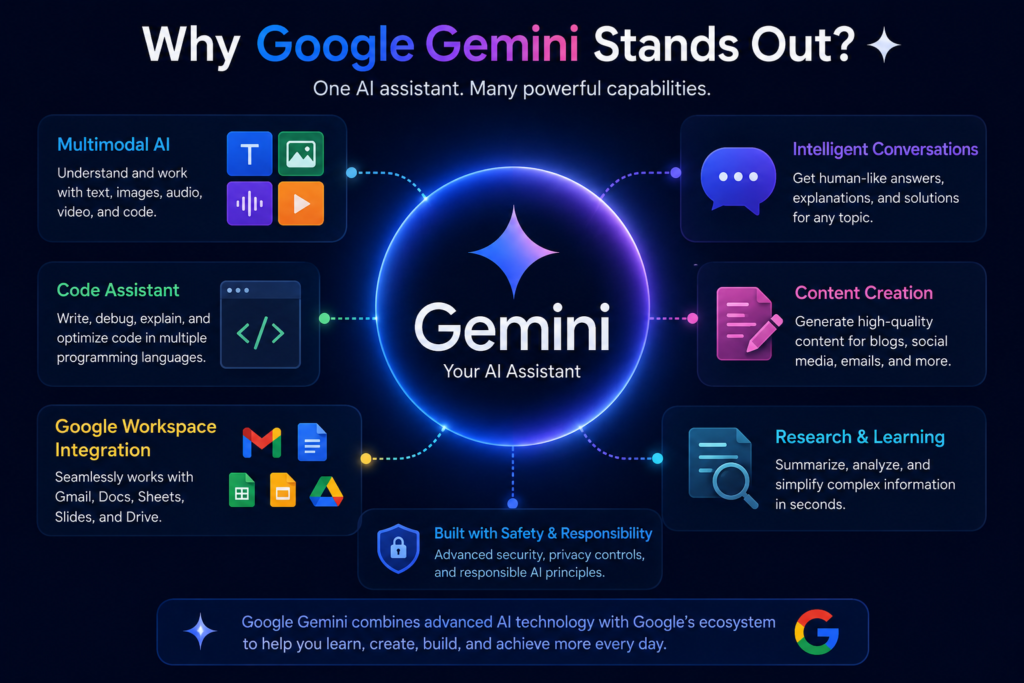
Google Gemini Apps and Integrations
One of the biggest advantages of Google Gemini is that it is deeply integrated into Google’s ecosystem. Instead of functioning as a standalone AI chatbot, Gemini works alongside many Google products that millions of people already use every day. This seamless integration makes Google Gemini a powerful productivity assistant for students, professionals, businesses, and creators.
Whether you’re writing an email, preparing a presentation, organizing files, or conducting research, Google Gemini can help complete tasks faster without requiring you to switch between multiple applications.
Gemini Web
The web version is the easiest way to access Google Gemini. Users can simply sign in with a Google account and start chatting with the AI through their web browser.
The web interface supports:
- Writing assistance
- Research
- Brainstorming ideas
- Coding help
- File uploads
- Image analysis
- Document summarization
It is suitable for both personal and professional use.
Android Integration
Google Gemini is becoming the default AI assistant on many Android devices. Users can ask questions, create reminders, summarize webpages, generate messages, control supported apps, and perform everyday tasks using voice or text.
Its deep Android integration makes it more than just a chatbot—it becomes an intelligent mobile assistant.
Gmail
Gemini helps users write professional emails, generate replies, summarize long email threads, improve grammar, and adjust the tone of messages.
Instead of spending several minutes writing an email, users can generate polished drafts in seconds.
Google Docs
Inside Google Docs, Gemini assists with writing reports, blog articles, lesson plans, business proposals, meeting notes, and research documents. It can also rewrite paragraphs, improve readability, and suggest better wording.
Google Sheets
Gemini simplifies spreadsheet tasks by helping users analyze data, create formulas, organize information, identify trends, and generate summaries without requiring advanced spreadsheet skills.
Google Slides
Users can create presentation outlines, generate slide content, improve speaker notes, and organize information more efficiently. This feature is particularly useful for students, teachers, and business professionals.
Google Drive
Gemini can search files stored in Google Drive, summarize documents, locate important information, and answer questions based on uploaded content, helping users save significant time when working with large document collections.
Google Workspace
Google Workspace integration combines Gemini with Gmail, Docs, Sheets, Slides, Drive, Meet, and Calendar to create an AI-powered workplace. Employees can automate repetitive tasks, prepare meeting summaries, draft documents, and collaborate more efficiently across teams.
🚀 AI in Real Life
Imagine preparing for an important office meeting. Google Gemini can summarize previous emails in Gmail, collect related documents from Drive, prepare a presentation in Slides, generate meeting notes in Docs, and organize schedules in Calendar—all within the Google Workspace ecosystem.
Why Google Integrations Matter
The strength of Google Gemini is not only its intelligence but also its ability to work naturally within the tools people already use every day. Instead of opening separate AI applications, users can access AI assistance directly inside familiar Google services, reducing manual work and increasing productivity.
This deep integration is one of the key reasons why Google Gemini Complete Guide is considered essential reading for anyone planning to use Google’s AI ecosystem effectively.
Google Gemini Live
Google Gemini Live is an advanced voice conversation feature that allows users to interact with Gemini naturally, almost like speaking with another person. Instead of typing prompts, users can ask questions, discuss ideas, solve problems, or continue long conversations using their voice.
Unlike traditional voice assistants that mainly execute commands, Gemini Live understands context, remembers the flow of a conversation, and responds intelligently to follow-up questions. This creates a much more natural and interactive AI experience.
Natural Conversations
Gemini Live is designed for real-time communication. Users can interrupt, ask additional questions, or change topics without restarting the conversation. The AI understands conversational context and adjusts its responses accordingly.
This makes brainstorming sessions, language practice, interview preparation, and problem-solving much smoother than traditional chatbot interactions.
Real-Time Assistance
Google Gemini Live can help users during everyday situations, including:
- Explaining complex topics while studying.
- Planning travel itineraries.
- Preparing presentations.
- Practicing speeches.
- Learning new languages.
- Solving coding problems.
- Brainstorming business ideas.
Its conversational approach makes information easier to understand and quicker to access.
Multimodal Interaction
Gemini Live is becoming more than just a voice assistant. Depending on supported devices and features, it can combine voice conversations with images, documents, and camera input, allowing users to ask questions about what they see around them.
For example, a user can point their camera at a chart, diagram, or object and ask Gemini Live to explain it in simple language.
💡 Did You Know?
Google Gemini Live is designed to support more natural human-AI conversations by understanding context, follow-up questions, and changing topics without requiring users to repeat the entire prompt each time.
Benefits of Gemini Live
- Hands-free AI assistance.
- Faster communication than typing.
- More natural conversations.
- Better accessibility for users.
- Helpful while driving, traveling, or multitasking.
- Improved learning through interactive discussions.
AI in Everyday Life
🚀 AI in Real Life
Imagine you’re cooking a new recipe. Instead of touching your phone with messy hands, you simply ask Gemini Live what the next step is, request ingredient substitutions, or convert measurements instantly through a natural voice conversation.
Google continues to expand Gemini Live with new capabilities, making it one of the most important features highlighted in this Google Gemini Complete Guide. As conversational AI evolves, Gemini Live is expected to become an even more capable personal assistant across Android devices and Google’s ecosystem.
Google Gemini Advanced
Google Gemini Advanced is Google’s premium AI subscription that provides access to the company’s most capable AI models and advanced productivity features. It is designed for users who require deeper reasoning, higher-quality responses, longer context windows, and enhanced performance for professional and complex tasks.
While the free version of Gemini is suitable for everyday conversations and basic content generation, Gemini Advanced is built for professionals, researchers, developers, educators, businesses, and power users who rely on AI for demanding workflows.
What Is Gemini Advanced?
Gemini Advanced is available through Google’s Google AI Pro (formerly AI Premium) subscription. Subscribers receive access to Google’s latest and most powerful Gemini models, along with additional AI features integrated across Google’s ecosystem.
The premium version is ideal for users who regularly work with lengthy documents, advanced coding projects, business reports, research papers, data analysis, and strategic planning.
Key Benefits of Gemini Advanced
Compared with the free version, Gemini Advanced offers several important advantages:
- Access to Google’s latest flagship AI models.
- Better reasoning and problem-solving abilities.
- Improved coding assistance for developers.
- More accurate responses for technical and research questions.
- Enhanced document analysis.
- Longer conversation memory and context handling.
- Priority access to newly released AI features.
- Advanced integration with Google Workspace.
These capabilities make Google Gemini Advanced particularly valuable for professionals who use AI every day.
Who Should Use Gemini Advanced?
Gemini Advanced is recommended for:
- Researchers analyzing complex information.
- Software developers writing and debugging code.
- Students working on advanced academic projects.
- Teachers preparing educational materials.
- Business professionals creating reports and presentations.
- Marketing teams generating campaigns and content strategies.
- Content creators producing long-form articles and scripts.
For occasional users who mainly ask simple questions or generate short pieces of content, the free version of Google Gemini may already provide everything they need.
🚀 AI in Real Life
A marketing manager preparing a quarterly campaign can use Gemini Advanced to analyze market trends, summarize competitor research, generate advertising copy, create presentation outlines, draft client emails, and organize the entire strategy within Google Workspace—saving hours of manual work.
Free vs Gemini Advanced
| Feature | Free Version | Gemini Advanced |
|---|---|---|
| Everyday AI Chat | ✔ | ✔ |
| Latest AI Models | Limited | ✔ |
| Advanced Reasoning | Basic | ✔ |
| Coding Assistance | Good | Better |
| Long Document Analysis | Limited | ✔ |
| Google Workspace AI Features | Limited | ✔ |
| Early Access to New Features | No | ✔ |
Is Gemini Advanced Worth It?
The answer depends on how frequently you use AI. If you rely on artificial intelligence for studying, programming, research, writing, business planning, or professional productivity, Gemini Advanced can significantly improve efficiency and save valuable time.
As discussed throughout this Google Gemini Complete Guide, Google’s premium AI experience is designed for users who want the best capabilities the Gemini ecosystem currently offers, along with continuous improvements as new models and features are released.
Google Gemini Pricing
Google Gemini offers both free and premium plans, allowing users to choose the option that best matches their needs. Casual users can access many AI features at no cost, while professionals and businesses can upgrade to Google AI Pro to unlock advanced capabilities.
Free Plan
The free version of Google Gemini includes:
- AI chat and question answering
- Writing assistance
- Basic coding help
- Content generation
- Limited document analysis
- Access through the web and mobile app
For everyday tasks, the free plan is sufficient for most users.
Google AI Pro
Google AI Pro is Google’s premium subscription that includes Gemini Advanced and additional AI-powered features across the Google ecosystem.
Subscribers receive benefits such as:
- Access to Google’s latest AI models
- Better reasoning performance
- Enhanced coding capabilities
- Longer context handling
- Advanced Workspace integration
- Priority access to new AI features
Google occasionally updates its subscription plans, pricing, and included features. Therefore, it’s always recommended to check the official Google Gemini pricing page for the latest information before subscribing.
Which Plan Should You Choose?
If you occasionally use AI for learning, writing, or asking questions, the free version is usually enough. However, if your work depends on AI for research, programming, business productivity, or content creation, upgrading to Google AI Pro can provide significant productivity benefits.
As explained throughout this Google Gemini Complete Guide, the right plan depends on how frequently you use AI and the complexity of the tasks you perform.
How to Use Google Gemini
Getting started with Google Gemini is simple. Whether you’re using a computer, smartphone, or tablet, you can begin using Google’s AI assistant in just a few minutes.
Step 1: Sign In
Visit the Google Gemini website or open the Gemini mobile app, then sign in with your Google account.
Step 2: Write a Clear Prompt
Enter your question or instruction in natural language. The more specific your prompt is, the more accurate and useful the response will be.
For example, instead of asking:
“Write about AI.”
Try asking:
“Write a 500-word article explaining how artificial intelligence is transforming education.”
If you’re completely new to artificial intelligence, it’s a good idea to first read What Is Artificial Intelligence? to understand the basic concepts before exploring advanced AI tools like Google Gemini.
Step 3: Upload Files
Google Gemini supports PDFs, Word documents, spreadsheets, images, and other files. It can summarize documents, explain charts, extract important information, and answer questions based on uploaded content.
Step 4: Refine the Response
You don’t have to accept the first answer. Ask follow-up questions, request more details, simplify explanations, change the writing style, or generate alternative versions until the output matches your requirements.
Step 5: Use Google Workspace
Google Gemini integrates with Gmail, Docs, Sheets, Slides, Drive, and other Google services, allowing you to write emails, create reports, analyze spreadsheets, and organize information more efficiently.
Teachers and students can also explore AI in Education to discover how AI is changing modern classrooms and improving the learning experience.
💡 Did You Know?
Professional users often improve AI responses by refining the same prompt several times instead of starting a new conversation. This simple technique usually produces more accurate and personalized results.
Tips for Better Results
- Write clear and specific prompts.
- Provide background information whenever possible.
- Divide complex tasks into smaller steps.
- Upload supporting files when needed.
- Always verify important facts before using them professionally.
To compare Google Gemini with other leading AI assistants, you can also read ChatGPT Complete Guide and Best AI Chatbots in 2026. Understanding the strengths of different AI platforms will help you choose the right tool for writing, coding, research, business, or everyday productivity.
By following these best practices, you’ll unlock the full potential of Google Gemini and get the maximum value from the features discussed throughout this Google Gemini Complete Guide.
Best Google Gemini Prompts
The quality of your results depends largely on the quality of your prompts. A well-written prompt gives Google Gemini clear instructions, enough context, and a specific goal, resulting in more accurate and useful responses.
Below are some practical prompts you can copy, modify, and use for different purposes.
For Students
Explain the concept of quantum computing in simple language with real-world examples suitable for college students.
For Teachers
Create a one-hour lesson plan on artificial intelligence, including learning objectives, classroom activities, and assessment questions.
For Content Creators
Write a 1,500-word SEO-friendly blog post on the future of artificial intelligence using clear headings, practical examples, and a professional tone.
For Developers
Write a Python program to read data from a CSV file, remove duplicate records, and export the cleaned data into a new file with proper comments.
For Business Professionals
Prepare a professional SWOT analysis for an AI startup entering the education technology market.
For Researchers
Summarize the latest research on generative AI, highlighting key findings, limitations, and future research opportunities.
🧠 Research Insight
The most effective prompts clearly define the objective, target audience, desired format, writing style, and expected output. Adding these details usually produces significantly better results.
As you continue exploring Google Gemini, experimenting with different prompt styles and providing clear instructions will help you unlock the full potential of this AI assistant.
Best Use Cases of Google Gemini
Google Gemini is designed to help people across different professions and industries. From education and software development to business and content creation, its AI capabilities make everyday tasks faster, smarter, and more efficient.
Students
Students can use Google Gemini to understand difficult concepts, summarize study materials, prepare assignments, create revision notes, solve mathematics problems, and practice interview or examination questions. Those beginning their AI journey should also explore What Is Artificial Intelligence? to build a strong foundation.
Teachers
Teachers can generate lesson plans, classroom activities, quizzes, worksheets, presentation outlines, and assessment questions within minutes. To learn more about AI in modern education, read AI in Education.
Content Creators and Bloggers
Writers, bloggers, and YouTubers can use Google Gemini for topic research, article outlines, script writing, SEO content ideas, social media captions, and content planning. It works well as a creative assistant while maintaining productivity.
Developers
Programmers can generate code, debug errors, explain programming concepts, optimize algorithms, write documentation, and learn new technologies more efficiently.
Researchers
Researchers can summarize lengthy reports, compare information from multiple sources, organize literature reviews, identify key findings, and simplify complex academic topics for better understanding.
Businesses
Businesses use Google Gemini to prepare reports, analyze customer feedback, draft professional emails, create marketing content, automate repetitive tasks, and improve team productivity through Google Workspace integration.
🚀 AI in Real Life
A small business owner can use Google Gemini to write marketing emails, analyze customer reviews, prepare sales reports, generate social media content, create business proposals, and organize meeting notes—all within a single AI-powered workflow.
No matter your profession, Google Gemini can significantly improve productivity by reducing repetitive work and helping you focus on higher-value tasks. Understanding where it performs best also makes it easier to compare with other leading AI assistants, which we’ll explore in the next section.
Google Gemini vs ChatGPT
Google Gemini and ChatGPT are two of the world’s most popular AI assistants. Both can generate content, answer questions, write code, summarize documents, and assist with research. However, each platform has its own strengths depending on the type of work you want to accomplish.
| Feature | Google Gemini | ChatGPT |
|---|---|---|
| Developer | Google DeepMind | OpenAI |
| Ecosystem | Google Workspace, Android, Gmail, Docs | ChatGPT, OpenAI ecosystem |
| Multimodal Support | Excellent | Excellent |
| Coding Assistance | Excellent | Excellent |
| Research & Productivity | Excellent | Excellent |
| Workspace Integration | Strong | Limited with Google services |
| Voice Features | Gemini Live | Advanced Voice Mode |
| Best For | Google ecosystem users | General AI productivity |
Which One Should You Choose?
Choose Google Gemini if you regularly use Gmail, Google Docs, Google Drive, Android, or other Google services and want AI deeply integrated into your daily workflow.
Choose ChatGPT if you need a versatile AI assistant for writing, brainstorming, coding, learning, or professional productivity across multiple platforms.
Neither platform is universally better—the ideal choice depends on your workflow, preferred ecosystem, and specific requirements.
For a detailed walkthrough of OpenAI’s AI assistant, read ChatGPT Complete Guide. You can also explore ChatGPT vs Gemini vs Claude for an in-depth comparison of today’s leading AI chatbots.
🌍 Global AI Fact
Google Gemini and ChatGPT are among the most widely used generative AI platforms in the world, helping millions of users every day with education, software development, business productivity, research, and creative work.
Advantages of Google Gemini
Google Gemini has become one of the leading AI assistants because it combines powerful language models with Google’s extensive ecosystem. Its multimodal capabilities, intelligent reasoning, and seamless integration make it suitable for both personal and professional use.
Key Advantages
- Deep integration with Google Workspace, including Gmail, Docs, Sheets, Slides, and Drive.
- Powerful multimodal AI capable of understanding text, images, documents, audio, video, and code.
- Fast and accurate responses for everyday productivity tasks.
- Excellent support for coding, research, education, and business workflows.
- Multiple AI models optimized for different devices and performance requirements.
- Natural voice conversations through Gemini Live.
- Regular updates with new models and AI features from Google DeepMind.
- User-friendly interface suitable for beginners as well as advanced users.
🧠 Research Insight
One of Google’s greatest strengths is its ability to integrate AI directly into products that billions of people already use every day. Rather than functioning as a standalone chatbot, Gemini enhances existing workflows across Google’s ecosystem, making AI more practical and accessible.
Overall, Google Gemini stands out as a comprehensive AI assistant for users who want productivity, creativity, and intelligent automation within the Google ecosystem. Its continuous development also ensures that new capabilities are regularly added, making it one of the most future-ready AI platforms available today.
Limitations of Google Gemini
Although Google Gemini is one of the most advanced AI assistants available today, it is not perfect. Like every generative AI system, it has certain limitations that users should understand before relying on it for important work.
Current Limitations
- AI-generated responses may occasionally contain incorrect or outdated information.
- Complex reasoning tasks can still produce inaccurate conclusions in some situations.
- Premium features require a paid Google AI Pro subscription.
- Some advanced capabilities are available only in selected countries, languages, or supported devices.
- Responses may vary depending on the prompt, making consistent results challenging for certain tasks.
- Internet-dependent features may not function properly without a stable connection.
- Users should always verify medical, legal, financial, or academic information before making important decisions.
💡 Did You Know?
Even the most advanced AI models can sometimes produce confident but incorrect answers. This phenomenon is commonly known as an AI hallucination, which is why human verification remains essential for critical tasks.
Best Practice
Google Gemini should be viewed as an intelligent assistant rather than a replacement for human expertise. It excels at brainstorming, writing, coding, summarizing, and improving productivity, but important decisions should always be reviewed by qualified professionals or verified using reliable sources.
By understanding both its strengths and limitations, users can use Google Gemini more effectively while avoiding common mistakes and getting the best possible results from the platform.
Privacy and Security
As artificial intelligence becomes more integrated into everyday life, privacy and security have become important considerations for every AI platform. Google has introduced various privacy controls and security measures to help users manage their data while using Gemini.
Users should avoid sharing highly sensitive information such as passwords, banking details, government identification numbers, confidential business documents, or private medical records unless they fully understand how the information will be processed and stored.
Google also provides account-level privacy settings that allow users to review activity, manage AI interactions, and control certain personalization features. These settings may change over time as Google continues to improve its AI services.
Best Practice
Treat AI as a productivity assistant—not as a secure storage location for confidential information. Always review AI-generated content before publishing or using it in professional, academic, legal, or financial situations.
For anyone beginning their AI journey, understanding both the benefits and responsibilities of using artificial intelligence is just as important as learning the technology itself. That’s why we recommend reading Future of Artificial Intelligence to explore how AI is expected to evolve and how responsible AI use will shape the years ahead.
The Future of Google Gemini
Google continues to invest heavily in artificial intelligence, making Gemini one of its highest-priority technologies. As AI models become more capable, Google Gemini is expected to evolve from an intelligent chatbot into a comprehensive AI assistant that can understand, reason, plan, and collaborate with users across almost every digital task.
Future versions of Gemini are likely to offer stronger reasoning abilities, improved multimodal understanding, more personalized assistance, deeper integration with Google products, and greater support for scientific research, software development, education, healthcare, and business automation.
Google is also focusing on AI agents—systems capable of performing multi-step tasks on behalf of users. Instead of simply answering questions, future versions of Gemini may help organize schedules, manage projects, automate workflows, conduct research, and complete complex tasks with minimal human intervention.
Another important direction is the expansion of Gemini Live, enabling more natural conversations using voice, camera, and real-world context. This could transform how people interact with smartphones, computers, smart devices, and wearable technology in everyday life.
🔮 Future Outlook
The future of Google Gemini is not just about creating a smarter chatbot—it’s about building an intelligent digital assistant that works seamlessly across every Google product, helping individuals and organizations become more productive, creative, and informed.
To understand how Google Gemini fits into the broader evolution of artificial intelligence, we recommend reading AI Trends in 2026 and Future of Artificial Intelligence. These guides explore the technologies, innovations, and challenges that are shaping the next generation of AI.
As Google DeepMind continues to release new models and capabilities, Google Gemini is expected to remain one of the world’s leading AI platforms, driving innovation across education, research, business, software development, and everyday productivity.
Conclusion
Google Gemini has rapidly evolved into one of the world’s most capable AI assistants, combining advanced reasoning, multimodal intelligence, and seamless integration with Google’s ecosystem. Whether you’re a student, educator, developer, researcher, content creator, or business professional, it offers practical tools to improve productivity, creativity, and decision-making.
Throughout this Google Gemini Complete Guide, we’ve explored its history, creators, AI models, features, pricing, integrations, use cases, advantages, limitations, and future potential. As Google DeepMind continues to innovate, Gemini is expected to become even more intelligent, personalized, and deeply integrated into our daily digital lives.
If you’re just beginning your AI journey, we recommend reading What Is Artificial Intelligence? to build a strong foundation. To understand where AI is heading next, explore Future of Artificial Intelligence and AI Trends in 2026. If you’re comparing leading AI assistants before choosing one, don’t miss ChatGPT vs Gemini vs Claude.
Artificial intelligence is evolving at an extraordinary pace, and Google Gemini is playing a major role in that transformation. By learning how to use it effectively today, you’ll be better prepared for the AI-powered future of tomorrow.
🎯 Final Thought
“The real power of Google Gemini isn’t just answering questions—it’s helping people think better, learn faster, create smarter, and solve real-world problems more efficiently.”
What is Google Gemini?
Google Gemini is Google’s advanced generative AI assistant developed by Google DeepMind. It can understand and generate text, images, code, and other types of content to help users with writing, learning, research, coding, and productivity.
Is Google Gemini free to use?
Yes. Google Gemini offers a free version for everyday AI tasks. Users who need advanced AI models and premium features can subscribe to Google AI Pro.
What is the difference between Google Gemini and ChatGPT?
Both are powerful AI assistants. Google Gemini is deeply integrated with Google’s ecosystem, while ChatGPT is known for its versatility across writing, coding, research, and creative tasks. The best choice depends on your workflow and requirements.
Can Google Gemini generate images?
Yes. Google Gemini supports AI-powered image generation and image analysis, depending on the available model and features in your region.
Is Google Gemini good for students?
Absolutely. Students can use Google Gemini to understand complex topics, summarize notes, prepare assignments, practice interview questions, and improve their overall learning experience.
Can Google Gemini help with coding?
Yes. Google Gemini supports many programming languages and can generate code, explain programming concepts, debug errors, optimize algorithms, and assist with software development.
Does Google Gemini work with Google Workspace?
Yes. Google Gemini integrates with Gmail, Google Docs, Sheets, Slides, Drive, and other Google Workspace applications to improve productivity and collaboration.
Is Google Gemini safe to use?
Google provides privacy controls and security features for Gemini. However, users should avoid sharing confidential or sensitive personal, financial, medical, or business information with any AI assistant.
Which industries can benefit from Google Gemini?
Google is continuously improving Gemini with better reasoning, multimodal AI capabilities, AI agents, and deeper integration across its products. It is expected to become one of the world’s most capable AI assistants in the coming years.
What is the future of Google Gemini?
Google is continuously improving Gemini with better reasoning, multimodal AI capabilities, AI agents, and deeper integration across its products. It is expected to become one of the world’s most capable AI assistants in the coming years.