
Introduction: Leonardo AI Complete Guide
Artificial intelligence has transformed the way people create digital content. What once required years of artistic experience, expensive software, and countless hours of manual work can now be accomplished in minutes with AI-powered creative tools. Among these innovations, Leonardo AI has emerged as one of the most powerful and user-friendly AI image generators for creators, designers, businesses, educators, and professionals.
Unlike many AI image generation platforms that focus only on creating beautiful artwork, Leonardo AI provides a complete creative ecosystem. It allows users to generate high-quality images, edit existing visuals, train custom AI models, create game assets, design marketing materials, produce book covers, product photography, and much more—all from simple text prompts.
Whether you are a complete beginner exploring AI image generation for the first time or an experienced designer looking for professional-level creative control, Leonardo AI offers features that suit every skill level. Its combination of powerful AI models, intuitive interface, advanced editing tools, and flexible workflow has made it a preferred choice for millions of creators worldwide.
In this comprehensive guide, you will learn everything about Leonardo AI—from understanding its core technology to mastering prompt writing, image generation, editing techniques, pricing plans, practical applications, comparisons with competing AI tools, and expert tips for achieving professional-quality results.
By the end of this guide, you will know not only how to use Leonardo AI, but also when to use it, why it stands out from other AI image generators, and how to maximize its potential for personal, educational, and commercial projects.
🚀 AI in Real Life
Imagine you’re writing a novel and need a stunning book cover, launching a business that requires product images, creating social media posts for your brand, designing YouTube thumbnails, or developing concept art for a video game. Instead of hiring multiple designers or spending hours editing images manually, Leonardo AI can generate professional-quality visuals in minutes—making creativity faster, more affordable, and accessible to everyone.
What Is Leonardo AI? (Leonardo AI Complete Guide)
Leonardo AI is an advanced AI-powered image generation platform that transforms text prompts into high-quality digital artwork, illustrations, realistic images, concept designs, marketing graphics, game assets, and many other visual creations using generative artificial intelligence.
Launched to simplify professional digital content creation, Leonardo AI combines multiple state-of-the-art AI models with powerful editing capabilities, allowing users to move beyond basic image generation. It supports text-to-image creation, image-to-image transformation, AI-powered editing, background replacement, canvas expansion, image upscaling, texture generation, and custom model training—all within a single platform.
One of Leonardo AI’s biggest strengths is its flexibility. Beginners can create impressive images using simple prompts, while advanced users can fine-tune outputs through prompt engineering, style presets, aspect ratio settings, guidance controls, negative prompts, and specialized AI models.
To explore the platform, features, and latest updates, you can visit the official Leonardo AI website.
Today, Leonardo AI is widely used by:
- Graphic Designers
- Digital Artists
- Game Developers
- Book Publishers
- Content Creators
- YouTubers
- Bloggers
- Marketing Agencies
- E-commerce Businesses
- Social Media Managers
- Educators
- Students
- Freelancers
- Entrepreneurs
Its growing ecosystem and continuous feature updates have positioned Leonardo AI as one of the leading AI image generation platforms alongside Midjourney, DALL·E, Adobe Firefly, Flux, and other modern AI image generators.
💡 Did You Know?
Leonardo AI is designed for much more than artistic illustrations. Professionals use it to create product mockups, advertising creatives, architectural concepts, interior designs, game environments, logo ideas, educational graphics, fashion concepts, and even printable book covers.
History of Leonardo AI
Leonardo AI was founded in 2022 with a vision to make professional-quality AI image generation accessible to everyone. While many early AI image generators focused mainly on creating artistic images, Leonardo AI was designed as a complete creative platform for artists, designers, game developers, marketers, businesses, and content creators.
The platform quickly gained popularity because it combined powerful AI image generation with advanced editing tools, custom AI model training, image upscaling, and production-ready workflows. Instead of generating only beautiful artwork, Leonardo AI focused on helping users create practical visual content for real-world projects.
A major milestone came when Leonardo AI introduced its own advanced AI models, including the Phoenix model, which significantly improved prompt understanding, image quality, realism, and text rendering. Features such as AI Canvas, Flow State, Realtime Canvas, and transparent PNG generation further strengthened its position among professional AI image generation platforms.
In 2024, Leonardo AI became part of Canva, one of the world’s leading online design platforms. This acquisition combined Leonardo AI’s powerful image-generation technology with Canva’s design ecosystem, allowing millions of users to access more advanced AI-powered creative tools while continuing Leonardo AI’s independent development.
Today, Leonardo AI is recognized as one of the world’s leading AI image generation platforms and competes with tools such as Midjourney, DALL·E, Adobe Firefly, Ideogram, Flux, and Stable Diffusion. It is used by individuals, startups, enterprises, educational institutions, and creative professionals worldwide for producing high-quality digital artwork, marketing graphics, product images, game assets, book covers, concept art, and much more.
🌍 Global AI Fact
Leonardo AI has grown from a specialized AI image generation platform into a comprehensive creative ecosystem. Following its integration with Canva, it continues to expand its AI capabilities while serving millions of creators across different industries.
How Leonardo AI Works
Leonardo AI uses advanced generative artificial intelligence to transform simple text descriptions into high-quality images. Instead of drawing manually, users describe what they want to create, and the AI analyzes the prompt, understands the context, and generates an image that closely matches the description.
Although the technology behind Leonardo AI is highly advanced, the actual workflow is simple and beginner-friendly. In most cases, creating professional AI artwork takes only a few minutes.
Step 1: Create an Account
Visit the Leonardo AI website and sign up using your Google, Apple, Microsoft, or email account. New users can start with the free plan, which provides daily tokens for generating AI images.
Step 2: Enter Your Prompt
Describe the image you want to create in the prompt box. The more specific your description, the better the results. You can mention the subject, background, lighting, camera angle, colors, artistic style, and image quality.
Example Prompt:
“A futuristic smart city at sunrise, ultra-realistic, cinematic lighting, 8K, highly detailed, vibrant colors.”
Step 3: Select an AI Model
Leonardo AI offers multiple AI models optimized for different creative tasks. Some models generate realistic photographs, while others specialize in illustrations, fantasy art, concept designs, anime, game assets, or product visuals. Choosing the right model significantly improves the final output.
Step 4: Adjust Generation Settings
Before generating the image, users can customize several settings, including:
- Image size and aspect ratio
- Number of images
- Prompt guidance
- Style presets
- Negative prompts
- Seed value
- Generation quality
These controls help produce more accurate and consistent results.
Step 5: Generate the Image
Click the Generate button, and Leonardo AI processes the prompt using its AI models. Within a few seconds, it creates one or multiple images based on your selected settings.
Step 6: Edit and Improve
If the generated image is not exactly what you expected, Leonardo AI provides several editing tools to refine it. You can expand the canvas, remove unwanted objects, replace backgrounds, upscale image quality, adjust details, or regenerate specific areas without starting from scratch.
Step 7: Download or Use Your Image
Once satisfied, you can download the image and use it for presentations, blogs, social media, marketing campaigns, book covers, game development, product design, educational projects, or commercial work, depending on your licensing and usage rights.
✅ Pro Tip
The quality of your prompt has the biggest impact on the final image. A clear and detailed prompt combined with the right AI model will usually produce far better results than repeatedly generating images with a short or vague description.
Key Features of Leonardo AI
Leonardo AI offers much more than basic AI image generation. It combines advanced AI models, creative editing tools, and professional workflows into a single platform, making it suitable for beginners as well as experienced creators. Whether you want to design social media graphics, create game assets, generate realistic product photos, or produce digital artwork, Leonardo AI provides a comprehensive set of features.
1. Text-to-Image Generation
The core feature of Leonardo AI allows users to convert simple text prompts into stunning AI-generated images. By describing a scene, object, or concept, users can generate realistic photographs, illustrations, fantasy artwork, concept designs, anime, architectural visuals, and much more within seconds.
2. Image-to-Image Generation
Instead of creating images from scratch, Leonardo AI can transform an existing image into a new style while preserving its overall structure. This feature is particularly useful for redesigning artwork, improving concepts, or generating multiple design variations.
3. AI Canvas
AI Canvas enables users to edit images intelligently. You can remove unwanted objects, expand backgrounds, replace specific areas, or add completely new elements using AI-powered inpainting and outpainting tools.
4. Flow State
Flow State helps creators rapidly generate multiple creative variations from a single idea. Instead of repeatedly changing prompts manually, users can explore different artistic directions and select the best result more efficiently.
5. High-Quality Upscaling
Leonardo AI improves image resolution while preserving fine details. This makes AI-generated artwork suitable for presentations, posters, websites, book covers, social media, and even high-quality printing.
6. Transparent Background Generation
Users can generate PNG images with transparent backgrounds, making Leonardo AI extremely useful for logo creation, product images, icons, stickers, and graphic design projects.
7. Custom AI Models
Advanced users can train custom AI models using their own datasets. This helps maintain a consistent visual style across branding projects, games, illustrations, and commercial content.
8. Commercial Use
Depending on the selected plan and licensing terms, Leonardo AI allows creators and businesses to use generated images for commercial projects such as marketing campaigns, websites, advertising materials, e-commerce listings, books, and digital products.
💡 Did You Know?
One of the biggest advantages of Leonardo AI is that it combines image generation, editing, upscaling, and creative workflow tools in one platform, reducing the need for multiple design applications.
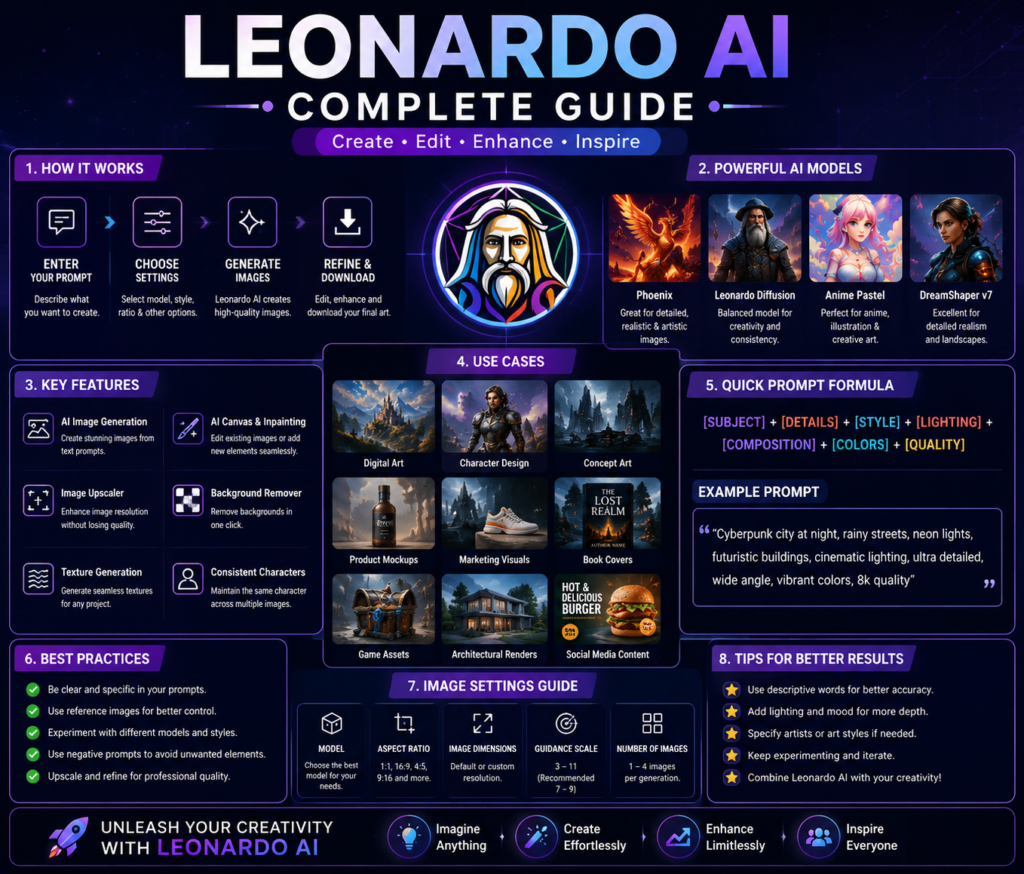
Leonardo AI Models Explained
One of the biggest strengths of Leonardo AI is its wide range of AI models. Instead of relying on a single model for every task, Leonardo AI provides specialized models designed for different creative needs. Choosing the right model can significantly improve image quality, realism, artistic style, and prompt accuracy.
Below are some of the most important Leonardo AI models and technologies available to creators.
1. Phoenix Model
Phoenix is one of Leonardo AI’s most advanced image generation models. It is designed to understand prompts more accurately and produce highly detailed, realistic, and visually appealing images.
The Phoenix model offers:
- Better prompt understanding
- Improved image realism
- Enhanced lighting and textures
- More accurate text rendering
- Better human anatomy
- Consistent image quality
It is an excellent choice for professional artwork, marketing graphics, product photography, and realistic illustrations.
2. Lightning Models
Lightning models are optimized for speed. They generate high-quality images much faster than standard models, making them ideal for rapid content creation, brainstorming, and quick design iterations.
These models are commonly used for:
- Social media graphics
- Blog illustrations
- YouTube thumbnails
- Creative brainstorming
- Fast design previews
3. Anime and Illustration Models
Leonardo AI also offers specialized models for anime, comics, cartoons, and digital illustrations. These models produce vibrant colors, expressive characters, and unique artistic styles suitable for entertainment and creative projects.
4. Photorealistic Models
Photorealistic models focus on generating images that closely resemble real-world photography. They are particularly useful for product photography, portraits, architecture, fashion, advertising, and commercial presentations.
5. Custom Fine-Tuned Models
Professional users can train custom AI models using their own datasets. This allows businesses, studios, and designers to generate images in a consistent visual style while maintaining brand identity across multiple projects.
How to Choose the Right Model
Selecting the correct AI model depends on your project goals.
| Requirement | Recommended Model |
|---|---|
| Realistic photos | Phoenix / Photorealistic Models |
| Digital artwork | Phoenix |
| Anime illustrations | Anime Models |
| Fast image generation | Lightning Models |
| Product design | Photorealistic Models |
| Brand consistency | Custom Fine-Tuned Models |
🧠 Research Insight
Modern AI image generators use specialized models because no single model performs equally well for every creative task. Selecting a model that matches your project often improves image quality more effectively than simply writing a longer prompt.
Leonardo AI Pricing Plans
One of the reasons behind Leonardo AI’s growing popularity is its flexible pricing structure. Whether you are a beginner experimenting with AI image generation or a professional designer working on commercial projects, Leonardo AI offers plans that suit different budgets and creative needs. Since subscription plans may change over time, always check the official Leonardo AI pricing page before choosing a plan.
Free Plan
The Free Plan is ideal for beginners who want to explore Leonardo AI without spending money. Users receive a limited number of daily tokens that can be used to generate images and test various AI features.
The free version allows users to:
- Generate AI images
- Explore different AI models
- Experiment with prompts
- Use basic editing features
- Learn the platform before upgrading
Although token limits may restrict heavy usage, the free plan is more than sufficient for students, hobbyists, and first-time users.
Paid Plans
Leonardo AI also offers premium subscription plans designed for creators who need higher generation limits, faster processing, advanced AI models, and commercial workflows.
Depending on the selected plan, users may receive benefits such as:
- More daily or monthly tokens
- Priority image generation
- Access to premium AI models
- Advanced editing capabilities
- Higher-resolution image generation
- Commercial usage benefits
- Faster processing speeds
Since Leonardo AI regularly updates its pricing and subscription options, it is always recommended to check the official website for the latest plans and features before purchasing.
Free vs Paid: Which One Should You Choose?
| Free Plan | Paid Plans |
|---|---|
| Limited daily tokens | Higher token limits |
| Suitable for learning | Best for professional work |
| Basic features | Premium AI models and tools |
| Ideal for beginners | Ideal for businesses and creators |
| No initial investment | Faster workflow and productivity |
Is the Free Plan Enough?
For most beginners, the answer is yes. The free plan provides enough resources to learn prompt writing, understand AI image generation, and create impressive visuals for personal projects.
However, if you generate images frequently for YouTube, blogging, digital marketing, publishing, graphic design, game development, or client work, upgrading to a paid plan can significantly improve productivity and reduce generation limitations.
✅ Pro Tip
Start with the free plan and focus on learning effective prompt writing. Better prompts usually produce better results than simply upgrading to a paid plan. Once you consistently use Leonardo AI for professional or commercial projects, a premium subscription becomes a worthwhile investment.
Best Use Cases of Leonardo AI
One of the biggest reasons behind the success of Leonardo AI is its versatility. Unlike many AI image generators that are designed for only one type of artwork, Leonardo AI can be used across multiple industries and professions. From students creating presentation graphics to professional game studios developing concept art, the platform offers solutions for a wide variety of creative needs.
1. Graphic Design
Graphic designers use Leonardo AI to create posters, banners, brochures, logos, social media graphics, packaging concepts, and marketing materials. Instead of starting every project from scratch, designers can generate creative concepts within minutes and refine them using professional editing tools.
2. Book Cover Design
Authors, publishers, and self-publishing professionals can generate attractive book cover concepts, fantasy illustrations, children’s book artwork, and promotional graphics. Leonardo AI significantly reduces the time required to visualize creative ideas before finalizing the design.
3. Social Media Content
Content creators can generate eye-catching visuals for Instagram, Facebook, LinkedIn, Pinterest, and X (formerly Twitter). High-quality AI-generated images help increase audience engagement and improve brand visibility.
4. Blogging and Website Graphics
Bloggers can quickly create featured images, infographics, article illustrations, thumbnails, icons, and website banners without relying entirely on stock photography.
5. YouTube Thumbnail Design
Professional-looking thumbnails play a major role in improving click-through rates. Leonardo AI helps YouTubers generate custom thumbnail concepts with dramatic lighting, realistic characters, cinematic backgrounds, and attention-grabbing compositions.
6. Game Development
Game developers frequently use Leonardo AI to create:
- Character concepts
- Environment designs
- Weapons
- Buildings
- Fantasy creatures
- Textures
- User interface ideas
These visuals help accelerate the game development process before final production begins.
7. Product Photography
E-commerce businesses can generate professional product backgrounds, advertising visuals, lifestyle images, and promotional banners without organizing expensive photo shoots.
8. Marketing and Advertising
Marketing agencies use Leonardo AI to design campaign graphics, advertisements, product mockups, presentation visuals, landing page illustrations, and creative concepts for digital advertising.
9. Education
Teachers and students can create educational diagrams, classroom posters, science illustrations, history visuals, presentation graphics, and project artwork that make learning more engaging.
10. Personal Creativity
Even users with no design experience can generate personalized wallpapers, greeting cards, digital paintings, travel posters, invitation cards, and creative artwork simply by writing detailed prompts.
🚀 AI in Real Life
A self-published author can write a novel in the morning, generate multiple book cover concepts using Leonardo AI in the afternoon, edit the final design, and publish the book online the same day. Tasks that previously required several professionals can now be completed by a single creator using AI-powered tools.
Leonardo AI Prompt Writing Guide
Learning how to write effective prompts is one of the most valuable skills in this Leonardo AI Complete Guide. Even the most advanced AI model cannot produce excellent results if the prompt is unclear or lacks important details. A well-written prompt helps Leonardo AI understand your creative vision and generate images that closely match your expectations.
What Is a Prompt?
A prompt is a written description that tells Leonardo AI what kind of image you want to create. It can include the subject, environment, lighting, camera angle, artistic style, colors, mood, composition, and quality.
Example of a Weak Prompt
“A cat”
This prompt is too short and gives the AI very little information.
Example of a Strong Prompt
“A realistic white Persian cat sitting beside a wooden window during sunrise, soft golden lighting, ultra-detailed fur, shallow depth of field, 8K photography.”
The second prompt provides much more context, allowing Leonardo AI to generate a higher-quality image.
Elements of a Good Prompt
For the best results, try to include:
- Main Subject – What should appear in the image?
- Environment – Where is the scene located?
- Lighting – Sunrise, sunset, studio lighting, cinematic, neon, etc.
- Style – Realistic, anime, watercolor, oil painting, cyberpunk, fantasy, Pixar, and more.
- Camera Angle – Close-up, aerial view, portrait, wide shot, macro, etc.
- Quality – Ultra HD, highly detailed, 8K, photorealistic.
- Mood – Happy, mysterious, dramatic, peaceful, futuristic, dark, etc.
Use Negative Prompts
Negative prompts tell Leonardo AI what should not appear in the generated image.
Common negative prompts include:
- Blurry
- Low quality
- Extra fingers
- Deformed face
- Watermark
- Text
- Logo
- Cropped image
- Noise
- Distorted anatomy
Using negative prompts often improves image quality and produces cleaner, more professional results.
Experiment and Refine
Professional creators rarely generate the perfect image on their first attempt. Instead, they refine prompts, adjust settings, change AI models, and compare multiple outputs before selecting the final version.
✅ Pro Tip
When using Leonardo AI, improve your prompt step by step instead of rewriting everything. Small changes in lighting, style, camera angle, or descriptive details can dramatically improve the final image.
Leonardo AI vs Midjourney
When choosing an AI image generator, many users compare Leonardo AI with Midjourney because both platforms are known for producing high-quality AI-generated images. While they share the same goal of transforming text prompts into visuals, their strengths and target audiences are quite different.
Image Quality
Both Leonardo AI and Midjourney produce stunning images. Midjourney is widely recognized for its artistic, cinematic, and highly creative outputs, making it a favorite among digital artists and concept designers. Leonardo AI, on the other hand, offers an excellent balance between realism, creativity, and commercial usability.
Ease of Use
Leonardo AI provides a modern web-based interface that is easy for beginners to understand. Users can generate, edit, upscale, and organize images without leaving the platform.
Midjourney has also become easier to use with its web interface, but many users still associate it with its original Discord-based workflow, which can feel less intuitive for beginners.
Editing Features
One of Leonardo AI’s biggest advantages is its built-in editing tools. Features like AI Canvas, Realtime Canvas, background editing, object replacement, and image upscaling allow users to modify images without switching to another application.
Midjourney focuses primarily on image generation and offers fewer integrated editing capabilities.
Speed and Workflow
Leonardo AI is designed for rapid content creation. Multiple AI models, Flow State, and editing features help creators complete projects efficiently.
Midjourney excels at producing visually stunning artwork but often requires additional editing software for professional workflows.
Best For
| Leonardo AI | Midjourney |
|---|---|
| Beginners | Digital Artists |
| Graphic Designers | Concept Artists |
| Marketing Teams | Fantasy Artwork |
| Book Cover Designers | Cinematic Illustrations |
| Product Mockups | Creative Art |
| Commercial Projects | Artistic Visuals |
Which One Should You Choose?
Choose Leonardo AI if your goal is to create professional graphics, marketing materials, book covers, product images, educational content, or commercial designs with powerful editing capabilities.
Choose Midjourney if your primary focus is creating highly artistic, imaginative, and visually cinematic digital artwork.
💡 Did You Know?
Many professional creators use both platforms together. They generate artistic concepts in Midjourney and then refine, edit, or expand those visuals using Leonardo AI to achieve the final production-ready result.
Leonardo AI Pros and Cons
Like every AI-powered platform, Leonardo AI has its strengths and limitations. Understanding both sides will help you decide whether it is the right AI image generator for your personal or professional needs.
| Pros | Cons |
|---|---|
| Beginner-friendly interface | Daily token limits in the free plan |
| High-quality AI image generation | Some premium features require a paid subscription |
| Multiple AI models for different creative tasks | Image quality depends on prompt quality |
| Powerful editing tools such as AI Canvas | Learning advanced settings takes time |
| Fast image generation with Lightning models | Occasional inconsistencies in complex images |
| Transparent PNG generation | Internet connection is required |
| Suitable for commercial projects | Some advanced workflows consume more tokens |
| Regular feature updates | Premium plans may not suit casual users |
Advantages
The biggest advantage of Leonardo AI is that it combines image generation, editing, upscaling, and workflow management within a single platform. Users do not need multiple applications to complete creative projects, making the overall design process faster and more efficient.
Its intuitive interface also makes it accessible to beginners, while advanced controls provide enough flexibility for professional designers, marketers, publishers, and digital artists.
Limitations
Despite its impressive capabilities, Leonardo AI is not perfect. Beginners may initially struggle with prompt writing, model selection, and generation settings. In addition, free users receive limited daily tokens, which may not be sufficient for large commercial projects or frequent image generation.
Like every AI image generator, the quality of the final output depends largely on the quality of the prompt. A detailed prompt generally produces much better results than a short or vague description.
💡 Did You Know?
Most issues reported by beginners are related to prompt writing rather than the AI itself. Learning how to write clear, descriptive prompts often improves image quality more than changing AI models or upgrading to a premium plan.
Expert Tips to Get the Best Results with Leonardo AI
Creating impressive AI-generated images is not only about using the right tool but also about understanding how to use it effectively. Whether you are a beginner or an experienced creator, the following tips will help you get better results with Leonardo AI and improve your overall creative workflow. Beginners and professionals can improve their skills through the official Leonardo AI Learn Center.
1. Write Detailed Prompts
Avoid short prompts such as “beautiful landscape” or “modern house.” Instead, describe the subject, environment, lighting, colors, camera angle, artistic style, and quality. Detailed prompts help Leonardo AI understand your vision more accurately.
2. Choose the Right AI Model
Different AI models are optimized for different tasks. Select a realistic model for product photography, a creative model for concept art, or an illustration model for cartoons and digital paintings.
3. Use Negative Prompts
Negative prompts help remove unwanted objects, distortions, blurry effects, watermarks, extra fingers, or unrealistic facial features. They are one of the easiest ways to improve image quality.
4. Experiment with Different Settings
Don’t rely on default settings every time. Adjust the aspect ratio, prompt guidance, image dimensions, and generation quality to discover which configuration works best for your project.
5. Generate Multiple Variations
Instead of accepting the first image, generate several variations. Small differences in composition, lighting, and perspective can produce significantly better results.
6. Use AI Canvas for Refinement
If only a small part of the generated image needs improvement, edit it using AI Canvas instead of generating an entirely new image. This saves both time and generation tokens.
7. Keep Your Prompts Organized
Save your best prompts in a document or prompt library. Reusing and refining successful prompts helps maintain consistency across multiple projects.
8. Stay Updated
Leonardo AI regularly introduces new AI models, creative features, and workflow improvements. Exploring these updates can help you achieve better results and work more efficiently.
9. Respect Copyright and Licensing
Before using AI-generated images for commercial purposes, always review the latest licensing and usage policies to ensure your work complies with current guidelines.
10. Practice Regularly
Like any creative skill, mastering Leonardo AI requires practice. The more prompts you write and the more settings you experiment with, the better your results will become over time.
✅ Pro Tip
Professional creators rarely generate the perfect image on their first attempt. They continuously refine prompts, compare multiple outputs, adjust settings, and make small improvements until the final image matches their creative vision.
Leonardo AI Complete Guide: From Beginner to Expert related Frequently Asked Questions (FAQs)
What is Leonardo AI?
Leonardo AI is an advanced AI-powered image generation platform that creates high-quality images, illustrations, concept art, product visuals, and marketing graphics from text prompts. As explained throughout this Leonardo AI Complete Guide, it also offers editing tools, AI Canvas, multiple AI models, and professional creative workflows.
Is Leonardo AI free to use?
Yes. Leonardo AI offers a free plan that allows users to generate AI images using a limited number of daily tokens. Beginners can learn the platform without purchasing a subscription, while professionals can upgrade to premium plans for higher limits and advanced features.
Is Leonardo AI better than Midjourney?
It depends on your requirements. Leonardo AI is an excellent choice for creators who need image generation, editing, AI Canvas, transparent backgrounds, and commercial design workflows in one platform. Midjourney is widely recognized for its artistic and cinematic image generation. This Leonardo AI Complete Guide compares both platforms to help you choose the right one.
Can I use Leonardo AI for commercial projects?
Yes. Depending on your subscription plan and the latest licensing policy, Leonardo AI can be used for commercial work such as marketing materials, product images, book covers, websites, advertisements, and digital products. Always review the latest licensing terms before commercial use.
Which industries use Leonardo AI?
Leonardo AI is widely used in graphic design, digital marketing, publishing, education, game development, architecture, e-commerce, social media management, advertising, product design, and content creation.
Do I need design experience to use Leonardo AI?
No. One of the biggest advantages highlighted in this Leonardo AI Complete Guide is its beginner-friendly interface. Anyone can generate professional-quality images by writing clear prompts, even without prior graphic design experience.
What is the best feature of Leonardo AI?
Many professionals consider AI Canvas, Phoenix Model, Flow State, and high-quality image generation to be Leonardo AI’s most valuable features. These tools provide greater creative control and improve productivity for both beginners and professionals.
Is Leonardo AI worth learning in 2026?
Absolutely. As AI-powered content creation continues to grow, learning Leonardo AI has become a valuable skill for designers, bloggers, marketers, educators, YouTubers, publishers, entrepreneurs, and businesses. Mastering the platform can significantly improve creativity, productivity, and professional workflow.
Final Verdict
After exploring every aspect in this Leonardo AI Complete Guide, one thing becomes clear—Leonardo AI is far more than a simple AI image generator. It is a complete creative platform that combines powerful image generation, intelligent editing, multiple AI models, and professional workflows into a single, easy-to-use interface.
Whether you are a student creating presentations, a blogger designing featured images, a YouTuber producing thumbnails, a publisher designing book covers, a marketer building advertising campaigns, or a professional designer working on commercial projects, Leonardo AI provides the tools needed to transform ideas into high-quality visuals quickly and efficiently.
Its beginner-friendly interface makes it easy to start, while advanced features such as Phoenix, AI Canvas, Flow State, and custom AI models provide enough flexibility for experienced creators. Although the free plan has token limitations, it offers an excellent opportunity to learn the platform before upgrading.
If your goal is to create professional-quality AI images while improving productivity and creativity, Leonardo AI is undoubtedly one of the best AI image generation platforms available in 2026. Learning this platform today can become a valuable investment for your future creative projects.
Continue Your AI Learning Journey
If you found this Leonardo AI Complete Guide helpful, continue expanding your AI knowledge with these in-depth guides available on AllFutureAI:
- Best AI Image Generators in 2026 — Compare the most powerful AI image generation platforms and choose the right one for your needs.
- Midjourney AI Complete Guide — Learn how to create stunning artistic and cinematic AI-generated images.
- ChatGPT Complete Guide — Master the world’s most popular AI chatbot for writing, coding, research, and productivity.
- Google Gemini Complete Guide — Discover Google’s multimodal AI assistant and its practical applications.
- Claude AI Complete Guide — Explore Anthropic’s AI assistant for writing, reasoning, research, and professional tasks.
- Best AI Tools for Graphic Designers in 2026 — Explore the top AI tools that help designers work faster and more creatively.
- AI Prompt Engineering Guide — Learn how to write better prompts for AI image generators and AI chatbots to achieve more accurate and professional results.
Artificial intelligence is evolving rapidly, and learning one AI tool is only the beginning. The more AI platforms you understand, the more productive, creative, and future-ready you become.