
Midjourney AI Complete Guide: Introduction
Artificial Intelligence has transformed the creative world in ways that once seemed impossible. Today, anyone can generate breathtaking digital artwork, realistic photographs, fantasy landscapes, architectural concepts, product mockups, book covers, and cinematic illustrations simply by describing an idea in words. This remarkable technology is known as AI image generation, and among all the AI image generators available today, Midjourney has established itself as one of the most powerful and respected platforms for creating high-quality AI art.
Unlike traditional graphic design software that requires years of practice, Midjourney allows users to transform imagination into professional-quality visuals within minutes. Whether you are a student, designer, digital artist, YouTuber, blogger, marketer, architect, publisher, or business owner, Midjourney helps bring creative ideas to life without requiring advanced drawing or illustration skills.
The popularity of Midjourney comes from its ability to generate visually stunning images with rich colors, cinematic lighting, detailed textures, and artistic compositions. From realistic portraits and fantasy worlds to product advertisements and concept art, Midjourney has become a favorite creative tool for millions of users around the world.
However, creating exceptional AI artwork involves much more than typing a simple sentence. The quality of the final image depends on several factors, including prompt writing, artistic styles, lighting, camera angles, image composition, parameters, and creative experimentation. Learning how these elements work together is the key to mastering Midjourney.
This Midjourney AI Complete Guide is designed as a complete educational resource for beginners as well as experienced creators. Instead of covering only the basics, this guide explains the technology behind Midjourney, its history, evolution, features, prompt engineering, parameters, pricing, commercial usage, practical applications, common mistakes, and professional techniques in a simple, structured, and easy-to-understand manner.
Whether your goal is to create your very first AI image or become an advanced AI artist capable of producing professional-quality artwork for personal or commercial projects, this guide will help you develop the knowledge and confidence needed to unlock the full creative potential of Midjourney.
What You Will Learn in This Guide
By the end of this guide, you will understand:
- What Midjourney AI is and how it works
- The history and evolution of Midjourney
- Who created Midjourney and why it became popular
- How to generate AI images step by step
- Midjourney’s interface and essential features
- Prompt engineering techniques with practical examples
- Important Midjourney parameters and their uses
- Photography, anime, fantasy, cinematic, and artistic styles
- Professional tips to create better AI artwork
- Midjourney pricing plans and commercial licensing
- Common mistakes beginners should avoid
- Real-world applications of Midjourney across different industries
- Frequently asked questions and expert recommendations
What Is Midjourney AI?
Midjourney is an advanced Artificial Intelligence (AI) image generation platform that creates original images from natural language descriptions, commonly known as text prompts. Instead of drawing an image manually, users simply describe what they want to create, and Midjourney’s AI interprets those instructions to generate one or more unique images.
For example, if you enter a prompt such as:
A futuristic city floating above the clouds during sunset, cinematic lighting, ultra-realistic, highly detailed.
Midjourney analyzes every part of the prompt—including the subject, environment, lighting, artistic style, colors, composition, and visual mood—and combines them to produce an entirely new image. Each generated image is unique, making Midjourney a powerful tool for creativity, design, education, publishing, entertainment, and commercial projects.
Unlike many AI image generators that focus mainly on realism, Midjourney is widely recognized for producing visually appealing artwork with a distinctive artistic style. Its images often feature exceptional composition, dramatic lighting, creative imagination, and fine details, making them suitable for concept art, book covers, posters, advertisements, illustrations, social media content, architecture, fashion, and digital storytelling.
One of the biggest advantages of Midjourney is that it significantly reduces the time required to create visual content. A task that might normally take several hours—or even days—using traditional graphic design software can often be completed within a few minutes using well-written prompts.
As AI technology continues to evolve, Midjourney has become much more than an image generator. It is now an important creative partner for artists, designers, educators, entrepreneurs, marketers, and content creators who want to explore ideas, experiment with visual concepts, and improve productivity without compromising creativity.
In simple terms, Midjourney allows anyone to convert imagination into visual reality. Whether you want to create a fantasy kingdom, a realistic portrait, a futuristic product advertisement, or a cinematic movie scene, Midjourney provides the tools to transform written ideas into impressive digital artwork.
History of Midjourney
The story of Midjourney began during a period when artificial intelligence was rapidly transforming creative industries. Although AI image generation had already attracted global attention through research projects and early image-generation models, creating high-quality digital artwork from simple text descriptions was still a challenging task. Most AI-generated images lacked artistic consistency, realistic details, and creative composition.
To solve this challenge, Midjourney was introduced as an independent AI research project focused on expanding human creativity rather than replacing it. The platform was officially launched in July 2022 by Midjourney, Inc., an independent research laboratory dedicated to exploring new ways for humans and artificial intelligence to work together.
Unlike many technology companies that primarily focused on photorealistic image generation, Midjourney emphasized artistic quality, imagination, visual storytelling, and creative expression. This unique approach quickly attracted artists, designers, architects, filmmakers, writers, and digital creators from around the world.
Initially, Midjourney operated exclusively through Discord, where users generated images using simple text commands. This community-driven approach encouraged users to learn from one another by viewing prompts, experimenting with different artistic styles, and sharing creative results. The open environment helped Midjourney grow into one of the world’s largest AI art communities within a short period.
As the platform evolved, Midjourney released multiple versions of its AI model, with each version introducing significant improvements in image quality, prompt understanding, realism, lighting, anatomy, text interpretation, and overall artistic performance. Every update brought the generated images closer to professional digital artwork while also making the platform easier for beginners to use.
Today, Midjourney has become one of the most influential AI image generation platforms in the creative industry. It is widely used for concept art, book cover design, advertising, product visualization, architecture, fashion, game development, social media content, education, and digital publishing. Millions of images are generated every month by creators who rely on Midjourney to transform ideas into visually compelling artwork.
Evolution of Midjourney
| Version | Major Improvement |
|---|---|
| Version 1 | First public AI image generation model |
| Version 2 | Improved image quality and composition |
| Version 3 | Better artistic styles and prompt interpretation |
| Version 4 | Major improvement in realism and object consistency |
| Version 5 | Highly realistic images with enhanced lighting and details |
| Version 6 | Better text understanding, prompt accuracy, and image quality |
| Version 7 | Faster generation, improved consistency, advanced creative control, and higher-quality outputs |
From a small experimental project launched in 2022, Midjourney has evolved into one of the leading AI art platforms worldwide. Its continuous innovation, active community, and exceptional image quality have made it an essential creative tool for both beginners and professionals, shaping the future of AI-powered visual content creation.
Who Created Midjourney?
Midjourney was founded by David Holz, an American entrepreneur, researcher, and technology innovator who has spent many years working at the intersection of creativity, human-computer interaction, and artificial intelligence. Before founding Midjourney, David Holz was best known as the co-founder of Leap Motion, a company that developed advanced hand-tracking technology for computers and virtual reality systems. His work has always focused on making technology more natural, intuitive, and accessible for people.
In 2022, David Holz established Midjourney, Inc. as an independent research laboratory with a vision that was different from many other AI companies. Instead of building AI only for automation or productivity, Midjourney was created to expand human imagination and creativity. The goal was not to replace artists but to provide creators with a powerful tool that could help them visualize ideas faster and explore artistic possibilities that would otherwise require significant time, resources, and technical expertise.
Unlike many technology companies backed by large corporations, Midjourney has remained an independent organization. This independence has allowed the company to focus on research, artistic innovation, and community-driven development rather than competing directly as a traditional software company. The Midjourney team includes engineers, AI researchers, designers, artists, and creative professionals who continuously improve the platform based on technological advancements and user feedback.
One of the most distinctive decisions made by David Holz was to launch Midjourney through Discord instead of creating a conventional web application. At first, this approach seemed unusual, but it quickly became one of Midjourney’s greatest strengths. Users could generate images, observe prompts shared by other creators, learn new techniques, exchange ideas, and receive feedback from the global community. This collaborative environment accelerated learning and helped thousands of beginners become skilled AI artists.
As Midjourney gained worldwide popularity, the company gradually expanded its services by introducing a dedicated web interface, improved editing tools, personalization features, style references, and more advanced AI models. These developments made the platform easier to use while maintaining the high artistic quality that distinguishes Midjourney from many other AI image generators.
Today, David Holz is widely recognized as one of the leading innovators in AI-assisted creativity. Under his leadership, Midjourney has become one of the most respected AI art platforms in the world, serving millions of creators across industries such as graphic design, advertising, architecture, publishing, filmmaking, fashion, game development, education, and digital content creation.
Midjourney at a Glance
| Feature | Details |
|---|---|
| Founder | David Holz |
| Company | Midjourney, Inc. |
| Founded | 2022 |
| Headquarters | San Francisco, California, USA |
| Type | Independent AI Research Laboratory |
| Primary Focus | AI-powered image generation and creative research |
| Initial Platform | Discord |
| Current Access | Discord and Web Interface |
| Main Users | Artists, Designers, Students, Businesses, Content Creators, Educators, Developers |
| Mission | Expand human creativity through artificial intelligence |
How Does Midjourney Work?
At first glance, Midjourney appears almost magical—you type a few words, and within seconds, it creates an impressive image. However, behind this simple experience lies a combination of advanced artificial intelligence, machine learning, natural language processing, and image generation technologies working together.
Midjourney converts written descriptions, known as text prompts, into completely original digital images. Instead of searching for existing pictures on the internet, it generates new visuals by predicting how different objects, colors, textures, lighting conditions, artistic styles, and compositions should appear based on what it learned during training.
Step 1: Understanding Your Prompt
Everything begins with a prompt. A prompt is simply a written description that tells Midjourney what you want to create.
For example:
A futuristic city at sunset with flying cars, cinematic lighting, ultra realistic, 8K.
Midjourney does not read this sentence like a human. Instead, it analyzes every important keyword separately.
For example:
- Subject: Futuristic city
- Environment: Sunset
- Objects: Flying cars
- Lighting: Cinematic lighting
- Style: Ultra realistic
- Quality: 8K
The more descriptive and organized the prompt, the better the generated image usually becomes.
Step 2: AI Interprets the Description
Once the prompt is submitted, Midjourney uses advanced AI models to understand the relationship between words and visual concepts.
For example, the AI already knows:
- What a castle looks like.
- How sunsets affect lighting.
- How cinematic scenes are usually composed.
- How reflections appear on water.
- How different artistic styles influence colors and textures.
Instead of copying existing images, the AI combines these learned concepts to generate an entirely new composition.
Step 3: Image Generation
After understanding the prompt, Midjourney begins generating the image.
The AI predicts millions of tiny visual details simultaneously, including:
- Shapes
- Colors
- Shadows
- Textures
- Perspective
- Depth
- Lighting
- Composition
This prediction process gradually transforms abstract information into a complete digital image.
Step 4: Refinement and Enhancement
The first generated image is only the beginning.
Midjourney automatically refines:
- Facial features
- Clothing details
- Background elements
- Object proportions
- Light and shadow
- Overall artistic balance
This refinement process is one of the reasons why Midjourney images often look more polished than those produced by many other AI image generators.
Step 5: User Controls the Final Result
After the images are generated, users can continue improving them by using Midjourney’s built-in tools.
These include:
- Upscaling for higher resolution
- Creating image variations
- Remixing prompts
- Zooming out
- Panning the scene
- Editing selected areas
- Applying different artistic styles
- Using style references
- Maintaining character consistency
This allows creators to gradually refine an image until it matches their creative vision.
The Midjourney Image Generation Workflow
The complete workflow can be summarized as follows:
- Write a text prompt.
- Midjourney analyzes the prompt.
- AI understands objects, styles, lighting, and composition.
- The image generation model creates multiple image variations.
- The user selects the preferred result.
- The image can then be upscaled, edited, remixed, or further refined.
Why Prompt Quality Matters
Many beginners believe that Midjourney alone determines image quality. In reality, the quality of the output depends heavily on the quality of the prompt.
For example:
Basic Prompt
A cat.
This may produce a simple image with limited detail.
Detailed Prompt
A fluffy white Persian cat sitting beside a wooden window during golden hour, soft natural light, shallow depth of field, ultra realistic, highly detailed, 85mm photography.
This prompt provides much more information, enabling Midjourney to create a richer, more realistic, and visually appealing image.
In general, better prompts lead to better results. Learning how to describe subjects, environments, lighting, artistic styles, camera settings, and composition is one of the most valuable skills for anyone who wants to master Midjourney.
Key Features of Midjourney
Midjourney offers much more than simple text-to-image generation. Over the years, it has evolved into a comprehensive AI-powered creative platform with tools that help users generate, edit, refine, and personalize images for a wide range of professional and creative applications. Whether you are creating concept art, marketing visuals, product mockups, social media graphics, or digital illustrations, Midjourney provides features that make the creative process faster and more efficient.
Below are the most important features that make Midjourney one of the world’s leading AI image generation platforms.
1. Text-to-Image Generation
The core feature of Midjourney is its ability to convert written descriptions into high-quality images.
Users simply enter a text prompt describing what they want to create, and Midjourney generates multiple unique image variations based on those instructions.
This feature can be used for:
- Digital artwork
- Book covers
- Product photography
- Logo concepts
- Character design
- Fantasy illustrations
- Architecture
- Interior design
- Marketing visuals
- Educational graphics
2. High-Quality AI Artwork
Midjourney is widely recognized for producing visually attractive images with excellent composition, realistic lighting, detailed textures, and artistic creativity.
Compared to many AI image generators, Midjourney often delivers:
- Better artistic quality
- Rich color combinations
- Cinematic lighting
- More realistic textures
- Creative compositions
- Professional-looking illustrations
These qualities have made it popular among artists, designers, and creative professionals.
3. Multiple Image Variations
Instead of generating only one image, Midjourney usually creates four different variations for a single prompt.
Each variation follows the same idea while presenting different:
- Camera angles
- Composition
- Lighting
- Color balance
- Object placement
- Artistic interpretation
This allows users to choose the version that best matches their creative vision.
4. Upscaling
Once a preferred image has been selected, Midjourney allows users to upscale it to a higher resolution.
Upscaling improves:
- Image clarity
- Fine details
- Sharpness
- Texture quality
- Overall resolution
This makes images more suitable for presentations, posters, websites, digital publishing, and commercial projects.
5. Prompt-Based Creative Control
Midjourney gives users significant creative control through prompts.
By changing only a few words, users can completely transform the appearance of an image.
For example, changing:
- Lighting
- Camera lens
- Weather
- Mood
- Art style
- Color palette
can produce dramatically different results while keeping the same subject.
6. Style Reference
Style Reference allows users to apply the visual style of one image to another generation.
Instead of copying an image, Midjourney learns the overall artistic characteristics such as:
- Color palette
- Illustration style
- Brush texture
- Lighting
- Mood
- Composition
This feature is especially useful for maintaining a consistent artistic identity across multiple projects.
7. Character Reference
Creating the same character repeatedly is one of the biggest challenges in AI image generation.
Midjourney’s Character Reference feature helps maintain consistency in:
- Facial appearance
- Hair style
- Clothing
- Accessories
- Character identity
This is particularly valuable for comics, storybooks, games, animation, branding, and marketing campaigns.
8. Image Editing
Midjourney allows users to refine generated images instead of starting over.
Users can:
- Modify selected areas
- Expand backgrounds
- Change compositions
- Improve image details
- Generate new variations
- Replace specific objects
These editing capabilities make the creative workflow faster and more flexible.
9. Fast Image Generation
One of Midjourney’s greatest strengths is speed.
A complex image that might take several hours to create manually can often be generated in less than a minute.
This significantly increases productivity for professionals working on multiple creative projects.
10. Community-Based Learning
Midjourney initially became popular through its Discord community, where users could observe prompts written by experienced creators, study different artistic techniques, and learn from real examples.
Even today, the community remains an excellent source of inspiration, collaboration, and prompt-writing ideas for beginners and professionals alike.
Why These Features Matter
Each feature in Midjourney is designed to simplify the creative process while giving users greater artistic freedom. Instead of replacing creativity, the platform enhances it by allowing people to experiment with ideas, explore different visual styles, and produce professional-quality artwork in a fraction of the time required by traditional design methods.
Whether you are creating content for education, publishing, business, advertising, architecture, gaming, or social media, these features make Midjourney a powerful creative assistant capable of turning imagination into high-quality digital art.
How to Get Started with Midjourney
Getting started with Midjourney is much easier than many beginners expect. Unlike traditional graphic design software that requires installation, complex settings, or drawing skills, Midjourney allows users to generate AI artwork by simply creating an account, choosing a subscription plan, and entering text prompts.
Whether you want to create realistic photographs, fantasy landscapes, product designs, or artistic illustrations, the following steps will help you begin your Midjourney journey.
Step 1: Create a Midjourney Account
The first step is to create your Midjourney account.
Visit the official Midjourney website and sign up using your Google account or another supported login method. Existing users can simply sign in.
Once your account is created, you can access your dashboard, manage subscriptions, view generated images, and begin creating AI artwork.
Step 2: Choose a Subscription Plan
Midjourney currently operates as a subscription-based service.
After creating your account, choose the plan that best suits your needs.
Generally, plans differ in:
- Monthly image generation limits
- Fast GPU hours
- Relax mode availability
- Stealth mode (available on higher plans)
- Commercial usage options
- Priority image generation
Beginners usually start with the basic plan, while professionals often choose higher-tier plans for increased productivity.
Step 3: Access the Midjourney Interface
Midjourney can be accessed through its web interface, making image creation much easier than the early Discord-only workflow.
After logging in, you can:
- Create new images
- View previous creations
- Organize projects
- Edit generated images
- Explore community artwork
- Manage subscriptions and settings
The clean interface is designed to help both beginners and experienced users work efficiently.
Step 4: Write Your First Prompt
A prompt is simply a written description of the image you want to create.
For example:
A modern luxury house on a mountain during sunset, cinematic lighting, ultra realistic.
After entering the prompt, click the generate button.
Within a short time, Midjourney produces multiple image variations based on your description.
Step 5: Review the Generated Images
Midjourney normally generates several versions of your prompt.
Each image may differ in:
- Composition
- Lighting
- Camera angle
- Artistic interpretation
- Color palette
- Object arrangement
Take time to compare the variations before deciding which one best matches your idea.
Step 6: Improve the Selected Image
Once you find a suitable result, you can continue improving it.
Depending on the available tools, you can:
- Upscale the image
- Create new variations
- Expand the scene
- Modify specific areas
- Change artistic styles
- Improve composition
- Refine image quality
Many professional creators repeat this process several times until they achieve the desired result.
Step 7: Download and Use Your Artwork
After finalizing the image, download it in the available resolution.
The artwork can then be used for various purposes, including:
- Social media graphics
- YouTube thumbnails
- Blog illustrations
- Book covers
- Posters
- Marketing materials
- Product presentations
- Concept art
- Educational content
- Personal creative projects
Before using images commercially, always review Midjourney’s current licensing terms associated with your subscription.
Tips for Beginners
If you are using Midjourney for the first time, keep these practical tips in mind:
- Start with simple prompts before writing complex descriptions.
- Describe the subject clearly.
- Add lighting, environment, and style gradually.
- Experiment with different artistic styles.
- Compare multiple image variations before selecting one.
- Keep refining prompts instead of expecting perfect results on the first attempt.
- Save your best prompts for future projects.
Developing good prompt-writing skills takes practice, but even small improvements in your prompts can significantly enhance the quality of your AI-generated images. The more you experiment with different subjects, styles, and parameters, the more control you will gain over the final results.
Understanding Midjourney Prompts
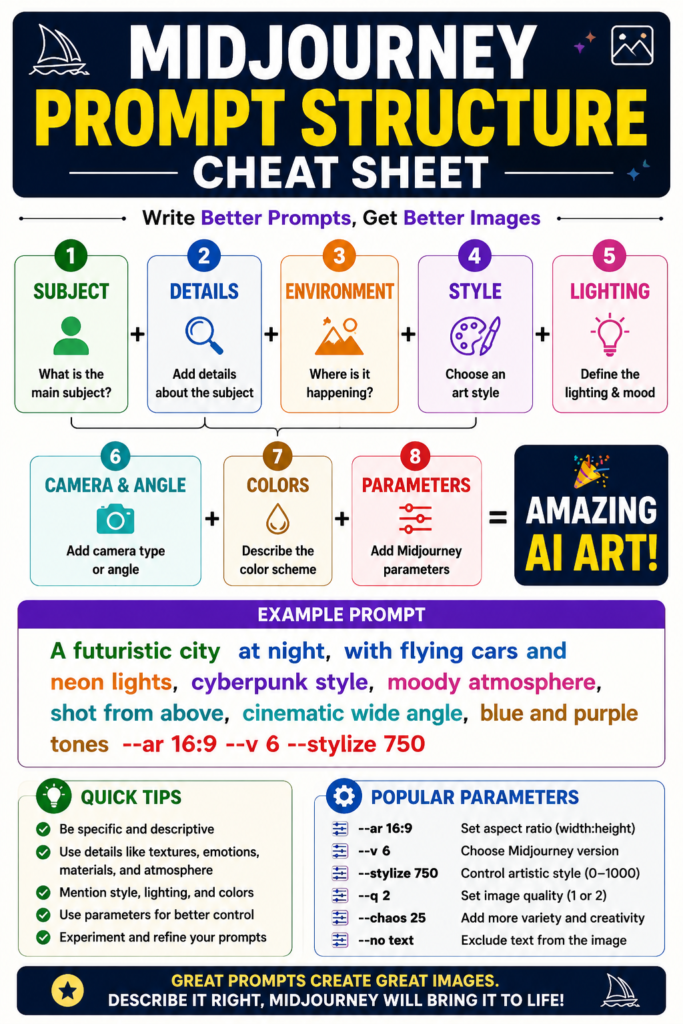
The quality of every image generated in Midjourney depends largely on one factor—the prompt. A prompt is a written instruction that tells the AI what you want to create. It acts as the communication bridge between your imagination and Midjourney’s image generation model.
Many beginners believe that writing a long sentence automatically produces better results. In reality, an effective prompt is not about length but about clarity. The more specific and well-structured your description is, the easier it becomes for Midjourney to understand your creative intent and generate an image that closely matches your expectations.
A simple prompt can generate an image, but a detailed prompt gives you much greater control over the final output. By adding information such as the subject, environment, lighting, camera angle, artistic style, mood, colors, and composition, you can significantly improve image quality.
Basic Prompt Example
A lion.
This prompt tells Midjourney only the subject. The AI has complete freedom to decide everything else, including the background, lighting, camera angle, and artistic style.
Improved Prompt Example
A majestic African lion standing on a rocky cliff during golden hour, dramatic cinematic lighting, ultra realistic, 85mm photography, highly detailed.
The second prompt provides much more context, resulting in a richer and more professional-looking image.
The Anatomy of a Great Midjourney Prompt
Most professional prompts follow a logical structure.
Subject → Environment → Style → Lighting → Camera → Colors → Mood → Parameters
For example:
A futuristic electric sports car driving through Tokyo at night, cyberpunk style, neon lighting, rain reflections, cinematic composition, ultra realistic, 35mm photography, –ar 16:9
Although this may look complex at first, it is simply a collection of clear instructions that help Midjourney understand exactly what kind of image you want.
Essential Elements of a Prompt
1. Subject
The subject is the main focus of the image.
Examples:
- Ancient castle
- Bengal tiger
- Modern office
- Luxury sports car
- Space station
The subject should always be clear and specific.
2. Environment
Describe where the subject is located.
Examples:
- Snow-covered mountains
- Desert at sunset
- Dense rainforest
- Futuristic city
- Medieval village
The environment adds context and depth to the scene.
3. Artistic Style
Style determines the overall visual appearance of the image.
Examples:
- Photorealistic
- Watercolor painting
- Oil painting
- Anime
- Cyberpunk
- Pixar style
- Minimalist illustration
- Fantasy concept art
Changing only the style can produce dramatically different results from the same subject.
4. Lighting
Lighting has a major impact on the mood and realism of an image.
Popular lighting styles include:
- Golden Hour
- Soft Natural Light
- Studio Lighting
- Cinematic Lighting
- Neon Lighting
- Volumetric Lighting
- Rim Lighting
- Moonlight
Professional AI artists often spend as much time selecting lighting as they do choosing the subject.
5. Camera and Lens
Adding photography terms makes images look more realistic.
Common examples include:
- DSLR photography
- 35mm lens
- 50mm lens
- 85mm portrait lens
- Macro photography
- Wide-angle shot
- Drone photography
These terms influence perspective, depth of field, and overall composition.
✅ Pro Tip
Instead of writing a very long prompt at once, start with a clear subject and gradually add the environment, lighting, artistic style, and camera details. Small improvements in your prompt often produce much better images than adding unnecessary words.
6. Mood and Atmosphere
Mood gives emotional depth to the image.
Examples:
- Peaceful
- Epic
- Mysterious
- Dark
- Dreamlike
- Magical
- Romantic
- Post-apocalyptic
Even with the same subject, changing the mood can completely transform the final artwork.
🧠 Research Insight
Professional Midjourney users rarely rely on short prompts alone. They carefully combine subject details, artistic style, lighting, camera settings, and composition to achieve consistent, high-quality results. Prompt engineering has become one of the most valuable skills in AI-assisted digital art.
Creating effective prompts is a skill that improves with practice. As you experiment with different subjects, styles, and descriptive details, you will gradually gain greater control over the images generated by Midjourney.
If you want to explore more AI-powered creative platforms before deciding which one suits your workflow best, you can also read our Best AI Image Generators in 2026 guide, where we compare Midjourney with Leonardo AI, Adobe Firefly, DALL·E, FLUX, and other leading AI image generation tools based on quality, features, pricing, and ease of use.
Midjourney Parameters Explained
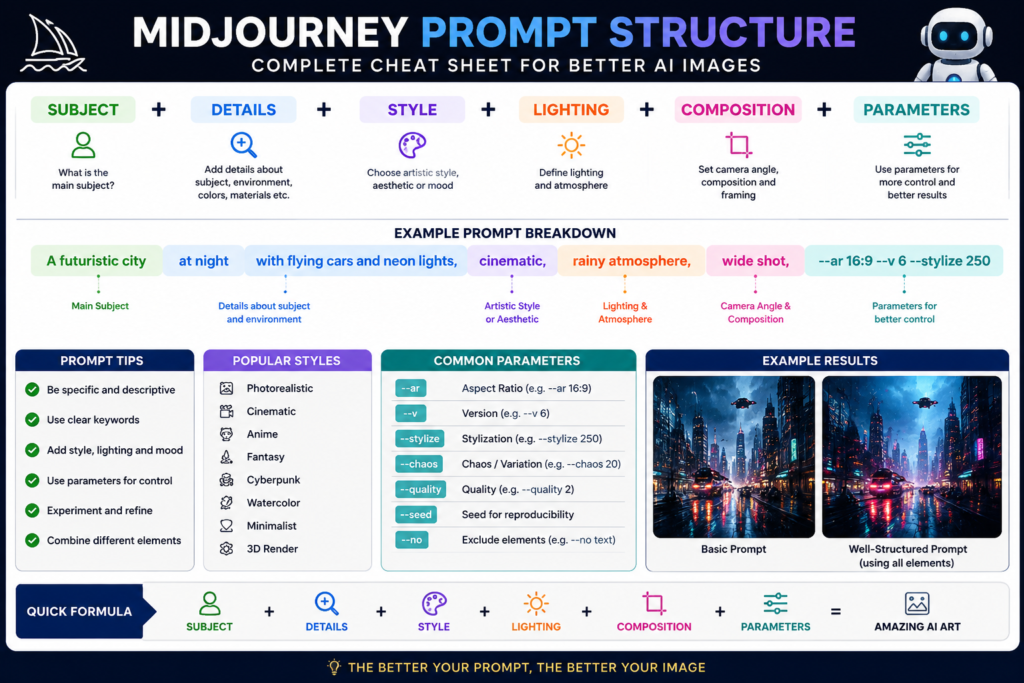
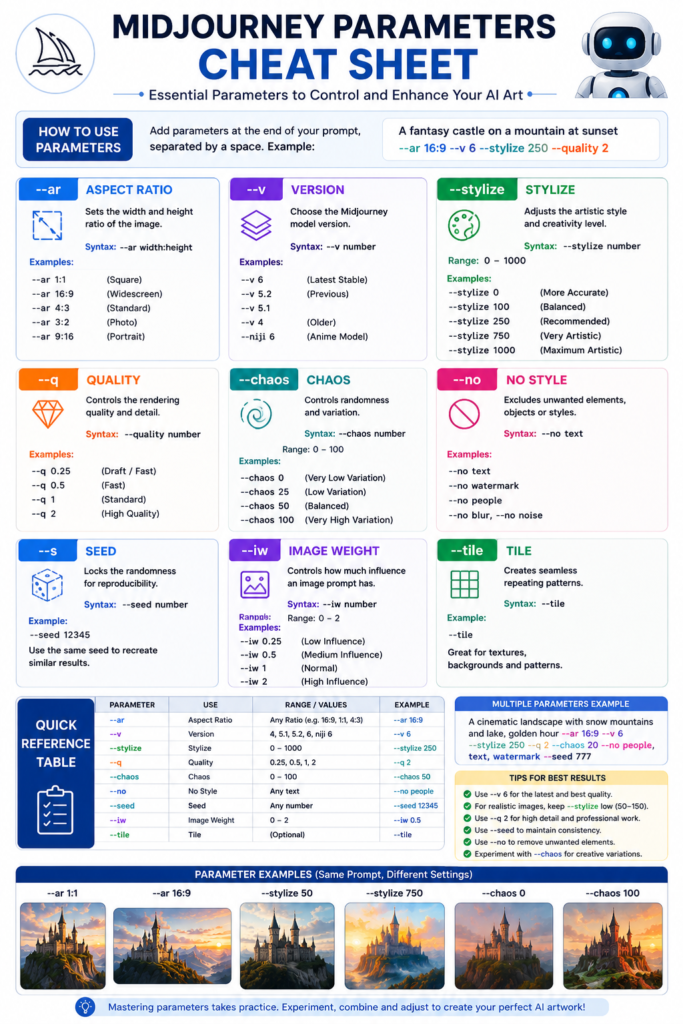
While a well-written prompt describes what you want to create, Midjourney Parameters control how the image should be generated. Parameters are special commands added at the end of a prompt to influence the image’s aspect ratio, creativity, quality, model version, randomness, and many other visual characteristics.
Think of prompts as giving instructions to an artist, while parameters are the technical settings that determine how the artwork is produced. Learning to use parameters correctly gives you much greater control over the final result and helps you create images that are more consistent, professional, and visually appealing.
For example, compare the following prompts:
Without Parameters
A futuristic city at sunset.
With Parameters
A futuristic city at sunset, cinematic lighting, ultra realistic –ar 16:9 –stylize 250 –v 7
The second prompt gives Midjourney additional instructions about image dimensions, artistic creativity, and the AI model version, resulting in a more refined output.
✅ Pro Tip
Do not use every parameter in a single prompt. Start with only two or three important parameters, understand how each one affects the result, and then gradually experiment with additional settings.
1. Aspect Ratio (–ar)
The Aspect Ratio parameter controls the shape and dimensions of the generated image.
Different projects require different aspect ratios.
| Parameter | Best For |
|---|---|
| –ar 1:1 | Social media posts |
| –ar 3:2 | Photography |
| –ar 4:5 | Instagram posts |
| –ar 16:9 | YouTube thumbnails, presentations |
| –ar 9:16 | Mobile wallpapers, Stories, Shorts |
Example
A modern workspace with AI technology, realistic office, natural lighting –ar 16:9
2. Stylization (–stylize)
The Stylize parameter controls how artistic or creative Midjourney becomes while interpreting your prompt.
Lower values follow your instructions more closely, while higher values allow Midjourney to add more artistic creativity.
Examples:
--stylize 50→ More accurate to the prompt.--stylize 250→ Balanced creativity.--stylize 1000→ Highly artistic interpretation.
Example
A fantasy castle on a floating island, magical atmosphere –stylize 500
3. Version (–v)
Midjourney continuously improves its AI models. The Version parameter lets you choose which model generates your image.
Example:
A luxury sports car, studio lighting –v 7
Using the latest version usually provides:
- Better prompt understanding
- Improved realism
- Higher image quality
- More consistent results
4. Chaos (–chaos)
The Chaos parameter controls how different the generated image variations are from one another.
A lower value produces predictable results, while a higher value encourages more creative and unexpected compositions.
Examples:
--chaos 0→ Consistent results.--chaos 25→ Moderate variation.--chaos 100→ Maximum creativity.
Example
Futuristic fashion model, cyberpunk city –chaos 60
🧠 Research Insight
Many professional AI artists create multiple versions of the same prompt by changing only one parameter at a time. This approach makes it easier to understand how each parameter influences composition, lighting, creativity, and overall image quality.
5. Quality (–quality)
The Quality parameter controls the amount of processing time Midjourney spends generating an image.
Higher quality generally produces finer details but may require more processing resources.
Common values include:
--quality .5→ Faster generation--quality 1→ Standard quality--quality 2→ Higher detail (where supported)
Example
Luxury wristwatch on a marble table, premium commercial photography –quality 2
6. Seed (–seed)
The Seed parameter helps reproduce similar image compositions.
If you generate an image that you really like, saving its seed value allows you to create similar variations later.
Example:
Portrait of a medieval queen –seed 12345
This is especially useful for maintaining visual consistency across projects.
If you want to improve your prompt-writing skills before experimenting with advanced parameters, you may also find our AI Prompt Engineering Guide helpful. It explains how prompt structure, descriptive keywords, and prompt optimization techniques can dramatically improve AI-generated results across different creative tools.
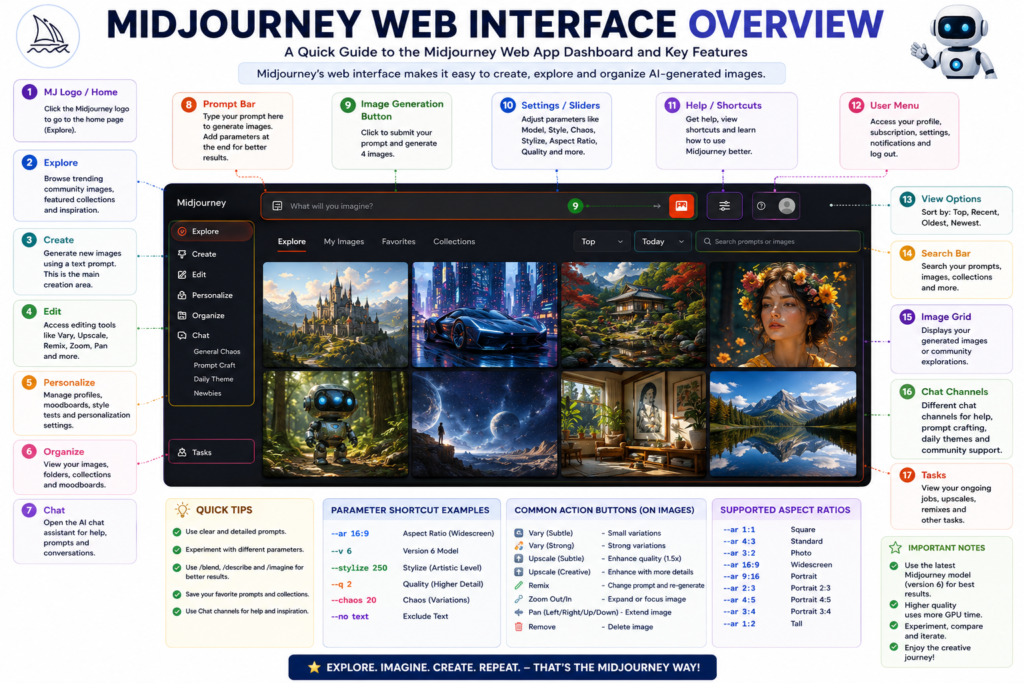
Midjourney Interface Explained
A powerful AI tool becomes much easier to use when you understand its interface. Although Midjourney was originally available only through Discord, it has evolved into a more user-friendly platform with a modern web interface that allows users to generate, organize, edit, and manage AI artwork efficiently.
Whether you are creating your first AI image or managing hundreds of projects, understanding each section of the interface can significantly improve your workflow and save valuable time.
Home Dashboard
The dashboard is the first screen you see after signing in. It acts as the central workspace where you can quickly access all major features of Midjourney.
From the dashboard, you can:
- Start a new image generation
- View your recent creations
- Continue previous projects
- Access editing tools
- Explore community artwork
- Manage your account and subscription
For beginners, spending a few minutes exploring the dashboard makes learning the platform much easier.
Create Workspace
The Create section is where most users spend their time.
This is where you write prompts, generate AI images, refine results, and experiment with different creative ideas.
A typical workflow includes:
- Write a prompt.
- Add optional parameters.
- Generate images.
- Compare the results.
- Select the best variation.
- Edit or upscale the chosen image.
As your prompt-writing skills improve, this workspace becomes your primary creative environment.
Explore Gallery
The Explore section showcases artwork created by the Midjourney community.
This gallery is useful because it allows you to:
- Discover new artistic styles
- Observe how experienced users write prompts
- Learn different lighting techniques
- Find inspiration for future projects
- Understand current AI art trends
Instead of copying someone else’s work, study how successful prompts are structured and use that knowledge to improve your own prompt-writing skills.
🎓 Student Tip
One of the fastest ways to learn Midjourney is by analyzing high-quality community artwork. Observe how professionals describe subjects, lighting, styles, and camera settings, then practice creating your own original prompts using a similar structure.
Archive
Every image you generate is stored in your Archive, making it easy to revisit previous projects.
The Archive helps you:
- Review earlier creations
- Compare prompt improvements
- Download images again
- Organize creative work
- Reuse successful ideas
Many professional users maintain an organized archive because prompt refinement often requires multiple versions of the same concept.
Image Editor
The built-in editor allows you to improve generated images instead of starting from scratch.
Depending on the available tools and model capabilities, you can:
- Edit selected areas
- Expand the canvas
- Improve composition
- Change backgrounds
- Replace unwanted objects
- Create additional variations
This editing workflow saves considerable time while giving you greater creative control over the final artwork.
Personal Profile
Your profile contains information related to your Midjourney account, including:
- Subscription details
- Usage history
- Generated images
- Account settings
- Billing information
- Personal preferences
Reviewing these settings periodically helps you manage your account more effectively.
🚀 AI in Real Life
A freelance designer creating social media campaigns for multiple clients can use the Archive to organize projects, the Create workspace to generate fresh concepts, and the Image Editor to refine selected visuals. This streamlined workflow reduces design time while maintaining professional quality across different projects.
Understanding the Midjourney interface is just as important as learning prompt writing. Once you become familiar with each section, you can spend less time navigating the platform and more time creating high-quality AI artwork efficiently.
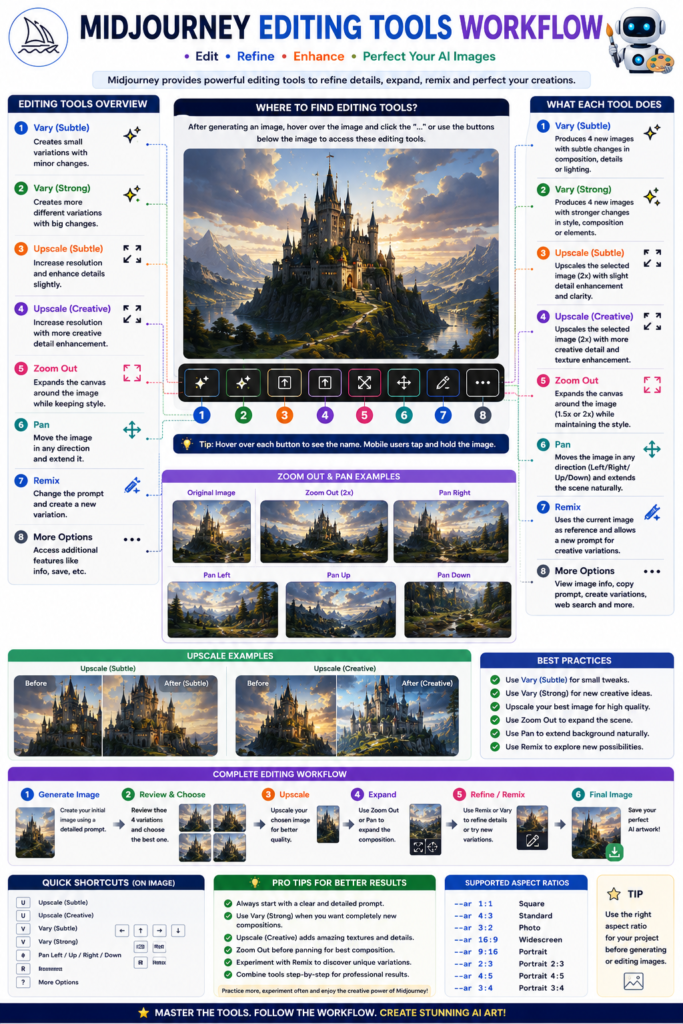
Editing Images in Midjourney
Generating an image is only the beginning of the creative process. Professional AI artists rarely use the first result exactly as it appears. Instead, they refine, improve, and experiment with different editing tools until the image matches their creative vision. Midjourney provides several powerful editing features that help users transform a good image into an exceptional one.
Understanding when and how to use these tools can significantly improve the quality and consistency of your AI-generated artwork.
Upscale
The Upscale feature increases the resolution and detail of a selected image.
After Midjourney generates multiple image variations, users can choose the best one and upscale it for a sharper, more detailed result.
Upscaling is useful for:
- High-resolution printing
- Posters
- Book covers
- Product presentations
- Website banners
- Marketing materials
Instead of simply enlarging an image, Midjourney enhances textures, lighting, and fine details during the upscaling process.
Variations
Sometimes an image is almost perfect but needs a few creative adjustments. Instead of writing a completely new prompt, you can generate Variations.
This feature creates new versions while preserving the main concept.
Variations may include changes in:
- Composition
- Camera angle
- Facial expression
- Background
- Lighting
- Artistic interpretation
- Object placement
Professional creators often compare several variations before selecting the final design.
Remix Mode
Remix Mode allows you to modify the original prompt while creating a new variation.
For example, you can change:
Original Prompt
A medieval castle during sunrise.
Remixed Prompt
A medieval castle during a snowy winter night with northern lights.
Instead of starting over, Remix lets you build upon your previous work while introducing new creative ideas.
Zoom Out
The Zoom Out feature expands the visible area around an existing image.
Rather than enlarging the subject, Midjourney generates additional surroundings that naturally extend the original scene.
This feature is particularly useful for:
- Landscape artwork
- Architecture
- Cinematic scenes
- Storytelling
- Wallpapers
- Presentation backgrounds
Zoom Out helps create a wider perspective without losing the original composition.
Pan
The Pan tool extends the image in a specific direction.
You can expand:
- Left
- Right
- Up
- Down
This allows you to reveal more of the environment while maintaining visual consistency.
For example, if an image shows only part of a mountain range, panning can generate additional landscape beyond the original frame.
Edit Region
Sometimes only one part of an image needs improvement.
Instead of regenerating the entire artwork, Edit Region allows you to modify a selected area.
Common uses include:
- Replacing an object
- Correcting facial features
- Changing clothing
- Editing backgrounds
- Adding accessories
- Improving small details
This feature saves time and preserves the rest of the image.
✅ Pro Tip
Avoid regenerating an entire image for minor corrections. Use editing tools such as Variations, Remix, Zoom Out, or Edit Region whenever possible. This approach maintains consistency while saving both time and generation credits.
Why Editing Matters
Professional AI artwork is rarely created in a single attempt. Most experienced Midjourney users follow an iterative workflow:
- Generate multiple images.
- Select the strongest variation.
- Upscale the preferred result.
- Create new variations if needed.
- Edit specific regions.
- Expand the composition with Zoom Out or Pan.
- Download the final high-quality image.
This refinement process produces artwork that is significantly more polished than relying on the first generated result alone.
🧠 Research Insight
Professional designers often spend more time refining AI-generated images than generating them. Small improvements in composition, lighting, and object placement can dramatically increase the visual quality and commercial value of the final artwork.
If your goal is to create professional-quality visuals for websites, social media, publishing, or marketing, learning these editing tools is just as important as mastering prompt writing. Combining strong prompts with effective editing techniques allows you to produce consistent, high-quality AI artwork suitable for both personal and commercial projects.
Style Reference and Character Reference
One of the biggest challenges in AI image generation is maintaining consistency across multiple images. For example, you may want the same character to appear in different scenes, or you may want every image in a project to follow the same artistic style. Without consistency, each generated image may look completely different, making it difficult to create books, comics, marketing campaigns, or branded content.
To solve this challenge, Midjourney provides two powerful features: Style Reference and Character Reference. These tools help creators maintain visual consistency while still allowing room for creativity.
What Is Style Reference?
Style Reference allows Midjourney to understand the artistic appearance of a reference image and apply similar visual characteristics to newly generated artwork.
Rather than copying an existing image, Midjourney studies elements such as:
- Color palette
- Lighting style
- Brush strokes
- Overall mood
- Composition
- Texture
- Visual atmosphere
It then uses these characteristics to generate new, original images with a similar artistic identity.
This feature is especially useful when working on projects that require a consistent visual style, such as:
- Children’s books
- Graphic novels
- Brand illustrations
- Marketing campaigns
- Social media content
- Educational materials
For example, if your first illustration uses a soft watercolor style, Style Reference helps ensure that future illustrations maintain the same artistic appearance.
What Is Character Reference?
Character Reference is designed to keep the same character visually consistent across multiple images.
Without Character Reference, AI may change important details every time a new image is generated. These changes can include:
- Face shape
- Hair style
- Clothing
- Eye color
- Accessories
- Body proportions
Character Reference reduces these inconsistencies by guiding Midjourney to preserve the identity of the character while placing them in different poses, environments, or situations.
This feature is invaluable for creators developing:
- Storybooks
- Comics
- Animated concepts
- Game characters
- Brand mascots
- Educational characters
- Marketing campaigns
For example, an author creating an illustrated children’s book can use Character Reference to ensure that the main character looks the same throughout every chapter.
Style Reference vs Character Reference
Although both features improve consistency, they serve different purposes.
| Feature | Primary Purpose |
|---|---|
| Style Reference | Maintains a consistent artistic style across multiple images. |
| Character Reference | Maintains the appearance of the same character across different scenes. |
In many professional projects, these two features are used together to produce images that are both visually consistent and artistically cohesive.
🚀 AI in Real Life
Imagine a publishing company creating a 100-page illustrated storybook. Every page must feature the same main character while maintaining the same illustration style. By combining Character Reference with Style Reference, Midjourney can help produce a visually consistent book that feels professionally illustrated from beginning to end.
Best Practices for Consistent Results
To achieve the best results with Style Reference and Character Reference:
- Begin with a strong, high-quality reference image.
- Keep your prompt structure consistent.
- Use similar lighting across related images.
- Avoid making too many changes in a single prompt.
- Generate multiple variations before selecting the best result.
- Save successful prompts for future use.
- Refine images gradually rather than rewriting the entire prompt.
✅ Pro Tip
When working on long-term creative projects such as books, comics, or brand campaigns, save your reference images and successful prompts in a dedicated folder. Reusing the same references throughout the project helps maintain consistency and reduces the need for repeated adjustments.
Maintaining consistency is one of the defining characteristics of professional AI artwork. By understanding and effectively using Style Reference and Character Reference, creators can produce visually unified projects that look polished, recognizable, and suitable for commercial use.
Midjourney Pricing Plans
Midjourney is a subscription-based AI image generation platform. Unlike some AI tools that offer a permanent free plan, Midjourney primarily provides its services through paid subscription plans. Each plan is designed for different types of users, from beginners who generate a limited number of images to professionals who create AI artwork every day.
Before choosing a plan, consider how frequently you generate images, whether you need faster processing, and if you plan to use Midjourney for commercial work.
Midjourney Subscription Plans
Although pricing and features may change over time, Midjourney generally offers four subscription tiers.
| Plan | Best For | Key Benefits |
|---|---|---|
| Basic Plan | Beginners and hobbyists | Affordable entry, suitable for learning and occasional image generation |
| Standard Plan | Regular creators | More image generation time, Relax Mode, balanced performance |
| Pro Plan | Professionals and freelancers | Increased GPU time, Stealth Mode, suitable for commercial workflows |
| Mega Plan | Heavy users and businesses | Maximum generation capacity, advanced features, large creative projects |
Each subscription includes access to Midjourney’s latest AI models, while higher plans provide additional GPU hours and productivity features.
Which Plan Should You Choose?
Basic Plan
The Basic Plan is suitable if you are:
- Learning Midjourney
- Creating personal artwork
- Exploring AI image generation
- Working on small creative projects
It offers enough resources for beginners to understand prompts, parameters, and editing tools without a significant financial commitment.
Standard Plan
The Standard Plan is ideal for users who generate images regularly.
It is a good choice for:
- Bloggers
- YouTubers
- Graphic designers
- Students
- Content creators
- Social media managers
The additional generation time makes it easier to experiment with prompts and refine images.
Pro Plan
The Pro Plan is designed for professionals who rely on Midjourney as part of their daily workflow.
It is commonly used by:
- Freelance designers
- Marketing agencies
- Publishers
- Architects
- Advertising professionals
- Creative studios
Features such as Stealth Mode can also be valuable for users working on confidential client projects.
Mega Plan
The Mega Plan is intended for businesses and users with high-volume image generation requirements.
It is suitable for:
- Design agencies
- Large creative teams
- Commercial production
- High-frequency AI image generation
This plan provides the greatest flexibility for large-scale professional workflows.
💼 Business Tip
If you create AI artwork for clients or commercial projects on a regular basis, choosing a higher subscription plan can improve productivity by providing more generation time and advanced workflow features. Evaluate your monthly workload before selecting a plan.
Is Midjourney Worth Paying For?
For occasional users, a paid subscription may seem expensive at first. However, for professionals who regularly create illustrations, advertisements, book covers, product visuals, or marketing graphics, Midjourney can significantly reduce both design time and production costs.
Instead of spending hours creating a concept manually, designers can generate multiple high-quality ideas within minutes, allowing them to focus more on refinement and creativity.
Pricing May Change
Midjourney periodically updates its subscription plans, pricing, and available features. Therefore, before purchasing a subscription, always review the latest pricing information and feature comparison on the official Midjourney website to ensure you choose the plan that best fits your creative needs.
Midjourney Copyright and Commercial Use
One of the most common questions asked by beginners is, “Can I use Midjourney images commercially?” The answer depends on your subscription plan and Midjourney’s current Terms of Service. Understanding copyright and licensing is essential before using AI-generated images for business, publishing, advertising, or client work.
Although Midjourney generates original images from text prompts, responsible usage is just as important as creating high-quality artwork. Every creator should understand what is permitted and what requires additional caution.
Who Owns the Images?
In general, Midjourney grants users rights to use the images they generate according to the terms associated with their subscription. However, these rights are governed by Midjourney’s licensing policies, which may change over time.
If you create images for commercial purposes, always review the latest Terms of Service before publishing or selling your work.
Commercial Use
Many creators use Midjourney professionally for:
- Book covers
- Marketing campaigns
- Website graphics
- Social media content
- Product mockups
- Advertising materials
- Presentation designs
- Digital illustrations
- Print-on-demand products
Commercial use is generally supported under applicable subscription terms, but users should ensure that their intended use complies with Midjourney’s current licensing requirements.
Respect Intellectual Property
AI should never be used to intentionally copy or imitate copyrighted artwork, protected logos, trademarked characters, or another artist’s unique creative work without permission.
Avoid prompts that attempt to recreate:
- Protected brand logos
- Copyrighted illustrations
- Trademarked characters
- Proprietary designs
- Unauthorized commercial artwork
Creating original ideas not only reduces legal risks but also helps you develop your own creative style.
Human Review Is Still Important
Even though Midjourney produces impressive results, AI-generated images should always be reviewed before commercial use.
Check for:
- Incorrect anatomy
- Unwanted objects
- Text errors
- Distorted hands or faces
- Unrealistic details
- Brand-related issues
Careful review ensures that the final artwork meets professional quality standards.
🧠 Research Insight
Many professional designers treat AI-generated artwork as a starting point rather than the finished product. They often refine the image, make creative adjustments, and perform quality checks before using it in commercial projects.
Best Practices for Commercial Projects
To use Midjourney responsibly in professional work:
- Read the latest Midjourney Terms of Service.
- Create original prompts instead of copying others.
- Verify important visual details before publishing.
- Keep records of your prompts and generated images.
- Respect copyright, trademarks, and intellectual property laws.
- Edit and refine AI-generated artwork whenever necessary.
Following these practices helps reduce legal risks while producing higher-quality creative work.
✅ Pro Tip
For client work or commercial publishing, always save your original prompts and the final edited versions of your images. Maintaining clear project records can make future revisions easier and demonstrates a professional workflow.
Is Midjourney Safe for Professional Use?
Yes, Midjourney is widely used by designers, marketers, publishers, educators, architects, and content creators around the world. However, responsible use requires understanding the platform’s licensing policies, reviewing generated images carefully, and respecting intellectual property rights.
By combining creative originality with ethical practices, Midjourney can become a valuable tool for producing professional-quality visuals for both personal and commercial projects.
Common Midjourney Mistakes to Avoid
Learning Midjourney is an exciting journey, but many beginners become disappointed because they expect perfect results from their very first prompt. In reality, creating high-quality AI artwork requires practice, experimentation, and a good understanding of how Midjourney interprets prompts and parameters.
Avoiding the following common mistakes will help you generate better images, save time, and improve your overall workflow.
1. Writing Very Short Prompts
One of the biggest mistakes beginners make is using prompts that contain only one or two words.
For example:
A castle
Although Midjourney can generate an image, it has very little information to understand your creative vision.
Instead, describe:
- Subject
- Environment
- Lighting
- Artistic style
- Mood
- Camera perspective
A more detailed prompt almost always produces a better result.
2. Adding Too Many Unnecessary Keywords
Some users believe that adding dozens of random keywords will improve image quality.
In reality, excessive or unrelated words often confuse the AI and produce inconsistent results.
Use only meaningful descriptive words that contribute to your intended image.
3. Ignoring Lighting
Lighting has a significant impact on realism and artistic quality.
Instead of leaving lighting unspecified, include details such as:
- Golden Hour
- Soft Natural Light
- Cinematic Lighting
- Studio Lighting
- Neon Lighting
Well-chosen lighting can completely transform an ordinary image into a professional-looking artwork.
4. Forgetting Parameters
Many beginners focus entirely on prompts while ignoring important Midjourney parameters.
Parameters such as:
- Aspect Ratio
- Stylization
- Chaos
- Quality
- Version
provide additional control over image generation and often improve the final result.
✅ Pro Tip
When experimenting with prompts, change only one parameter at a time. This makes it much easier to understand how each setting influences the final image.
5. Expecting the First Image to Be Perfect
Professional creators rarely use the first generated image.
Instead, they:
- Generate multiple variations.
- Compare results.
- Refine prompts.
- Edit selected regions.
- Upscale the best version.
Image generation is an iterative creative process rather than a one-click solution.
6. Ignoring Composition
Many beginners focus only on the subject while forgetting the overall composition.
Simple additions such as:
- Close-up
- Wide-angle view
- Bird’s-eye view
- Symmetrical composition
- Rule of thirds
can dramatically improve visual storytelling.
7. Not Saving Successful Prompts
Whenever you generate an outstanding image, save the prompt for future use.
Building a personal prompt library allows you to:
- Reuse successful ideas.
- Maintain consistency.
- Speed up future projects.
- Improve your workflow.
8. Copying Other People’s Prompts Without Understanding Them
Using community prompts for learning is helpful, but copying them without understanding their structure limits your growth.
Study why a prompt works.
Notice how it describes:
- Subject
- Style
- Lighting
- Camera
- Mood
- Parameters
Then create your own improved version.
🧠 Research Insight
The most successful Midjourney creators continuously experiment with prompt structure instead of relying on a single “perfect prompt.” Small adjustments often produce dramatically different artistic results and gradually improve prompt-writing skills over time.
9. Skipping Image Refinement
Generating an image is only the first step.
Professional-quality AI artwork usually involves:
- Variations
- Upscaling
- Remix
- Zoom Out
- Region Editing
These refinement tools help transform a good image into an excellent one.
10. Giving Up Too Early
Midjourney is a creative tool, not a search engine.
Every prompt teaches you something new about composition, artistic style, lighting, and visual storytelling.
The more you experiment, the better your prompts become—and better prompts lead to better AI-generated artwork.
If you want to strengthen your prompt-writing skills further, don’t miss our AI Prompt Engineering Guide, where you’ll learn practical techniques that can improve prompts not only for Midjourney but also for ChatGPT, Claude, Gemini, and other leading AI tools.
Real-World Applications of Midjourney
Midjourney is much more than an AI art generator. Today, it is used by professionals across a wide range of industries to accelerate creative workflows, visualize ideas, reduce production time, and improve design quality. From education and publishing to marketing and product development, Midjourney has become an important creative tool for individuals, freelancers, businesses, and organizations.
1. Graphic Design
Graphic designers use Midjourney to generate creative concepts before starting detailed design work.
Common applications include:
- Poster concepts
- Social media graphics
- Advertising visuals
- Banner designs
- Brand illustrations
- Presentation graphics
Instead of beginning with a blank canvas, designers can quickly explore multiple visual ideas and then refine the strongest concept.
2. Publishing and Book Covers
Authors and publishers use Midjourney to create visually appealing concepts for:
- Book covers
- Children’s books
- Story illustrations
- Magazine covers
- Editorial artwork
These images help communicate the theme of a publication while reducing the time required for concept development.
🚀 AI in Real Life
Independent authors often use Midjourney to visualize characters, locations, and cover concepts before working with a professional designer. This helps them communicate their creative vision more effectively and speeds up the design process.
3. Marketing and Advertising
Marketing professionals use Midjourney to produce eye-catching visuals for digital campaigns.
Popular use cases include:
- Advertisement concepts
- Product promotions
- Landing page graphics
- Email marketing visuals
- Social media campaigns
- Brand storytelling
Generating multiple creative concepts within minutes allows marketing teams to test different visual approaches before launching a campaign.
4. Architecture and Interior Design
Architects and interior designers use Midjourney to visualize ideas during the early planning stage.
Examples include:
- Modern house concepts
- Interior layouts
- Landscape ideas
- Hotel designs
- Office spaces
- Urban development concepts
AI-generated concept images help clients better understand design ideas before detailed modeling begins.
5. Education
Teachers and students can use Midjourney to make learning more visual and engaging.
It can help create:
- Educational illustrations
- Historical reconstructions
- Scientific visualizations
- Classroom posters
- Presentation graphics
- Learning materials
Visual content often makes complex concepts easier to understand and remember.
6. Content Creation
Content creators use Midjourney to design custom visuals that stand out from generic stock images.
It is commonly used for:
- Blog featured images
- YouTube thumbnails
- Podcast artwork
- Website illustrations
- Infographics
- Digital storytelling
Unique visuals help improve audience engagement and strengthen brand identity.
7. Product Design
Businesses and entrepreneurs use Midjourney to visualize products before manufacturing.
Examples include:
- Packaging concepts
- Furniture designs
- Consumer products
- Fashion accessories
- Electronic gadgets
- Luxury product presentations
Rapid concept generation allows teams to evaluate multiple design directions before investing in production.
💼 Business Tip
Before investing in expensive product photography or 3D rendering, businesses can use Midjourney to create multiple design concepts, compare customer preferences, and refine ideas at a much lower cost.
8. Entertainment and Game Development
Game studios, filmmakers, and animation teams frequently use Midjourney during pre-production.
It helps generate:
- Character concepts
- Environment designs
- Fantasy worlds
- Creature ideas
- Costume concepts
- Storyboarding references
These visuals provide a strong creative foundation before detailed production begins.
Why Professionals Choose Midjourney
Across different industries, Midjourney offers several practical advantages:
- Faster concept development
- Greater creative flexibility
- Reduced design costs
- Rapid idea visualization
- Improved collaboration
- High-quality artistic output
- Increased productivity
Rather than replacing creative professionals, Midjourney enables them to work more efficiently by accelerating the idea-generation stage and allowing more time for refinement and final production.
If you’re interested in exploring the broader world of AI-powered creative tools, be sure to read our Best AI Tools in 2026 guide, where we compare leading AI solutions for writing, design, productivity, coding, research, marketing, and business automation.
Conclusion
Artificial intelligence has fundamentally changed the way digital content is created, and Midjourney stands at the forefront of this creative revolution. What once required advanced artistic skills, expensive software, and countless hours of manual work can now be accomplished through thoughtfully written prompts combined with the power of AI.
Throughout this Midjourney AI Complete Guide, you have learned how Midjourney works, explored its history, understood its key features, discovered the importance of prompt engineering, mastered essential parameters, learned image editing techniques, explored Style Reference and Character Reference, reviewed pricing plans, understood copyright considerations, and examined real-world applications across multiple industries.
However, becoming skilled with Midjourney is not about memorizing prompts or parameters. The real skill lies in developing creative thinking, experimenting with different ideas, refining prompts through practice, and continuously improving your workflow. Every prompt teaches something new, and every generated image helps you better understand how artificial intelligence interprets language and transforms imagination into visual art.
Whether you are a student creating educational illustrations, a designer building professional portfolios, a content creator producing engaging visuals, or a business owner developing marketing campaigns, Midjourney can become a valuable creative partner. By combining your imagination with AI-assisted image generation, you can create unique artwork that is both visually impressive and commercially valuable.
As AI image generation technology continues to evolve, new features, better models, and more advanced creative tools will make the design process even more accessible and powerful. Learning Midjourney today is not just about using another software tool—it is about preparing for the future of digital creativity.
If you are just beginning your AI journey, continue exploring related topics such as What Is Artificial Intelligence?, History of Artificial Intelligence, AI Prompt Engineering Guide, and Best AI Image Generators in 2026. Together, these resources will help you build a deeper understanding of artificial intelligence and confidently apply AI tools in your studies, career, business, and creative projects.
🎯 Final Thought
Midjourney is not here to replace human creativity—it is here to expand it. The most impressive AI-generated artwork is created when human imagination, clear communication, and thoughtful experimentation work together. Keep learning, keep experimenting, and let your creativity lead the way.
Frequently Asked Questions
What is Midjourney AI?
Midjourney is an AI-powered image generation platform that transforms text prompts into original digital artwork. By describing an idea in natural language, users can create realistic images, illustrations, concept art, product designs, and other visual content without traditional drawing skills.
Is Midjourney free to use?
Midjourney primarily operates on a paid subscription model. Users need an active subscription to generate images and access its latest AI models. Since plans and features may change over time, it is recommended to check the official Midjourney website for the most up-to-date pricing information.
Do I need drawing or graphic design skills to use Midjourney?
No. Midjourney is designed for both beginners and professionals. You do not need drawing, painting, or graphic design experience to create impressive AI artwork. By learning how to write clear prompts and use important parameters, anyone can generate professional-quality images for personal, educational, or commercial projects.
What types of images can I create with Midjourney?
Midjourney can generate a wide variety of images, including realistic portraits, landscapes, fantasy artwork, anime illustrations, concept art, product mockups, architectural designs, book covers, social media graphics, marketing visuals, digital paintings, fashion concepts, wildlife photography, and cinematic scenes. The final result depends on the quality of your prompt and the parameters you use.
Can I use Midjourney images for commercial purposes?
Yes, Midjourney supports commercial use according to its current subscription plans and Terms of Service. If you plan to use AI-generated images for client work, publishing, advertising, or selling products, you should always review Midjourney’s latest licensing policy before using the images commercially.
How can I write better prompts in Midjourney?
The best Midjourney prompts are clear, specific, and well-structured. Instead of writing only the subject, include details such as the environment, artistic style, lighting, camera angle, mood, colors, and relevant parameters. Experimenting with different prompt structures and refining your prompts over time will significantly improve image quality.
What are Midjourney parameters, and why are they important?
Midjourney parameters are special commands added to the end of a prompt to control how an image is generated. Parameters such as aspect ratio, stylization, quality, chaos, and model version allow you to influence image composition, creativity, dimensions, and overall output quality. Using the right parameters gives you greater control over the final result.
Can Midjourney create realistic images?
Yes. Midjourney is capable of generating highly realistic portraits, landscapes, product photography, architecture, wildlife, and cinematic scenes. Combining detailed prompts with appropriate lighting, camera settings, and parameters can produce images that closely resemble professional photography.
Is Midjourney better than other AI image generators?
The answer depends on your creative needs. Midjourney is widely recognized for its artistic quality, detailed compositions, and visually impressive results. Other AI image generators may offer different strengths, such as image editing, text rendering, or integration with specific design workflows. Comparing features, pricing, and intended use cases can help you choose the right tool.
How can beginners learn Midjourney more quickly?
Beginners should start with simple prompts, gradually learn prompt structure, experiment with important parameters, study high-quality community artwork, and practice regularly. Saving successful prompts and refining previous images will help build experience much faster than generating random images without understanding how Midjourney works.
Can Midjourney replace graphic designers or artists?
No. Midjourney is a creative assistant rather than a replacement for human artists. While it can generate impressive visual concepts quickly, professional designers still play an essential role in creative direction, branding, storytelling, editing, and final production. The best results are achieved when human creativity and AI work together.
Is this Midjourney AI Complete Guide enough to get started?
Yes. This Midjourney AI Complete Guide covers the essential concepts every beginner should understand, including how Midjourney works, prompt writing, parameters, editing tools, pricing, copyright, commercial use, and practical applications. After completing this guide, you will have a strong foundation for creating professional-quality AI artwork and confidently exploring more advanced techniques.