
Introduction to Notion AI Complete Guide
Artificial Intelligence has transformed how people write, learn, plan, and collaborate. However, using multiple AI tools for different tasks can quickly become inefficient. You might write content in one app, manage projects in another, store notes somewhere else, and search for information across several platforms. This constant switching wastes time and reduces productivity.
Notion AI solves this problem by bringing artificial intelligence directly into your workspace. Instead of acting as a separate chatbot, it works alongside your notes, documents, databases, projects, and team knowledge, helping you create, organize, summarize, and retrieve information without leaving Notion.
Today, students use Notion AI to create study notes and revision plans. Professionals rely on it for meeting summaries, project documentation, and task management. Writers and bloggers generate outlines and improve articles faster, while businesses use it to build internal knowledge bases, standard operating procedures (SOPs), and collaborative workspaces.
What makes Notion AI truly different is that it is not just a writing assistant. It is an intelligent productivity partner that understands the context of your workspace and helps you manage information more efficiently. From brainstorming ideas and translating content to answering questions about your documents and extracting action items from meetings, Notion AI can save hours of manual work every week.
However, many users never unlock its full potential because they only use a small fraction of its capabilities. Features such as AI-powered search, database assistance, document summarization, workflow automation, and collaborative knowledge management often remain unexplored.
This guide is designed to change that.
Whether you are a complete beginner exploring Notion AI for the first time or an experienced user looking to maximize productivity, this comprehensive guide will walk you through everything you need to know—from the basics to advanced workflows. You’ll learn how Notion AI works, its key features, pricing, real-world use cases, practical prompts, security considerations, best practices, limitations, comparisons with other AI tools, and expert tips to help you get the most value from your workspace.
By the end of this guide, you’ll have a clear understanding of when to use Notion AI, when to use alternative AI tools, and how to integrate it into your daily workflow to save time, stay organized, and work more efficiently.
What Is Notion AI?
Notion AI is an AI-powered assistant built into the Notion workspace that helps users write, edit, summarize, organize, analyze, and search information using natural language. Instead of requiring separate AI applications, it allows you to perform these tasks directly within your notes, documents, databases, and collaborative workspaces.
Unlike traditional AI chatbots that primarily answer general questions, Notion AI is designed to work with the content inside your workspace. It can summarize lengthy documents, generate meeting notes, rewrite paragraphs, translate text, brainstorm ideas, create task lists, draft project plans, and help you find information across connected knowledge sources—all without leaving your current page.
In simple terms, Notion AI combines the power of artificial intelligence with one of the world’s most popular productivity platforms, making it easier to manage information, collaborate with teams, and complete work faster.
📘 Simple Definition
Notion AI is an AI-powered productivity and knowledge management assistant integrated into the Notion workspace that helps users create, organize, summarize, and retrieve information more efficiently using natural language.
History of Notion and Notion AI
Notion AI did not appear overnight. Its development is closely connected to the evolution of Notion, one of the world’s most popular productivity and knowledge management platforms. Understanding its history helps explain why Notion AI is more than just another AI chatbot—it is an intelligent assistant built specifically for organizing information and improving workflows.
The Beginning of Notion
Notion was founded in 2013 by Ivan Zhao and Simon Last with a vision to create an all-in-one workspace where people could write notes, manage projects, build databases, create wikis, and collaborate without relying on multiple software applications.
At that time, professionals often switched between different tools for note-taking, documentation, task management, spreadsheets, and team collaboration. This fragmented workflow reduced productivity and made information difficult to organize. The founders wanted to solve this problem by bringing everything into one flexible workspace.
Initially, Notion gained popularity among startups, students, writers, and remote teams because of its highly customizable interface. Users could build pages, databases, project trackers, documentation systems, and knowledge bases according to their own needs instead of following rigid templates.
The Evolution of Notion
Over the years, Notion introduced several major improvements that transformed it from a simple note-taking application into a complete productivity platform.
Some important milestones include:
- 2013: Notion was founded by Ivan Zhao and Simon Last.
- 2016: A redesigned version of Notion introduced a more flexible and user-friendly workspace.
- 2018–2021: Rapid global adoption among students, startups, creators, and businesses.
- 2022: Collaboration and database capabilities expanded significantly, making Notion a preferred knowledge management platform.
- 2023: Notion AI was officially launched and integrated directly into the Notion workspace.
- 2024 onwards: Continuous improvements added AI-powered search, meeting summaries, writing assistance, workspace Q&A, and deeper integrations with connected knowledge sources.
Why Notion Introduced AI
By 2022, generative AI had changed how people created and consumed information. Many users were already using external AI tools to write documents, summarize notes, brainstorm ideas, and answer questions.
However, constantly copying content between different applications created unnecessary friction.
Instead of asking users to leave their workspace, Notion embedded AI directly into its platform. This allowed users to generate, edit, summarize, and search content exactly where they were already working.
The goal was simple:
Bring artificial intelligence to the user’s knowledge instead of forcing the user to move their knowledge to artificial intelligence.
This philosophy remains one of the biggest reasons why Notion AI stands out from many standalone AI assistants.
How Notion AI Has Continued to Evolve
Since its launch, Notion AI has expanded beyond content generation. Today, it helps users:
- Write and improve documents
- Summarize long pages and meeting notes
- Brainstorm ideas and outlines
- Generate project plans
- Translate and rewrite content
- Search across workspace knowledge
- Answer questions using connected information
- Organize tasks and documentation more efficiently
Rather than replacing human work, Notion AI is designed to reduce repetitive tasks so users can focus on thinking, planning, and decision-making.
Why This History Matters
Understanding the history of Notion AI explains why it feels different from traditional AI chatbots. It was not created merely as a conversational assistant but as an extension of a productivity platform that millions of people already use to manage their daily work.
This strong foundation allows Notion AI to combine writing assistance, knowledge management, project organization, and AI-powered search within a single workspace, making it one of the most practical AI productivity tools available today.
💡 Did You Know?
Notion started as a productivity app in 2013, but today millions of users across the world rely on it as a complete workspace for notes, projects, databases, documentation, and AI-powered knowledge management.
How Does Notion AI Work?
Unlike traditional AI chatbots that operate as separate applications, Notion AI works directly inside your Notion workspace. Instead of copying information between different platforms, you can generate, edit, summarize, and organize content without leaving your documents or databases.
At its core, Notion AI combines advanced large language models (LLMs) with the information stored in your workspace. When you ask a question or give a prompt, the AI analyzes your request and generates relevant responses based on its capabilities and, where applicable, the content you have permission to access within your workspace.
This seamless integration makes Notion AI more than just a writing assistant. It acts as an intelligent productivity partner that helps users manage information, automate repetitive tasks, and improve collaboration.
Step 1: Understands Your Prompt
Everything starts with a prompt. You simply describe what you want in natural language, just as you would ask another person.
For example, you can ask Notion AI to:
- Write a blog post
- Summarize meeting notes
- Create a project timeline
- Rewrite a paragraph
- Translate content
- Generate ideas
- Build a study plan
- Create a checklist
The clearer your prompt, the more accurate and useful the response will be.
Step 2: Analyzes the Context
After receiving your prompt, Notion AI analyzes the context of your request. Depending on the task, it may use the content already available on your current page or information that you have permission to access within your workspace.
For example, if you ask it to summarize a meeting document, it focuses on that document rather than generating a completely generic response.
This contextual understanding helps produce results that are more relevant to your work.
Step 3: Generates Intelligent Responses
Once the request is analyzed, Notion AI generates content within seconds.
It can:
- Write new content from scratch.
- Improve existing writing.
- Expand short notes into detailed documents.
- Summarize lengthy pages.
- Correct grammar and spelling.
- Change the tone of writing.
- Translate text into multiple languages.
- Extract action items from meeting notes.
Instead of replacing your work, it accelerates the writing and editing process while leaving you in control of the final output.
Step 4: Helps You Organize Information
One of Notion AI’s biggest strengths is its ability to organize information.
It can convert unstructured notes into well-formatted documents, create tables, generate task lists, prepare project plans, and structure large amounts of information into a format that is easier to understand and manage.
This reduces manual formatting and allows users to focus on decision-making rather than repetitive editing.
Step 5: Supports Continuous Collaboration
Because Notion AI is built directly into the Notion workspace, it naturally supports collaboration.
Teams can create documents together, maintain shared knowledge bases, summarize discussions, prepare meeting notes, and keep projects organized from a single platform. This improves communication and ensures that important information remains accessible to everyone with the appropriate permissions.
Why This Matters
The real strength of Notion AI is not that it writes content—it is that it works where your information already exists. By combining artificial intelligence with documents, databases, notes, and collaborative workspaces, Notion AI reduces context switching, saves valuable time, and helps individuals and teams work more efficiently.
Understanding how Notion AI works also helps users write better prompts, organize knowledge more effectively, and unlock features that many beginners often overlook.
🚀 AI in Real Life
A marketing team can use Notion AI to summarize weekly meetings, generate project updates, and organize campaign plans in minutes instead of hours.
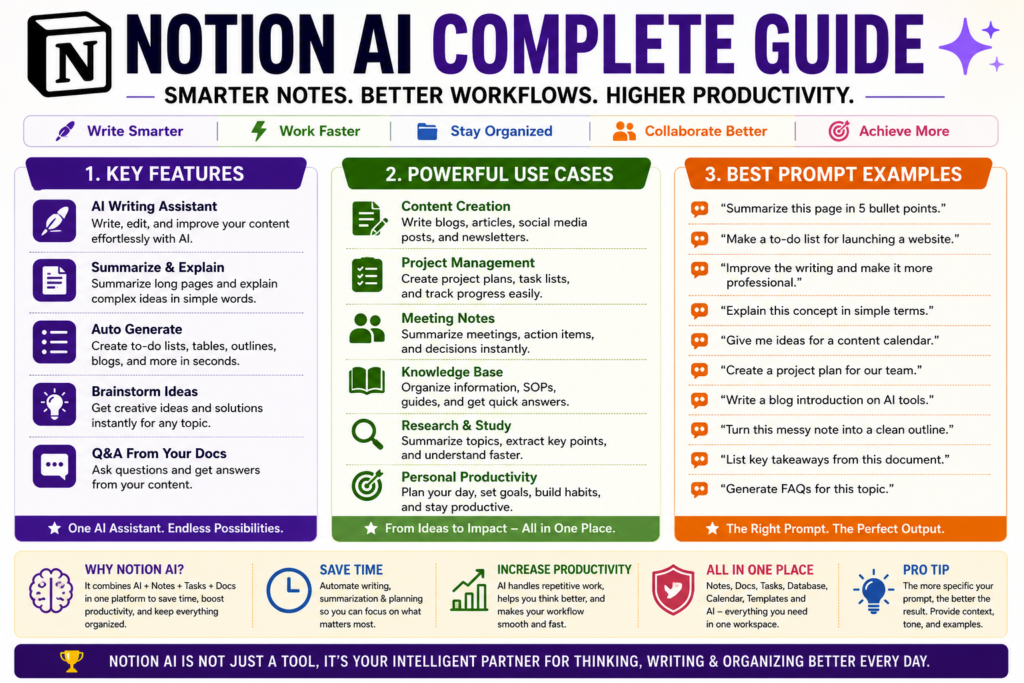
Key Features of Notion AI
One of the biggest reasons behind Notion AI’s popularity is its wide range of productivity features. Unlike many AI tools that specialize in only one task, Notion AI combines writing assistance, knowledge management, project planning, document organization, and intelligent search within a single workspace.
Whether you are creating content, managing projects, studying for exams, documenting business processes, or collaborating with a team, these features help you work faster while maintaining accuracy and consistency.
Let’s explore the most important features of Notion AI in detail.
1. AI Writing Assistant
Notion AI can generate high-quality content from simple prompts. Whether you need a blog post, report, email, meeting agenda, social media caption, or business proposal, it can produce a well-structured first draft within seconds.
Instead of staring at a blank page, users can begin with an AI-generated draft and refine it according to their own style and requirements.
2. Smart Content Editing
Editing existing content is often more time-consuming than writing it. Notion AI simplifies this process by improving grammar, correcting spelling mistakes, rewriting sentences, shortening lengthy paragraphs, expanding brief notes, and changing the tone of writing.
This feature is especially useful for students, professionals, bloggers, and business teams who regularly produce written content.
3. AI Summarization
Reading lengthy documents can consume valuable time. Notion AI quickly identifies the main ideas and converts long pages into concise summaries without losing the essential information.
It can summarize:
- Research papers
- Meeting notes
- Project documents
- Business reports
- Study materials
- Long articles
This makes reviewing information significantly faster.
4. Brainstorming and Idea Generation
Creativity often begins with ideas. Notion AI helps overcome writer’s block by generating fresh concepts, headlines, outlines, business ideas, marketing campaigns, lesson plans, project topics, and content strategies.
Instead of replacing human creativity, it acts as an intelligent brainstorming partner.
5. Translation and Language Improvement
Notion AI can translate text into multiple languages while also improving clarity and readability. It helps users communicate with global audiences without relying on separate translation tools.
It can also simplify complex writing, making documents easier to understand.
6. Action Item Extraction
After meetings, users often spend time identifying important tasks. Notion AI automatically extracts action items, deadlines, responsibilities, and follow-up points from meeting notes.
This reduces manual effort and helps teams stay organized.
7. Knowledge Management
Notion AI is designed to work inside your knowledge base. Instead of searching through dozens of pages manually, users can ask questions in natural language and quickly locate relevant information stored within their workspace.
For organizations with extensive documentation, this feature saves significant time.
8. Database Assistance
Notion is well known for its powerful databases, and Notion AI makes them even more useful. It can help generate summaries, categorize information, autofill database properties, and organize structured data more efficiently.
This is particularly valuable for project managers, researchers, HR teams, and business operations.
9. Project Planning
Planning a project from scratch can be challenging. Notion AI assists by creating project roadmaps, timelines, task lists, milestones, objectives, and implementation plans.
It provides a structured starting point that teams can customize according to their specific requirements.
10. Meeting Notes and Documentation
Notion AI transforms raw meeting notes into organized documentation. It highlights key discussions, summarizes important decisions, identifies action items, and produces professional meeting records that are easy to review later.
This feature is especially beneficial for remote teams and organizations that conduct frequent meetings.
Why These Features Matter
Individually, each feature saves time. Together, they transform Notion from a simple productivity application into an intelligent workspace capable of supporting writing, planning, collaboration, documentation, research, and knowledge management from one centralized platform.
For this reason, millions of students, professionals, creators, startups, and enterprises use Notion AI not only to write faster but also to organize information more effectively and make better decisions.
How to Use Notion AI (Step-by-Step Guide)
Getting started with Notion AI is simple, even if you have never used an AI-powered productivity tool before. Once your workspace is ready, you can begin creating documents, organizing projects, generating ideas, and managing information with just a few prompts.
Follow these steps to start using Notion AI effectively.
Step 1: Create a Notion Account
Visit the official Notion website and create a free account using your email address or Google account. If you already have an account, simply sign in to your workspace.
Step 2: Open or Create a Workspace
After logging in, create a new workspace or open an existing one. Your workspace is where all pages, notes, databases, projects, and documents are stored.
You can organize your workspace into folders, pages, and databases according to your personal or professional needs.
Step 3: Access Notion AI
Open any page and start typing. Depending on your plan and available AI features, you can activate Notion AI using the AI option, slash commands, or by selecting text and choosing an AI action.
The AI assistant is integrated directly into the editor, allowing you to work without switching to another application.
Step 4: Write Clear Prompts
Describe exactly what you want Notion AI to do.
For example:
- Write a professional meeting agenda.
- Summarize this research article.
- Create a weekly study timetable.
- Rewrite this paragraph in simple English.
- Generate ten blog title ideas.
- Create a project timeline.
- Translate this document into Hindi.
Specific prompts generally produce more accurate and useful results than vague instructions.
Step 5: Review the AI Output
Although Notion AI generates high-quality responses, you should always review the content before publishing or sharing it.
Check for:
- Accuracy
- Completeness
- Tone
- Grammar
- Updated information
- Personalization
Think of AI as an assistant rather than a replacement for human judgment.
Step 6: Edit and Customize
Modify the generated content to match your own writing style, audience, and objectives.
You can expand sections, simplify explanations, add examples, include images, create tables, or reorganize information as needed.
The final document should always reflect your own expertise and requirements.
Step 7: Save, Share, and Collaborate
Once your content is ready, save it within your workspace. You can also share pages with teammates, classmates, or clients, allowing everyone to collaborate in real time.
Since Notion AI works inside the workspace, all updates remain organized and accessible from one central location.
Best Practices for Beginners
If you are new to Notion AI, these simple habits will help you achieve better results:
- Start with short and specific prompts.
- Give enough context before asking AI to generate content.
- Break complex tasks into smaller requests.
- Review every AI-generated response before using it.
- Organize pages properly for easier navigation.
- Keep important documents updated.
- Use AI to assist your work—not to replace critical thinking.
Common Mistakes to Avoid
Many beginners fail to get the best results because of avoidable mistakes.
Avoid these common errors:
- Writing very vague prompts.
- Expecting AI to know information you never provided.
- Publishing AI-generated content without proofreading.
- Ignoring factual verification.
- Using AI for confidential information without understanding organizational policies.
- Creating cluttered workspaces with poor organization.
Notion AI Use Cases
One of the greatest strengths of Notion AI is its versatility. It is not designed for a single profession or industry—it adapts to different workflows and helps users accomplish a wide variety of tasks more efficiently. Whether you are a student organizing study materials or a business managing complex projects, Notion AI can become a valuable productivity partner.
Below are some of the most practical real-world use cases.
1. For Students
Students can use Notion AI to simplify learning and stay organized throughout the academic year.
It can help them:
- Create well-structured class notes.
- Summarize lengthy chapters.
- Generate revision notes.
- Prepare study schedules.
- Explain difficult topics in simple language.
- Organize assignments and deadlines.
- Brainstorm ideas for presentations and projects.
Instead of spending hours organizing information manually, students can focus more on learning and understanding concepts.
2. For Teachers and Educators
Teachers often manage lesson planning, assessments, and classroom documentation. Notion AI helps reduce administrative workload by generating educational content quickly.
Teachers can use it to:
- Create lesson plans.
- Prepare quizzes and assignments.
- Draft classroom announcements.
- Organize teaching materials.
- Summarize educational research.
- Maintain academic documentation.
- Develop course outlines.
This allows educators to spend more time teaching and less time preparing paperwork.
3. For Bloggers and Content Creators
Creating quality content consistently can be challenging. Notion AI speeds up the entire content creation process.
It can assist with:
- Generating article ideas.
- Creating blog outlines.
- Writing first drafts.
- Improving readability.
- Repurposing content for social media.
- Planning editorial calendars.
- Maintaining content research.
Instead of replacing creativity, it helps creators overcome writer’s block and maintain publishing consistency.
4. For Businesses and Teams
Organizations use Notion AI to centralize company knowledge and improve collaboration across departments.
Common business applications include:
- Writing Standard Operating Procedures (SOPs).
- Creating project documentation.
- Managing company knowledge bases.
- Preparing meeting summaries.
- Tracking project progress.
- Documenting internal processes.
- Improving team collaboration.
This ensures that important information remains accessible and organized.
5. For Project Managers
Managing multiple projects requires careful planning and documentation. Notion AI simplifies project management by assisting with:
- Project planning.
- Task breakdowns.
- Milestone creation.
- Risk documentation.
- Progress tracking.
- Team updates.
- Weekly project reports.
These capabilities help project managers maintain better visibility and improve team coordination.
6. For Researchers
Researchers often work with large volumes of information. Notion AI helps organize and process research materials more efficiently.
Researchers can use it to:
- Summarize research papers.
- Organize literature reviews.
- Generate research outlines.
- Compare findings.
- Maintain research notes.
- Document references.
- Plan research projects.
This saves valuable time during the research process.
7. For Freelancers
Freelancers frequently manage multiple clients, deadlines, and projects simultaneously.
Notion AI helps by:
- Drafting proposals.
- Creating project plans.
- Managing client documentation.
- Tracking deliverables.
- Writing reports.
- Organizing invoices and work records.
- Maintaining personal knowledge bases.
It provides a structured workspace for managing both creative and administrative tasks.
8. For HR and Administrative Teams
Human Resource professionals can use Notion AI to streamline routine documentation.
Typical applications include:
- Writing job descriptions.
- Preparing onboarding documents.
- Creating employee handbooks.
- Summarizing interview notes.
- Drafting HR policies.
- Organizing employee records.
- Managing internal documentation.
This improves efficiency while maintaining consistent documentation.
9. For Personal Productivity
Notion AI is equally useful for personal organization.
Individuals can use it to:
- Plan daily schedules.
- Track personal goals.
- Maintain journals.
- Organize travel plans.
- Manage reading lists.
- Create habit trackers.
- Store important information.
It becomes a central hub for managing both work and personal life.
Which Users Benefit the Most?
Although almost anyone can use Notion AI, it provides the greatest value to people who regularly create documents, organize information, collaborate with others, or manage ongoing projects.
The more knowledge you work with, the more valuable Notion AI becomes. Rather than replacing your expertise, it helps you spend less time on repetitive tasks and more time on meaningful thinking, planning, creativity, and decision-making.
Notion AI Pricing
Notion AI is available through Notion’s subscription plans, allowing individuals, teams, and enterprises to choose a plan that best fits their needs. While many basic workspace features are available for free, advanced AI capabilities and higher usage limits are offered through paid plans.
Understanding the available plans helps you decide whether the free version is sufficient or if upgrading is worthwhile.
Free Plan
The Free Plan is ideal for individuals who want to explore Notion and experience its core workspace features.
It includes:
- Personal workspace
- Notes and documents
- Basic collaboration
- Databases and pages
- Limited AI access (subject to current plan availability)
This plan is suitable for students, beginners, and casual users who are learning the platform.
Plus Plan
The Plus Plan is designed for individuals and small teams that require additional collaboration features and greater workspace flexibility.
Key benefits include:
- Increased file upload limits
- Extended collaboration tools
- Shared team workspace
- Version history
- More workspace management options
- Access to advanced AI capabilities depending on the subscription
This plan is appropriate for freelancers, bloggers, educators, and growing businesses.
Business Plan
The Business Plan is intended for organizations managing multiple teams and larger knowledge bases.
It offers:
- Advanced team collaboration
- Enhanced security controls
- Private team spaces
- Detailed permission management
- Longer page history
- Administrative controls
- Expanded AI functionality for professional workflows
Medium and large organizations often choose this plan to improve productivity across departments.
Enterprise Plan
The Enterprise Plan is built for large organizations with advanced security, compliance, and governance requirements.
It includes:
- Enterprise-grade security
- Advanced identity management
- Audit logs
- Compliance features
- Dedicated administration tools
- Enterprise support
- Large-scale knowledge management capabilities
This plan is generally used by corporations, universities, government organizations, and enterprises with complex operational needs.
Is Notion AI Free?
Many users ask whether Notion AI is completely free.
The answer depends on your subscription plan and the AI features available at the time. Notion may provide limited AI access for eligible users, while more advanced capabilities typically require a paid subscription. Since pricing structures and AI availability can change over time, it is always advisable to check the latest information on Notion’s official pricing page before making a decision.
Which Plan Should You Choose?
Choose the Free Plan if you are:
- Exploring Notion for the first time.
- Taking personal notes.
- Managing simple projects.
- Learning how the platform works.
Choose the Plus Plan if you are:
- A student managing multiple subjects.
- A freelancer handling client projects.
- A blogger or content creator.
- A small business owner.
Choose the Business Plan if you are:
- Managing a growing team.
- Building an internal knowledge base.
- Coordinating multiple departments.
- Running collaborative projects.
Choose the Enterprise Plan if you require:
- Enterprise-level security.
- Regulatory compliance.
- Large-scale collaboration.
- Advanced administrative control.
Advantages of Notion AI
Notion AI is more than just an AI writing assistant—it is a complete productivity companion that helps individuals and teams work smarter. By combining artificial intelligence with note-taking, documentation, databases, project management, and collaboration, it eliminates many repetitive tasks that consume valuable time.
Here are the major advantages of using Notion AI.
1. All-in-One Productivity Workspace
Unlike many AI tools that require switching between multiple applications, Notion AI works directly inside the Notion workspace. Users can write, edit, organize, plan, and collaborate without leaving the platform.
This centralized approach reduces distractions and creates a more efficient workflow.
2. Saves Significant Time
Many daily tasks such as writing meeting notes, summarizing documents, creating task lists, and drafting reports can be completed within seconds.
Instead of spending hours on repetitive work, users can focus on problem-solving, creativity, and decision-making.
3. Improves Writing Quality
Notion AI helps users create clear, well-structured, and grammatically correct content.
It can rewrite sentences, improve readability, adjust tone, simplify complex explanations, and expand brief notes into detailed documents, making it valuable for both beginners and experienced writers.
4. Better Knowledge Management
Finding information becomes much easier when everything is stored in one organized workspace.
Notion AI helps users retrieve relevant information quickly, reducing the time spent searching through multiple pages and documents.
5. Enhances Team Collaboration
Teams can create shared documents, maintain knowledge bases, summarize meetings, and organize projects from a single workspace.
Since everyone works with the same information, communication becomes more transparent and collaboration becomes more effective.
6. Supports Multiple Professions
One of Notion AI’s biggest strengths is its flexibility.
Students, teachers, bloggers, researchers, freelancers, startups, project managers, HR professionals, and business organizations can all use the same platform while adapting it to their own workflow.
7. Simplifies Project Management
Planning and managing projects becomes much easier with AI assistance.
Users can generate project plans, create milestones, organize tasks, prepare documentation, and monitor progress more efficiently.
8. Reduces Manual Documentation
Documentation is often one of the most time-consuming business activities.
Notion AI automatically assists with meeting summaries, reports, standard operating procedures (SOPs), knowledge articles, and internal documentation, reducing repetitive manual work.
9. Easy to Learn and Use
Despite offering advanced capabilities, Notion AI remains beginner-friendly.
Its clean interface and natural language prompts allow users to start working with AI without requiring technical knowledge or programming skills.
10. Continuous Improvement
Notion regularly introduces new AI features and workspace improvements.
As artificial intelligence continues to evolve, users benefit from ongoing updates that enhance productivity, collaboration, and knowledge management without changing the overall user experience.
Why These Advantages Matter
The real value of Notion AI lies not in generating text alone but in improving the entire way people work. It combines writing assistance, project management, documentation, collaboration, and knowledge organization into one intelligent workspace.
For individuals, this means saving time and staying organized. For teams and businesses, it leads to better collaboration, faster decision-making, and more efficient knowledge sharing. These advantages make Notion AI one of the most practical AI-powered productivity platforms available today.
Limitations of Notion AI
While Notion AI is a powerful productivity assistant, it is not perfect. Like every AI tool, it has certain limitations that users should understand before relying on it for important work.
Knowing these limitations helps you use Notion AI more effectively and avoid unrealistic expectations.
1. AI Can Make Mistakes
Although Notion AI usually generates accurate and well-structured content, it can sometimes produce incorrect, incomplete, or misleading information.
For this reason, important documents, research findings, business reports, and academic content should always be reviewed and fact-checked before use.
2. Depends on Prompt Quality
The quality of the output largely depends on the quality of your prompt.
Vague instructions often produce generic responses, while detailed prompts with proper context usually generate more useful and relevant results.
Learning how to write effective prompts is essential for achieving the best results.
3. Limited Human Creativity
Notion AI can generate ideas and improve existing content, but it cannot fully replace human creativity, critical thinking, or personal experience.
Original insights, emotional storytelling, strategic planning, and expert decision-making still require human involvement.
4. Subscription Required for Advanced AI Features
Although Notion offers free workspace features, many advanced AI capabilities require a paid subscription.
Users should compare available plans before deciding whether the additional AI features justify the cost.
5. Internet Connection Is Required
Since Notion AI operates as a cloud-based service, a stable internet connection is generally required to access AI-powered features.
Without internet access, users can work with locally available content in Notion, but AI assistance will not function.
6. Not a Replacement for Professional Advice
Notion AI should not be treated as a substitute for professional legal, medical, financial, or technical advice.
For high-stakes decisions, always consult qualified experts and verify important information from reliable sources.
7. Workspace Organization Still Matters
Even with AI assistance, a poorly organized workspace can reduce productivity.
If pages, databases, and documents are scattered or poorly structured, AI may not help users locate information as efficiently as expected.
Maintaining a clean and organized workspace remains an important responsibility.
8. Privacy Requires User Awareness
Notion provides security features and administrative controls, but users should still understand their organization’s data policies before storing confidential or sensitive information.
Following company guidelines and access permissions helps protect important business data.
9. Learning Curve for Advanced Features
Basic AI features are easy to use, but advanced capabilities such as databases, automation, knowledge management, and collaborative workflows may take time to master.
Fortunately, as users gain experience, these features become much easier to use and significantly improve long-term productivity.
Why Understanding These Limitations Is Important
Notion AI delivers the best results when it is viewed as an intelligent assistant rather than a complete replacement for human expertise.
Users who combine AI-generated content with their own knowledge, judgment, and creativity achieve far better outcomes than those who rely entirely on automation. By understanding both its strengths and limitations, you can use Notion AI more responsibly, efficiently, and confidently in both personal and professional work.
Best Notion AI Prompts
One of the biggest factors that determines the quality of Notion AI’s output is the prompt you provide. A well-written prompt gives the AI clear instructions, context, and expectations, resulting in more accurate and useful responses.
Below are some practical prompts that you can copy, customize, and use in your daily work.
For Students
- Create a 30-day study plan for my upcoming examinations.
- Summarize these lecture notes into easy revision points.
- Explain this topic in simple language suitable for beginners.
- Generate 20 important questions from this chapter.
- Create flashcards for quick revision.
For Teachers
- Prepare a detailed lesson plan for this topic.
- Create a classroom quiz with answers.
- Design an assignment for undergraduate students.
- Simplify this chapter for slow learners.
- Prepare discussion questions for classroom activities.
For Bloggers and Writers
- Write a detailed blog outline on this topic.
- Suggest 20 SEO-friendly blog titles.
- Improve the readability of this article.
- Rewrite this paragraph in a professional tone.
- Generate an engaging conclusion for this article.
For Businesses
- Create a Standard Operating Procedure (SOP) for this process.
- Write professional meeting minutes from these notes.
- Generate a project execution plan.
- Prepare a business proposal for a new client.
- Create a weekly progress report template.
For Project Managers
- Break this project into milestones and tasks.
- Identify potential project risks.
- Prepare a project timeline with deadlines.
- Generate a stakeholder communication plan.
- Summarize today’s project meeting into action items.
For Researchers
- Summarize this research paper in simple language.
- Compare these two research studies.
- Generate a literature review outline.
- Identify research gaps from these findings.
- Prepare a research methodology draft.
For Content Creators
- Generate 30 social media content ideas.
- Create a one-month content calendar.
- Suggest YouTube video topics for this niche.
- Write an engaging video script introduction.
- Repurpose this blog into LinkedIn and Facebook posts.
For Personal Productivity
- Create my daily task list based on these priorities.
- Design a weekly goal tracker.
- Build a monthly habit tracker.
- Plan my weekend schedule.
- Organize these notes into clear categories.
Tips for Writing Better Prompts
To get the best results from Notion AI:
- Be specific about your objective.
- Provide enough background information.
- Mention the desired tone and writing style.
- Define the expected output format.
- Break complex tasks into smaller prompts.
- Review and refine the generated response before using it.
The better your prompt, the better your results. Instead of asking Notion AI to “write something,” clearly explain what you need, who the audience is, and what outcome you expect. This simple habit can dramatically improve the quality of AI-generated content.
Tips and Best Practices for Using Notion AI
Notion AI can significantly improve your productivity, but getting the best results requires more than simply typing prompts. The most successful users combine clear instructions, organized workspaces, and thoughtful review to make AI a reliable productivity partner rather than a shortcut.
The following best practices will help you maximize the value of Notion AI in your daily work.
1. Be Clear and Specific
The quality of AI-generated content depends largely on the quality of your instructions.
Instead of writing:
“Write about Artificial Intelligence.”
Write:
“Write a 1,500-word beginner-friendly article explaining Artificial Intelligence with real-world examples, advantages, disadvantages, and future applications.”
The more context you provide, the better the results.
2. Organize Your Workspace
A well-organized workspace improves both your productivity and the effectiveness of Notion AI.
Create separate pages for:
- Projects
- Meeting Notes
- Research
- Study Materials
- Documentation
- Personal Notes
A structured workspace makes information easier to manage and retrieve.
3. Review Every AI Response
Although Notion AI produces impressive results, it should never replace human judgment.
Before publishing or sharing any document:
- Verify facts.
- Correct inaccuracies.
- Improve readability.
- Add personal insights.
- Update outdated information.
Human review remains essential for high-quality work.
4. Use AI as an Assistant, Not a Replacement
Think of Notion AI as a productivity partner rather than an automatic decision-maker.
Use it to generate ideas, organize information, prepare drafts, and automate repetitive tasks, while leaving important decisions, creativity, and critical thinking to yourself.
5. Break Large Tasks into Smaller Steps
Complex requests often produce better results when divided into multiple prompts.
For example, instead of asking AI to create an entire business plan at once, ask it to generate:
- Executive Summary
- Market Analysis
- Marketing Strategy
- Financial Plan
- Risk Assessment
This approach usually delivers more accurate and detailed output.
6. Maintain Consistent Documentation
Keep your documents updated and properly organized.
An organized knowledge base makes it easier to locate information, collaborate with team members, and maintain consistency across projects.
7. Protect Sensitive Information
Before entering confidential business or personal information, ensure that doing so complies with your organization’s security policies and data handling guidelines.
AI should be used responsibly, especially when working with sensitive data.
8. Continue Learning New Features
Notion AI continues to evolve with new capabilities and improvements.
Regularly exploring newly released features can help you discover better workflows and improve productivity over time.
Common Mistakes to Avoid
Many users fail to get the best results because of simple but avoidable mistakes.
Avoid these common errors:
- Writing vague prompts.
- Expecting AI to understand missing context.
- Publishing AI-generated content without editing.
- Ignoring factual verification.
- Keeping an unorganized workspace.
- Depending entirely on AI for important decisions.
Final Tip
The true power of Notion AI lies in the combination of artificial intelligence and human expertise. Users who provide clear instructions, maintain an organized workspace, verify AI-generated content, and continuously refine their workflow consistently achieve the best long-term results.
Instead of asking, “What can Notion AI do for me?” ask, “How can I work more efficiently with Notion AI?” That mindset alone can transform the way you learn, create, organize, and collaborate.
Privacy and Security
As artificial intelligence becomes an essential part of everyday work, privacy and data security have become major concerns for individuals, businesses, and organizations. Before using any AI-powered tool, it is important to understand how your information is handled and what precautions you should take.
Notion AI is designed with security and collaboration in mind, but users also share responsibility for protecting sensitive information and following their organization’s data policies.
Data Privacy
When using Notion AI, the content you choose to process may be handled according to Notion’s privacy practices and the AI services supporting its features.
Before storing confidential business documents, personal information, or sensitive client data, always review your organization’s internal policies and Notion’s latest privacy documentation.
Understanding how your data is managed helps you make informed decisions about what information should and should not be processed using AI.
Workspace Permissions
One of Notion’s biggest strengths is its permission management system.
Workspace owners can control:
- Who can view pages.
- Who can edit documents.
- Who can comment.
- Who can share content.
- Who can manage databases.
Proper permission management helps protect confidential information while ensuring smooth collaboration.
Collaboration Security
Notion AI works inside collaborative workspaces where multiple users may contribute to shared documents.
To maintain security:
- Share pages only with authorized users.
- Review access permissions regularly.
- Remove inactive collaborators.
- Organize confidential documents into restricted workspaces.
Good collaboration practices reduce the risk of accidental data exposure.
Responsible AI Usage
Artificial intelligence should always be used responsibly.
Before accepting AI-generated content:
- Verify important facts.
- Review calculations.
- Check legal or financial information.
- Confirm technical accuracy.
- Apply human judgment before making critical decisions.
AI can accelerate work, but responsibility always remains with the user.
Security Best Practices
Follow these simple practices to keep your workspace secure:
- Enable a strong password.
- Use two-factor authentication whenever available.
- Keep your account credentials private.
- Review shared workspace permissions regularly.
- Avoid uploading highly confidential information unless permitted by your organization’s security policy.
- Regularly update important documents.
These habits improve both account security and information management.
Privacy Tips for Businesses
Organizations using Notion AI should establish clear internal guidelines for AI usage.
Recommended practices include:
- Define which information can be processed by AI.
- Train employees on responsible AI usage.
- Review access permissions periodically.
- Maintain secure documentation workflows.
- Monitor compliance with company policies.
A clear governance strategy ensures that AI improves productivity without compromising security.
Final Thoughts
Notion AI provides powerful productivity features, but secure and responsible usage is equally important. By understanding privacy settings, managing workspace permissions, verifying AI-generated content, and following good security practices, users can confidently take advantage of Notion AI while protecting valuable information.
The safest and most productive approach is to treat AI as a trusted assistant—not as the sole authority for handling sensitive or business-critical information.
Notion AI vs ChatGPT vs Gemini vs Claude
Choosing the right AI assistant depends on your workflow and productivity needs. While Notion AI, ChatGPT, Gemini, and Claude are all powered by advanced artificial intelligence, each tool is designed with a different primary purpose.
The comparison below highlights their key differences.
| Feature | Notion AI | ChatGPT | Gemini | Claude |
|---|---|---|---|---|
| Primary Purpose | Workspace Productivity | General AI Assistant | Google Ecosystem AI | Writing & Analysis |
| Best For | Notes, Documentation, Project Management | Content Creation, Coding, Learning | Google Workspace Integration | Long Documents & Professional Writing |
| Built Into Workspace | ✅ Yes | ❌ No | Partial | ❌ No |
| Document Summarization | Excellent | Excellent | Very Good | Excellent |
| Writing Assistance | Excellent | Excellent | Very Good | Excellent |
| Brainstorming | Very Good | Excellent | Excellent | Excellent |
| Database Support | Excellent | Limited | Limited | Limited |
| Team Collaboration | Excellent | Limited | Good | Limited |
| Integration with Productivity Tools | Excellent | Moderate | Excellent with Google Apps | Moderate |
| Coding Assistance | Good | Excellent | Excellent | Excellent |
| Research Support | Good | Excellent | Excellent | Excellent |
When Should You Choose Notion AI?
Notion AI is an excellent choice if your daily work revolves around notes, documentation, project planning, knowledge management, meeting summaries, databases, and team collaboration. Because AI is built directly into your workspace, you don’t need to switch between multiple applications to complete your tasks.
When Is ChatGPT a Better Choice?
ChatGPT is better suited for users who need an all-purpose AI assistant for writing, coding, learning, brainstorming, research, problem-solving, and creative content generation. It offers greater flexibility across a wide range of tasks beyond document management.
When Is Gemini a Better Choice?
Gemini works particularly well for users who rely heavily on Google’s ecosystem, including Gmail, Google Docs, Google Sheets, Google Drive, and Google Workspace. Its deep integration with Google services makes everyday productivity more seamless.
When Is Claude a Better Choice?
Claude is known for handling lengthy documents, producing natural writing, and assisting with detailed analysis. It is often preferred by researchers, writers, consultants, and professionals who regularly work with large volumes of text.
💼 Business Tip
If your organization already uses Notion as its primary workspace, Notion AI usually provides the most seamless experience because documentation, collaboration, project management, and AI assistance are available in a single platform. However, many professionals combine Notion AI with tools like ChatGPT or Claude to leverage the strengths of each for different types of work.
Final Comparison
There is no single AI tool that is best for every user. Notion AI excels at productivity and knowledge management, ChatGPT offers unmatched versatility, Gemini integrates naturally with Google’s ecosystem, and Claude stands out for long-form writing and document analysis.
The best choice depends on your workflow, preferred ecosystem, and the type of tasks you perform most frequently.
Best Alternatives to Notion AI
Although Notion AI is one of the best AI-powered productivity assistants, it is not the only option available. Depending on your workflow, budget, and preferred ecosystem, several alternatives may better suit your needs.
1. ChatGPT
ChatGPT is one of the world’s most popular AI assistants. It excels in writing, coding, brainstorming, research, summarization, and problem-solving. Unlike Notion AI, it is designed as a general-purpose AI that can assist with a wide variety of personal and professional tasks.
Best for: Writers, students, developers, marketers, and professionals.
2. Google Gemini
Gemini integrates seamlessly with Google’s ecosystem, making it an excellent choice for users who regularly work with Gmail, Google Docs, Google Sheets, Google Drive, and Google Workspace.
Best for: Google Workspace users and business teams.
3. Claude
Claude is widely recognized for its natural writing style and ability to analyze long documents. It performs particularly well when working with reports, research papers, business documents, and detailed explanations.
Best for: Researchers, educators, consultants, and professional writers.
4. Microsoft Copilot
Microsoft Copilot brings AI directly into Microsoft 365 applications such as Word, Excel, PowerPoint, Outlook, and Teams. It helps users draft documents, analyze spreadsheets, create presentations, and automate everyday office tasks.
Best for: Microsoft Office users and enterprise organizations.
5. ClickUp AI
ClickUp AI combines project management with AI-powered writing, task planning, document creation, and workflow automation. It is designed to improve team productivity within project-based environments.
Best for: Project managers and collaborative teams.
6. Coda AI
Coda AI enhances documents with intelligent writing, data organization, automation, and collaborative features. It is a strong alternative for users who want flexible document management beyond traditional note-taking.
Best for: Teams managing complex documentation and workflows.
Quick Comparison
| Tool | Best For |
|---|---|
| ChatGPT | General AI assistance, writing, coding, learning |
| Gemini | Google Workspace productivity |
| Claude | Long-form writing and document analysis |
| Microsoft Copilot | Microsoft 365 integration |
| ClickUp AI | Project management and collaboration |
| Coda AI | Intelligent documentation and workflow management |
💡 Did You Know?
Many professionals do not rely on a single AI tool. Instead, they combine multiple AI assistants—for example, using Notion AI to organize knowledge, ChatGPT for brainstorming, Claude for document analysis, and Gemini for Google Workspace tasks. Choosing the right combination often delivers better productivity than depending on just one platform.
Which Alternative Should You Choose?
If your work is centered around an organized workspace, notes, databases, and collaboration, Notion AI remains one of the strongest choices. However, if your priority is content creation, coding, deep research, office productivity, or project management, one of the alternatives above may better match your specific requirements.
The ideal AI tool is the one that fits naturally into your existing workflow and helps you complete your work more efficiently.
Future of Notion AI
Artificial intelligence is rapidly transforming the way people organize information, collaborate with teams, and manage daily work. As AI technology continues to evolve, Notion AI is expected to become even more intelligent, personalized, and deeply integrated into modern productivity workflows.
One of the biggest future trends is the development of AI that understands the context of an entire workspace rather than individual documents. Instead of responding only to prompts, future versions of Notion AI may proactively organize knowledge, recommend tasks, identify project risks, summarize ongoing work, and provide personalized suggestions based on user activity.
Businesses are also expected to adopt AI-powered knowledge management systems at a much larger scale. As organizations generate increasing amounts of digital information, tools like Notion AI will help employees quickly locate documents, automate repetitive processes, and collaborate more efficiently across departments.
Another important area of development is workflow automation. Future updates may allow Notion AI to coordinate tasks across multiple applications, reducing manual work and improving productivity through smarter integrations with business tools and cloud services.
Advances in multimodal AI are also likely to expand Notion AI’s capabilities. In addition to text, future versions may provide stronger support for images, voice interactions, presentations, diagrams, and other forms of digital content, creating a more natural and interactive workspace.
🌍 Global AI Fact
The global market for AI-powered workplace productivity tools is growing rapidly as organizations increasingly invest in intelligent collaboration, automation, and knowledge management solutions. This trend is expected to make AI assistants an essential part of everyday work over the coming years.
Final Outlook
Notion AI is evolving from a writing assistant into a comprehensive productivity companion. As artificial intelligence becomes more capable, users can expect smarter organization, better collaboration, greater automation, and more personalized assistance. Individuals and organizations that learn to use these capabilities effectively will be better prepared for the future of AI-powered work.
Who Should Use Notion AI?
Notion AI is designed for anyone who wants to organize information, improve productivity, and reduce the time spent on repetitive tasks. Whether you are studying, managing projects, running a business, or creating content, Notion AI can help streamline your daily workflow.
Students
Students can use Notion AI to summarize lecture notes, create study plans, prepare revision materials, generate flashcards, organize assignments, and manage academic projects. It helps save time while making learning more structured and efficient.
🎓 Student Tip
Create separate Notion pages for each subject and let Notion AI summarize lengthy notes into concise revision points before exams. This makes last-minute preparation much faster and more organized.
Teachers and Educators
Teachers can prepare lesson plans, generate quizzes, create assignments, organize teaching materials, and maintain classroom documentation. Notion AI also helps simplify complex topics for students.
Content Creators and Bloggers
Writers, bloggers, YouTubers, and marketers can use Notion AI to brainstorm ideas, create outlines, draft articles, summarize research, and maintain content calendars. It speeds up the content creation process while keeping everything organized in one workspace.
Business Professionals
Business users can document processes, prepare meeting notes, create Standard Operating Procedures (SOPs), manage projects, and organize company knowledge. Teams benefit from faster collaboration and improved documentation.
Researchers
Researchers can collect references, summarize academic papers, organize literature reviews, and maintain structured research notes. Notion AI makes it easier to manage large amounts of information throughout the research process.
Freelancers and Consultants
Freelancers can manage clients, track projects, prepare proposals, organize invoices, and maintain project documentation. Having AI integrated into the workspace reduces administrative effort and improves overall efficiency.
Teams and Organizations
Organizations that rely on documentation and collaboration can use Notion AI to centralize knowledge, improve communication, automate documentation, and help employees find information more quickly.
Is Notion AI Right for You?
Notion AI is an excellent choice if you:
- Regularly create notes or documentation.
- Manage multiple projects.
- Work with large amounts of information.
- Collaborate with teams.
- Want to improve personal productivity.
- Prefer having AI integrated directly into your workspace.
However, if your primary needs involve advanced coding, complex research, or general-purpose conversations, combining Notion AI with tools like ChatGPT, Gemini, or Claude may provide an even more powerful AI workflow.
Final Recommendation
Notion AI is suitable for beginners as well as experienced professionals. Its greatest strength lies in bringing AI directly into the place where you already work, making writing, planning, organizing, and collaboration faster without constantly switching between different applications.
What is Notion AI?
Notion AI is an artificial intelligence assistant built directly into the Notion workspace. It helps users write content, summarize documents, brainstorm ideas, translate text, improve writing, organize information, and automate routine tasks without leaving the Notion app.
Is Notion AI free to use?
Notion offers free workspace features, but access to advanced AI capabilities depends on your subscription plan. Users should check the latest pricing on Notion’s official website to determine which AI features are included in each plan.
Can students use Notion AI?
Yes. Notion AI is an excellent tool for students. It can summarize lecture notes, generate study plans, create flashcards, organize assignments, explain complex topics, and help prepare for examinations more efficiently.
Is Notion AI better than ChatGPT?
It depends on your needs. Notion AI is designed for productivity, documentation, and knowledge management within a workspace, while ChatGPT is a more general-purpose AI assistant for writing, coding, research, brainstorming, and problem-solving. Many users combine both tools to maximize productivity.
Can Notion AI write complete articles?
Yes. Notion AI can generate outlines, drafts, summaries, blog posts, reports, meeting notes, and other written content. However, users should always review, edit, and fact-check AI-generated material before publishing or sharing it.
Does Notion AI support team collaboration?
Yes. Because Notion AI is integrated into collaborative workspaces, teams can work together on documents, databases, project plans, meeting notes, and shared knowledge bases while using AI to improve productivity and documentation.
Is my data safe when using Notion AI?
Notion provides security features and workspace permission controls, but users should always follow their organization’s privacy policies and avoid processing highly sensitive information unless permitted. Reviewing the official privacy documentation is recommended before using AI for confidential work.
Can Notion AI generate images?
No. Notion AI primarily focuses on text-based productivity tasks such as writing, summarization, organization, brainstorming, and documentation. Users who need AI image generation typically use dedicated AI image generator tools.
Which professionals benefit the most from Notion AI?
Notion AI is valuable for students, teachers, researchers, writers, bloggers, freelancers, consultants, project managers, business professionals, startups, and organizations that rely on documentation, collaboration, and knowledge management.
Is Notion AI worth using in 2026?
Yes. For individuals and teams already using Notion as their primary workspace, Notion AI is a worthwhile productivity assistant. Its ability to streamline writing, organize information, summarize documents, and support collaboration can save significant time and improve overall efficiency.
Final Verdict
Notion AI has evolved from a simple writing assistant into a powerful AI-powered productivity companion that helps individuals and teams organize information, create content, manage projects, and collaborate more efficiently—all within a single workspace.
Its greatest advantage is that AI is built directly into Notion. Instead of constantly switching between different applications, users can write, summarize, brainstorm, plan projects, manage documentation, and organize knowledge without leaving their workspace. This seamless integration makes everyday tasks faster and more efficient.
Notion AI is especially valuable for students, teachers, writers, researchers, freelancers, startups, and businesses that rely on structured documentation and effective collaboration. Features such as content generation, meeting summaries, task organization, database support, and knowledge management can significantly improve productivity while reducing repetitive manual work.
However, like any AI tool, Notion AI is not perfect. Users should always review AI-generated content, verify important information, and apply their own judgment before making critical decisions. AI works best as an intelligent assistant—not as a replacement for human expertise, creativity, or professional advice.
If you are already using Notion as your primary workspace, enabling Notion AI is one of the easiest ways to increase productivity without changing your existing workflow. For users who require broader AI capabilities such as advanced research, coding, or creative conversations, combining Notion AI with tools like ChatGPT, Gemini, or Claude can create an even more powerful productivity ecosystem.
Our Rating
| Category | Rating |
|---|---|
| Ease of Use | ⭐⭐⭐⭐⭐ (5/5) |
| Writing Assistance | ⭐⭐⭐⭐⭐ (5/5) |
| Productivity | ⭐⭐⭐⭐⭐ (5/5) |
| Collaboration | ⭐⭐⭐⭐⭐ (5/5) |
| Value for Money | ⭐⭐⭐⭐☆ (4.5/5) |
| Overall Rating | ⭐⭐⭐⭐⭐ (4.9/5) |
🎯 Final Thought
If your goal is to work smarter rather than harder, Notion AI is one of the best AI productivity tools available today. Its combination of intelligent writing assistance, knowledge management, project organization, and seamless collaboration makes it an excellent investment for anyone looking to save time, stay organized, and get more done with the power of artificial intelligence.
Explore More AI Guides
To expand your knowledge beyond Notion AI, explore our detailed guides on Best AI Tools in 2026, Best AI Productivity Tools in 2026, ChatGPT Complete Guide, Google Gemini Complete Guide, Claude AI Complete Guide, Perplexity AI Complete Guide, and AI Prompt Engineering Guide. These comprehensive resources will help you compare leading AI tools, improve your productivity, and choose the right AI solutions for your personal, academic, or professional needs.