
Introduction to the Best Leonardo AI Prompts
Creating a beautiful AI image often begins with a simple idea. You may imagine a cinematic portrait, a fantasy kingdom, a professional product photo, or an eye-catching social media graphic. However, turning that idea into the right words can be difficult. A short or unclear prompt may produce an image that looks attractive but does not match what you had in mind.
That is where this collection of 100 best Leonardo AI prompts can help.
Leonardo AI allows beginners, designers, marketers, content creators, and digital artists to create images from text descriptions. You do not need to understand complicated design software or write highly technical instructions. You simply need to describe the subject, setting, visual style, lighting, composition, and mood clearly.
Still, writing every prompt from scratch takes time. It can also be frustrating when you are unsure which details to include. The ready-to-copy prompts in this guide give you a practical starting point. You can use them as written or replace the details inside square brackets to match your project.
For example, you can change the character, background, colour palette, clothing, camera angle, artistic style, or image purpose without rewriting the complete prompt.
This guide includes Leonardo AI prompts for:
- Realistic portraits and professional photographs
- Fantasy worlds and science-fiction scenes
- Anime characters and digital illustrations
- Products and ecommerce advertisements
- Logos, branding, and graphic design
- Social media and marketing content
- Architecture, interiors, and landscapes
- Cinematic scenes, 3D artwork, and game assets
- Advanced image creation and editing tasks
Whether you are experimenting with AI art for the first time or already use one of the best AI image generators in 2026, these prompts can help you create more focused and visually consistent results.
What Makes a Good Leonardo AI Prompt?
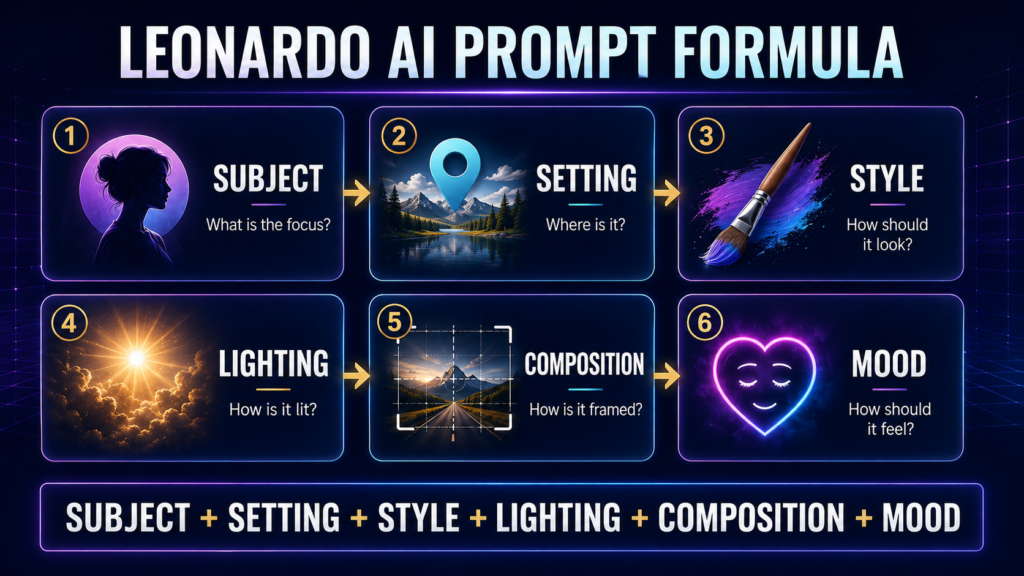
A good prompt does more than name an object. For example, writing “a luxury watch” leaves most creative decisions to the AI. Leonardo AI must guess the background, lighting, angle, materials, colours, and overall visual style.
A more useful prompt would describe a luxury watch placed on a dark marble surface, photographed from a particular angle, illuminated with soft studio lighting, and presented in the style of a premium advertisement.
Leonardo AI’s official image prompting guide recommends beginning with three essential elements: the subject, context, and style. You can then add other details when greater control is required.
A practical Leonardo AI prompt can follow this structure:
Subject + Setting + Style + Lighting + Composition + Mood + Colours + Important Details
For example:
A confident female entrepreneur standing inside a modern office, professional editorial photography, waist-up composition, soft window lighting, neutral blue and grey colour palette, calm and inspiring mood, realistic skin texture, natural facial expression, clean background.
Every prompt does not need to include all these elements. A simple idea may work with a short description, while a complex scene may require additional details. The aim is to be clear, not to make the prompt unnecessarily long.
How to Use These Leonardo AI Prompts
Using the prompts in this guide is simple:
- Choose a prompt that matches the image you want to create.
- Copy the complete prompt into Leonardo AI.
- Replace the details inside square brackets with your own information.
- Select a suitable image model, style, and aspect ratio.
- Generate the image and adjust one or two details if the first result is not perfect.
Avoid changing too many instructions at the same time. If an image is almost correct, make a small change such as adjusting the lighting, background, pose, or camera angle. This makes it easier to understand which instruction improved the result.
If you are completely new to the platform, read our Leonardo AI Complete Guide before using the advanced prompts. It explains the main tools, models, settings, and image-generation workflow in beginner-friendly language.
Best Leonardo AI Prompts for Portraits and Characters
Portraits are among the most popular images created with Leonardo AI. A well-written portrait prompt should describe the person’s appearance, clothing, expression, pose, background, lighting, and camera style. The following prompts can be customised for personal projects, professional profiles, storytelling, advertising, or character design.
1. Create a Cinematic Character Portrait
Best For: Movie-style portraits, posters, storytelling, and creative profiles.
Ready-to-Copy Prompt:
Create a cinematic portrait of a [AGE]-year-old [MAN/WOMAN] with [HAIR STYLE] and [FACIAL FEATURES], wearing [CLOTHING]. The character is standing in [LOCATION] with a calm but determined expression. Dramatic side lighting, shallow depth of field, realistic skin texture, detailed eyes, atmospheric background, rich cinematic colours, professional film still, close-up composition, highly detailed.
How to Customise: Replace the age, appearance, clothing, location, and expression. Add a genre such as historical, fantasy, mystery, or science fiction.
2. Generate a Professional Business Headshot
Best For: LinkedIn profiles, company websites, portfolios, and professional introductions.
Ready-to-Copy Prompt:
A professional headshot of a confident [PROFESSION] in their [AGE RANGE], wearing [FORMAL CLOTHING], facing the camera with a natural and approachable expression. Clean [COLOUR] studio background, soft diffused lighting, realistic facial details, balanced skin tones, sharp focus on the eyes, chest-up composition, modern corporate photography, polished but natural appearance.
How to Customise: Add the profession, preferred clothing, age range, and background colour. You can also specify whether the portrait should appear formal, friendly, creative, or authoritative.
3. Design a High-Fashion Editorial Portrait
Best For: Fashion concepts, magazine covers, clothing advertisements, and style inspiration.
Ready-to-Copy Prompt:
A high-fashion editorial portrait of a [MALE/FEMALE] model wearing an elegant [COLOUR] outfit made from [MATERIAL]. The model is posing confidently inside [LOCATION], with dramatic studio lighting, bold shadows, refined facial features, luxury fashion photography, sophisticated colour grading, clean composition, detailed fabric texture, magazine-quality image, vertical format.
How to Customise: Change the outfit, material, pose, setting, and colour palette. Add accessories such as jewellery, sunglasses, a handbag, or a hat when required.
4. Create a Fantasy Warrior Character
Best For: Fantasy stories, game characters, book covers, and concept art.
Ready-to-Copy Prompt:
A powerful fantasy warrior from [KINGDOM OR CULTURE], wearing detailed [METAL/LEATHER] armour decorated with [SYMBOLS]. The warrior holds a [WEAPON] and stands on a rocky battlefield surrounded by mist. Strong heroic pose, intense expression, dramatic clouds, golden light breaking through the sky, cinematic fantasy artwork, realistic materials, intricate costume details, epic atmosphere.
How to Customise: Replace the kingdom, armour, symbols, and weapon. You can create a knight, archer, guardian, commander, or magical warrior from the same prompt.
5. Generate a Royal Historical Portrait
Best For: Historical illustrations, educational projects, period stories, and royal character designs.
Ready-to-Copy Prompt:
A formal royal portrait of a [KING/QUEEN/PRINCE/PRINCESS] from the [HISTORICAL PERIOD], wearing authentic [CLOTHING STYLE] with detailed embroidery and traditional jewellery. The subject sits confidently inside a grand palace hall, surrounded by carved pillars and rich fabrics. Soft window lighting, dignified expression, realistic oil-painting texture, balanced composition, historically inspired colours, highly detailed.
How to Customise: Mention the historical period, region, clothing, jewellery, and palace style. Avoid using a real historical person unless accuracy is checked separately.
6. Create a Cyberpunk City Character
Best For: Futuristic stories, science-fiction posters, game design, and digital artwork.
Ready-to-Copy Prompt:
A futuristic cyberpunk [MAN/WOMAN] walking through a crowded neon city at night, wearing a black technological jacket with glowing [COLOUR] details. Rain-covered streets reflect holographic signs and colourful lights. Confident expression, cinematic camera angle, realistic face, detailed clothing, atmospheric fog, strong contrast, futuristic urban environment, science-fiction concept art, ultra-detailed composition.
How to Customise: Change the neon colours, clothing, city environment, weather, and technology. Add robotic features or futuristic accessories only when they support the character concept.
7. Design a Children’s Storybook Character
Best For: Children’s books, educational stories, worksheets, and friendly illustrations.
Ready-to-Copy Prompt:
A cheerful children’s storybook character named [NAME], a curious [CHILD/ANIMAL/FANTASY CREATURE] wearing [CLOTHING OR ACCESSORY]. The character is exploring [LOCATION] with a joyful expression. Soft rounded shapes, warm pastel colours, gentle lighting, clean background details, expressive eyes, friendly appearance, hand-painted storybook illustration, suitable for children aged [AGE GROUP].
How to Customise: Replace the name, character type, clothing, location, and age group. Keep the same physical description in future prompts if the character will appear on several pages.
8. Create an Emotional Elderly Storyteller Portrait
Best For: Cultural stories, editorial illustrations, documentary concepts, and emotional artwork.
Ready-to-Copy Prompt:
An intimate portrait of an elderly [MAN/WOMAN] from [REGION OR CULTURE], sitting beside a window and sharing an old story. The subject has expressive eyes, natural wrinkles, silver hair, and wears traditional [CLOTHING]. Warm afternoon light falls gently across the face, peaceful home interior, authentic emotion, documentary photography style, realistic skin detail, respectful composition, soft earthy colours.
How to Customise: Change the culture, clothing, room, expression, and lighting. Include respectful environmental details that support the person’s background without using stereotypes.
9. Generate an Original Superhero Character
Best For: Comic concepts, posters, game characters, and action illustrations.
Ready-to-Copy Prompt:
An original superhero named [HERO NAME] wearing a [COLOUR] and [COLOUR] suit inspired by [THEME OR ELEMENT]. The hero stands on the roof of a tall building overlooking a modern city, with [SPECIAL POWER] glowing around their hands. Strong heroic pose, flowing costume details, dramatic sunset, dynamic low camera angle, cinematic lighting, detailed comic-inspired realism, energetic atmosphere, original character design.
How to Customise: Replace the hero’s name, colours, theme, power, costume details, and location. Describe original visual features instead of copying an existing comic-book character.
10. Create a Consistent Character Reference Sheet
Best For: Books, comics, animation, games, and repeated character generation.
Ready-to-Copy Prompt:
Create a clean character reference sheet for an original character named [NAME]. The character is a [AGE]-year-old [DESCRIPTION] with [HAIR], [EYE COLOUR], [FACIAL FEATURES], and a distinctive [ACCESSORY]. Show front view, side view, back view, and three facial expressions: happy, serious, and surprised. Plain light background, consistent clothing and proportions, neutral studio lighting, detailed concept-art presentation, clearly separated views.
How to Customise: Keep the character’s age, face, hairstyle, clothing, colours, and accessory unchanged whenever you reuse the prompt. Leonardo AI’s image guidance and reference features can also help maintain visual consistency across different scenes.
Best Leonardo AI Prompts for Photorealistic Photography
Photorealistic prompts should include details such as the camera angle, lighting, environment, lens effect, depth of field, and natural textures. Model selection can also influence the final result, as different image models perform better at realism, text rendering, editing, or complex compositions. Leonardo AI’s official image-model guide can help you choose a model suited to your project.
These photography prompts are useful for bloggers, designers, marketers, and anyone using the best AI tools for content creators in 2026.
11. Create a Natural Outdoor Portrait
Best For: Personal branding, lifestyle blogs, profile images, and editorial content.
Ready-to-Copy Prompt:
A photorealistic outdoor portrait of a [MAN/WOMAN] aged [AGE RANGE], wearing casual [COLOUR] clothing and standing in a peaceful public garden. Natural relaxed expression, soft morning sunlight, realistic skin texture, gentle background blur, eye-level camera angle, sharp focus on the eyes, natural colours, professional lifestyle photography, authentic and unedited appearance.
How to Customise: Change the person’s age, clothing, location, season, and time of day. Use a simple background when you want the face to remain the main subject.
12. Generate a Golden-Hour Travel Photograph
Best For: Travel blogs, destination guides, posters, and social media content.
Ready-to-Copy Prompt:
A photorealistic travel photograph of [DESTINATION] during golden hour, showing [MAIN LANDMARK OR NATURAL FEATURE] from a wide scenic viewpoint. Warm sunlight, long natural shadows, a few local people in the distance, realistic sky, detailed landscape, balanced composition, natural colours, documentary travel photography, high clarity, peaceful and inviting atmosphere.
How to Customise: Replace the destination, landmark, season, weather, and viewpoint. Mention whether you want a vertical social media image or a wide website banner.
13. Create Professional Food Photography
Best For: Restaurant menus, food blogs, recipe articles, and advertisements.
Ready-to-Copy Prompt:
A professional food photograph of [DISH NAME] served in a beautiful [PLATE OR BOWL] on a [SURFACE MATERIAL] table. The dish is freshly prepared and decorated with [GARNISH]. Soft side lighting, realistic food texture, natural colours, shallow depth of field, carefully arranged ingredients in the background, appetising presentation, premium restaurant photography, close-up composition.
How to Customise: Add the dish, serving style, table surface, garnish, and background props. Avoid adding too many objects that could distract attention from the food.
14. Generate a Wildlife Photograph
Best For: Nature articles, wildlife posters, educational materials, and conservation content.
Ready-to-Copy Prompt:
A photorealistic wildlife photograph of a [ANIMAL] in its natural [HABITAT], captured while [ACTION]. Early morning light, detailed fur or feathers, natural body proportions, sharp eyes, realistic vegetation, soft background blur, ground-level camera perspective, documentary wildlife photography, authentic colours, quiet and undisturbed environment.
How to Customise: Replace the animal, habitat, action, season, and lighting. Describe natural behaviour instead of creating an unnatural pose.
15. Create an Extreme Macro Photograph
Best For: Nature details, product textures, scientific visuals, and creative photography.
Ready-to-Copy Prompt:
An extreme macro photograph of [SMALL SUBJECT], showing intricate surface details and tiny droplets of water. Sharp focus on the central feature, very shallow depth of field, soft natural lighting, realistic texture, smooth background bokeh, rich but believable colours, professional macro photography, highly detailed close-up, clean and balanced composition.
How to Customise: Use subjects such as an insect, flower, leaf, gemstone, watch mechanism, or fabric texture. Specify the most important detail that should remain in focus.
16. Generate a Rainy Night Street Photograph
Best For: Urban stories, cinematic blogs, album artwork, and atmospheric posters.
Ready-to-Copy Prompt:
A photorealistic night photograph of a busy street in [CITY], moments after heavy rain. Wet roads reflecting colourful shop lights, pedestrians carrying umbrellas, light traffic, gentle mist in the distance, realistic buildings, cinematic contrast, natural motion blur, street-level camera angle, detailed urban photography, moody but believable atmosphere.
How to Customise: Change the city, weather, traffic level, lighting colours, and number of people. Add a specific season or architectural style when required.
17. Create a Dynamic Sports Photograph
Best For: Sports articles, event posters, fitness campaigns, and promotional graphics.
Ready-to-Copy Prompt:
A dynamic sports photograph of a [ATHLETE] performing [ACTION] during a professional [SPORT] event. Powerful body movement, focused expression, realistic uniform, stadium audience softly blurred in the background, dramatic overhead lighting, fast shutter effect, sharp subject, low camera angle, natural muscle definition, energetic composition, professional sports photography.
How to Customise: Replace the sport, athlete, action, uniform colours, and venue. Describe one clear movement to reduce distorted poses or confusing body positions.
18. Generate a Warm Lifestyle Photograph
Best For: Blogs, wellness websites, family content, and everyday product campaigns.
Ready-to-Copy Prompt:
A natural lifestyle photograph of a [PERSON OR FAMILY] enjoying [ACTIVITY] inside a bright and comfortable [ROOM OR LOCATION]. Warm window light, relaxed expressions, natural body language, realistic home details, soft neutral colours, candid composition, subtle background blur, authentic everyday moment, professional lifestyle photography, welcoming and emotionally warm atmosphere.
How to Customise: Add the people, activity, location, clothing, and emotional tone. Keep the activity simple so the scene appears natural rather than staged.
19. Create a Romantic Wedding Photograph
Best For: Wedding concepts, invitations, photography portfolios, and romantic visuals.
Ready-to-Copy Prompt:
A photorealistic wedding photograph of a newly married couple standing in [LOCATION] during sunset. The couple wears elegant [WEDDING CLOTHING STYLE] and shares a natural joyful moment. Soft golden backlight, realistic fabric details, gentle breeze, floral decorations, shallow depth of field, balanced skin tones, emotional candid composition, premium wedding photography.
How to Customise: Replace the location, clothing style, decorations, season, and pose. Mention cultural wedding details clearly when creating a traditional ceremony.
20. Generate a Documentary-Style Workplace Photograph
Best For: Business websites, educational articles, reports, and professional storytelling.
Ready-to-Copy Prompt:
A documentary-style photograph of [PROFESSIONAL OR WORKER] performing [TASK] inside a real [WORKPLACE]. Natural working posture, practical clothing, realistic tools and surroundings, soft available light, authentic facial expression, unobtrusive camera angle, accurate environmental details, natural colours, professional editorial photography, respectful and believable representation of everyday work.
How to Customise: Add the profession, task, workplace, tools, and lighting conditions. Check technical or cultural details separately when accuracy is important.
Best Leonardo AI Prompts for Fantasy and Science-Fiction Art
Fantasy and science-fiction prompts work best when the world, character, atmosphere, and source of light are clearly described. Small details such as ancient symbols, unusual plants, futuristic materials, or atmospheric effects can make an imaginary scene feel more believable.
21. Create an Enchanted Forest
Best For: Fantasy stories, book illustrations, wallpapers, and magical scenes.
Ready-to-Copy Prompt:
An enchanted forest filled with ancient trees, glowing blue flowers, floating particles, and a narrow stone path leading towards a hidden temple. Soft moonlight passes through the branches, gentle mist covers the ground, rich green and blue colour palette, highly detailed fantasy environment, cinematic composition, magical atmosphere, realistic textures, no people.
How to Customise: Change the time of day, colour palette, weather, and destination at the end of the path. Add a traveller or fantasy creature when a clear focal subject is required.
22. Generate a Floating Fantasy Kingdom
Best For: Epic landscapes, fantasy novels, game environments, and posters.
Ready-to-Copy Prompt:
A magnificent fantasy kingdom built across floating islands above the clouds. Tall white towers, hanging gardens, waterfalls flowing into the sky, stone bridges connecting the islands, small flying ships in the distance, warm sunrise, wide panoramic view, epic scale, detailed architecture, cinematic fantasy artwork, bright and hopeful atmosphere.
How to Customise: Replace the architecture, weather, time of day, and flying vehicles. You can make the kingdom peaceful, abandoned, mysterious, or under attack.
23. Design an Ancient Dragon Guardian
Best For: Fantasy character art, book covers, game design, and dramatic posters.
Ready-to-Copy Prompt:
An enormous ancient dragon guarding the entrance to a ruined mountain temple. The dragon has [COLOUR] scales, large weathered wings, glowing [COLOUR] eyes, and detailed horns. Broken statues and burning torches surround the entrance, dramatic storm clouds, low camera angle, cinematic lighting, realistic scale texture, powerful fantasy concept art, tense atmosphere.
How to Customise: Change the dragon’s colour, elemental power, temple design, weather, and mood. Describe whether the dragon should appear dangerous, wise, or protective.
24. Create a Lone Space Explorer
Best For: Science-fiction stories, film concepts, posters, and digital art.
Ready-to-Copy Prompt:
A lone space explorer in a detailed white and [COLOUR] spacesuit standing on the surface of an unknown planet. Giant ringed planets fill the sky, unusual crystal formations rise from the ground, the explorer’s visor reflects a distant spacecraft, realistic planetary landscape, dramatic lighting, wide cinematic composition, detailed science-fiction artwork, feeling of discovery and isolation.
How to Customise: Change the spacesuit, planet surface, sky, spacecraft, and emotional tone. Add signs of alien life only when they are important to the scene.
25. Generate a Futuristic Alien City
Best For: Science-fiction worlds, game backgrounds, cinematic scenes, and concept design.
Ready-to-Copy Prompt:
A vast alien city on a distant planet, featuring curved metallic towers, glowing transportation lanes, suspended platforms, and unfamiliar geometric architecture. Several moons appear in the evening sky, small spacecraft move between the buildings, atmospheric haze, blue and violet lighting, wide aerial perspective, highly detailed science-fiction environment, advanced but believable technology.
How to Customise: Replace the architecture, lighting colours, transportation system, planet atmosphere, and viewpoint. Keep the number of major visual elements controlled for a cleaner result.
26. Design a Steampunk Inventor
Best For: Character concepts, retro-futuristic stories, games, and illustrations.
Ready-to-Copy Prompt:
A brilliant steampunk inventor working inside a crowded Victorian workshop. The character wears a brown leather coat, brass goggles, and mechanical gloves while repairing a small clockwork machine. Copper pipes, gears, tools, and warm lamps fill the background, focused expression, detailed costume, cinematic workshop lighting, realistic metal textures, imaginative retro-futuristic character art.
How to Customise: Change the character, invention, clothing, workshop size, and lighting. Add smoke or steam lightly so that important details remain visible.
27. Create an Underwater Fantasy Kingdom
Best For: Children’s stories, fantasy books, game environments, and dreamlike artwork.
Ready-to-Copy Prompt:
A hidden underwater kingdom surrounded by colourful coral reefs and ancient stone structures. Tall palace towers are decorated with glowing pearls, schools of fish swim through clear blue water, rays of sunlight descend from the surface, gentle sea plants move in the current, wide cinematic view, detailed aquatic fantasy art, peaceful and mysterious atmosphere.
How to Customise: Add merfolk, sea creatures, a royal character, or a sunken ship. Change the water colour and lighting to create a brighter or darker mood.
28. Generate a Post-Apocalyptic Survivor
Best For: Dystopian stories, game characters, film concepts, and action posters.
Ready-to-Copy Prompt:
A resourceful post-apocalyptic survivor walking through an abandoned modern city reclaimed by nature. The character wears practical layered clothing, carries a weathered backpack, and holds a handmade survival tool. Damaged buildings, vines, broken vehicles, soft dusty sunlight, realistic environment, cinematic wide shot, restrained colours, detailed survival character design, quiet and uncertain atmosphere.
How to Customise: Change the character’s clothing, equipment, city, weather, and level of destruction. Avoid overcrowding the background with too many unrelated objects.
29. Create a Magical Ancient Library
Best For: Book-themed artwork, fantasy stories, posters, and educational visuals.
Ready-to-Copy Prompt:
An enormous magical library with endless wooden bookshelves, spiral staircases, floating books, glowing symbols, and a glass ceiling showing a star-filled sky. A young scholar stands at the centre holding an illuminated ancient book, warm golden lamps, deep blue shadows, symmetrical composition, detailed fantasy interior, cinematic lighting, mysterious and inspiring atmosphere.
How to Customise: Replace the scholar, book, architectural style, magical effects, and colour palette. Remove the character when you want the library itself to remain the main subject.
30. Generate a Portal Through Time
Best For: Science-fiction covers, historical concepts, storytelling, and cinematic artwork.
Ready-to-Copy Prompt:
A glowing circular time portal opening inside [MODERN OR HISTORICAL LOCATION]. One side of the scene shows [FIRST TIME PERIOD], while the other reveals [SECOND TIME PERIOD]. Energy waves, floating particles, realistic environmental details, strong contrast between the two eras, dramatic central composition, cinematic lighting, detailed science-fiction concept art, clear visual separation between past and future.
How to Customise: Replace both time periods, location, portal design, and colour scheme. Use two clearly different eras so the transition is immediately understandable.
Best Leonardo AI Prompts for Anime, Illustration and Digital Art
Illustration prompts give you more freedom than realistic photography because colours, shapes, proportions, and textures can be deliberately exaggerated. Clearly mention the illustration technique, line style, colour palette, background, and intended use.
These prompts can also support designers who use the best AI tools for graphic designers in 2026 to develop initial concepts, backgrounds, characters, posters, and visual references.
31. Create an Original Anime Hero
Best For: Anime concepts, character design, posters, and profile artwork.
Ready-to-Copy Prompt:
An original anime hero named [NAME], a [AGE]-year-old [BOY/GIRL] with [HAIR COLOUR] hair and [EYE COLOUR] eyes, wearing a distinctive [COLOUR] adventure outfit. The character stands on a mountain above a futuristic city, determined expression, wind moving the hair and clothing, clean line art, detailed cel shading, dramatic sky, dynamic composition, vibrant anime illustration.
How to Customise: Replace the name, appearance, clothing, location, and personality. Reuse the same physical details when generating the character in new scenes.
32. Generate a Dramatic Manga Panel
Best For: Manga concepts, comics, visual storytelling, and action scenes.
Ready-to-Copy Prompt:
A black-and-white manga panel showing an original [CHARACTER] confronting [CHALLENGE OR OPPONENT] inside [LOCATION]. Powerful facial expression, dramatic perspective, bold ink lines, detailed cross-hatching, speed lines, strong light and shadow, clear foreground and background, energetic composition, traditional printed manga appearance, no speech bubbles, no written text.
How to Customise: Change the character, action, setting, and camera angle. Add text later in a design tool for greater control over spelling and placement.
33. Create a Soft Watercolour Landscape
Best For: Wall art, book illustrations, greeting cards, and peaceful backgrounds.
Ready-to-Copy Prompt:
A delicate watercolour painting of [LANDSCAPE OR LOCATION] during [TIME OF DAY]. Soft washes of [COLOUR PALETTE], gentle sunlight, loosely painted trees and distant hills, subtle paper texture, flowing brush edges, balanced negative space, calm atmosphere, traditional watercolour illustration, elegant handmade appearance, horizontal composition.
How to Customise: Replace the landscape, season, colours, and time of day. Use fewer objects when you want a softer and more spacious composition.
34. Design a Flat Vector Illustration
Best For: Websites, presentations, apps, educational content, and infographics.
Ready-to-Copy Prompt:
A clean flat vector illustration of [PERSON OR SUBJECT] performing [ACTIVITY] in [LOCATION]. Simple geometric shapes, smooth outlines, limited [COLOUR] colour palette, minimal shadows, friendly modern characters, uncluttered background, balanced composition, clear visual hierarchy, professional web illustration, no gradients, no text, suitable for a landing page.
How to Customise: Add the subject, activity, location, brand colours, and required format. Mention a plain or transparent-looking background when the illustration will be placed in a layout.
35. Generate a Retro Travel Poster
Best For: Destination posters, wall art, tourism campaigns, and social media graphics.
Ready-to-Copy Prompt:
A vintage travel poster featuring [DESTINATION] and its famous [LANDMARK OR LANDSCAPE]. Bold simplified shapes, warm sun-faded colours, dramatic perspective, subtle paper grain, strong shadows, clean border, classic mid-century print design, balanced space for adding a title later, vertical composition, nostalgic and adventurous mood, no text.
How to Customise: Replace the destination, landmark, colours, season, and layout. Add the destination name later to avoid incorrect AI-generated lettering.
36. Create a Dynamic Comic-Book Scene
Best For: Comics, action posters, character concepts, and storytelling.
Ready-to-Copy Prompt:
A dynamic comic-book illustration of an original [HERO] leaping between tall buildings while avoiding [OBSTACLE]. Dramatic low camera angle, bold outlines, strong ink shadows, vibrant colours, expressive pose, motion lines, detailed urban background, high-energy composition, printed comic texture, clear anatomy, no logos, no captions, no speech bubbles.
How to Customise: Change the hero, action, obstacle, city, and colour scheme. Focus on one main action so the pose remains clear.
37. Generate a Layered Paper-Cut Illustration
Best For: Posters, cards, book covers, decorative artwork, and craft-inspired designs.
Ready-to-Copy Prompt:
A layered paper-cut illustration of [SCENE], created from carefully arranged sheets of [COLOUR PALETTE] paper. Visible cut edges, gentle shadows between layers, handcrafted texture, simple elegant shapes, strong foreground-to-background depth, centred composition, soft studio lighting, detailed paper craftsmanship, clean background, charming and decorative appearance.
How to Customise: Replace the scene and colour palette. Landscapes, animals, flowers, and cultural monuments work particularly well with this style.
38. Create a Pixel-Art Game Environment
Best For: Retro games, game maps, social media graphics, and nostalgic artwork.
Ready-to-Copy Prompt:
A detailed pixel-art environment showing [LOCATION] during [TIME OR WEATHER]. Include [MAIN OBJECT], small environmental details, clearly defined pathways, limited [COLOUR PALETTE] colours, consistent pixel size, crisp edges, layered background, classic 16-bit game appearance, atmospheric lighting, readable level design, side-view composition, no interface or text.
How to Customise: Replace the location, main object, weather, and colour palette. Mention top-down, isometric, or side-view depending on the game perspective you need.
39. Generate a Surreal Dream Illustration
Best For: Album covers, editorial art, posters, and imaginative visual projects.
Ready-to-Copy Prompt:
A surreal dreamscape showing [MAIN SUBJECT] floating above [UNUSUAL LOCATION], surrounded by oversized [OBJECTS] and slowly moving clouds. Soft violet, blue, and golden colour palette, impossible scale, smooth visual transitions, mysterious light source, detailed digital painting, poetic atmosphere, wide composition, visually strange but harmonious, no text.
How to Customise: Change the main subject, setting, floating objects, and colours. Connect the unusual elements through a common theme to keep the scene visually meaningful.
40. Create a Traditional Ink-Wash Illustration
Best For: Elegant landscapes, cultural artwork, book pages, and minimalist wall art.
Ready-to-Copy Prompt:
A traditional ink-wash illustration of [SUBJECT OR LANDSCAPE] on textured handmade paper. Expressive black and grey brush strokes, controlled ink bleeding, delicate fine details, large areas of negative space, subtle mist, balanced asymmetrical composition, calm and reflective mood, authentic hand-painted appearance, minimal use of [ACCENT COLOUR], no text.
How to Customise: Replace the subject, setting, accent colour, and level of detail. Mountains, birds, trees, rivers, and solitary figures are suitable for this restrained style.
Best Leonardo AI Prompts for Product Photography and Ecommerce
Product prompts should keep the item as the main visual focus. Describe its material, shape, colour, background, camera angle, lighting, and intended advertising style. Avoid filling the scene with unnecessary props, as they may distract attention from the product.
For accurate results, describe the packaging visually and add final brand names, prices, or legal information later in your preferred design software.
41. Create a Luxury Product Advertisement
Best For: Premium advertisements, website banners, catalogues, and social media campaigns.
Ready-to-Copy Prompt:
A premium advertising photograph of a luxury [PRODUCT] placed on a polished black marble platform. Soft golden light highlights the product’s [MATERIAL] surface, subtle reflections, dark elegant background, minimal decorative elements, low camera angle, sharp product details, cinematic studio lighting, sophisticated black and gold colour palette, high-end commercial photography, no text or logo.
How to Customise: Replace the product, material, platform, and colour palette. Add one relevant prop if it helps communicate the product’s purpose.
42. Generate a Clean White-Background Product Photo
Best For: Ecommerce stores, online marketplaces, catalogues, and product listings.
Ready-to-Copy Prompt:
A professional ecommerce photograph of a [PRODUCT] in [COLOUR], centred against a pure white seamless background. Front three-quarter camera angle, soft balanced studio lighting, realistic materials, accurate product proportions, gentle natural shadow below the item, sharp focus, clean edges, no reflections unless appropriate, no props, no text, commercial product photography.
How to Customise: Add the product’s colour, material, shape, and required angle. Use the same lighting and camera description to create a consistent product catalogue.
43. Create a Cosmetic Product Campaign
Best For: Skincare advertisements, beauty brands, product launches, and social media posts.
Ready-to-Copy Prompt:
A stylish beauty campaign featuring a [COSMETIC PRODUCT] in elegant [COLOUR] packaging, standing on a smooth stone platform surrounded by [NATURAL INGREDIENTS]. Soft diffused light, subtle water droplets, clean pastel background, realistic packaging material, fresh and luxurious atmosphere, balanced composition, high-end cosmetic photography, detailed product focus, space for adding promotional text later.
How to Customise: Replace the cosmetic product, packaging colour, ingredients, and background. Choose ingredients that genuinely relate to the product concept.
44. Generate a Jewellery Close-Up
Best For: Jewellery stores, luxury catalogues, advertisements, and product portfolios.
Ready-to-Copy Prompt:
A highly detailed close-up photograph of a [JEWELLERY ITEM] made from [METAL] and decorated with [GEMSTONE]. The jewellery rests on soft [FABRIC OR SURFACE], illuminated by controlled studio lighting that creates elegant highlights. Sharp gemstone details, realistic metal reflections, shallow depth of field, dark refined background, premium jewellery advertisement, clean composition, no text.
How to Customise: Change the jewellery item, metal, gemstone, surface, and background. Mention the exact shape and setting of the stones when those details are important.
45. Create a Modern Electronics Advertisement
Best For: Technology products, launch campaigns, website banners, and digital advertisements.
Ready-to-Copy Prompt:
A futuristic commercial photograph of a sleek [ELECTRONIC PRODUCT] in [COLOUR], floating slightly above a reflective platform. Thin blue light lines surround the product, dark modern studio background, crisp edges, realistic glass and metal materials, dramatic rim lighting, front three-quarter view, clean high-tech composition, premium electronics advertising style, no brand name, no text.
How to Customise: Replace the device, colour, materials, lighting, and viewing angle. Add only a few technological effects to keep the product clearly visible.
46. Generate a Fashion Product Flat Lay
Best For: Clothing stores, fashion blogs, seasonal collections, and Instagram posts.
Ready-to-Copy Prompt:
A carefully arranged flat-lay photograph featuring a [FASHION PRODUCT] in [COLOUR], paired with [TWO OR THREE ACCESSORIES] on a clean [SURFACE]. Top-down camera view, soft natural lighting, realistic fabric texture, coordinated colour palette, balanced spacing, gentle shadows, modern fashion editorial style, uncluttered composition, high-resolution commercial photography, no text.
How to Customise: Replace the main product, accessories, surface, and colours. Keep the number of accessories limited so the main item remains dominant.
47. Create an Appetising Food Packaging Mockup
Best For: Packaging concepts, food brands, advertisements, and presentation mockups.
Ready-to-Copy Prompt:
A realistic packaging mockup for a [FOOD PRODUCT], using a [BOX/POUCH/JAR] with a clean [COLOUR] design. The package stands beside a small serving of the actual food on a wooden kitchen surface. Warm natural lighting, fresh ingredients in the background, front-facing package, appetising presentation, realistic materials, commercial food photography, blank label area, no readable text.
How to Customise: Change the food, packaging type, colours, serving style, and background. Add final product names and nutrition details separately.
48. Generate a Furniture Catalogue Image
Best For: Furniture stores, interior catalogues, ecommerce pages, and advertisements.
Ready-to-Copy Prompt:
A professional catalogue photograph of a modern [FURNITURE ITEM] made from [MATERIAL], placed inside a bright minimalist room. Neutral walls, light wooden floor, soft daylight, realistic material texture, clean architectural lines, front three-quarter camera angle, balanced composition, subtle decorative objects, Scandinavian-inspired interior photography, product clearly visible, no people.
How to Customise: Replace the furniture, material, room colours, and interior style. Remove extra decorations when a simpler catalogue image is required.
49. Create an Outdoor Lifestyle Product Image
Best For: Sports equipment, travel products, outdoor brands, and lifestyle campaigns.
Ready-to-Copy Prompt:
A realistic lifestyle advertisement showing a [PRODUCT] being used by a [PERSON] during [OUTDOOR ACTIVITY] in [LOCATION]. Natural body position, product clearly visible, golden-hour sunlight, detailed landscape, authentic clothing, energetic but believable moment, slight background blur, professional outdoor photography, warm colour grading, space for advertising text.
How to Customise: Add the product, user, activity, location, and weather. Make sure the product’s use is described clearly and naturally.
50. Generate an Eco-Friendly Product Campaign
Best For: Sustainable brands, organic products, environmental campaigns, and social media content.
Ready-to-Copy Prompt:
A clean commercial photograph of an eco-friendly [PRODUCT] made from [SUSTAINABLE MATERIAL], placed on a natural stone surface with green leaves and soft sunlight. Earthy colour palette, realistic recycled texture, minimal background, gentle shadows, fresh and responsible brand atmosphere, modern sustainable product photography, balanced composition, space for a message, no logos or text.
How to Customise: Replace the product, sustainable material, plants, surface, and colour palette. Use environmental claims only when they are supported by accurate product information.
Best Leonardo AI Prompts for Logos, Branding and Graphic Design
Leonardo AI can help generate early branding concepts, symbols, patterns, icons, and presentation mockups. For professional use, recreate the selected design as a clean vector, add accurate text separately, and check that the final identity does not conflict with an existing trademark.
51. Create a Minimalist Logo Symbol
Best For: Startups, websites, apps, and modern businesses.
Ready-to-Copy Prompt:
A minimalist logo symbol for a [BUSINESS TYPE] brand, combining [OBJECT ONE] and [OBJECT TWO] into one simple visual mark. Clean geometric lines, balanced proportions, flat [COLOUR] palette, white background, memorable silhouette, modern professional identity, no mockup, no gradients, no text.
How to Customise: Replace the business type, objects, and colours. Choose objects that represent the brand’s purpose or values.
52. Generate a Geometric Monogram
Best For: Personal brands, luxury businesses, studios, and professional services.
Ready-to-Copy Prompt:
A refined geometric monogram combining the letters [LETTER ONE] and [LETTER TWO]. Elegant negative space, symmetrical structure, clean vector-style lines, premium [COLOUR] and [COLOUR] palette, plain background, timeless luxury branding, sharp edges, centred composition, no additional text, no mockup.
How to Customise: Change the initials, colours, line thickness, and desired personality, such as modern, traditional, bold, or elegant.
53. Design a Friendly Mascot Logo
Best For: Food brands, children’s businesses, sports teams, and community projects.
Ready-to-Copy Prompt:
An original mascot logo featuring a friendly [ANIMAL OR CHARACTER] wearing [ACCESSORY]. Cheerful expression, bold outlines, simple shapes, limited [COLOUR] palette, clear silhouette, energetic pose, clean vector illustration, plain background, suitable for a [BUSINESS TYPE], no words, no existing brand elements.
How to Customise: Replace the mascot, accessory, colours, pose, and business type. Keep the character simple enough to remain clear at a small size.
54. Create a Vintage Badge Logo
Best For: Cafés, barbershops, outdoor brands, workshops, and heritage businesses.
Ready-to-Copy Prompt:
A vintage badge logo for a [BUSINESS TYPE], featuring a central [SYMBOL] inside a circular frame. Classic engraved lines, limited black and [ACCENT COLOUR] palette, slightly weathered print texture, strong symmetrical layout, traditional handcrafted identity, plain background, blank banner area, no readable text.
How to Customise: Change the business, symbol, badge shape, colours, and level of texture. Add the business name manually after selecting the design.
55. Generate a Complete Brand Mood Board
Best For: Brand planning, client presentations, startups, and creative direction.
Ready-to-Copy Prompt:
A professional brand mood board for a [BUSINESS TYPE] with a [BRAND PERSONALITY] identity. Include coordinated colour swatches, typography-style samples without readable words, material textures, product imagery, abstract shapes, and photography references. Clean editorial grid, [COLOUR PALETTE], balanced spacing, premium presentation.
How to Customise: Add the industry, personality, colours, audience, and visual preferences. Use the result as inspiration rather than a final brand guide.
56. Create a Seamless Brand Pattern
Best For: Packaging, stationery, fabric, websites, and branded backgrounds.
Ready-to-Copy Prompt:
A seamless repeating pattern for a [BRAND TYPE], featuring simplified illustrations of [OBJECTS]. Clean vector style, evenly spaced elements, limited [COLOUR] palette, consistent line weight, playful but organised composition, flat background, tileable design, no text, no shadows, no visible borders.
How to Customise: Replace the objects, colours, spacing, and visual style. Generate a simple pattern when it will appear behind text or product information.
57. Design a Modern Mobile App Icon
Best For: Mobile apps, software concepts, digital products, and presentations.
Ready-to-Copy Prompt:
A modern app icon for a [APP PURPOSE] application, featuring a simple [SYMBOL] in the centre. Rounded square shape, bold [COLOUR] gradient, clean depth, subtle highlights, clear contrast, polished digital appearance, easily recognisable at a small size, centred composition, no letters, no text.
How to Customise: Change the app purpose, symbol, colours, and whether the design should appear flat, glossy, playful, or professional.
58. Create a Premium Business Card Mockup
Best For: Branding presentations, portfolios, and client approvals.
Ready-to-Copy Prompt:
A realistic business card mockup for a [BUSINESS TYPE], showing two blank cards placed on a [SURFACE]. Minimal [COLOUR] and [COLOUR] design, subtle embossed logo symbol, soft studio shadows, top three-quarter camera view, premium paper texture, clean professional presentation, no readable contact details.
How to Customise: Replace the industry, colours, surface, paper type, and printing effect. Add the final name and contact information later.
59. Generate a Promotional Poster Background
Best For: Events, sales, workshops, launches, and social media advertising.
Ready-to-Copy Prompt:
A modern promotional poster background for a [EVENT OR CAMPAIGN], featuring [VISUAL THEME], bold geometric shapes, energetic [COLOUR] palette, strong central focal area, clear empty space for a headline and details, professional graphic design, vertical layout, balanced contrast, no words, no logos.
How to Customise: Add the event, theme, colours, and intended audience. Keep enough empty space for manually adding readable information.
60. Create a Professional Book Cover Concept
Best For: Novels, educational books, edited books, journals, and ebooks.
Ready-to-Copy Prompt:
A professional front-cover background for a book about [TOPIC OR STORY], featuring [MAIN VISUAL] in a [VISUAL STYLE] composition. Refined [COLOUR] palette, strong focal point, balanced lighting, clear empty space for title and author name, print-ready vertical layout, detailed but uncluttered, no text, no barcode.
How to Customise: Replace the topic, main visual, style, and colours. Add the title, author, publisher mark, and other publication details separately.
Best Leonardo AI Prompts for Social Media and Marketing
Marketing images should communicate one clear message and leave enough space for headlines, offers, or calls to action. Leonardo AI can create the visual foundation, while important text, prices, logos, and contact details should be added manually for accuracy.
61. Create an Instagram Promotional Post
Best For: Product promotions, service announcements, and brand campaigns.
Ready-to-Copy Prompt:
A stylish square Instagram promotional image for [PRODUCT OR SERVICE], featuring [MAIN SUBJECT] against a modern [COLOUR] background. Clean commercial lighting, bold geometric accents, strong focal point, balanced negative space for a headline, polished brand aesthetic, high contrast, professional social media design, no text or logo.
How to Customise: Replace the product, subject, colours, and campaign mood. Keep the 1:1 square composition for Instagram posts.
62. Generate a Facebook Advertisement
Best For: Lead generation, local businesses, promotions, and online campaigns.
Ready-to-Copy Prompt:
A professional Facebook advertisement visual for a [BUSINESS TYPE], showing [CUSTOMER] benefiting from [PRODUCT OR SERVICE]. Natural expression, bright welcoming environment, realistic commercial photography, brand-inspired [COLOUR] accents, subject positioned to one side, clear space for an offer and call to action, horizontal composition, no text.
How to Customise: Add the business, customer, service, setting, and brand colours. Show the benefit through a believable action.
63. Create a YouTube Thumbnail Background
Best For: Tutorials, reviews, explainers, and entertainment videos.
Ready-to-Copy Prompt:
A high-impact YouTube thumbnail background about [VIDEO TOPIC], featuring [MAIN SUBJECT] with a clear emotional expression. Bright dramatic lighting, bold [COLOUR] contrast, simple background, strong separation between subject and surroundings, space for three to five large words, 16:9 horizontal composition, sharp details, no text or logo.
How to Customise: Replace the topic, subject, expression, and colours. Avoid adding too many objects because thumbnails are viewed at a small size.
64. Generate a Blog Featured Image
Best For: Blog posts, guides, tutorials, and website articles.
Ready-to-Copy Prompt:
A clean editorial featured image for an article about [ARTICLE TOPIC]. Show [MAIN VISUAL] in a modern realistic style, soft professional lighting, coordinated [COLOUR] palette, uncluttered background, subject placed slightly off-centre, clear empty space for optional title placement, wide 16:9 composition, no text, no watermark.
How to Customise: Replace the topic, main visual, colour palette, and style. Match the image closely with the article’s actual subject.
65. Create a Product Launch Campaign
Best For: New product announcements, landing pages, and launch-day posts.
Ready-to-Copy Prompt:
A dramatic product-launch visual featuring a new [PRODUCT] emerging from soft light at the centre of a dark [COLOUR] background. Floating particles, subtle reflections, premium studio lighting, realistic product materials, energetic but clean composition, space for launch date and headline, modern advertising style, no text or logos.
How to Customise: Change the product, colours, lighting intensity, and campaign tone. Use brighter colours for an energetic launch and darker tones for a premium launch.
66. Generate an Inspirational Quote Background
Best For: Motivational posts, educational pages, and personal branding.
Ready-to-Copy Prompt:
A peaceful background image designed for an inspirational quote, showing [LANDSCAPE OR SYMBOLIC SUBJECT] during soft sunrise. Gentle [COLOUR] palette, subtle light, calm atmosphere, minimal visual distractions, large clean negative space in the centre, elegant photographic composition, vertical social media format, no words, no watermark.
How to Customise: Replace the landscape, symbolic subject, colours, and format. Add the quote later using a readable font.
67. Create a Festival Marketing Visual
Best For: Seasonal promotions, cultural greetings, events, and festive campaigns.
Ready-to-Copy Prompt:
An elegant festive marketing visual for [FESTIVAL OR OCCASION], featuring authentic [DECORATIVE ELEMENTS] arranged around the edges. Warm celebratory lighting, rich [COLOUR] palette, tasteful cultural details, clean central space for a greeting or offer, premium commercial composition, respectful atmosphere, no readable text, no brand logo.
How to Customise: Replace the festival, decorations, colours, and mood. Check cultural symbols and traditions before publishing.
68. Generate an Email Newsletter Banner
Best For: Email campaigns, announcements, newsletters, and special offers.
Ready-to-Copy Prompt:
A wide email newsletter banner for a [BUSINESS OR CAMPAIGN], featuring [MAIN VISUAL] on the right side and clean space on the left for a headline and button. Bright professional lighting, simple [COLOUR] background, modern brand-friendly design, balanced composition, clear focal point, no words or logos.
How to Customise: Change the business, subject, colours, and placement. Keep important elements away from the outer edges.
69. Create a Real Estate Advertisement
Best For: Property listings, real estate campaigns, and agency promotions.
Ready-to-Copy Prompt:
A premium real estate advertisement showing a modern [PROPERTY TYPE] in [LOCATION] during golden hour. Clean architecture, landscaped surroundings, warm interior lights, realistic materials, wide professional property photography, inviting atmosphere, subject positioned with space for price and contact details, high clarity, no people, no text.
How to Customise: Replace the property, location, time, and architectural style. Ensure the final advertisement does not misrepresent an actual property.
70. Generate a Social Awareness Campaign Visual
Best For: NGOs, educational campaigns, public messages, and community organisations.
Ready-to-Copy Prompt:
A respectful social awareness campaign visual about [ISSUE], showing [SYMBOLIC SCENE OR ACTION] with a hopeful and human-centred tone. Natural expressions, realistic environment, restrained [COLOUR] palette, strong emotional focal point, clear negative space for a message, documentary-inspired photography, no shocking imagery, no text or logos.
How to Customise: Replace the issue, scene, audience, and emotional tone. Use accurate and respectful imagery for sensitive subjects.
Best Leonardo AI Prompts for Architecture, Interiors and Landscapes
Architectural prompts should clearly describe the building type, materials, surroundings, viewpoint, lighting, and design style. For interiors, include the room’s purpose, furniture, colour palette, and source of light. AI images are useful for concepts and inspiration, but they should not replace professional architectural plans.
71. Create a Modern House Exterior
Best For: Architectural concepts, property marketing, and design inspiration.
Ready-to-Copy Prompt:
A photorealistic exterior view of a modern [ONE/TWO]-storey house with large glass windows, clean concrete walls, natural wood panels, and a landscaped front garden. Warm evening light, realistic materials, eye-level camera angle, balanced architecture photography, clear entrance, uncluttered surroundings, high detail.
How to Customise: Change the number of floors, materials, garden, weather, and architectural style.
72. Generate a Minimalist Living Room
Best For: Interior design concepts, furniture catalogues, and home décor content.
Ready-to-Copy Prompt:
A bright minimalist living room with a [COLOUR] sofa, natural wooden furniture, soft curtains, indoor plants, and a textured rug. Large windows, gentle daylight, neutral colour palette, clean layout, realistic materials, comfortable atmosphere, wide interior photography, no people, no clutter.
How to Customise: Replace the furniture, colours, flooring, lighting, and décor style.
73. Design a Productive Modern Office
Best For: Workplace design, business websites, and office renovation concepts.
Ready-to-Copy Prompt:
A modern professional office designed for [NUMBER] people, featuring ergonomic desks, organised storage, indoor plants, acoustic wall panels, and large windows. Soft natural lighting, calm [COLOUR] accents, realistic furniture, clean pathways, productive atmosphere, wide architectural visualisation, practical and uncluttered layout.
How to Customise: Add the number of users, business type, room size, colours, and required equipment.
74. Create a Welcoming Café Interior
Best For: Café concepts, hospitality branding, and commercial interior design.
Ready-to-Copy Prompt:
A cosy neighbourhood café interior with wooden tables, comfortable seating, hanging lights, a visible service counter, and small green plants. Warm amber lighting, earthy colours, realistic materials, inviting atmosphere, practical walking space, eye-level interior photography, detailed but uncluttered composition, no customers.
How to Customise: Change the café theme, seating, colours, lighting, and decorative elements.
75. Generate a Peaceful Bedroom Design
Best For: Home décor ideas, furniture promotions, and interior portfolios.
Ready-to-Copy Prompt:
A peaceful modern bedroom featuring a comfortable [BED SIZE] bed, layered neutral bedding, wooden side tables, soft lamps, light curtains, and minimal wall art. Warm morning sunlight, natural textures, muted [COLOUR] palette, realistic interior photography, balanced composition, relaxing atmosphere, no people.
How to Customise: Replace the bed size, colours, furniture, flooring, and time of day.
76. Design a Sustainable Public Building
Best For: Eco-friendly concepts, educational projects, and architectural presentations.
Ready-to-Copy Prompt:
A sustainable public [LIBRARY/SCHOOL/COMMUNITY CENTRE] with solar panels, shaded glass windows, green roofs, rainwater collection features, and native landscaping. Contemporary architecture, realistic construction materials, people for scale, bright daylight, wide exterior view, environmentally responsible design concept, clean and welcoming surroundings.
How to Customise: Choose the building type, climate, materials, green features, and surrounding landscape.
77. Create a Small Urban Garden
Best For: Landscape design, home improvement content, and garden planning.
Ready-to-Copy Prompt:
A beautifully designed small urban garden behind a [HOUSE TYPE], featuring a stone pathway, compact seating area, flowering plants, herbs, and a small water feature. Soft morning light, realistic plant sizes, practical layout, natural colours, detailed landscape photography, peaceful atmosphere, limited space used efficiently.
How to Customise: Change the garden size, climate, plants, seating, and maintenance level.
78. Generate a Mountain Lake Landscape
Best For: Wallpapers, travel visuals, posters, and nature-inspired artwork.
Ready-to-Copy Prompt:
A photorealistic mountain lake surrounded by pine forests and distant snow-covered peaks. Perfect reflection on calm water, light morning mist, soft sunrise, natural green and blue colours, detailed rocks in the foreground, wide panoramic composition, realistic landscape photography, peaceful untouched environment, no people.
How to Customise: Change the season, weather, time of day, viewpoint, and type of vegetation.
79. Create a Futuristic Smart City
Best For: Technology presentations, science-fiction concepts, and urban planning inspiration.
Ready-to-Copy Prompt:
A futuristic smart city with energy-efficient towers, elevated public transport, pedestrian gardens, solar structures, and clean public spaces. Diverse people walking safely, bright daylight, realistic modern materials, organised urban layout, wide aerial perspective, optimistic near-future atmosphere, detailed architectural visualisation, no flying cars.
How to Customise: Replace the transport, architecture, energy systems, climate, and camera viewpoint.
80. Visualise a Restored Historical Building
Best For: Educational concepts, heritage presentations, and architectural restoration ideas.
Ready-to-Copy Prompt:
A respectful visualisation of a restored [HISTORICAL BUILDING TYPE] from [REGION OR PERIOD], showing repaired stonework, traditional windows, authentic decorative details, and a clean surrounding courtyard. Soft daylight, realistic aged materials, eye-level architectural photography, historically inspired colours, balanced composition, no modern signs.
How to Customise: Add the building type, period, region, materials, and known architectural features. Verify historical details before using the image educationally.
Best Leonardo AI Prompts for Cinematic Scenes, 3D Art and Gaming
Cinematic and gaming prompts benefit from clear camera directions, lighting, movement, environment, and character actions. Describe a single important moment instead of placing several unrelated events in one image.
81. Create a Cinematic Movie Poster Background
Best For: Film concepts, short movies, trailers, and promotional posters.
Ready-to-Copy Prompt:
A cinematic movie poster background for a [GENRE] story about [SHORT PREMISE]. Show [MAIN CHARACTER OR SYMBOL] in the foreground and [IMPORTANT LOCATION] behind it. Dramatic lighting, atmospheric particles, strong colour contrast, vertical composition, clear title space, professional film-poster appearance, no text or logos.
How to Customise: Replace the genre, story, subject, location, colours, and emotional tone.
82. Generate an Action Chase Scene
Best For: Action stories, game concepts, posters, and cinematic artwork.
Ready-to-Copy Prompt:
A fast-paced cinematic chase showing [CHARACTER OR VEHICLE] moving through [LOCATION] while escaping [THREAT]. Dynamic low camera angle, natural motion blur, flying dust, dramatic side lighting, clear direction of movement, realistic environment, strong foreground action, high-energy film still, detailed composition.
How to Customise: Change the subject, threat, location, weather, and camera position. Keep the action focused on one chase.
83. Design a Stylised 3D Mascot
Best For: Apps, educational platforms, brands, and children’s projects.
Ready-to-Copy Prompt:
A friendly stylised 3D mascot based on a [ANIMAL OR OBJECT], wearing [ACCESSORY] and showing a cheerful expression. Smooth rounded shapes, appealing proportions, soft [COLOUR] palette, clean studio lighting, subtle shadows, polished animated-film quality, plain background, full-body view, original design.
How to Customise: Replace the mascot, colours, accessory, pose, and personality.
84. Create a Fantasy Game Hero
Best For: Role-playing games, character selection screens, and concept art.
Ready-to-Copy Prompt:
A full-body fantasy game hero from [REGION OR KINGDOM], wearing detailed [ARMOUR OR CLOTHING] and holding a [WEAPON]. Confident neutral pose, realistic anatomy, clear costume layers, dramatic rim lighting, misty environment, detailed game concept art, centred character, visible from head to toe.
How to Customise: Add the character’s culture, class, clothing, weapon, colours, and special ability.
85. Generate an Isometric Game Map
Best For: Strategy games, mobile games, level planning, and fantasy maps.
Ready-to-Copy Prompt:
An isometric game map of a [VILLAGE/CITY/ISLAND] containing [KEY LOCATIONS]. Clear pathways connect each area, readable building shapes, consistent scale, detailed terrain, soft directional lighting, coordinated [COLOUR] palette, polished strategy-game artwork, organised composition, no interface, labels, or text.
How to Customise: Replace the setting, locations, terrain, season, and colour palette.
86. Design a Legendary Fantasy Weapon
Best For: Game inventories, fantasy stories, cards, and concept design.
Ready-to-Copy Prompt:
A legendary [SWORD/AXE/BOW/STAFF] forged from [MATERIAL], decorated with glowing [COLOUR] symbols and inspired by [THEME]. The weapon rests on a dark stone display, dramatic studio lighting, realistic metal or wood texture, centred composition, detailed fantasy item design, no hands or text.
How to Customise: Change the weapon, material, symbols, element, theme, and level of decoration.
87. Create a Futuristic Vehicle Concept
Best For: Science-fiction games, films, transportation concepts, and posters.
Ready-to-Copy Prompt:
A futuristic [VEHICLE TYPE] designed for travel across [ENVIRONMENT]. Streamlined body, practical mechanical details, [COLOUR] exterior, visible lights and wheels or engines, realistic materials, three-quarter front view, cinematic studio background, professional transportation concept art, believable engineering, no brand logo.
How to Customise: Replace the vehicle, environment, energy source, colours, and viewing angle.
88. Generate an Abandoned Game Environment
Best For: Adventure games, mystery scenes, level design, and concept art.
Ready-to-Copy Prompt:
An abandoned [TEMPLE/FACTORY/STATION] slowly reclaimed by nature. Broken structures, vines, scattered objects, a clear pathway towards a mysterious doorway, soft light entering through the roof, atmospheric dust, realistic textures, wide game-environment concept art, quiet tension, detailed foreground and background.
How to Customise: Change the location, damage, vegetation, lighting, and object at the end of the pathway.
89. Create a Clay-Style 3D Scene
Best For: Children’s stories, educational visuals, advertisements, and playful artwork.
Ready-to-Copy Prompt:
A handcrafted clay-style 3D scene showing [CHARACTER] performing [ACTIVITY] in [LOCATION]. Soft rounded forms, visible clay texture, warm colours, miniature handmade props, gentle studio lighting, shallow depth of field, friendly expression, stop-motion appearance, clean and playful composition.
How to Customise: Replace the character, activity, setting, props, and colour palette.
90. Generate a Cinematic Storyboard Frame
Best For: Films, advertisements, animation planning, and visual storytelling.
Ready-to-Copy Prompt:
A cinematic storyboard frame showing [CHARACTER] entering [LOCATION] and noticing [IMPORTANT OBJECT]. Wide [LOW/HIGH/EYE-LEVEL] camera angle, clear character placement, strong light and shadow, readable action, restrained colours, professional pre-production illustration, horizontal composition, no captions, arrows, or text.
How to Customise: Replace the character, location, discovery, shot type, and lighting. Create each storyboard moment as a separate image.
Advanced Leonardo AI Prompts for Image Editing and Consistency
Leonardo AI can use reference images to guide a new generation, transfer visual characteristics, and give creators greater control over composition and appearance. Its official Image Guidance documentation explains the available reference-based options.
Results may vary between models, so begin with a clear instruction and make small changes during each generation.
91. Maintain a Consistent Character
Best For: Books, comics, advertising campaigns, and repeated characters.
Ready-to-Copy Prompt:
Using the uploaded character image as a visual reference, create the same character in [NEW LOCATION], performing [ACTION]. Preserve the facial features, hairstyle, age, body proportions, clothing colours, and distinctive [ACCESSORY]. Use [LIGHTING], a natural pose, and a consistent [VISUAL STYLE].
How to Customise: Change only the scene, action, pose, or expression while keeping the main character description unchanged.
92. Replace an Image Background
Best For: Product images, profile photographs, advertisements, and creative editing.
Ready-to-Copy Prompt:
Keep the main [PERSON OR PRODUCT] unchanged and replace the existing background with [NEW BACKGROUND]. Preserve the subject’s shape, colours, face, clothing, and fine details. Match the new environment’s lighting, shadows, perspective, and depth naturally, with clean edges and a realistic final composition.
How to Customise: Describe the new location, time of day, lighting, and required level of background blur.
93. Change a Character’s Clothing
Best For: Fashion concepts, character development, and costume experiments.
Ready-to-Copy Prompt:
Keep the person’s face, hairstyle, body proportions, pose, and background unchanged. Replace the current clothing with [NEW OUTFIT], made from [MATERIAL] in [COLOUR]. Ensure realistic fabric folds, correct fit, natural shadows, accurate body structure, and consistent lighting across the edited image.
How to Customise: Replace the outfit, material, colour, accessories, and clothing style.
94. Transfer a Visual Style
Best For: Artistic experiments, campaigns, illustrations, and design variations.
Ready-to-Copy Prompt:
Recreate the main composition of the uploaded image using the visual characteristics of the style reference. Preserve the original subject, pose, and important objects, but apply the reference image’s colour palette, texture, lighting approach, and overall mood. Produce a unified, detailed, and original result.
How to Customise: Mention which parts of the reference style should be strongest, such as colour, texture, line work, or lighting.
95. Replace an Object with Inpainting
Best For: Image correction, product editing, interior changes, and creative revisions.
Ready-to-Copy Prompt:
Replace the selected [EXISTING OBJECT] with a realistic [NEW OBJECT]. Match the surrounding perspective, scale, lighting, colour temperature, reflections, and shadows. Blend the new object naturally into the scene while keeping all unselected areas unchanged, with clean boundaries and consistent image quality.
How to Customise: Clearly name the old and new objects and describe the new object’s material, colour, and position.
96. Expand an Image with Outpainting
Best For: Banners, book covers, website headers, and changing aspect ratios.
Ready-to-Copy Prompt:
Extend the image beyond its current borders to create a [WIDE/VERTICAL/SQUARE] composition. Continue the existing background, lighting, perspective, colours, and environmental details naturally. Add [OPTIONAL ELEMENTS] only in the expanded area while keeping the original subject unchanged and maintaining a seamless transition.
How to Customise: Choose the direction, final format, and any elements required in the newly created space.
97. Create an Image Containing Simple Text
Best For: Signs, posters, labels, title concepts, and short visual messages.
Ready-to-Copy Prompt:
A clean [POSTER/SIGN/PACKAGE] featuring the exact words “[SHORT TEXT]” in large, clear [FONT STYLE] lettering. Correct spelling, strong contrast, simple [COLOUR] background, centred layout, minimal decorative elements, balanced spacing, professional graphic design, no additional words, symbols, or distorted letters.
How to Customise: Keep the requested wording short. Check every letter carefully and correct the final text manually when necessary.
98. Generate a Seamless Surface Texture
Best For: 3D models, game assets, backgrounds, packaging, and digital design.
Ready-to-Copy Prompt:
A seamless tileable texture of [MATERIAL], viewed directly from above. Even lighting, consistent surface detail, realistic [COLOUR] variation, no perspective distortion, no objects, no borders, no strong shadows, uniform scale, high-detail material appearance, suitable for repeating across a digital surface.
How to Customise: Replace the material, colour, age, roughness, pattern size, and level of surface damage.
99. Create a Multi-Angle Product Reference
Best For: Product concepts, catalogues, presentations, and 3D modelling references.
Ready-to-Copy Prompt:
A clean product reference sheet showing the same [PRODUCT] from front, back, left side, right side, and three-quarter views. Preserve identical proportions, colours, materials, and design details in every view. Neutral studio lighting, plain background, evenly spaced images, clear professional presentation, no labels or text.
How to Customise: Replace the product, material, colours, and required views. Inspect each view carefully for design consistency.
100. Use a Reusable Master Leonardo AI Prompt
Best For: Building detailed prompts for almost any image idea.
Ready-to-Copy Prompt:
Create a [IMAGE TYPE] featuring [MAIN SUBJECT] in [SETTING]. The subject is [ACTION OR POSE] and has [IMPORTANT DETAILS]. Use a [VISUAL STYLE] approach with [CAMERA ANGLE OR COMPOSITION], [LIGHTING], and a [COLOUR PALETTE] palette. The mood should feel [MOOD]. Include [SUPPORTING DETAILS], maintain clear proportions and realistic spatial relationships, and avoid [UNWANTED ELEMENTS]. Format the image for [INTENDED USE OR ASPECT RATIO].
How to Customise: Replace every bracketed section. Remove any detail that does not support the main subject or intended purpose.
How to Get Better Results with Leonardo AI Prompts
Even a detailed prompt may not produce the perfect image on the first attempt. Image generation is often an iterative process. Start with a clear idea, examine the result, and then adjust only the details that need improvement.
Begin with One Clear Subject
Every image should have an obvious focal point. If you request several characters, objects, locations, and actions in the same prompt, the final composition may become confusing.
Instead of describing everything at once, begin with one main subject and add only the supporting elements that strengthen the scene.
Describe the Setting Clearly
Do not leave the background completely undefined. Mention whether the subject is inside a studio, office, forest, palace, street, home, or another environment.
The setting provides context and helps Leonardo AI select suitable lighting, colours, objects, and atmosphere.
Add a Specific Visual Style
Words such as “beautiful” or “creative” are too broad. Describe the visual approach more precisely, such as:
- Photorealistic photography
- Cinematic film still
- Digital painting
- Flat vector illustration
- Watercolour painting
- Anime illustration
- Stylised 3D artwork
- Vintage poster design
Choose one main style instead of mixing several unrelated styles in the same prompt.
Control the Composition
Composition tells Leonardo AI how the subject should appear inside the frame. Useful directions include:
- Close-up portrait
- Full-body view
- Eye-level perspective
- Low camera angle
- Top-down view
- Centred composition
- Wide establishing shot
- Subject positioned on the left or right
Composition is especially important when you need empty space for a headline, logo, or call to action.
Explain the Lighting and Mood
Lighting can completely change the appearance of an image. Soft window light creates a natural and peaceful result, while dramatic side lighting can make the same subject appear mysterious or powerful.
You can use descriptions such as golden-hour sunlight, soft studio lighting, warm indoor light, neon night lighting, dramatic rim light, or cloudy natural daylight.
Connect the lighting with the intended mood. For example, warm colours can feel welcoming, while dark blue and grey tones may create a serious or futuristic atmosphere.
Use Negative Instructions Carefully
Negative instructions tell the model what should not appear in the image. They can be helpful when you repeatedly notice the same unwanted problem.
Examples include:
Avoid distorted hands, duplicate objects, extra limbs, unreadable text, unnatural facial features, cluttered backgrounds, watermarks, and logos.
Do not add a very long list of negative terms without checking whether each one is necessary. A clear positive description of the desired result is usually more useful.
Change One Detail at a Time
If the generated image is almost correct, avoid rewriting the entire prompt. Change one element, such as:
- The camera angle
- Facial expression
- Background
- Lighting
- Colour palette
- Clothing
- Image format
Small revisions make it easier to identify which instruction improved or weakened the image.
Review Important Details Before Publishing
Always inspect faces, hands, product shapes, text, cultural symbols, and background objects. AI-generated images can contain small errors that are easy to miss at first glance.
For commercial, educational, or professional use, verify the final image carefully and make any required corrections before publishing it.
Final Thoughts: Start Creating with the Best Leonardo AI Prompts
A good AI image does not always require a complicated prompt. It requires a clear idea, useful visual details, and a little experimentation. The 100 best Leonardo AI prompts in this guide give you a practical starting point for creating portraits, product photographs, fantasy scenes, illustrations, marketing visuals, architectural concepts, game assets, and many other types of images.
If you are new to the platform, our Leonardo AI Complete Guide explains its tools, models, settings, and workflow in simple language. You can also explore the Best AI Image Generators in 2026 to compare Leonardo AI with other leading platforms. Content professionals may find additional ideas in the Best AI Tools for Content Creators in 2026, while designers can explore the Best AI Tools for Graphic Designers in 2026. For another creative image-generation platform, read our Midjourney AI Complete Guide.
Choose one prompt from this collection, replace the bracketed details, and generate your first version. Review the result and adjust the lighting, composition, background, style, or mood one detail at a time. With practice, these ready-to-copy Leonardo AI prompts can help you turn simple ideas into more focused, original, and visually engaging images.
Frequently Asked Questions About Leonardo AI Prompts
What is a Leonardo AI prompt?
A Leonardo AI prompt is a written description of the image you want to generate. It can include the subject, setting, visual style, lighting, colours, composition, mood, camera angle, and other important details. A clear prompt helps Leonardo AI understand your idea and create a more relevant image.
How do I write a good Leonardo AI prompt?
Start with the main subject and then describe its appearance, action, setting, visual style, lighting, colours, and mood. Use clear and specific language instead of adding unnecessary words. A well-structured prompt gives Leonardo AI enough information to create an image closer to your idea.
Can beginners use these Leonardo AI prompts?
Yes. These Leonardo AI prompts are suitable for beginners as well as experienced creators. Choose a prompt, copy it into Leonardo AI, and replace the bracketed details with your subject, style, colours, location, or intended use.
Should a Leonardo AI prompt be long or short?
A Leonardo AI prompt should be long enough to explain the image clearly. A simple image may need only one or two sentences, while a complex scene may require more details. Adding unnecessary words does not automatically improve the result.
Which Leonardo AI model should I use?
The best Leonardo AI model depends on the image you want to create. Some models are better suited to photorealism, while others may perform better with illustrations, text, image editing, or complex compositions. Test the same prompt with suitable models and compare the results.
What is a negative prompt in Leonardo AI?
A negative prompt describes elements you do not want in the generated image. It may include unwanted details such as duplicate objects, distorted hands, extra limbs, cluttered backgrounds, unreadable text, logos, or watermarks. Use negative instructions only when they solve a specific problem.
How can I maintain character consistency in Leonardo AI?
Reuse the same character description, including age, facial features, hairstyle, clothing, colours, body proportions, and distinctive accessories. Reference images and Image Guidance can also help maintain a similar character appearance across multiple scenes.
Can Leonardo AI generate readable text inside images?
Leonardo AI can generate text inside images, but accuracy may vary depending on the selected model and design complexity. Keep the wording short and check every letter carefully. Important titles, prices, names, and contact details should be added or corrected manually.
Why does the same Leonardo AI prompt create different images?
AI image generation includes variation, so the same prompt can produce different compositions, colours, expressions, and details. When consistency is important, keep the prompt and major settings unchanged and use suitable reference-image or seed controls when available.
Can I customise these 100 best Leonardo AI prompts?
Yes. All 100 best Leonardo AI prompts in this guide can be customised. Replace the bracketed details with your subject, location, colours, style, mood, camera angle, or intended use. You can also remove instructions that do not support your creative goal.