
Introduction
Software development is evolving rapidly, and artificial intelligence is playing a major role in transforming how developers write, test, and debug code. In 2026, AI coding tools have become essential for programmers, software engineers, students, and businesses looking to improve productivity and reduce development time.
The best AI coding tools can generate code, explain programming concepts, detect bugs, suggest improvements, and even help developers learn new programming languages. Whether you are building websites, mobile applications, software products, or automation scripts, AI coding assistants can significantly speed up your workflow.
Today, developers have access to a wide range of AI-powered coding assistants, including GitHub Copilot, Cursor AI, ChatGPT, Claude, Tabnine, and Amazon CodeWhisperer. Each tool offers unique strengths depending on your programming needs and experience level.
In this guide, we will explore the Best AI Coding Tools in 2026, compare their features, strengths, pricing, and use cases, and help you choose the right AI coding assistant for your development projects.
What Are AI Coding Tools?
AI coding tools are software applications that use artificial intelligence and machine learning to assist developers with programming tasks. These tools can generate code, suggest improvements, identify errors, explain code logic, and automate repetitive development activities.
Modern AI coding assistants understand natural language instructions, allowing developers to describe what they want to build and receive working code suggestions within seconds.
The Best AI Coding Tools can help developers write cleaner code, improve productivity, reduce debugging time, and accelerate software development workflows.
How AI Coding Tools Work
Most AI coding tools are trained on large datasets containing programming languages, software documentation, and open-source code repositories.
When a developer enters a prompt, the AI analyzes the request and generates relevant code suggestions. Many tools also provide real-time code completion, error detection, documentation support, and debugging assistance.
Advanced AI coding assistants can understand project context, making their recommendations more accurate and useful.
Benefits of Using AI Coding Tools
Faster Development
The Best AI Coding Tools help developers write code significantly faster by generating functions, classes, and scripts automatically.
Better Productivity
Developers can focus on solving complex problems while AI handles repetitive coding tasks.
Improved Learning
Students and beginner programmers can use AI coding assistants to understand programming concepts and receive explanations for unfamiliar code.
Reduced Debugging Time
AI tools can identify bugs, suggest fixes, and explain error messages, helping developers resolve issues more efficiently.
Support for Multiple Languages
Most leading AI coding tools support popular programming languages such as Python, JavaScript, Java, C++, PHP, TypeScript, and many others.
Best AI Coding Tools in 2026
The Best AI Coding Tools available today offer a combination of code generation, debugging support, learning assistance, and productivity improvements. Below are some of the most popular options for developers in 2026.
GitHub Copilot
GitHub Copilot is one of the most widely used AI coding assistants in the world. Developed through a collaboration between GitHub and OpenAI, it provides real-time code suggestions directly inside popular development environments.
GitHub Copilot can generate functions, automate repetitive coding tasks, and help developers write code more efficiently.
Key Features
- Real-time code completion
- AI-powered code generation
- Support for multiple programming languages
- IDE integration
- Code suggestions and automation
Best For
- Professional developers
- Software engineers
- Web developers
- Programming teams
Pros
- Excellent code completion
- Fast suggestions
- Strong IDE integration
Cons
- Premium subscription required
- Suggestions still require review
Cursor AI
Cursor AI has become one of the fastest-growing AI coding tools because it combines an advanced code editor with powerful AI assistance.
Developers can chat with their codebase, generate new code, explain functions, and refactor projects directly inside the editor.
Key Features
- AI-powered code editor
- Project-wide understanding
- Code generation
- Refactoring assistance
- Debugging support
Best For
- Full-stack developers
- Advanced programmers
- Development teams
Pros
- Deep project awareness
- Excellent coding workflow
- Fast development experience
Cons
- Learning curve for beginners
- Advanced features require paid plans
ChatGPT
ChatGPT has become one of the most popular AI coding tools for developers, students, and software professionals. It can generate code, explain programming concepts, debug errors, optimize functions, and help developers learn new technologies.
Many programmers use ChatGPT as a coding assistant because it supports multiple programming languages and provides detailed explanations for code-related questions.
Key Features
- Code generation
- Bug fixing and debugging
- Code explanation
- Documentation assistance
- Multi-language support
- Learning and tutoring support
Best For
- Students
- Beginner programmers
- Developers
- Technical learners
Pros
- Easy to use
- Excellent explanations
- Supports many programming languages
Cons
- May generate incorrect code
- Requires verification of outputs
Claude
Claude is a powerful AI assistant developed for reasoning, coding, and document analysis. It has become increasingly popular among developers who work with large codebases and complex technical documentation.
Claude is particularly strong at understanding context and explaining complicated programming logic.
Key Features
- Large context window
- Code generation
- Code review
- Documentation analysis
- Technical explanations
Best For
- Professional developers
- Software architects
- Technical writers
- Large projects
Pros
- Strong reasoning abilities
- Excellent code explanations
- Handles large codebases effectively
Cons
- Some advanced features require paid plans
- Not as deeply integrated into IDEs as some competitors
Amazon CodeWhisperer
Amazon CodeWhisperer is an AI coding assistant designed to help developers write code faster while working within AWS and cloud development environments.
The tool provides code recommendations, security suggestions, and productivity improvements for developers building cloud-based applications.
Key Features
- AI code suggestions
- AWS integration
- Security recommendations
- Multi-language support
- Productivity enhancement
Best For
- AWS developers
- Cloud engineers
- Enterprise teams
Pros
- Strong cloud development support
- Security-focused recommendations
- Useful for AWS projects
Cons
- Best suited for AWS environments
- Less versatile than some competitors
Tabnine
Tabnine is one of the earliest AI coding assistants and remains a popular choice among developers. It focuses on code completion, productivity, and workflow improvement.
The platform integrates with many development environments and supports numerous programming languages.
Key Features
- AI code completion
- IDE integration
- Multi-language support
- Team collaboration
- Private deployment options
Best For
- Developers
- Enterprise teams
- Productivity-focused workflows
Pros
- Fast code suggestions
- Wide IDE compatibility
- Strong privacy options
Cons
- Less conversational than ChatGPT
- Fewer advanced reasoning features
Replit AI
Replit AI is integrated into the Replit online development platform and provides AI assistance directly within the coding environment.
It is particularly useful for beginners, students, and developers who want a cloud-based coding experience.
Key Features
- AI coding assistance
- Cloud development environment
- Project generation
- Bug fixing
- Learning support
Best For
- Students
- Beginners
- Independent developers
Pros
- Easy to use
- Browser-based development
- Beginner friendly
Cons
- Limited compared to advanced IDE solutions
- Performance depends on project complexity
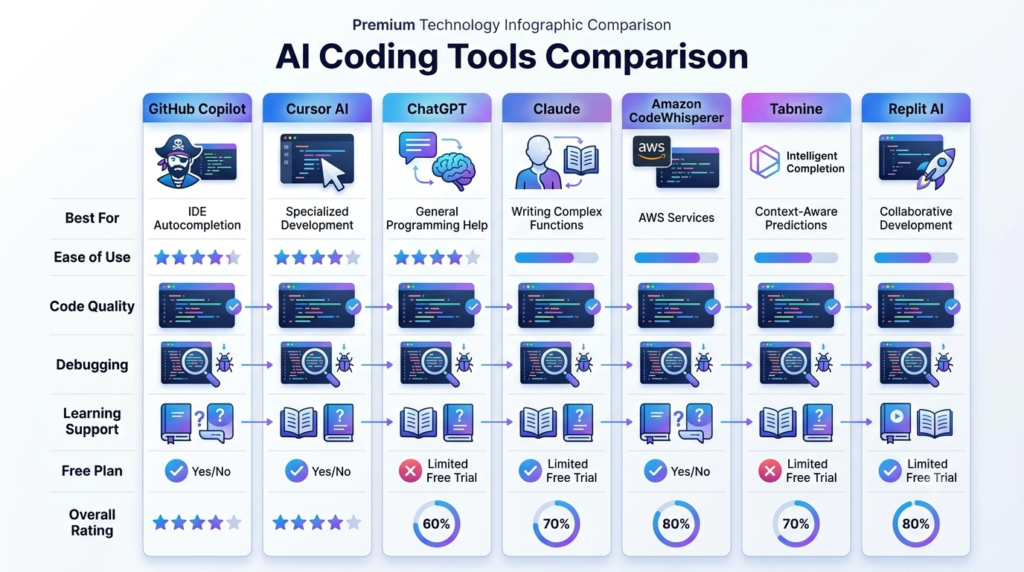
Comparison Table: Best AI Coding Tools
| Tool | Best For | Ease of Use | Code Quality | Free Plan |
|---|---|---|---|---|
| GitHub Copilot | Professional Developers | Easy | Excellent | Limited |
| Cursor AI | Advanced Development | Medium | Excellent | Limited |
| ChatGPT | Learning & Coding | Easy | Very Good | Yes |
| Claude | Large Codebases | Easy | Excellent | Yes |
| Amazon CodeWhisperer | AWS Development | Medium | Very Good | Yes |
| Tabnine | Code Completion | Easy | Very Good | Limited |
| Replit AI | Beginners | Easy | Good | Yes |
Best AI Coding Tools for Beginners
Beginners often need coding tools that not only generate code but also explain concepts clearly. ChatGPT and Replit AI are among the best AI coding tools for new programmers because they provide learning support alongside code generation.
These tools help users understand programming concepts, debug errors, and build projects without requiring extensive experience.
Best AI Coding Tools for Professional Developers
Professional developers require advanced features such as project awareness, code refactoring, debugging, and IDE integration.
GitHub Copilot and Cursor AI are among the Best AI Coding Tools for experienced developers because they integrate directly into development workflows and significantly improve productivity.
Claude is also an excellent option for developers working on large projects that require deep reasoning and code analysis.
Best AI Coding Tools for Debugging
Debugging is one of the most time-consuming aspects of software development. Modern AI coding assistants can identify bugs, explain error messages, and suggest fixes quickly.
ChatGPT, Claude, and Cursor AI are among the most effective AI coding tools for debugging because they can analyze code and provide detailed troubleshooting assistance.
Best AI Coding Tools for Learning Programming
Students and self-learners can benefit greatly from AI-powered coding assistants.
ChatGPT and Replit AI are particularly useful because they explain programming concepts, generate examples, and provide step-by-step guidance for learning languages such as Python, JavaScript, Java, and C++.
How to Choose the Right AI Coding Tool
Selecting the Best AI Coding Tools depends on your experience level, programming goals, and development environment.
Choose GitHub Copilot If
- You are a professional developer.
- You want real-time code completion.
- You work inside Visual Studio Code or similar IDEs.
Choose Cursor AI If
- You work on large software projects.
- You want an AI-first coding environment.
- You need advanced debugging and refactoring support.
Choose ChatGPT If
- You are learning programming.
- You need coding explanations.
- You want help with debugging and problem-solving.
Choose Claude If
- You work with large codebases.
- You need detailed technical analysis.
- You want strong reasoning capabilities.
Choose Replit AI If
- You are a beginner.
- You prefer cloud-based development.
- You want a simple coding experience.
Pros and Cons of AI Coding Tools
Pros
- Faster software development
- Improved coding productivity
- Better debugging assistance
- Reduced repetitive work
- Helpful for learning programming
- Support for multiple languages
- Better documentation generation
- Faster project completion
Cons
- Generated code may contain errors
- Developers must review AI suggestions
- Premium plans can be expensive
- Security risks if code is blindly accepted
- Overreliance may reduce learning opportunities
Frequently Asked Questions
What is the best AI coding tool in 2026?
GitHub Copilot, Cursor AI, ChatGPT, and Claude are among the best AI coding tools in 2026. The right choice depends on whether you prioritize productivity, learning, debugging, or advanced development features.
Which AI coding tool is best for beginners?
ChatGPT and Replit AI are excellent choices for beginners because they provide coding assistance, explanations, examples, and learning support in addition to code generation.
Is GitHub Copilot better than ChatGPT?
GitHub Copilot is better for real-time coding assistance inside an IDE, while ChatGPT is better for learning, debugging, code explanations, and solving programming problems.
Can AI write code automatically?
Yes. Modern AI coding tools can generate code automatically from natural language instructions. However, developers should always review and test AI-generated code before using it in production.
What is the best free AI coding tool?
ChatGPT, Claude, Replit AI, and Amazon CodeWhisperer offer useful free plans that help developers write, learn, and debug code efficiently.
Which AI tool is best for debugging code?
ChatGPT, Claude, and Cursor AI are among the best AI tools for debugging because they can analyze code, identify errors, explain issues, and suggest solutions.
Can AI replace software developers?
No. AI coding tools can improve productivity and automate repetitive tasks, but software developers are still required for architecture, problem-solving, business logic, security, and decision-making.
Are AI coding tools worth using?
Yes. The Best AI Coding Tools can save time, improve productivity, reduce debugging effort, and help developers learn new technologies more efficiently.
Which AI Coding Tool Should You Choose?
The Best AI Coding Tools can dramatically improve the way developers write, test, and maintain software. Whether you are a beginner learning programming or an experienced software engineer managing large projects, AI coding assistants can help you work faster and more effectively.
For professional development, GitHub Copilot and Cursor AI remain top choices. For learning and debugging, ChatGPT and Claude provide exceptional value. Beginners can benefit greatly from Replit AI, while cloud developers may prefer Amazon CodeWhisperer.
Ultimately, the best AI coding tool depends on your workflow, goals, and development environment. By choosing the right tool, developers can increase productivity, improve code quality, and stay competitive in the rapidly evolving software industry.
What is the best AI coding tool in 2026?
GitHub Copilot, Cursor AI, ChatGPT, and Claude are among the best AI coding tools in 2026. The right choice depends on whether you prioritize productivity, learning, debugging, or advanced development features.
Which AI coding tool is best for beginners?
ChatGPT and Replit AI are excellent choices for beginners because they provide coding assistance, explanations, examples, and learning support in addition to code generation.
Is GitHub Copilot better than ChatGPT?
GitHub Copilot is better for real-time coding assistance inside an IDE, while ChatGPT is better for learning, debugging, code explanations, and solving programming problems.
Can AI write code automatically?
Yes. Modern AI coding tools can generate code automatically from natural language instructions. However, developers should always review and test AI-generated code before using it in production.
What is the best free AI coding tool?
ChatGPT, Claude, Replit AI, and Amazon CodeWhisperer offer useful free plans that help developers write, learn, and debug code efficiently.
Which AI tool is best for debugging code?
ChatGPT, Claude, and Cursor AI are among the best AI tools for debugging because they can analyze code, identify errors, explain issues, and suggest solutions.
Can AI replace software developers?
No. AI coding tools can improve productivity and automate repetitive tasks, but software developers are still required for architecture, problem-solving, security, business logic, and decision-making.
Are AI coding tools worth using?
Yes. The best AI coding tools can save time, improve productivity, reduce debugging effort, and help developers learn new technologies more efficiently.
Which AI Coding Tool Should You Choose?
The Best AI Coding Tools have transformed modern software development by helping programmers write code faster, debug issues more efficiently, and learn new technologies with ease. GitHub Copilot and Cursor AI are excellent choices for professional developers, while ChatGPT and Claude provide powerful support for coding, debugging, and technical learning. Beginners can start with ChatGPT or Replit AI, whereas cloud developers may benefit from Amazon CodeWhisperer. Ultimately, the best AI coding tool depends on your goals, workflow, and experience level. By choosing the right AI assistant, developers can improve productivity, reduce development time, and build better software in 2026 and beyond.
Related AI Guides: