
Introduction
YouTube has become one of the most competitive content platforms in the world. Millions of videos are uploaded every day across categories such as education, technology, entertainment, business, gaming, finance, and lifestyle. As competition increases, creators must produce high-quality content consistently while also managing research, scripting, editing, thumbnails, SEO, and audience engagement.
Artificial intelligence is helping creators solve many of these challenges. Modern AI tools can assist with content planning, script writing, video editing, thumbnail creation, voice generation, keyword research, and channel optimization. Tasks that once required hours of manual effort can now be completed much faster with the help of AI-powered software.
The popularity of AI tools among YouTubers continues to grow because they improve productivity without requiring large teams or expensive production resources. Solo creators can now access capabilities that were previously available only to professional media companies.
In this guide, we will explore the best AI tools for YouTube creators in 2026, compare their strengths, discuss real-world applications, and help you choose the right tools for growing your channel efficiently.
What Are AI Tools for YouTube Creators?
AI tools for YouTube creators are software applications that use artificial intelligence to assist with various stages of video production and channel management. These tools help creators generate ideas, write scripts, edit videos, design thumbnails, optimize SEO, create voiceovers, and improve overall productivity.
Unlike traditional content creation software, AI-powered platforms can automate repetitive tasks and provide intelligent recommendations. This allows creators to focus more on strategy, creativity, and audience engagement rather than spending excessive time on technical processes.
How AI Is Transforming YouTube Content Creation
AI is changing nearly every aspect of YouTube production. Script-writing assistants can generate outlines and content ideas. Video editing platforms can automatically remove mistakes and create captions. Thumbnail tools help improve click-through rates, while SEO tools identify keywords and optimization opportunities.
As AI technology continues to evolve, creators are able to produce professional-quality content faster than ever before.
Key Features of Modern YouTube AI Tools
Common features include:
- Script generation
- Video editing automation
- Thumbnail design
- Voice generation
- Keyword research
- SEO optimization
- Content planning
- Audience analytics
These capabilities make AI valuable for creators of all experience levels.
Why YouTube Creators Are Using AI Tools
The demand for high-quality video content has increased significantly in recent years. Viewers expect better production quality, more frequent uploads, and valuable information delivered in engaging formats.
Growing Competition on YouTube
Thousands of creators compete for attention in nearly every niche. Standing out requires strong content, effective SEO, attractive thumbnails, and consistent publishing. AI tools help creators remain competitive by improving efficiency and supporting content quality.
The Need for Faster Content Production
Producing videos involves many time-consuming steps. Research, scripting, editing, optimization, and promotion can consume hours for every upload. AI tools streamline these tasks and allow creators to focus more on creating valuable content.
Many successful channels now use AI-assisted workflows because they reduce production time while helping maintain consistent quality standards.
Quick Comparison Table of AI Tools for YouTube Creators
| Tool | Best For | Free Plan | Main Strength |
|---|---|---|---|
| ChatGPT | Script Writing | Yes | Content Planning |
| Descript | Video Editing | Yes | AI Editing |
| VidIQ | YouTube SEO | Yes | Keyword Research |
| TubeBuddy | Channel Growth | Yes | Optimization |
| Canva AI | Thumbnails | Yes | Visual Design |
ChatGPT: AI-Powered Script Writing and Content Planning
ChatGPT has become one of the most useful AI tools for YouTube creators because of its versatility. It can assist with brainstorming video ideas, generating content calendars, creating video outlines, writing scripts, and developing audience engagement strategies.
Many creators use ChatGPT at the beginning of the content creation process. Instead of spending hours searching for topics, they can quickly generate video ideas, identify audience questions, and build structured content plans.
The platform is particularly useful for educational channels, technology channels, business creators, and faceless YouTube channels that depend heavily on well-organized scripts.
ChatGPT can also help repurpose content. Creators can transform blog posts into videos, videos into social media content, and long-form videos into short-form clips with the help of AI-generated summaries and scripts.
Best Uses
- Video scripting
- Content planning
- Idea generation
- Research assistance
- Content repurposing
- Audience engagement strategies
Advantages
- Extremely versatile
- Easy to use
- Fast content generation
- Supports multiple niches
- Available through free and paid plans
For many YouTube creators, ChatGPT serves as the foundation of an AI-powered content workflow because it supports nearly every stage of planning and script development.
Descript: AI Video Editing Made Simple
Descript has become one of the most popular AI-powered video editing platforms for YouTube creators because it simplifies complex editing tasks. Traditional video editing software often requires technical expertise and considerable time investment. Descript removes many of these barriers by allowing creators to edit videos through text-based workflows.
One of its most useful features is automatic transcription. After uploading a video, Descript generates a text transcript that creators can edit directly. Deleting words from the transcript automatically removes the corresponding video segments, making editing faster and more intuitive.
The platform also offers AI-powered features such as filler word removal, automatic captions, voice enhancement, screen recording, and podcast editing. These capabilities help creators improve production quality while reducing editing time.
Descript is particularly useful for educational channels, podcasts, interviews, tutorials, and talking-head videos where efficient editing is important.
Best Uses
- Video editing
- Podcast production
- Automatic captions
- Screen recording
- Transcript-based editing
Advantages
- Beginner-friendly interface
- Fast editing workflow
- Accurate transcription
- AI-powered enhancements
- Time-saving features
For creators looking to simplify editing without sacrificing quality, Descript remains one of the strongest AI video production tools available.
VidIQ: AI for YouTube SEO and Growth
Creating great content is only part of YouTube success. Videos also need visibility, and that is where VidIQ becomes valuable. VidIQ is an AI-powered YouTube optimization platform designed to help creators improve rankings, increase views, and grow their channels.
The platform provides keyword research, SEO recommendations, competitor analysis, trend discovery, and performance insights. These features help creators understand what audiences are searching for and identify opportunities for content growth.
VidIQ’s AI-powered content suggestions are particularly useful. The platform can recommend topics, titles, keywords, and content ideas based on current trends and audience demand.
Many creators use VidIQ to improve video discoverability and make data-driven content decisions rather than relying solely on intuition.
Best Uses
- Keyword research
- YouTube SEO
- Topic discovery
- Competitor analysis
- Channel growth planning
Advantages
- Valuable SEO insights
- Strong keyword tools
- Trend identification
- Audience-focused recommendations
- Easy integration with YouTube
For creators focused on organic growth and search visibility, VidIQ is one of the most powerful AI-assisted optimization tools available.
TubeBuddy: Channel Optimization and Productivity
TubeBuddy is another popular YouTube productivity platform that helps creators optimize their channels and improve workflow efficiency. It provides a variety of tools designed to simplify channel management and support long-term growth.
The platform assists with keyword research, tag suggestions, thumbnail testing, SEO analysis, bulk updates, and publishing workflows. These features help creators save time while improving video performance.
One of TubeBuddy’s strengths is channel management. Large channels often manage hundreds of videos, making manual updates difficult. TubeBuddy helps automate repetitive tasks and streamline administrative work.
The platform also offers A/B testing features that allow creators to compare thumbnails, titles, and optimization strategies. This data-driven approach can improve click-through rates and overall channel performance.
Best Uses
- Channel management
- SEO optimization
- Thumbnail testing
- Workflow automation
- Productivity improvement
Advantages
- Time-saving features
- Helpful optimization tools
- Strong workflow support
- Channel management capabilities
- Suitable for growing channels
TubeBuddy remains a valuable tool for creators seeking efficiency and performance improvements.
Canva AI: Thumbnails and Visual Branding
Canva AI has become one of the most useful design platforms for YouTube creators. Attractive thumbnails play a critical role in video performance because they influence click-through rates and viewer engagement.
Canva allows creators to design professional thumbnails without advanced graphic design skills. Its AI-powered features help generate layouts, improve visual consistency, and accelerate the design process.
The platform offers thousands of templates that can be customized for different niches, including education, technology, gaming, business, finance, and entertainment.
Beyond thumbnails, Canva can also be used for channel banners, social media graphics, presentation slides, promotional materials, and branding assets. This makes it a versatile design solution for creators building a recognizable visual identity.
Best Uses
- Thumbnail creation
- Channel branding
- Social media graphics
- Marketing materials
- Visual content design
Advantages
- Easy to use
- Professional templates
- AI-assisted design tools
- Fast workflow
- Suitable for beginners
For creators who want professional-looking visuals without hiring designers, Canva AI remains an excellent option.
Additional AI Tools Worth Considering
Several additional AI tools can further improve YouTube workflows and content quality.
Opus Clip
Opus Clip automatically converts long-form videos into short-form clips optimized for platforms such as YouTube Shorts, Instagram Reels, and TikTok. This helps creators maximize content reach.
ElevenLabs
ElevenLabs specializes in AI voice generation and voice cloning. Creators use it for narrations, faceless videos, educational content, and multilingual voiceovers.
Claude
Claude helps creators develop scripts, research topics, structure educational content, and generate detailed explanations for video production.
Gemini
Gemini supports brainstorming, research, summarization, and content planning. Its integration with Google’s ecosystem makes it useful for creators who rely heavily on online research.
Together, these tools help creators improve efficiency across scripting, editing, promotion, and audience engagement.
Benefits of Using AI Tools for YouTube Creators
AI tools offer numerous advantages for YouTube creators, particularly in an environment where competition continues to increase every year. Producing successful videos requires much more than simply recording content. Creators must generate ideas, research topics, write scripts, edit footage, design thumbnails, optimize SEO, and engage with audiences. Managing all of these responsibilities can be overwhelming, especially for solo creators.
One of the biggest benefits of AI is efficiency. Tasks that once required hours can now be completed in minutes. AI can generate content ideas, create outlines, assist with scripts, suggest titles, and improve video descriptions.
Another important benefit is consistency. Many creators struggle to maintain regular upload schedules. AI tools help streamline workflows, making it easier to publish content consistently without sacrificing quality.
AI also supports creativity. Rather than replacing creators, it often helps them explore new ideas, identify trends, and discover content opportunities they may not have considered.
Cost savings are another major advantage. Small creators and startup channels can access advanced capabilities without hiring large production teams. Features such as automated editing, AI voice generation, and thumbnail design reduce production expenses while improving quality.
As YouTube continues to evolve, creators who use AI strategically can improve productivity, increase content output, and compete more effectively.
How AI Improves Video Production Productivity
Video production is a multi-step process that often requires significant time and effort. AI tools help creators accelerate many of these tasks, allowing them to focus on storytelling, audience engagement, and content quality.
Research becomes faster when AI tools summarize information, identify trends, and organize source material. Script-writing assistants can generate outlines and draft content, helping creators move from idea to production more quickly.
Editing is another area where AI delivers major productivity improvements. Automatic transcription, caption generation, filler-word removal, and scene detection reduce manual editing time significantly.
Thumbnail creation and branding also benefit from AI assistance. Instead of spending hours designing graphics from scratch, creators can use AI-powered design tools to generate professional visuals quickly.
Content repurposing has become increasingly important as creators expand across multiple platforms. AI can convert long-form videos into short clips, generate social media posts, create newsletter content, and produce promotional materials from existing videos.
By automating repetitive tasks, AI allows creators to spend more time developing valuable content and less time handling technical processes.
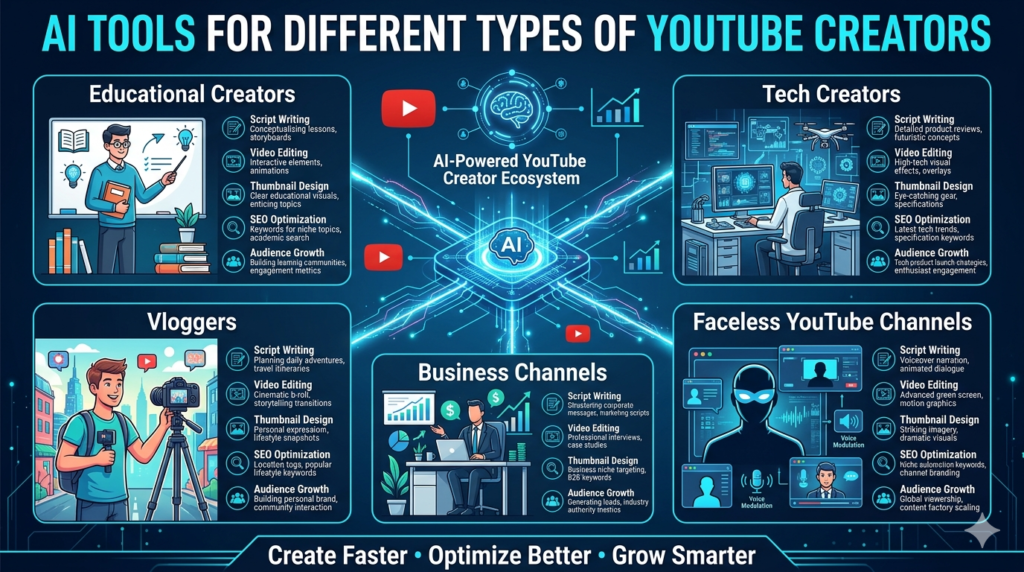
AI Tools for Different Types of YouTube Creators
Different YouTube channels have different production requirements. AI tools can support a variety of creator types and content strategies.
Educational Creators
Educational channels often require extensive research, structured scripts, and clear explanations. AI tools help organize information, generate outlines, and simplify complex topics.
Tech Creators
Technology channels benefit from AI-assisted research, product comparisons, script generation, and trend analysis. These tools help creators stay current with rapidly changing industries.
Vloggers
Vloggers often spend significant time editing footage and creating thumbnails. AI editing tools help speed up post-production while maintaining quality.
Business Channels
Business-focused creators use AI for content planning, script writing, presentation development, and audience engagement strategies. AI helps improve efficiency while maintaining professional standards.
Faceless YouTube Channels
Faceless channels rely heavily on AI-powered workflows. Script generation, voice synthesis, video editing, stock media organization, and thumbnail creation can all be supported by AI tools.
Because each creator type has unique needs, selecting the right combination of tools is often more important than choosing a single platform.
Best Practices for Using AI Tools on YouTube
The most successful creators use AI as a productivity assistant rather than a replacement for creativity and expertise. AI can accelerate workflows, but audience trust is still built through originality, authenticity, and valuable content.
One best practice is using AI for research and planning while adding personal insights and experiences to the final content. This approach creates videos that are both efficient to produce and unique to the creator.
Creators should also verify information before publishing. AI-generated content can occasionally contain errors, so fact-checking remains important, especially in educational, financial, health, and technology niches.
Maintaining a consistent brand voice is another essential practice. AI-generated scripts often benefit from editing to ensure they match the creator’s personality and communication style.
Experimentation is equally important. Different tools excel at different tasks, so testing multiple workflows can help identify the most efficient production process.
The creators who achieve long-term success are those who combine AI-powered efficiency with strong storytelling, audience understanding, and genuine expertise.
Common Mistakes to Avoid
AI tools can significantly improve content creation workflows, but many creators fail to achieve the best results because they use these tools incorrectly. One common mistake is relying entirely on AI-generated scripts without adding personal insights, experiences, or unique perspectives. Viewers often connect with creators because of their personality and expertise, not because of generic information.
Another mistake is prioritizing quantity over quality. Some creators use AI to generate large volumes of content quickly, but poorly researched or low-value videos rarely perform well over the long term. Consistent quality remains more important than publishing frequency alone.
Many creators also ignore fact-checking. AI-generated information can occasionally contain inaccuracies, making verification essential, especially in educational, financial, health, and technology content.
Overusing automation is another problem. AI should support creativity rather than replace it. The most successful channels combine AI efficiency with authentic storytelling and audience engagement.
By avoiding these mistakes, creators can use AI responsibly while maintaining quality, credibility, and viewer trust.
Free vs Paid AI Tools for YouTube
Many YouTube creators begin with free AI tools because they provide enough functionality for basic content production. Free plans often include script generation, thumbnail creation, keyword research, and limited editing capabilities.
For beginners and smaller channels, free tools are often sufficient. They provide opportunities to learn AI-assisted workflows and improve productivity without additional costs.
Paid plans become more valuable as channels grow. Premium subscriptions typically offer advanced AI models, higher usage limits, enhanced analytics, faster processing, and additional workflow features.
Professional creators often invest in paid tools because the time savings and productivity improvements justify the cost. Advanced editing features, detailed SEO insights, and premium content generation capabilities can contribute directly to channel growth.
The most practical approach is to start with free plans and upgrade only when specific limitations begin affecting production efficiency or content quality.
How to Choose the Right AI Tool for Your Channel
Choosing the right AI tool depends on your channel type, content strategy, and workflow requirements. Different creators face different challenges, so selecting tools that solve specific problems is more effective than collecting numerous platforms.
Creators who spend significant time writing scripts may benefit most from ChatGPT or Claude. Those focused on video editing often prefer Descript, while creators seeking channel growth may prioritize VidIQ or TubeBuddy.
Thumbnail-focused creators can gain substantial value from Canva AI, while faceless channels often benefit from voice-generation tools such as ElevenLabs.
When evaluating a tool, consider:
- Ease of use
- Pricing
- Time savings
- Content quality improvements
- Workflow compatibility
- Growth potential
The best AI tool is not necessarily the most powerful. It is the tool that fits naturally into your content creation process and helps achieve your goals efficiently.
Real-World YouTube Use Cases
AI tools are already being used successfully across many types of YouTube channels.
Script Creation
Creators use AI to generate outlines, develop video concepts, organize information, and write scripts more efficiently.
Video Editing
AI-powered editing tools automate repetitive tasks such as transcription, caption generation, filler-word removal, and clip organization.
Thumbnail Design
Design platforms help creators produce professional thumbnails that improve click-through rates and strengthen visual branding.
Voiceovers
AI voice generation allows creators to produce narrations for tutorials, educational content, documentaries, and faceless channels.
Content Repurposing
Long-form videos can be transformed into Shorts, social media clips, newsletters, blog posts, and promotional materials using AI-assisted workflows.
These applications demonstrate how AI supports nearly every stage of the YouTube production process.
Future of AI in YouTube Content Creation
Artificial intelligence is expected to play an even larger role in video production over the coming years. Future AI systems may assist with audience analysis, content personalization, automated editing, visual effects, multilingual content creation, and real-time production support.
Creators may eventually use AI to build highly customized workflows that adapt to their channel goals and audience preferences. Advanced systems could automatically identify trending topics, generate content suggestions, optimize publishing schedules, and recommend growth strategies.
Personalization is likely to become increasingly important. AI tools may help creators tailor content to different audience segments while maintaining consistency across platforms.
As technology advances, the creators who combine AI efficiency with creativity, authenticity, and expertise will be best positioned for long-term success.
Frequently Asked Questions
What are the best AI tools for YouTube creators in 2026?
Some of the best AI tools for YouTube creators in 2026 include ChatGPT, Descript, VidIQ, TubeBuddy, Canva AI, ElevenLabs, and Opus Clip. These tools help with scripting, editing, SEO, thumbnails, voiceovers, and channel growth.
Which AI tool is best for YouTube script writing?
ChatGPT and Claude are among the best AI tools for YouTube script writing because they help creators generate ideas, create outlines, conduct research, and write engaging video scripts.
Can AI edit YouTube videos automatically?
Can AI edit YouTube videos automatically?
Which AI tool is best for YouTube SEO?
VidIQ and TubeBuddy are among the best AI tools for YouTube SEO because they provide keyword research, optimization recommendations, competitor analysis, and growth insights.
Can AI create YouTube thumbnails?
Yes. Canva AI and other AI design platforms can help creators generate professional YouTube thumbnails, channel graphics, and branding materials quickly and efficiently.
What is the best AI tool for faceless YouTube channels?
ChatGPT, ElevenLabs, Descript, and Canva AI are excellent AI tools for faceless YouTube channels because they support script writing, voiceovers, video editing, and thumbnail creation.
Are free AI tools enough for YouTube creators?
For many beginners, free AI tools provide sufficient functionality for scripting, editing, SEO, and design. As channels grow, premium tools may offer additional productivity and growth benefits.
Can AI help grow a YouTube channel?
Yes. AI tools can improve content planning, video optimization, audience engagement, keyword research, and production efficiency, helping creators grow their channels more effectively.
Choosing the Right AI Tools for YouTube Success
YouTube continues to evolve into an increasingly competitive platform where efficiency, consistency, and quality are critical for growth. AI tools help creators manage complex workflows by supporting research, scripting, editing, optimization, design, and audience engagement.
Platforms such as ChatGPT, Descript, VidIQ, TubeBuddy, Canva AI, ElevenLabs, and Opus Clip each address different aspects of the content creation process. When used strategically, these tools can save time, improve productivity, and support channel growth.
The most successful creators will not rely entirely on automation. Instead, they will use AI to enhance creativity, strengthen workflows, and focus more attention on producing valuable content for their audiences.
By combining AI-powered efficiency with originality and expertise, creators can build stronger channels and prepare for the future of digital content creation.
Related AI Guides: