
Introduction
Productivity has become one of the most important factors for success in today’s fast-paced digital world. Whether you are a student, business owner, content creator, freelancer, or corporate professional, managing time effectively and completing tasks efficiently can significantly impact your results. However, increasing workloads, constant communication, and growing information demands often make it difficult to stay organized and productive.
Artificial intelligence is transforming the way people work by helping automate repetitive tasks, organize information, improve communication, and streamline workflows. Instead of spending hours on manual activities, users can now rely on AI-powered tools to handle research, writing, scheduling, note-taking, project management, and task prioritization.
The popularity of AI productivity tools has increased rapidly because they help individuals and teams accomplish more in less time. Many of these platforms combine automation, machine learning, and intelligent recommendations to improve efficiency without requiring advanced technical skills.
In this guide, we will explore the best AI productivity tools in 2026, compare their strengths, examine real-world applications, and help you choose the right tools for improving personal and professional productivity.
What Are AI Productivity Tools?
AI productivity tools are software applications that use artificial intelligence to help users manage tasks, organize information, automate workflows, and improve efficiency. These tools reduce the amount of time spent on repetitive work and allow users to focus on higher-value activities that require creativity, decision-making, and strategic thinking.
Unlike traditional productivity software, AI-powered platforms can analyze information, understand context, generate suggestions, and automate complex processes. This makes them significantly more useful than basic task managers or note-taking applications.
AI productivity tools support a wide range of activities including scheduling, writing, communication, project management, meeting summaries, research, collaboration, and knowledge organization.
Many modern productivity platforms combine multiple capabilities into a single workspace, reducing the need to switch between different applications throughout the day.
As artificial intelligence continues to improve, productivity tools are becoming smarter, more personalized, and better equipped to support individual work styles and professional goals.
Why AI Productivity Tools Are Becoming Essential
The modern workplace generates an enormous amount of information every day. Emails, meetings, documents, reports, messages, projects, and research materials can quickly become overwhelming if not managed effectively.
AI productivity tools help address these challenges by organizing information and automating repetitive tasks. Instead of manually scheduling meetings, summarizing documents, responding to routine messages, or tracking project updates, users can rely on AI to perform many of these functions automatically.
Another reason these tools have become essential is the rise of remote and hybrid work environments. Teams increasingly collaborate across different locations and time zones, creating a need for smarter communication and workflow management systems.
AI also helps reduce decision fatigue. By prioritizing tasks, recommending actions, and highlighting important information, productivity platforms help users focus on the work that matters most.
As workloads continue to increase, AI productivity tools are becoming valuable assistants that improve efficiency, reduce stress, and support better work-life balance.
Quick Comparison Table of AI Productivity Tools
| Tool | Best For | Free Plan | Main Strength |
|---|---|---|---|
| ChatGPT | General Productivity | Yes | Versatility |
| Notion AI | Knowledge Management | Yes | Organization |
| Microsoft Copilot | Workplace Tasks | Limited | Office Integration |
| Grammarly | Communication | Yes | Writing Quality |
| Motion AI | Scheduling | Limited | Time Management |
ChatGPT: AI Assistant for Everyday Productivity
ChatGPT has become one of the most widely used AI productivity tools because of its flexibility and broad range of capabilities. It can assist with writing, brainstorming, planning, research, organization, communication, and problem-solving, making it useful for both personal and professional workflows.
Many users rely on ChatGPT as a daily productivity assistant. It can generate meeting agendas, summarize documents, create action plans, organize ideas, draft emails, and help prioritize tasks. These capabilities reduce administrative workload and allow users to focus on more important responsibilities.
Another major advantage is adaptability. Students use ChatGPT for studying and note organization, professionals use it for workplace communication, and entrepreneurs use it for planning, marketing, and business operations.
Because ChatGPT can support so many different tasks, it often becomes the central hub of an AI-powered productivity system.
Best Uses
- Task planning
- Research assistance
- Email drafting
- Content creation
- Brainstorming
- Information organization
Advantages
- Extremely versatile
- Easy to use
- Supports multiple workflows
- Strong productivity benefits
- Available through free and paid plans
For many users, ChatGPT is the most valuable AI productivity tool because it combines flexibility, speed, and accessibility within a single platform.
Notion AI: Productivity and Knowledge Management
Notion AI has evolved into one of the most powerful productivity platforms available for individuals, students, creators, and businesses. While traditional note-taking applications focus mainly on storing information, Notion AI helps users organize, analyze, summarize, and manage knowledge more effectively.
One of the biggest strengths of Notion AI is its ability to combine note-taking, project management, task tracking, documentation, and AI assistance within a single workspace. This eliminates the need to constantly switch between multiple applications throughout the day.
Users can generate meeting summaries, create project plans, organize research materials, build content calendars, and draft documents directly inside Notion. The AI assistant can also help rewrite content, summarize long notes, and extract important information from large documents.
For teams, Notion AI improves collaboration by centralizing information and making knowledge easier to access. For individuals, it serves as a personal productivity hub that keeps tasks, ideas, and projects organized.
Best Uses
- Knowledge management
- Project planning
- Note organization
- Content calendars
- Team collaboration
Advantages
- All-in-one workspace
- Strong organization features
- AI-assisted note management
- Flexible workflow design
- Excellent collaboration tools
For users who manage large amounts of information, Notion AI can significantly improve organization and efficiency.
Microsoft Copilot: Workplace Productivity
Microsoft Copilot is designed to enhance productivity across the Microsoft ecosystem. Integrated with applications such as Word, Excel, Outlook, PowerPoint, and Teams, Copilot helps professionals automate routine tasks and work more efficiently.
One of its greatest strengths is document assistance. Users can generate reports, summarize information, draft emails, analyze spreadsheets, and create presentations using natural language instructions. This saves considerable time compared to manual workflows.
Copilot also improves workplace communication. It can summarize meetings, identify action items, draft responses, and help users stay organized across multiple projects.
Because many businesses already rely heavily on Microsoft products, Copilot fits naturally into existing workflows. Employees do not need to learn entirely new systems to benefit from AI-powered assistance.
As organizations continue adopting AI in the workplace, Microsoft Copilot is becoming an increasingly important productivity solution for professionals and enterprise teams.
Best Uses
- Document creation
- Email management
- Spreadsheet analysis
- Presentation development
- Workplace collaboration
Advantages
- Deep Microsoft integration
- Strong workplace productivity
- Time-saving automation
- Easy adoption for businesses
- Professional workflow support
For professionals working within Microsoft environments, Copilot offers substantial productivity benefits.
Grammarly: Faster and Better Communication
Grammarly is often viewed as a writing tool, but it is also a powerful productivity platform. Effective communication is essential in business, education, and professional environments, and Grammarly helps users communicate more clearly and efficiently.
The platform provides real-time suggestions for grammar, spelling, punctuation, clarity, tone, and readability. This reduces editing time and helps users produce polished content more quickly.
Professionals frequently use Grammarly when writing emails, reports, proposals, presentations, and workplace messages. Students use it for assignments and academic writing, while creators rely on it for blogs, newsletters, and social media content.
One major advantage is consistency. Grammarly helps ensure that communication remains professional and error-free across multiple platforms and content formats.
Best Uses
- Email writing
- Business communication
- Academic writing
- Editing
- Proofreading
Advantages
- Real-time corrections
- Improved clarity
- Better communication
- Easy integration
- Strong productivity benefits
For anyone who writes regularly, Grammarly can save time while improving communication quality.
Motion AI: Smart Task and Time Management
Motion AI focuses on one of the biggest productivity challenges people face: time management. Many professionals struggle with scheduling, prioritization, and balancing competing responsibilities throughout the day.
Motion uses artificial intelligence to automatically plan schedules, prioritize tasks, and optimize calendars. Instead of manually organizing every activity, users can allow Motion to create intelligent schedules based on deadlines, workload, and availability.
The platform continuously adjusts plans as priorities change. If a meeting is added or a task takes longer than expected, Motion can reorganize the schedule automatically.
This dynamic approach reduces planning effort and helps users focus on execution rather than calendar management. The platform is especially useful for entrepreneurs, freelancers, consultants, and busy professionals managing multiple projects simultaneously.
Best Uses
- Time management
- Scheduling
- Task prioritization
- Calendar optimization
- Work planning
Advantages
- Automated scheduling
- Smart prioritization
- Reduced planning workload
- Improved focus
- Dynamic adjustments
For users seeking better control over their time, Motion AI offers a highly specialized productivity solution.
Additional AI Productivity Tools Worth Considering
Several additional AI tools deserve consideration for users looking to improve productivity.
ClickUp AI
ClickUp AI combines project management, collaboration, task tracking, and AI-powered assistance. It is particularly useful for teams managing complex projects and workflows.
Gemini
Gemini helps users with research, brainstorming, information summarization, and content organization. Its integration with Google’s ecosystem makes it useful for everyday productivity tasks.
Claude
Claude assists with writing, planning, research, and knowledge work. Many professionals use it for long-form content creation and information analysis.
Otter AI
Otter AI specializes in meeting transcription, note-taking, and conversation summaries. It helps professionals capture important information without manual note-taking.
Together, these platforms provide additional options for improving productivity across a variety of professional and personal workflows.
Benefits of Using AI Productivity Tools
AI productivity tools offer numerous advantages for individuals and organizations seeking to work smarter rather than harder. One of the most significant benefits is time savings. Many daily tasks such as scheduling meetings, organizing notes, drafting emails, managing projects, and summarizing information can consume a large portion of the workday. AI helps automate these activities and frees users to focus on higher-priority responsibilities.
Another important benefit is improved organization. Modern productivity platforms can centralize information, track tasks, manage deadlines, and ensure that important details do not get lost across multiple applications. This creates a more structured workflow and reduces the risk of missed opportunities or forgotten responsibilities.
AI tools also improve decision-making by helping users analyze information more efficiently. Instead of spending hours reviewing documents or collecting data, users can quickly access summaries, insights, and recommendations that support better choices.
Collaboration is another area where AI provides value. Teams can communicate more effectively, share knowledge more easily, and coordinate projects with less friction. Automated meeting summaries, task assignments, and project updates improve alignment and reduce administrative workload.
As workloads continue to increase across industries, AI productivity tools help users achieve more while maintaining quality, accuracy, and efficiency.
How AI Improves Daily Efficiency
Daily efficiency depends on how effectively individuals manage their time, attention, and resources. AI productivity tools improve efficiency by reducing repetitive work and helping users focus on meaningful activities.
One major area of improvement is information management. Many professionals spend significant time searching for files, reviewing notes, reading emails, and organizing documents. AI can summarize information, categorize content, and surface relevant details quickly.
Communication efficiency also improves through AI assistance. Drafting emails, preparing reports, creating presentations, and responding to messages can often be completed much faster with AI-powered support. This reduces the time spent on administrative communication.
Scheduling and task management benefit greatly as well. AI-powered planning tools can prioritize activities, optimize calendars, and recommend schedules that maximize productivity while minimizing conflicts.
Research tasks become more efficient because AI can gather information, summarize sources, and organize findings into useful formats. Rather than spending hours collecting data, users can focus on understanding and applying information.
By automating routine processes and reducing cognitive overload, AI helps individuals accomplish more work with less effort throughout the day.
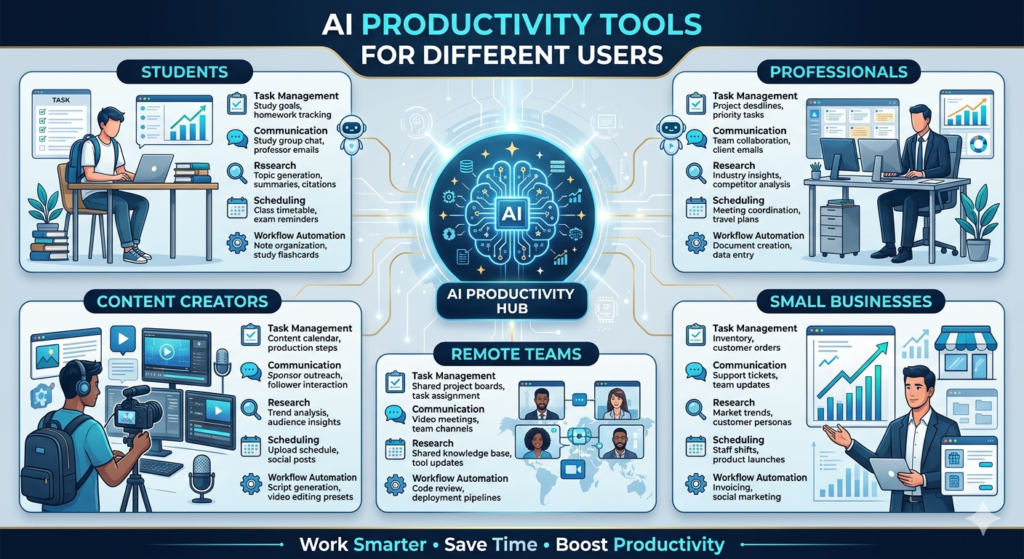
AI Productivity Tools for Different Users
Productivity requirements vary depending on professional responsibilities, work environments, and personal goals. AI tools support a wide variety of user types.
Students
Students use AI productivity tools for note organization, research assistance, assignment planning, study schedules, and exam preparation. These tools help manage academic workloads more effectively.
Professionals
Business professionals rely on AI for communication, project management, meeting summaries, scheduling, and information analysis. AI helps reduce administrative burdens and improve workplace efficiency.
Content Creators
Content creators use AI to manage publishing calendars, organize ideas, generate content plans, streamline research, and coordinate production workflows across multiple platforms.
Small Businesses
Small business owners often use AI to automate repetitive processes, manage customer communication, organize operations, and improve productivity without expanding staff.
Remote Teams
Remote and distributed teams benefit from AI-powered collaboration tools that improve communication, project tracking, meeting documentation, and workflow coordination.
Because productivity challenges differ across user groups, selecting tools that align with specific needs is often more effective than adopting generic solutions.
Best Practices for Using AI Productivity Tools
To achieve the best results, AI productivity tools should be used strategically rather than indiscriminately. The most successful users identify repetitive tasks that consume significant time and then use AI to automate or simplify those activities.
A useful approach is to begin with one or two core productivity tools rather than attempting to implement multiple platforms simultaneously. This allows users to develop effective workflows without creating unnecessary complexity.
It is also important to review AI-generated outputs. While AI can accelerate work, human judgment remains essential for evaluating recommendations, verifying information, and making final decisions.
Users should focus on integrating AI into existing workflows rather than redesigning everything at once. Gradual adoption often leads to better long-term results and smoother transitions.
Another best practice is maintaining a balance between automation and critical thinking. AI can assist with organization, planning, and communication, but creativity, leadership, problem-solving, and strategic decision-making still require human involvement.
The greatest productivity gains occur when AI handles routine work while people focus on high-value activities that require expertise, creativity, and judgment.
Common Mistakes to Avoid
While AI productivity tools can significantly improve efficiency, many users fail to realize their full benefits because they adopt poor workflows or unrealistic expectations. One common mistake is using too many productivity tools at the same time. Constantly switching between multiple platforms can create confusion and reduce productivity rather than improve it.
Another mistake is relying entirely on automation without reviewing outputs. AI-generated schedules, summaries, reports, and recommendations should still be reviewed by humans to ensure accuracy and relevance. Productivity improves most when AI supports decision-making rather than replacing it completely.
Many users also focus heavily on tools while ignoring habits. Even the best AI software cannot compensate for poor time management, lack of focus, or inconsistent work routines. Successful productivity combines effective tools with strong personal discipline.
Some individuals attempt to automate every task, including activities that benefit from creativity, strategic thinking, and human judgment. The goal should be to automate repetitive work while preserving time for meaningful contributions.
Avoiding these mistakes allows users to maximize the value of AI while maintaining control over their workflows and decisions.
Free vs Paid AI Productivity Tools
Most AI productivity platforms offer both free and premium plans. Free versions typically provide enough functionality for students, casual users, freelancers, and small teams that are just beginning to explore AI-assisted workflows.
Free plans often include task management, note-taking assistance, document summaries, content generation, scheduling features, and basic workflow automation. For many users, these capabilities are sufficient to improve daily productivity.
Paid plans usually provide advanced AI models, higher usage limits, additional integrations, priority processing, team collaboration features, and enhanced automation capabilities. Businesses and professionals with demanding workflows often find these upgrades valuable because they save significant time and improve efficiency.
The best approach is to start with free tools and identify areas where limitations affect productivity. Upgrading becomes worthwhile when premium features directly support important business or professional goals.
For many users, a combination of free and paid tools provides the ideal balance between functionality and cost.
How to Choose the Right AI Productivity Tool
Selecting the right AI productivity tool depends on your specific goals, work style, and daily responsibilities. Different tools excel at different tasks, so understanding your needs is essential before choosing a platform.
If your primary challenge is organization, Notion AI may be the best option. If you spend most of your time working in Microsoft applications, Microsoft Copilot can provide deeper integration and workflow support.
Individuals who struggle with communication and writing may benefit from Grammarly, while users seeking better scheduling and time management often find Motion AI more effective.
When evaluating productivity tools, consider factors such as:
- Ease of use
- Learning curve
- Integration options
- Automation capabilities
- Collaboration features
- Pricing
- Scalability
The ideal productivity tool is not necessarily the one with the most features. It is the one that solves your most important problems and fits naturally into your daily routine.
Real-World Productivity Use Cases
AI productivity tools are already transforming workflows across industries and professions.
Task Management
Professionals use AI-powered systems to organize projects, track deadlines, prioritize responsibilities, and improve accountability.
Communication
AI assists with email drafting, report creation, meeting summaries, business writing, and workplace messaging.
Research
Researchers, students, and professionals use AI to gather information, summarize documents, analyze data, and organize knowledge efficiently.
Project Planning
Teams rely on AI tools to coordinate projects, assign responsibilities, track progress, and improve collaboration across departments.
Personal Productivity
Individuals use AI for goal tracking, daily planning, habit management, scheduling, and information organization.
These use cases demonstrate how AI productivity tools support both professional and personal effectiveness.
Future of AI Productivity
The future of productivity technology will be increasingly intelligent, personalized, and automated. AI systems are expected to become more proactive in identifying opportunities, managing workloads, and supporting decision-making.
Future platforms may function as digital assistants that understand personal preferences, work patterns, priorities, and long-term goals. Rather than simply responding to commands, they may proactively recommend actions and optimize workflows automatically.
Greater integration between productivity tools is also expected. Scheduling, communication, project management, research, and documentation systems may operate as unified ecosystems rather than separate applications.
As artificial intelligence continues to evolve, productivity tools will likely become essential components of both personal and professional success.
Frequently Asked Questions
What are the best AI productivity tools in 2026?
Some of the best AI productivity tools in 2026 include ChatGPT, Notion AI, Microsoft Copilot, Grammarly, Motion AI, ClickUp AI, and Otter AI. These tools help users manage tasks, organize information, automate workflows, and improve efficiency.
Which AI productivity tool is best for students?
Students often benefit from ChatGPT, Notion AI, Grammarly, and Gemini because these tools support note-taking, research, writing, organization, and academic productivity.
Can AI improve workplace productivity?
Yes. AI productivity tools can automate repetitive tasks, organize information, improve communication, manage schedules, and help professionals complete work more efficiently.
Are AI productivity tools free?
Many AI productivity tools offer free plans with useful features. Premium subscriptions typically provide advanced AI capabilities, higher usage limits, and additional integrations.
Which AI productivity tool is best for project management?
Notion AI and ClickUp AI are among the best AI productivity tools for project management because they combine task tracking, collaboration, documentation, and workflow automation.
What is the best AI tool for scheduling and time management?
Motion AI is one of the best AI productivity tools for scheduling and time management because it automatically prioritizes tasks, optimizes calendars, and adjusts schedules based on changing workloads.
Are AI productivity tools worth paying for?
For professionals, freelancers, and businesses, paid AI productivity tools are often worth the investment because they save time, improve organization, and automate routine work.
Can AI replace human decision-making?
No. AI productivity tools can provide recommendations, automate tasks, and organize information, but human judgment, creativity, leadership, and strategic thinking remain essential.
Building a More Productive Workflow with AI
Artificial intelligence is reshaping productivity by helping individuals and organizations work more efficiently. Modern AI tools assist with communication, scheduling, organization, research, project management, and workflow automation, allowing users to focus on higher-value activities.
Platforms such as ChatGPT, Notion AI, Microsoft Copilot, Grammarly, Motion AI, ClickUp AI, Gemini, Claude, and Otter AI each provide unique capabilities that support different productivity goals. Choosing the right combination depends on your specific needs and work environment.
The most successful users will not simply adopt AI tools; they will integrate them thoughtfully into their workflows while maintaining strong habits, critical thinking, and personal accountability.
By combining AI-powered efficiency with effective work practices, individuals can improve productivity, reduce stress, and achieve better results in both professional and personal life.
Related AI Guides: