
Introduction
The best Gemini prompts can transform Google Gemini from a simple question-answering assistant into a powerful tool for work, study, research, writing, planning, and everyday productivity. However, the quality of the response largely depends on how clearly you explain your task.
A short instruction such as “create a study plan” may produce a basic response. A detailed prompt that includes your goal, available time, learning level, difficulties, and preferred format can generate a far more useful and personalized plan.
Google Gemini is an AI assistant developed by Google that can help users write, learn, brainstorm, plan, summarize information, analyze content, and solve problems. Its capabilities make it useful for students, teachers, professionals, writers, researchers, creators, freelancers, and business owners.
If you are new to Gemini and want to understand its features, models, pricing, and practical applications, read our Google Gemini Complete Guide before exploring these prompts.
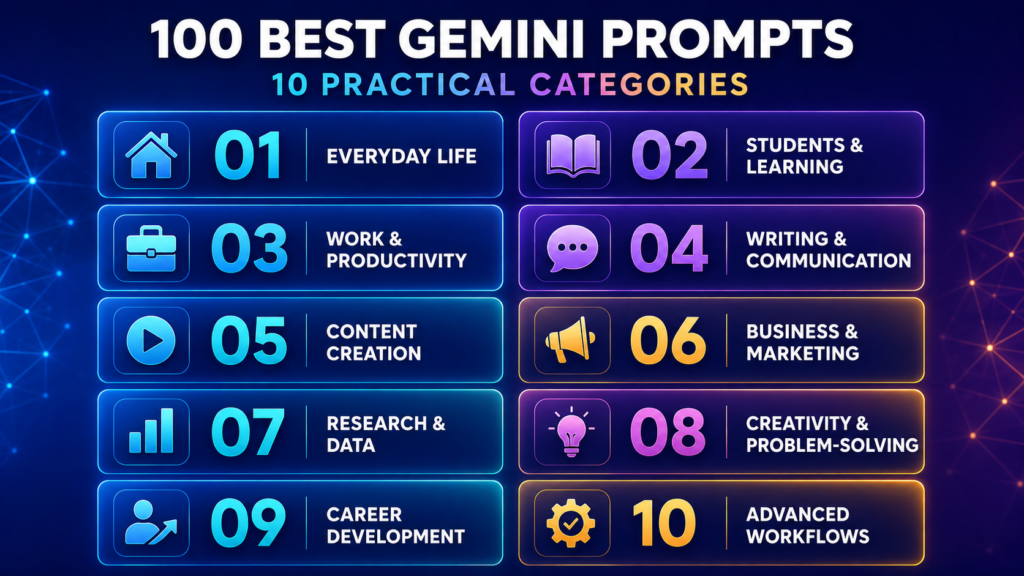
This article contains 100 ready-to-copy Gemini prompts covering ten practical categories. Each prompt includes customizable placeholders such as [TOPIC], [GOAL], [AUDIENCE], and [TIME]. Replace these placeholders with your own information before pasting the prompt into Gemini.
These prompts are designed to help you:
- Organize daily responsibilities
- Learn difficult subjects
- Complete professional tasks
- Improve writing and communication
- Conduct structured research
- Analyze information and data
- Develop business and marketing ideas
- Create digital content
- Prepare for career opportunities
- Build reusable AI workflows
If you want to understand why detailed instructions generate better AI responses, our AI Prompt Engineering Guide explains prompt structures, frameworks, examples, and practical techniques.
Google regularly adds new capabilities and improvements to Gemini. Users can check the official Gemini Apps Updates page for the latest changes. However, important facts, calculations, citations, medical information, legal guidance, and financial recommendations should always be independently verified.
By the end of this guide, you will have a practical collection of Gemini prompts that can help you work smarter, learn more effectively, save time, and receive better-organized AI responses.
What Is a Gemini Prompt?
A Gemini prompt is an instruction, question, description, or collection of information provided to Google Gemini. It explains what you want Gemini to do and how you want the answer to be presented.
A prompt may be as simple as:
Explain photosynthesis in simple language.However, a detailed prompt usually produces a more useful response:
Act as an experienced science teacher. Explain photosynthesis to a Grade 8 student using simple language. Include its definition, required elements, step-by-step process, chemical equation, importance, and one everyday example. Finish with five revision questions.The second prompt gives Gemini a role, topic, target audience, structure, and expected result. These details reduce ambiguity and help the AI understand the task more accurately.
What Makes a Good Gemini Prompt?
An effective Gemini prompt usually contains the following elements:
| Element | Purpose | Example |
|---|---|---|
| Role | Defines the perspective Gemini should adopt | Act as an experienced teacher |
| Task | Explains what Gemini must do | Create a lesson plan |
| Context | Provides relevant background information | The students are in Grade 8 |
| Goal | Defines the desired outcome | Help students understand photosynthesis |
| Audience | Identifies who will use the response | Beginner-level students |
| Limitations | Sets boundaries or restrictions | Avoid difficult scientific terminology |
| Format | Specifies how the response should appear | Present it as a table |
| Quality Check | Asks Gemini to review the result | Check the answer for missing information |
You do not need to include every element in every prompt. Use only the details that are relevant to your task.
How to Use These Gemini Prompts
Follow these steps to get better results:
- Select a prompt that matches your task.
- Copy the complete prompt from the box.
- Replace the bracketed placeholders with your information.
- Remove any instruction that does not apply to your situation.
- Paste the customized prompt into Gemini.
- Review the first response carefully.
- Ask follow-up questions or request revisions when necessary.
- Verify important facts before using the final result.
For example, replace [TOPIC] with “Artificial Intelligence,” [AUDIENCE] with “college students,” and [FORMAT] with “a table.”
The 10 Gemini Prompt Categories
The 100 best Gemini prompts in this guide are divided into the following categories:
- Everyday Life and Personal Productivity
- Students and Learning
- Work and Professional Productivity
- Writing and Communication
- Content Creation, Blogging, and Social Media
- Business and Marketing
- Research and Data Analysis
- Creativity and Problem-Solving
- Career Development
- Advanced and Reusable Gemini Workflows
Best Gemini Prompts for Everyday Life and Personal Productivity
Gemini can help you plan your day, organize responsibilities, build habits, compare options, prepare budgets, and manage routine tasks. These prompts can also be combined with the tools covered in our Best AI Productivity Tools in 2026 guide.
1. Create a Realistic Daily Schedule
Best For: Organizing work, study, family responsibilities, and personal time.
Ready-to-Copy Prompt:
Act as an experienced personal productivity planner. Create a realistic daily schedule for me using the following information:

Wake-up time: [TIME]
Preferred sleep time: [TIME]
Work or study hours: [HOURS]
Fixed responsibilities: [RESPONSIBILITIES]
Travel time: [TIME]
Personal goals: [GOALS]
Current energy level: [LOW/MEDIUM/HIGH]

Include focused work periods, short breaks, meals, exercise, family time, and relaxation. Prioritize the most important tasks without making the schedule overly strict.

Present the final plan as a table with columns for time, activity, duration, priority, and purpose. Identify any scheduling conflicts and suggest practical adjustments.
How to Customize: Add your working hours, commuting time, health requirements, and preferred duration for breaks.
2. Plan and Prioritize a Busy Week
Best For: Managing several tasks without becoming overwhelmed.
Ready-to-Copy Prompt:
Act as a weekly planning and prioritization assistant. Organize the following tasks into a realistic seven-day plan:

Tasks: [LIST ALL TASKS]
Deadlines: [DEADLINES]
Available time each day: [TIME]
Fixed appointments: [APPOINTMENTS]
Most important weekly goal: [GOAL]
Days with limited availability: [DAYS]

Classify every task as urgent, important, optional, or suitable for postponement. Estimate the time required for each task and distribute the work according to difficulty, deadline, and available time.

Do not schedule more work than can realistically be completed. Present the answer as a day-by-day table and include a short list of the three tasks I should complete first.
How to Customize: Mention your most productive hours and identify tasks that cannot be moved or postponed.
3. Break a Large Goal into Manageable Steps
Best For: Starting a project that appears difficult or overwhelming.
Ready-to-Copy Prompt:
Act as a practical goal-planning coach. Break the following goal into small and manageable steps:

Main goal: [GOAL]
Target completion date: [DATE]
Current progress: [PROGRESS]
Available knowledge and resources: [DETAILS]
Time available each day or week: [TIME]
Budget, if applicable: [BUDGET]
Possible difficulties: [CHALLENGES]

Divide the goal into clear milestones, weekly actions, and daily tasks. Identify the first action I can complete in less than 20 minutes.

Create a progress-tracking method and explain what I should do if I miss a deadline or fall behind. Keep the plan realistic for a beginner.
How to Customize: Add your experience level, available tools, budget, and personal limitations.
4. Build a Sustainable New Habit
Best For: Developing a positive habit without depending entirely on motivation.
Ready-to-Copy Prompt:
Act as a practical habit-building coach. Help me develop the following habit:

New habit: [HABIT]
Reason for building it: [REASON]
Current daily routine: [ROUTINE]
Time available: [TIME]
Previous attempts: [DETAILS]
Common obstacles: [OBSTACLES]

Create a realistic 30-day plan that begins with very small actions and gradually increases. Suggest a suitable habit trigger, simple reward, tracking method, and minimum action for difficult days.

Include weekly milestones and a recovery plan for missed days. Avoid making the routine overly strict or complicated.
How to Customize: Explain why previous attempts failed and whether you prefer daily or weekly progress tracking.
5. Compare Two Options Before Making a Decision
Best For: Making a balanced personal, educational, purchasing, or professional decision.
Ready-to-Copy Prompt:
Act as an unbiased decision-making assistant. Help me compare the following two options:

Option A: [OPTION A]
Option B: [OPTION B]
My main goal: [GOAL]
Available budget: [BUDGET]
Time available: [TIME]
Important priorities: [PRIORITIES]
Concerns or limitations: [CONCERNS]

Compare both options according to cost, benefits, disadvantages, risks, convenience, time requirements, long-term value, and suitability for my situation.

Create a weighted comparison table using scores from 1 to 10. Identify any important information that is missing. Finish with a recommendation and clearly explain the reasons behind it. Do not ignore the disadvantages of the recommended option.
How to Customize: Assign greater importance to factors such as price, quality, convenience, durability, or long-term value.
6. Create a Practical Monthly Budget
Best For: Organizing income, expenses, savings, and financial priorities.
Ready-to-Copy Prompt:
Act as a personal budgeting assistant. Create a practical monthly budget using the following information:

Monthly income: [AMOUNT]
Fixed expenses: [LIST WITH AMOUNTS]
Variable expenses: [LIST WITH AMOUNTS]
Debt payments: [AMOUNT]
Current savings: [AMOUNT]
Monthly savings goal: [GOAL]
Upcoming expenses: [DETAILS]
Family responsibilities: [DETAILS]

Divide the budget into essential expenses, flexible expenses, savings, debt repayment, and emergency funds. Calculate the total amount and percentage assigned to each category.

Identify areas where spending may be reduced without suggesting unrealistic sacrifices. Present the budget in a table and provide three practical actions for improving it.

Treat this as general educational planning and not professional financial advice.
How to Customize: Include irregular income, annual payments, loan instalments, and your preferred savings percentage.
7. Plan Simple Meals for the Week
Best For: Saving time while planning practical everyday meals.
Ready-to-Copy Prompt:
Act as a practical weekly meal-planning assistant. Create a seven-day meal plan using the following information:

Number of people: [NUMBER]
Food preference: [VEGETARIAN/NON-VEGETARIAN/OTHER]
Regional food preference: [PREFERENCE]
Available ingredients: [INGREDIENTS]
Foods to avoid: [FOODS]
Approximate weekly budget: [BUDGET]
Cooking time available: [TIME]
Meals required each day: [NUMBER]

Use simple, affordable, and easily available ingredients. Reduce food waste by reusing ingredients across different meals.

Present the meal plan as a table and create a categorized shopping list with approximate quantities. Do not make medical or nutritional claims.
How to Customize: Mention food allergies, kitchen equipment, regional preferences, and whether leftovers can be reused.
8. Organize and Declutter a Room
Best For: Cleaning an untidy space without feeling overwhelmed.
Ready-to-Copy Prompt:
Act as an experienced home-organization assistant. Create a step-by-step plan to clean and organize the following space:

Room or area: [SPACE]
Current condition: [DESCRIPTION]
Time available: [TIME]
Storage available: [DETAILS]
Types of items present: [ITEMS]
Main problem: [CLUTTER/STORAGE/PAPERWORK/OTHER]

Divide the work into short sessions of 15 to 30 minutes. Create categories for keeping, moving, donating, recycling, repairing, and discarding items.

Prioritize actions that will produce visible improvements first. Suggest an affordable storage system and a five-minute daily routine for keeping the space organized afterward.
How to Customize: Mention whether other people use the same space and identify items that must not be discarded.
9. Create a Personalized Morning Routine
Best For: Beginning the day with greater focus and less confusion.
Ready-to-Copy Prompt:
Act as a practical routine designer. Create a personalized morning routine based on the following information:

Wake-up time: [TIME]
Time available before work or study: [TIME]
Morning responsibilities: [RESPONSIBILITIES]
Travel time: [TIME]
Main personal goal: [GOAL]
Current difficulties: [DIFFICULTIES]
Preferred activities: [ACTIVITIES]
Activities I dislike: [ACTIVITIES]

Design a realistic sequence that includes essential preparation, light movement, breakfast, daily planning, and focused personal time where possible.

Provide a complete routine and a shorter emergency version for busy mornings. Do not create an overly complicated or unrealistic schedule.
How to Customize: Include family responsibilities, health limitations, travel time, and preferred morning activities.
10. Conduct a Weekly Personal Review
Best For: Evaluating progress and preparing for the coming week.
Ready-to-Copy Prompt:
Act as a thoughtful weekly review coach. Help me review the past week using the following information:

Important goals: [GOALS]
Tasks completed: [COMPLETED TASKS]
Tasks not completed: [INCOMPLETE TASKS]
Main difficulties: [DIFFICULTIES]
Positive achievements: [ACHIEVEMENTS]
Priorities for next week: [PRIORITIES]

First, ask me five short reflection questions. After I answer, summarize what went well, what needs improvement, and what should change.

Create three realistic priorities for the next week. Identify one activity I should stop, one I should continue, and one I should start. Finish with a simple seven-day action plan.
How to Customize: Include work, study, health, financial, and family goals that you want Gemini to review.
Best Gemini Prompts for Students and Learning
Gemini can help students understand difficult subjects, prepare study plans, create revision notes, generate practice questions, and improve learning skills. It should be used as a learning assistant rather than as a replacement for independent thinking.
Students can also explore our AI in Education guide to understand how artificial intelligence is changing teaching and learning. Our Best Free AI Tools for Students in 2026 guide provides additional tools for research, writing, revision, and academic productivity.
11. Explain a Difficult Topic in Simple Language
Best For: Understanding a complex topic at the appropriate learning level.
Ready-to-Copy Prompt:
Act as an experienced teacher who specializes in explaining difficult concepts clearly. Teach me the following topic:

Topic: [TOPIC]
Subject: [SUBJECT]
My class or learning level: [LEVEL]
What I already understand: [DETAILS]
What confuses me: [DIFFICULTIES]

Begin with a simple definition. Explain the topic step by step using clear language, a relatable example, and an analogy. Avoid unnecessary technical terms, but explain any important terms that must be used.

After the explanation, provide a short summary and ask me five questions to check my understanding. Do not provide the answers until I attempt the questions.
How to Customize: Add your class level, textbook chapter, syllabus, and the exact part of the topic that you find difficult.
12. Create a Personalized Study Plan
Best For: Organizing preparation for examinations, assignments, or long-term learning goals.
Ready-to-Copy Prompt:
Act as an experienced academic planner. Create a realistic study plan using the following information:

Subjects or topics: [LIST]
Examination or deadline date: [DATE]
Days available: [NUMBER]
Study time available each day: [TIME]
Strong subjects: [SUBJECTS]
Weak subjects: [SUBJECTS]
Other responsibilities: [DETAILS]
Preferred break duration: [TIME]

Give more time to difficult and high-priority topics while including regular revision and practice tests. Do not create an exhausting or unrealistic timetable.

Present the plan as a day-by-day table with columns for date, subject, topic, study duration, activity, and revision task. Include a backup plan for missed study sessions.
How to Customize: Add examination weightage, chapter length, school hours, coaching classes, and days when less study time is available.
13. Convert a Chapter into Revision Notes
Best For: Creating organized notes from textbooks, lectures, or uploaded material.
Ready-to-Copy Prompt:
Act as an academic note-making assistant. Convert the following chapter or study material into clear revision notes:

Subject: [SUBJECT]
Chapter or topic: [TOPIC]
Class or course level: [LEVEL]
Study material: [PASTE OR UPLOAD CONTENT]
Preferred note length: [SHORT/MEDIUM/DETAILED]

Organize the notes using headings, subheadings, bullet points, definitions, important facts, examples, dates, formulas, and key people where relevant.

Do not remove important information or add unsupported facts. Highlight the points most likely to require revision. Finish with a quick-summary table and ten key takeaways.
How to Customize: Ask Gemini to follow your syllabus, textbook sequence, or preferred examination format.
14. Generate a Practice Quiz
Best For: Testing understanding after completing a topic.
Ready-to-Copy Prompt:
Act as a subject teacher and assessment designer. Create a practice quiz using the following information:

Subject: [SUBJECT]
Topic: [TOPIC]
Class or course level: [LEVEL]
Number of questions: [NUMBER]
Difficulty level: [EASY/MEDIUM/HARD/MIXED]
Question types: [MCQ/TRUE-FALSE/SHORT ANSWER/LONG ANSWER/MIXED]

Cover definitions, concepts, applications, and common misunderstandings. Do not repeat the same concept unnecessarily.

Present the questions first without answers. Wait for me to submit my responses. Then evaluate each answer, explain my mistakes, provide the correct answer, and recommend the topics I should revise.
How to Customize: Include examination name, marking scheme, negative marking, or a specific textbook chapter.
15. Create Flashcards for Active Recall
Best For: Memorizing definitions, facts, formulas, dates, and important concepts.
Ready-to-Copy Prompt:
Act as a learning-science assistant. Create active-recall flashcards for the following material:

Subject: [SUBJECT]
Topic: [TOPIC]
Learning level: [LEVEL]
Source material: [PASTE OR UPLOAD CONTENT]
Number of flashcards: [NUMBER]

Create concise question-and-answer flashcards. Include a balanced mixture of definitions, facts, examples, comparisons, formulas, applications, and common mistakes.

Keep each answer brief enough for quick revision. Arrange the flashcards from basic to advanced. Add a separate section containing five challenging application-based flashcards.
How to Customize: Request flashcards in a table, printable format, or question-answer list.
16. Prepare for an Examination Strategically
Best For: Planning revision when an examination is approaching.
Ready-to-Copy Prompt:
Act as an examination-preparation coach. Create a focused revision strategy using the following information:

Examination: [EXAM NAME]
Subjects: [SUBJECTS]
Exam date: [DATE]
Syllabus remaining: [DETAILS]
Topics already completed: [TOPICS]
Strong areas: [AREAS]
Weak areas: [AREAS]
Daily study time: [TIME]
Previous examination difficulties: [DIFFICULTIES]

Prioritize topics according to importance, difficulty, and time available. Include concept revision, active recall, written practice, past-paper practice, and mock tests.

Create a daily schedule until the examination. Add a final revision plan for the last three days and a short checklist for the examination day. Keep the strategy realistic and avoid recommending unhealthy study habits.
How to Customize: Add the examination pattern, marks distribution, previous papers, and topic-wise weightage.
17. Use Gemini as a Personal Tutor
Best For: Learning a subject interactively instead of receiving all the information at once.
Ready-to-Copy Prompt:
Act as my patient personal tutor for the following subject:

Subject: [SUBJECT]
Topic: [TOPIC]
My learning level: [LEVEL]
My current understanding: [DETAILS]
My learning goal: [GOAL]
Time available for this session: [TIME]

Start by asking me three short questions to determine my current knowledge. Teach the topic in small sections, one section at a time.

After each section, ask me a question and wait for my answer before continuing. If my answer is incorrect, explain the mistake without making me feel discouraged. Gradually increase the difficulty and finish with a short assessment and revision summary.
How to Customize: Tell Gemini whether you prefer examples, diagrams, analogies, calculations, or step-by-step explanations.
18. Compare Two Concepts Clearly
Best For: Understanding the differences and similarities between related concepts.
Ready-to-Copy Prompt:
Act as an experienced subject teacher. Compare the following two concepts:

Concept A: [CONCEPT]
Concept B: [CONCEPT]
Subject: [SUBJECT]
Class or learning level: [LEVEL]

Begin with a simple definition of each concept. Create a comparison table covering meaning, purpose, characteristics, process, examples, advantages, limitations, and applications where relevant.

After the table, explain the most important similarity and difference in simple language. Include a memory trick for remembering the distinction and finish with five comparison-based practice questions.
How to Customize: Add the textbook chapter, examination type, or specific points that must be compared.
19. Improve an Assignment Responsibly
Best For: Reviewing and improving original academic work without replacing the student’s thinking.
Ready-to-Copy Prompt:
Act as an academic writing tutor. Review my assignment and help me improve it without rewriting the entire work for me.

Assignment question: [QUESTION]
Academic level: [LEVEL]
Required word count: [WORD COUNT]
Assessment criteria: [CRITERIA]
My draft: [PASTE DRAFT]

Evaluate the draft for relevance, structure, clarity, logical flow, grammar, evidence, and completeness. Identify strong points and areas that need improvement.

Give specific suggestions section by section. Point out unsupported claims and places where citations may be required. Do not invent references or sources. Provide a revision checklist, but allow me to make the final changes in my own words.
How to Customize: Include the required citation style, teacher’s instructions, grading rubric, and submission format.
20. Learn a New Language through Daily Practice
Best For: Building vocabulary, grammar, reading, writing, and conversation skills.
Ready-to-Copy Prompt:
Act as a supportive language tutor. Create a personalized learning session using the following information:

Language I want to learn: [LANGUAGE]
My current level: [BEGINNER/INTERMEDIATE/ADVANCED]
My native language: [LANGUAGE]
Daily practice time: [TIME]
Main goal: [CONVERSATION/WRITING/EXAM/TRAVEL/OTHER]
Topics I am interested in: [TOPICS]

Create a daily lesson containing ten useful words, five common sentences, one grammar concept, a short reading passage, and a conversation exercise.

Ask me questions one at a time and correct my mistakes politely. Explain difficult points in my native language when necessary. Finish with a short homework activity and a revision quiz.
How to Customize: Specify whether you want formal language, everyday conversation, workplace vocabulary, or examination preparation.
Best Gemini Prompts for Work and Professional Productivity
Professionals can use Gemini to organize projects, prepare meetings, create reports, draft emails, document workflows, and manage demanding workloads. Google also provides workplace tutorials and Gemini resources through the official Google Workspace Learning Center.
Always review AI-generated workplace material before using it, especially when it contains confidential information, financial data, legal terms, or important business decisions.
21. Organize a Busy Workday
Best For: Prioritizing professional responsibilities and completing important work on time.
Ready-to-Copy Prompt:
Act as an experienced workplace productivity consultant. Organize my workday using the following information:

Working hours: [HOURS]
List of tasks: [TASKS]
Deadlines: [DEADLINES]
Scheduled meetings: [MEETINGS]
High-priority responsibilities: [RESPONSIBILITIES]
Expected interruptions: [DETAILS]
Preferred break duration: [TIME]

Classify the tasks according to urgency, importance, effort, and deadline. Estimate how much time each task may require.

Create a realistic time-blocked schedule with focused work periods, meetings, administrative tasks, short breaks, and buffer time for unexpected work. Identify tasks that can be delegated, postponed, combined, or removed.
How to Customize: Include your most productive hours, fixed appointments, and tasks requiring approval from another person.
22. Create a Professional Meeting Agenda
Best For: Preparing focused and productive workplace meetings.
Ready-to-Copy Prompt:
Act as an experienced meeting facilitator. Create a professional meeting agenda using the following information:

Meeting topic: [TOPIC]
Main objective: [OBJECTIVE]
Participants: [PARTICIPANTS]
Meeting duration: [TIME]
Important discussion points: [POINTS]
Decisions required: [DECISIONS]
Documents or data to review: [DETAILS]

Arrange the agenda in a logical sequence. Assign an estimated time to each agenda item and identify who should lead each discussion.

Include preparation requirements, key questions, expected decisions, action-item recording, and the next-step process. Present the agenda in a clean table that can be shared directly with participants.
How to Customize: Add the meeting date, location, participant roles, and any unresolved issues from the previous meeting.
23. Convert Meeting Notes into Action Items
Best For: Turning unorganized meeting notes into a clear follow-up plan.
Ready-to-Copy Prompt:
Act as a professional meeting documentation assistant. Analyze the following meeting notes:

Meeting title: [TITLE]
Meeting date: [DATE]
Participants: [PARTICIPANTS]
Raw meeting notes: [PASTE NOTES]

Organize the information under these headings:

1. Meeting purpose
2. Important discussion points
3. Decisions made
4. Tasks assigned
5. Person responsible for each task
6. Deadlines
7. Unresolved questions
8. Follow-up meeting requirements

Create an action-item table with columns for task, owner, deadline, priority, status, and dependency. Do not invent decisions, responsibilities, or deadlines that are not present in the notes. Mark missing information as “To Be Confirmed.”
How to Customize: Include an existing project name, task IDs, or your organization’s preferred meeting-minutes format.
24. Draft a Professional Workplace Email
Best For: Writing clear, polite, and purpose-driven professional emails.
Ready-to-Copy Prompt:
Act as a professional business communication specialist. Draft an email using the following details:

Recipient and role: [RECIPIENT]
Purpose of the email: [PURPOSE]
Important information: [DETAILS]
Required action: [ACTION]
Deadline, if applicable: [DATE]
Preferred tone: [FORMAL/POLITE/FRIENDLY/FIRM]
Desired length: [SHORT/MEDIUM]

Write a clear subject line and a concise email. State the purpose early, organize important information logically, and make the required action easy to understand.

Avoid unnecessary jargon, exaggerated politeness, repetition, and vague language. Finish with an appropriate closing. Do not invent facts or commitments.
How to Customize: Add your relationship with the recipient, previous communication, and whether any documents are attached.
25. Create a Structured Professional Report
Best For: Turning workplace information into a formal and organized report.
Ready-to-Copy Prompt:
Act as an experienced professional report writer. Create a structured report using the following information:

Report title: [TITLE]
Purpose: [PURPOSE]
Target audience: [AUDIENCE]
Background information: [DETAILS]
Available data or findings: [DATA]
Main issues: [ISSUES]
Required recommendations: [DETAILS]
Preferred length: [WORD COUNT]

Organize the report with an executive summary, introduction, methodology if relevant, key findings, analysis, challenges, recommendations, action plan, and conclusion.

Use clear headings, concise paragraphs, bullet points, and tables where helpful. Separate verified facts from assumptions. Do not invent statistics, evidence, quotations, or sources. Mark any missing information clearly.
How to Customize: Add your organization’s report format, reporting period, citation style, and required performance indicators.
26. Develop a Professional Presentation Outline
Best For: Planning a presentation before designing the slides.
Ready-to-Copy Prompt:
Act as an experienced presentation strategist. Create a professional presentation outline using the following details:

Presentation topic: [TOPIC]
Main objective: [OBJECTIVE]
Target audience: [AUDIENCE]
Presentation duration: [TIME]
Number of slides: [NUMBER]
Key information: [DETAILS]
Desired action from the audience: [ACTION]
Preferred tone: [TONE]

Create a slide-by-slide outline. For each slide, provide:

1. Slide title
2. Main message
3. Three to five supporting points
4. Recommended visual or chart
5. Short speaker note
6. Transition to the next slide

Begin with a strong opening and finish with a clear conclusion and call to action. Avoid overcrowding slides with text.
How to Customize: Mention your presentation software, brand colours, audience knowledge level, and available data.
27. Build a Complete Project Plan
Best For: Converting an idea or objective into an actionable workplace project.
Ready-to-Copy Prompt:
Act as an experienced project manager. Develop a practical project plan using the following information:

Project name: [NAME]
Main objective: [OBJECTIVE]
Expected outcome: [OUTCOME]
Start date: [DATE]
Target completion date: [DATE]
Available team members: [TEAM]
Available budget and resources: [DETAILS]
Known limitations: [LIMITATIONS]
Major risks: [RISKS]

Divide the project into phases, milestones, tasks, and deliverables. Identify task dependencies and assign suggested responsibilities without inventing specific employee names.

Create a project table with columns for phase, task, responsible role, start date, deadline, priority, dependency, and completion criteria. Include a risk-management plan, communication schedule, and progress-review process.
How to Customize: Add team skills, approval stages, budget restrictions, tools, and mandatory completion dates.
28. Write a Standard Operating Procedure
Best For: Documenting a repeatable workplace process.
Ready-to-Copy Prompt:
Act as a process documentation specialist. Create a Standard Operating Procedure for the following task:

Procedure name: [NAME]
Purpose: [PURPOSE]
Department or team: [DEPARTMENT]
People responsible: [ROLES]
Process details: [DESCRIBE THE PROCESS]
Required tools or documents: [TOOLS]
Important rules: [RULES]
Common problems: [PROBLEMS]

Structure the SOP with purpose, scope, responsibilities, prerequisites, step-by-step instructions, quality checks, safety or compliance requirements, troubleshooting, record-keeping, and approval information.

Use numbered steps and clear action verbs. Do not assume missing organizational rules. Mark information requiring confirmation as “To Be Confirmed.”
How to Customize: Add form names, software, approval authority, document codes, and revision dates used by your organization.
29. Analyze and Improve a Workflow
Best For: Identifying delays, duplication, unnecessary steps, and automation opportunities.
Ready-to-Copy Prompt:
Act as a workflow improvement consultant. Analyze the following work process:

Workflow name: [NAME]
Main purpose: [PURPOSE]
Current steps: [LIST STEPS]
People or departments involved: [DETAILS]
Tools currently used: [TOOLS]
Average completion time: [TIME]
Common delays or errors: [PROBLEMS]
Required approvals: [APPROVALS]

Map the current workflow from beginning to end. Identify bottlenecks, repeated work, unclear responsibilities, unnecessary approvals, manual tasks, and possible sources of error.

Recommend a simpler workflow while preserving necessary quality controls. Present the current and improved processes in a comparison table. Include quick improvements, long-term improvements, possible automation opportunities, and measurable success indicators.
How to Customize: Provide actual processing times, error rates, costs, and limitations on changing the existing system.
30. Prepare a Weekly Professional Review
Best For: Reviewing completed work, unresolved tasks, and priorities for the coming week.
Ready-to-Copy Prompt:
Act as a professional performance and planning coach. Help me conduct a weekly work review using the following information:

My role: [ROLE]
Main responsibilities: [RESPONSIBILITIES]
Tasks completed this week: [TASKS]
Tasks still pending: [TASKS]
Deadlines met or missed: [DETAILS]
Challenges encountered: [CHALLENGES]
Feedback received: [FEEDBACK]
Priorities for next week: [PRIORITIES]

Summarize my main achievements, pending responsibilities, obstacles, and lessons learned. Identify tasks that require follow-up, approval, delegation, or rescheduling.

Create a professional weekly review table and recommend three realistic priorities for the coming week. Also draft a concise progress update that I can share with my manager or team. Do not exaggerate achievements or hide unresolved problems.
How to Customize: Add measurable targets, project names, performance indicators, and your organization’s reporting style.
Best Gemini Prompts for Writing and Communication
The best Gemini prompts for writing and communication can help users improve clarity, correct grammar, adjust tone, summarize documents, translate content, prepare speeches, and respond professionally. Gemini-generated content should always be reviewed to ensure that it accurately represents your message, facts, and intentions.
31. Improve the Clarity of a Written Draft
Best For: Making an existing draft clearer, more organized, and easier to understand.
Ready-to-Copy Prompt:
Act as an experienced editor. Improve the clarity and organization of the following draft:

Type of content: [EMAIL/ARTICLE/REPORT/LETTER/OTHER]
Target audience: [AUDIENCE]
Purpose: [PURPOSE]
Preferred tone: [TONE]
Draft: [PASTE DRAFT]

Correct unclear sentences, unnecessary repetition, weak transitions, and confusing organization. Preserve the original meaning, facts, names, figures, and important details.

Do not add unsupported claims or change the writer’s intention. First provide the improved version. Then list the five most important changes and briefly explain why each change improved the writing.
How to Customize: Add the desired word count, reading level, publication type, and phrases that must remain unchanged.
32. Rewrite Content in a Different Tone
Best For: Adapting the same message for different audiences or situations.
Ready-to-Copy Prompt:
Act as a professional communication editor. Rewrite the following content in the requested tone:

Original content: [PASTE CONTENT]
Current audience: [AUDIENCE]
New target audience: [AUDIENCE]
Required tone: [FORMAL/FRIENDLY/PERSUASIVE/EMPATHETIC/CONFIDENT/OTHER]
Purpose of the message: [PURPOSE]
Maximum length: [LENGTH]

Preserve all essential facts, names, dates, instructions, and commitments. Change only the tone, wording, sentence structure, and level of formality.

Avoid exaggerated language, unnecessary jargon, and meanings that were not present in the original content. After rewriting, explain in three bullet points how the tone was changed.
How to Customize: Mention words to avoid, preferred terminology, and whether the message is intended for email, social media, a website, or printed material.
33. Proofread Grammar, Spelling, and Punctuation
Best For: Correcting errors without unnecessarily rewriting the content.
Ready-to-Copy Prompt:
Act as a careful proofreader. Review the following text:

Language and regional style: [LANGUAGE AND VARIANT]
Type of document: [DOCUMENT TYPE]
Target audience: [AUDIENCE]
Text: [PASTE TEXT]

Correct grammar, spelling, punctuation, capitalization, spacing, and obvious typing errors. Maintain consistent terminology, tense, formatting, and writing style.

Do not change correct sentences simply to make them sound different. Preserve the original meaning and voice. Provide:

1. The corrected text
2. A list of important corrections
3. Any sentence whose intended meaning is unclear
4. Words, figures, or names that may require verification
How to Customize: Specify British English, American English, Indian English, Hindi, or another language style.
34. Write a Persuasive Message
Best For: Encouraging an audience to take a specific action.
Ready-to-Copy Prompt:
Act as an ethical persuasive-writing specialist. Create a persuasive message using the following details:

Subject: [SUBJECT]
Target audience: [AUDIENCE]
Desired action: [ACTION]
Main benefit to the audience: [BENEFIT]
Supporting facts: [FACTS]
Possible objections: [OBJECTIONS]
Preferred tone: [TONE]
Required length: [LENGTH]
Communication channel: [EMAIL/WEBSITE/LETTER/SOCIAL MEDIA/OTHER]

Begin with an attention-grabbing but honest opening. Explain the problem, present the benefit, address likely objections, and finish with a clear call to action.

Do not use false urgency, misleading claims, invented statistics, emotional manipulation, or unrealistic promises.
How to Customize: Add your organization’s name, genuine deadline, offer details, and words that must or must not be used.
35. Summarize a Long Document
Best For: Extracting the main ideas, decisions, arguments, and action points from lengthy material.
Ready-to-Copy Prompt:
Act as a precise document-summarization assistant. Summarize the following content:

Document type: [REPORT/ARTICLE/POLICY/RESEARCH PAPER/OTHER]
Purpose of the summary: [PURPOSE]
Target audience: [AUDIENCE]
Preferred length: [LENGTH]
Document: [PASTE OR UPLOAD DOCUMENT]

Identify the main purpose, key arguments, important findings, supporting evidence, decisions, deadlines, risks, and required actions.

Separate facts from opinions and recommendations. Do not introduce information that is not present in the source. Preserve important names, dates, figures, and qualifications.

Provide:
1. A one-paragraph overview
2. Key points in bullets
3. Important data or evidence
4. Decisions and action items
5. Questions or information missing from the document
How to Customize: Ask for an executive summary, student notes, management briefing, or section-by-section summary.
36. Translate and Localize Content
Best For: Translating a message while preserving its meaning, context, and tone.
Ready-to-Copy Prompt:
Act as an experienced translator and localization editor. Translate the following content:

Source language: [LANGUAGE]
Target language: [LANGUAGE]
Target country or region: [REGION]
Target audience: [AUDIENCE]
Preferred tone: [TONE]
Content: [PASTE CONTENT]

Preserve the original meaning, facts, names, numbers, dates, formatting, and emotional tone. Use natural expressions that a native speaker would understand.

Do not translate names, technical terms, titles, or abbreviations incorrectly. If a phrase has no direct equivalent, provide the most natural translation and briefly explain the choice.

After translating, list any ambiguous sentence or culturally specific expression that may require human confirmation.
How to Customize: Specify formal or conversational language and provide a list of terms that must remain untranslated.
37. Write a Formal Letter or Application
Best For: Preparing an official request, application, complaint, or information letter.
Ready-to-Copy Prompt:
Act as an expert in formal correspondence. Draft a professional letter using the following information:

Type of letter: [APPLICATION/REQUEST/COMPLAINT/INFORMATION/OTHER]
Sender details: [DETAILS]
Recipient and designation: [DETAILS]
Subject: [SUBJECT]
Purpose: [PURPOSE]
Important facts: [FACTS]
Requested action: [ACTION]
Relevant dates or reference numbers: [DETAILS]
Preferred tone: [POLITE/FORMAL/FIRM]

Use the correct formal structure, including date, recipient details, subject line, salutation, body, closing, and signature placeholder.

Keep the letter concise, factual, respectful, and easy to understand. Do not invent policies, legal rights, events, or supporting evidence.
How to Customize: Add the organization’s address, reference number, enclosure list, and required submission format.
38. Prepare an Engaging Speech
Best For: Writing speeches for academic, professional, social, or ceremonial occasions.
Ready-to-Copy Prompt:
Act as an experienced speechwriter. Prepare a speech using the following details:

Occasion: [OCCASION]
Topic: [TOPIC]
Speaker’s role: [ROLE]
Target audience: [AUDIENCE]
Speech duration: [TIME]
Main message: [MESSAGE]
Important facts or examples: [DETAILS]
Preferred tone: [INSPIRING/FORMAL/EDUCATIONAL/EMOTIONAL/OTHER]

Begin with a strong and relevant opening. Organize the speech into a clear introduction, main body, and conclusion.

Use natural spoken language, smooth transitions, memorable examples, and an appropriate closing message. Avoid invented quotations, statistics, stories, or achievements. Add delivery notes for pauses and emphasis where useful.
How to Customize: Include the event name, guest names, institutional details, and words or quotations that must be included.
39. Respond to a Complaint Professionally
Best For: Addressing customer, employee, student, or public complaints respectfully.
Ready-to-Copy Prompt:
Act as an experienced complaint-resolution specialist. Draft a professional response using the following information:

Person who complained: [CUSTOMER/EMPLOYEE/STUDENT/OTHER]
Complaint: [PASTE COMPLAINT]
Verified facts: [FACTS]
Information still being investigated: [DETAILS]
Possible resolution: [RESOLUTION]
Organization’s policy: [PASTE RELEVANT POLICY]
Preferred tone: [EMPATHETIC/FORMAL/FIRM]

Acknowledge the concern, summarize the issue accurately, explain the verified information, and provide clear next steps.

Do not admit legal responsibility, promise compensation, blame another person, or invent a policy unless this has been explicitly authorized. Clearly distinguish confirmed information from matters still under investigation.
How to Customize: Add the complaint reference number, response deadline, authorized solution, and contact details.
40. Simplify Complex Information for the Public
Best For: Converting technical, academic, administrative, or policy information into accessible language.
Ready-to-Copy Prompt:
Act as a plain-language communication specialist. Rewrite the following information so that it is easy for the general public to understand:

Original information: [PASTE CONTENT]
Target audience: [AUDIENCE]
Required reading level: [LEVEL]
Purpose: [PURPOSE]
Essential terms that must remain: [TERMS]
Preferred format: [FAQ/NOTICE/ARTICLE/BULLET LIST/OTHER]

Replace unnecessary jargon with simple language. Explain technical terms that cannot be removed. Use short sentences, clear headings, practical examples, and direct instructions.

Preserve all important conditions, warnings, dates, figures, and exceptions. Do not oversimplify the content in a way that changes its meaning. Finish with a short action checklist for the reader.
How to Customize: Mention whether the content is for students, customers, employees, website visitors, or government-service users.
Best Gemini Prompts for Content Creation, Blogging and Social Media
The best Gemini prompts for content creation can help bloggers, website owners, video creators, and social media managers generate ideas, build outlines, create content calendars, repurpose existing material, and improve audience communication.
AI-generated content should always be reviewed for accuracy, originality, usefulness, and brand consistency. Creators should add their own experience, examples, opinions, and insights instead of publishing an unedited AI response.
41. Generate Relevant Content Ideas
Best For: Finding practical content topics for a blog, website, YouTube channel, or social media account.
Ready-to-Copy Prompt:
Act as an experienced content strategist. Generate relevant content ideas using the following information:

Industry or niche: [NICHE]
Target audience: [AUDIENCE]
Platform: [BLOG/YOUTUBE/INSTAGRAM/LINKEDIN/OTHER]
Audience problems: [PROBLEMS]
Main content goal: [TRAFFIC/EDUCATION/ENGAGEMENT/LEADS/OTHER]
Topics already covered: [TOPICS]
Preferred content format: [FORMAT]
Number of ideas required: [NUMBER]

Generate ideas covering beginner questions, practical problems, comparisons, tutorials, mistakes, case studies, trends, and frequently asked questions.

Present the ideas in a table with columns for title, audience need, content format, search or engagement intent, unique angle, and suggested call to action. Avoid vague, repetitive, or clickbait ideas.
How to Customize: Add competitor topics, products, seasonal events, and content formats you do not want to create.
42. Create a Detailed Blog Post Outline
Best For: Planning a complete article before writing the first draft.
Ready-to-Copy Prompt:
Act as an experienced blog editor and content strategist. Create a detailed article outline using the following information:

Article topic: [TOPIC]
Primary keyword: [KEYWORD]
Related keywords: [KEYWORDS]
Target audience: [AUDIENCE]
Search intent: [INFORMATIONAL/COMMERCIAL/TRANSACTIONAL/OTHER]
Expected word count: [WORD COUNT]
Reader’s main problem: [PROBLEM]
Desired action after reading: [ACTION]

Create an SEO-friendly outline using one H1, logical H2 headings, and supporting H3 headings. Arrange the sections according to the reader’s learning journey.

For every section, explain what information should be covered, which questions should be answered, and where examples, tables, statistics, images, internal links, or outbound sources may be useful.

Do not insert irrelevant sections merely to increase the length.
How to Customize: Add your website category, published related articles, preferred writing style, and competing pages you want to cover more comprehensively.
43. Write a Helpful SEO Article Draft
Best For: Creating a structured first draft that can be edited and expanded by a human writer.
Ready-to-Copy Prompt:
Act as an experienced human-first SEO content writer. Create a helpful article draft using the following details:

Article title: [TITLE]
Primary keyword: [KEYWORD]
Related keywords: [KEYWORDS]
Target audience: [AUDIENCE]
Search intent: [INTENT]
Approved outline: [PASTE OUTLINE]
Required word count: [WORD COUNT]
Writing style: [STYLE]
Original experience or examples to include: [DETAILS]

Write a clear introduction, logically organized sections, useful examples, and a concise conclusion. Use the primary keyword naturally without keyword stuffing.

Do not invent facts, statistics, quotations, research, product features, prices, or sources. Mark every point requiring verification as [VERIFY]. Identify suitable locations for internal and authoritative outbound links without creating fake URLs.

The article must provide practical value and should not contain repetitive filler.
How to Customize: Add your brand voice, existing internal pages, callout-box style, and words or claims that must be avoided.
44. Build a Monthly Content Calendar
Best For: Planning consistent content across one or more publishing platforms.
Ready-to-Copy Prompt:
Act as a content calendar strategist. Create a realistic monthly publishing plan using the following information:

Business, website, or creator niche: [NICHE]
Target audience: [AUDIENCE]
Main content goals: [GOALS]
Platforms: [PLATFORMS]
Publishing frequency: [FREQUENCY]
Content categories or pillars: [CATEGORIES]
Important dates or events: [DATES]
Available team and resources: [DETAILS]
Existing content to promote: [CONTENT]

Balance educational, practical, promotional, community, and engagement-focused content. Do not recommend a publishing frequency that exceeds the available resources.

Create a calendar table with columns for date, platform, topic, format, target audience, purpose, key message, required asset, call to action, and status. Include time for research, creation, review, and publication.
How to Customize: Add holidays, product launches, article publication dates, campaigns, and days when publishing is not possible.
45. Create Platform-Specific Social Media Posts
Best For: Adapting one message for different social media platforms.
Ready-to-Copy Prompt:
Act as an experienced social media content writer. Create platform-specific posts using the following information:

Main topic or announcement: [TOPIC]
Source information: [PASTE INFORMATION]
Target audience: [AUDIENCE]
Platforms: [PLATFORMS]
Main objective: [AWARENESS/ENGAGEMENT/TRAFFIC/LEADS/OTHER]
Brand voice: [VOICE]
Required call to action: [ACTION]
Important link: [URL]

Create a separate version for each platform. Adjust the length, opening, structure, tone, and call to action according to the platform’s audience and communication style.

Preserve all facts and avoid invented claims, excessive emojis, misleading urgency, and irrelevant hashtags. Suggest a suitable visual idea and a small set of relevant hashtags for each post.
How to Customize: Specify character limits, preferred emojis, restricted terms, and whether the post is organic or promotional.
46. Write a YouTube Video Script
Best For: Creating structured educational, informational, review, or tutorial videos.
Ready-to-Copy Prompt:
Act as an experienced YouTube scriptwriter. Create a video script using the following information:

Video topic: [TOPIC]
Target audience: [AUDIENCE]
Video objective: [OBJECTIVE]
Expected duration: [TIME]
Main points: [POINTS]
Presenter’s style: [STYLE]
Call to action: [ACTION]
Verified facts and sources: [DETAILS]

Begin with a strong but honest hook that clearly communicates the value of the video. Include a short introduction, logically arranged sections, examples, transitions, and a concise conclusion.

Add visual suggestions, on-screen text, B-roll ideas, and natural pauses. Do not use misleading clickbait, invented statistics, false personal experiences, or unsupported claims.
How to Customize: Mention whether the video is a tutorial, list, comparison, documentary, review, short, or talking-head presentation.
47. Create an Email Newsletter
Best For: Sharing updates, educational content, offers, or curated resources with subscribers.
Ready-to-Copy Prompt:
Act as an experienced email newsletter writer. Draft a newsletter using the following details:

Newsletter topic: [TOPIC]
Target subscribers: [AUDIENCE]
Main objective: [OBJECTIVE]
Important updates or information: [DETAILS]
Resources or links to include: [LINKS]
Offer, if applicable: [OFFER]
Preferred tone: [TONE]
Desired length: [LENGTH]
Main call to action: [ACTION]

Write three subject-line options and suitable preview text. Create an engaging opening, clearly divided content sections, and a focused call to action.

Keep the newsletter easy to scan on mobile devices. Do not use deceptive subject lines, fake urgency, unsupported claims, or unnecessary promotional language.
How to Customize: Add the subscriber’s interests, newsletter frequency, brand style, and mandatory legal or unsubscribe text.
48. Generate SEO-Friendly Titles and Headlines
Best For: Creating clear and attractive titles without misleading the audience.
Ready-to-Copy Prompt:
Act as an experienced headline and SEO title writer. Generate title options using the following information:

Content topic: [TOPIC]
Primary keyword: [KEYWORD]
Target audience: [AUDIENCE]
Search intent: [INTENT]
Main benefit: [BENEFIT]
Content format: [GUIDE/LIST/COMPARISON/TUTORIAL/OTHER]
Preferred tone: [TONE]
Maximum title length: [LENGTH]

Create 20 title options divided into these groups:

1. Clear and direct
2. Benefit-focused
3. Question-based
4. List-based
5. Curiosity-driven but accurate

Use the primary keyword naturally. Avoid exaggerated claims, fake urgency, confusing wording, and clickbait. Select the three strongest titles and explain why each may be effective.
How to Customize: Specify whether you need an article H1, SEO title, YouTube title, email subject line, or social media headline.
49. Audit and Improve Existing Content
Best For: Updating an old article or page without losing its useful information.
Ready-to-Copy Prompt:
Act as an experienced content auditor and editor. Review the following content:

Content type: [ARTICLE/PAGE/SCRIPT/OTHER]
Original publication date: [DATE]
Primary keyword: [KEYWORD]
Target audience: [AUDIENCE]
Main objective: [OBJECTIVE]
Existing content: [PASTE OR UPLOAD CONTENT]

Evaluate the content for accuracy, relevance, completeness, structure, readability, search intent, repetition, outdated information, weak examples, and missing questions.

Separate your recommendations into:

1. Content to retain
2. Content to update
3. Content to expand
4. Content to remove
5. New sections to add
6. Facts and links requiring verification

Do not rewrite the entire content immediately. First create a prioritized improvement plan and explain the reason for each major recommendation.
How to Customize: Add search-performance data, reader feedback, competitor topics, and sections that must remain unchanged.
50. Repurpose One Piece of Content into Multiple Formats
Best For: Extending the value of an article, video, podcast, report, or webinar.
Ready-to-Copy Prompt:
Act as a content repurposing strategist. Convert the following original content into multiple formats:

Original content: [PASTE OR UPLOAD CONTENT]
Original format: [ARTICLE/VIDEO/PODCAST/REPORT/OTHER]
Target audience: [AUDIENCE]
Platforms: [PLATFORMS]
Brand voice: [VOICE]
Main objective: [OBJECTIVE]
Important link or call to action: [DETAILS]

Create:

1. A concise email newsletter
2. A LinkedIn post
3. An Instagram caption
4. A short video script
5. A five-post social media series
6. A summary for a website
7. Five frequently asked questions

Adapt each version to its platform instead of merely shortening the original text. Preserve the original facts and meaning. Do not introduce unsupported claims or repeat the same opening in every format.
How to Customize: Remove formats you do not need and add your preferred platform limits, visual style, or publication schedule.
Best Gemini Prompts for Business and Marketing
The best Gemini prompts for business and marketing can help entrepreneurs, small businesses, marketing professionals, and independent creators organize ideas, understand customers, evaluate competitors, plan campaigns, and improve business communication.
Gemini should support business research and decision-making, but its responses should not replace verified market data, customer feedback, financial analysis, or professional advice.
51. Evaluate a New Business Idea
Best For: Identifying the potential, risks, and unanswered questions surrounding a business idea.
Ready-to-Copy Prompt:
Act as an experienced business strategy consultant. Evaluate the following business idea:

Business idea: [IDEA]
Product or service: [DETAILS]
Target customers: [CUSTOMERS]
Target location or market: [MARKET]
Expected price range: [PRICE]
Available budget: [BUDGET]
My skills and experience: [DETAILS]
Known competitors: [COMPETITORS]

Analyze the customer problem, proposed solution, target market, value proposition, possible revenue model, required resources, major costs, risks, and barriers to entry.

Separate verified information from assumptions. Identify the ten most important questions that must be answered before investing money. Create a low-cost validation plan that can be completed before launching the business.
How to Customize: Add available market research, location, expected investment, team size, and legal or technical limitations.
52. Conduct Preliminary Market Research
Best For: Organizing existing information and planning further market investigation.
Ready-to-Copy Prompt:
Act as a market research analyst. Create a preliminary market research framework using the following information:

Product or service: [PRODUCT]
Industry: [INDUSTRY]
Target market: [MARKET]
Target customers: [CUSTOMERS]
Available research or data: [PASTE DATA]
Main business objective: [OBJECTIVE]
Known competitors: [COMPETITORS]

Analyze the potential market need, customer segments, buying behaviour, common problems, possible demand drivers, barriers, competitors, and emerging opportunities.

Do not invent market size, growth rates, customer statistics, or competitor data. Mark unsupported points as assumptions requiring verification.

Provide a research plan containing useful survey questions, interview questions, data requirements, reliable source types, and success indicators.
How to Customize: Add regional boundaries, customer age groups, available sales data, and the specific decision the research should support.
53. Create a Detailed Customer Persona
Best For: Understanding the needs, goals, concerns, and decision-making process of a target customer.
Ready-to-Copy Prompt:
Act as a customer research and marketing specialist. Build an evidence-based customer persona using the following information:

Business or product: [DETAILS]
Existing customer information: [DATA]
Customer feedback: [FEEDBACK]
Target market: [MARKET]
Typical customer problems: [PROBLEMS]
Reasons customers buy: [REASONS]
Reasons customers do not buy: [OBJECTIONS]

Create a persona covering background, goals, needs, challenges, buying motivations, objections, information sources, preferred communication channels, and decision-making criteria.

Clearly separate information supported by the provided data from assumptions. Do not invent personal details merely to make the persona appear complete.

Finish with suitable marketing messages, content topics, and questions that should be asked in future customer interviews.
How to Customize: Create separate personas for different customer groups instead of combining unrelated audiences.
54. Build a Practical Marketing Plan
Best For: Creating an organized marketing strategy for a business, service, product, or campaign.
Ready-to-Copy Prompt:
Act as an experienced marketing strategist. Create a practical marketing plan using the following details:

Business or brand: [NAME]
Product or service: [DETAILS]
Target audience: [AUDIENCE]
Main marketing goal: [GOAL]
Marketing period: [TIME PERIOD]
Available budget: [BUDGET]
Current marketing channels: [CHANNELS]
Available team and resources: [DETAILS]
Known strengths and limitations: [DETAILS]

Develop a plan covering audience segments, positioning, key messages, content strategy, marketing channels, campaign activities, budget allocation, timeline, and performance indicators.

Prioritize activities according to expected impact, cost, and available resources. Do not recommend more channels than the team can manage effectively.

Present the final plan as a weekly or monthly action table.
How to Customize: Add previous campaign results, location, seasonal events, existing website traffic, and sales targets.
55. Analyze Business Competitors
Best For: Comparing competitors without relying on unsupported assumptions.
Ready-to-Copy Prompt:
Act as a competitive analysis consultant. Analyze the following competitors using only the information I provide:

My business: [BUSINESS]
My product or service: [DETAILS]
Competitors: [COMPETITORS]
Competitor websites or information: [PASTE LINKS OR CONTENT]
Target customers: [CUSTOMERS]
My current strengths: [STRENGTHS]
My current weaknesses: [WEAKNESSES]

Compare products, services, pricing, positioning, target audience, website messaging, customer experience, marketing channels, strengths, weaknesses, and possible market gaps.

Create a comparison table and identify practical differentiation opportunities. Do not invent confidential information, revenue, market share, customer numbers, or business strategies.

List any missing information that should be researched before making a decision.
How to Customize: Provide verified competitor pages, customer reviews, product details, price lists, and your own performance data.
56. Develop a Clear Value Proposition
Best For: Explaining why customers should choose a particular product, service, or organization.
Ready-to-Copy Prompt:
Act as a brand positioning specialist. Develop a clear value proposition using the following information:

Product or service: [DETAILS]
Target customer: [CUSTOMER]
Main customer problem: [PROBLEM]
Solution provided: [SOLUTION]
Most important benefit: [BENEFIT]
Evidence or proof: [EVIDENCE]
Main alternatives or competitors: [ALTERNATIVES]
Unique difference: [DIFFERENCE]

Create:

1. A one-sentence value proposition
2. A website headline
3. A supporting subheading
4. Three key benefit statements
5. A short elevator pitch
6. A customer-focused call to action

Use clear and specific language. Focus on genuine customer value instead of vague claims. Do not use words such as “best,” “revolutionary,” or “guaranteed” unless evidence supports them.
How to Customize: Add customer language collected from surveys, testimonials, sales calls, or support conversations.
57. Design a Simple Sales Funnel
Best For: Planning how potential customers move from awareness to purchase and retention.
Ready-to-Copy Prompt:
Act as an ethical sales funnel strategist. Design a practical sales funnel using the following details:

Product or service: [DETAILS]
Target audience: [AUDIENCE]
Typical price: [PRICE]
Customer buying process: [PROCESS]
Available marketing channels: [CHANNELS]
Existing content or resources: [CONTENT]
Main sales goal: [GOAL]
Available budget and team: [DETAILS]

Create funnel stages for awareness, interest, consideration, conversion, onboarding, and retention.

For each stage, identify the customer’s question, suitable content, communication channel, call to action, possible objection, and performance metric.

Avoid manipulative scarcity, deceptive claims, hidden conditions, or excessive communication. Present the funnel in a structured table and recommend the first three actions to implement.
How to Customize: Include current conversion rates, average buying time, repeat-purchase behaviour, and available customer-support resources.
58. Write a Persuasive Product Description
Best For: Presenting a product clearly on an ecommerce page, catalogue, brochure, or marketplace.
Ready-to-Copy Prompt:
Act as an ecommerce product copywriter. Write an accurate and persuasive product description using the following information:

Product name: [NAME]
Product category: [CATEGORY]
Target customer: [CUSTOMER]
Verified features: [FEATURES]
Main benefits: [BENEFITS]
Materials or specifications: [DETAILS]
Price, if required: [PRICE]
Usage instructions: [INSTRUCTIONS]
Limitations or warnings: [LIMITATIONS]
Brand voice: [VOICE]

Create a clear product title, short summary, benefit-focused description, feature list, specifications section, usage guidance, and call to action.

Do not invent specifications, results, guarantees, certifications, customer reviews, or health benefits. Make the description easy to scan and distinguish features from customer benefits.
How to Customize: Add the marketplace’s character limit, SEO keyword, shipping details, warranty terms, and product variations.
59. Create an Email Marketing Campaign
Best For: Planning a sequence of emails for a launch, promotion, event, or customer journey.
Ready-to-Copy Prompt:
Act as an email marketing campaign strategist. Create an email sequence using the following information:

Campaign objective: [OBJECTIVE]
Product, service, or event: [DETAILS]
Target subscribers: [AUDIENCE]
Campaign duration: [DURATION]
Number of emails: [NUMBER]
Main benefits: [BENEFITS]
Verified offer and deadline: [DETAILS]
Possible customer objections: [OBJECTIONS]
Required call to action: [ACTION]
Brand tone: [TONE]

For each email, provide the purpose, recommended sending time, three subject-line options, preview text, email body, and call to action.

Build the sequence logically without repeating the same message. Do not use deceptive subject lines, false scarcity, unverified claims, or excessive pressure. Include a final non-promotional or helpful follow-up where appropriate.
How to Customize: Add subscriber segments, previous engagement data, existing landing pages, and mandatory disclaimer text.
60. Analyze Customer Feedback
Best For: Identifying recurring customer problems, satisfaction patterns, and improvement opportunities.
Ready-to-Copy Prompt:
Act as a customer experience analyst. Analyze the following customer feedback:

Business or product: [DETAILS]
Feedback source: [SURVEY/REVIEWS/EMAILS/SUPPORT/OTHER]
Feedback period: [TIME PERIOD]
Customer feedback: [PASTE OR UPLOAD FEEDBACK]
Main analysis goal: [GOAL]

Group the feedback into themes such as satisfaction, product quality, service, price, usability, delivery, communication, and requested improvements.

Identify recurring positive points, common complaints, urgent issues, possible root causes, and suggested improvements. Include the number of comments in each theme when the supplied data allows it.

Do not invent customer opinions or treat a small number of comments as representative of every customer. Present the findings in a table and create a prioritized action plan.
How to Customize: Add ratings, customer types, purchase dates, product versions, and previous improvement actions.
Best Gemini Prompts for Research and Data Analysis
The best Gemini prompts for research and data analysis can help users define research questions, evaluate sources, summarize papers, organize literature, design surveys, examine datasets, and communicate findings clearly.
Gemini may produce incorrect facts, calculations, quotations, or citations. Therefore, every source, statistic, author name, publication date, and research claim should be checked against the original material.
61. Develop a Research Question and Plan
Best For: Turning a broad topic into a focused and manageable research project.
Ready-to-Copy Prompt:
Act as an experienced academic research advisor. Help me develop a research plan using the following information:

Broad topic: [TOPIC]
Academic field: [FIELD]
Course or research level: [LEVEL]
Geographical area: [LOCATION]
Target population: [POPULATION]
Available time: [TIME]
Available resources: [RESOURCES]
Research interests: [INTERESTS]

Suggest five focused research questions that are specific, relevant, researchable, and realistic within the available time.

For each question, explain its purpose, possible research method, required data, likely limitations, and expected contribution. Recommend the strongest question and create a step-by-step research plan.

Do not claim that a research gap exists unless it has been confirmed through a literature review.
How to Customize: Add your university requirements, preferred research method, subject boundaries, and topics that must be excluded.
62. Evaluate the Credibility of a Source
Best For: Determining whether an article, website, report, or paper is suitable for research.
Ready-to-Copy Prompt:
Act as a research source-evaluation specialist. Evaluate the following source:

Source title: [TITLE]
Author or organization: [AUTHOR]
Publication date: [DATE]
Publisher or website: [PUBLISHER]
URL or document: [PASTE URL OR UPLOAD DOCUMENT]
Purpose of using the source: [PURPOSE]

Assess the source according to:

1. Author expertise and authority
2. Publisher reputation
3. Publication date and relevance
4. Evidence and references
5. Research method, if applicable
6. Possible bias or conflict of interest
7. Accuracy and consistency
8. Suitability for my research purpose

Do not assume credibility based only on professional appearance. Identify information that cannot be verified and recommend checks I should perform before citing the source.
How to Customize: Add your academic level, citation requirements, topic, and the claim you want the source to support.
63. Create a Literature Review Matrix
Best For: Organizing information from multiple research papers or academic sources.
Ready-to-Copy Prompt:
Act as an academic literature review assistant. Organize the following studies into a literature review matrix:

Research topic: [TOPIC]
Research question: [QUESTION]
Academic field: [FIELD]
Papers or source material: [PASTE OR UPLOAD MATERIAL]

For each source, extract only information stated in the supplied material. Create a table with columns for:

1. Author and year
2. Research objective
3. Location or context
4. Sample
5. Research method
6. Variables or themes
7. Main findings
8. Limitations
9. Relevance to my research
10. Important quotation with page number, if available

Do not invent missing details, citations, page numbers, methods, or findings. Write “Not stated” whenever the required information is unavailable.
How to Customize: Add columns required by your supervisor, such as theory, research gap, measurement tool, or future research recommendations.
64. Compare Multiple Research Studies
Best For: Identifying agreements, disagreements, patterns, and methodological differences across studies.
Ready-to-Copy Prompt:
Act as an academic research analyst. Compare the following studies using only the supplied material:

Research topic: [TOPIC]
Research question: [QUESTION]
Studies: [PASTE OR UPLOAD STUDIES]

Compare the studies according to objectives, theories, research methods, samples, locations, variables, findings, limitations, and conclusions.

Identify:

1. Areas of agreement
2. Areas of disagreement
3. Methodological differences
4. Repeated themes
5. Contradictory evidence
6. Populations or contexts not adequately studied
7. Questions that remain unanswered

Present the comparison in a table followed by a balanced synthesis. Do not claim a research gap solely because information is absent from the supplied studies.
How to Customize: Specify the number of studies, comparison criteria, word count, and citation style.
65. Summarize an Academic Research Paper
Best For: Understanding a research paper without losing its essential meaning.
Ready-to-Copy Prompt:
Act as an academic paper analysis assistant. Analyze the following research paper:

Paper: [PASTE OR UPLOAD PAPER]
Academic field: [FIELD]
My learning level: [LEVEL]
Purpose of the summary: [PURPOSE]

Create a structured summary covering:

1. Full title and stated publication details
2. Research problem
3. Objective or research question
4. Theoretical framework
5. Research design and method
6. Sample and data collection
7. Main findings
8. Authors’ conclusions
9. Limitations
10. Practical or academic significance

Separate the authors’ statements from your explanation. Do not invent missing details, citations, findings, or limitations. Add a simple explanation of difficult terms and five questions for critical evaluation.
How to Customize: Ask for a short abstract-style summary, detailed critical review, presentation notes, or examination revision format.
66. Analyze Qualitative Data
Best For: Organizing interviews, open-ended survey responses, observations, or textual feedback.
Ready-to-Copy Prompt:
Act as a qualitative research assistant. Analyze the following textual data:

Research question: [QUESTION]
Type of data: [INTERVIEWS/SURVEY RESPONSES/OBSERVATIONS/OTHER]
Participants or context: [DETAILS]
Analysis method, if specified: [METHOD]
Data: [PASTE OR UPLOAD DATA]

Read the data carefully and propose initial codes. Group related codes into categories and broader themes.

For each theme, provide a definition, supporting examples from the supplied text, possible alternative interpretations, and its relevance to the research question.

Do not invent participant statements or treat frequency as proof of importance. Clearly explain that the coding requires review by the researcher. Present the results in a structured codebook table.
How to Customize: Add an existing coding framework, participant IDs, theoretical approach, and words that must be anonymized.
67. Analyze a Spreadsheet or Data Table
Best For: Examining structured numerical or categorical data.
Ready-to-Copy Prompt:
Act as a careful data analyst. Analyze the following spreadsheet or data table:

Purpose of the analysis: [PURPOSE]
Description of columns: [COLUMN DETAILS]
Time period: [TIME PERIOD]
Dataset: [UPLOAD FILE OR PASTE TABLE]
Questions I want answered: [QUESTIONS]

First, inspect the dataset for missing values, duplicate records, inconsistent labels, incorrect data types, impossible values, and possible outliers.

Then calculate only the descriptive statistics supported by the data. Identify patterns, differences, trends, and unusual observations.

Show the formulas or calculation method used for important results. Do not invent missing data or claim that correlation proves causation. Present the findings in tables and recommend suitable charts.
How to Customize: Specify whether you need percentages, averages, ranks, growth rates, group comparisons, or time-based trends.
68. Identify Patterns and Insights in Data
Best For: Turning verified data into understandable observations and possible actions.
Ready-to-Copy Prompt:
Act as an evidence-focused data insights specialist. Examine the following data:

Dataset or findings: [PASTE OR UPLOAD DATA]
Business or research context: [CONTEXT]
Main objective: [OBJECTIVE]
Important variables: [VARIABLES]
Time period: [TIME PERIOD]

Identify major trends, group differences, recurring patterns, unusual values, possible relationships, and changes over time.

For every insight, include:

1. The supporting data
2. Why the observation may matter
3. Alternative explanations
4. Confidence or limitation
5. Recommended follow-up analysis

Separate direct observations from interpretations. Do not make causal claims unless the research design and evidence support them. Finish with a concise executive summary.
How to Customize: Add performance targets, comparison groups, known events, and the decisions the analysis will support.
69. Design a Research Survey
Best For: Creating clear and unbiased questions for collecting data.
Ready-to-Copy Prompt:
Act as a survey research specialist. Design a survey using the following information:

Research topic: [TOPIC]
Research objective: [OBJECTIVE]
Target participants: [PARTICIPANTS]
Information required: [INFORMATION]
Survey method: [ONLINE/PAPER/INTERVIEW/OTHER]
Maximum completion time: [TIME]
Preferred question types: [TYPES]

Create a logical survey containing an introduction, eligibility questions, main questions, demographic questions where genuinely necessary, and a closing message.

Use simple and neutral language. Avoid leading questions, double-barrelled questions, unnecessary personal questions, overlapping answer options, and confusing scales.

For each question, explain what it measures. Include an informed-consent statement and identify privacy or ethical issues that require review.
How to Customize: Add the required sample, language, scale type, institutional ethics rules, and questions already approved by your supervisor.
70. Fact-Check Claims in a Draft
Best For: Identifying statements that require reliable evidence before publication or submission.
Ready-to-Copy Prompt:
Act as a rigorous fact-checking assistant. Review the following draft:

Topic: [TOPIC]
Purpose: [PURPOSE]
Target audience: [AUDIENCE]
Draft: [PASTE DRAFT]
Available sources: [PASTE LINKS OR UPLOAD SOURCES]

Create a claim-checking table with columns for:

1. Claim
2. Type of claim
3. Evidence provided
4. Verification status
5. Reliability of the source
6. Missing evidence
7. Recommended correction or qualification

Mark each claim as verified, partly supported, unsupported, outdated, misleading, or requiring further verification.

Do not create citations, quotations, URLs, statistics, or publication details. If live source access is unavailable, clearly state that the claim has not been independently verified.
How to Customize: Add the required publication standard, preferred authoritative sources, geographical area, and acceptable publication dates.
Best Gemini Prompts for Creativity and Problem-Solving
These best Gemini prompts can help users generate ideas, examine problems from different perspectives, overcome creative blocks, and develop practical solutions.
71. Brainstorm Solutions to a Problem
Best For: Generating several possible solutions before selecting one.
Act as a creative problem-solving consultant.

Problem: [PROBLEM]
Desired outcome: [OUTCOME]
Available resources: [RESOURCES]
Limitations: [LIMITATIONS]
Previous attempts: [ATTEMPTS]

Generate ten practical solutions ranging from simple to innovative. For each solution, explain its benefits, limitations, required resources, and possible risks. Rank the three most realistic options and recommend the best first step.

Do not ignore the stated limitations or present unrealistic ideas as easy solutions.
How to Customize: Add your budget, deadline, location, and people affected by the problem.
72. Find the Root Cause of a Problem
Best For: Looking beyond symptoms to identify possible underlying causes.
Act as a root-cause analysis specialist.

Problem: [PROBLEM]
When it started: [DETAILS]
People or processes affected: [DETAILS]
Available evidence: [EVIDENCE]
Actions already taken: [ACTIONS]

Use the Five Whys method and a cause-category analysis to identify possible root causes. Separate confirmed facts from assumptions.

Create a table showing each possible cause, supporting evidence, missing information, verification method, and corrective action. Do not select a final cause without sufficient evidence.
How to Customize: Include dates, error records, feedback, and changes made before the problem began.
73. Improve an Idea with the SCAMPER Method
Best For: Finding creative ways to improve a product, service, process, or concept.
Act as an innovation facilitator. Apply the SCAMPER method to the following idea:

Idea or product: [IDEA]
Current purpose: [PURPOSE]
Target users: [USERS]
Main limitation: [LIMITATION]

Generate ideas under Substitute, Combine, Adapt, Modify, Put to Another Use, Eliminate, and Reverse.

Present the strongest idea from each category in a table. Evaluate every idea for usefulness, cost, difficulty, and possible impact. Recommend three ideas for further testing.
How to Customize: Add customer feedback, available technology, and features that cannot be changed.
74. Overcome a Creative Block
Best For: Restarting progress when you cannot develop new ideas.
Act as a supportive creative coach.

Creative task: [TASK]
Intended audience: [AUDIENCE]
Desired outcome: [OUTCOME]
Current difficulty: [DIFFICULTY]
Ideas already attempted: [IDEAS]
Restrictions: [RESTRICTIONS]

Ask me three short questions to understand the block. Then suggest five new directions, three unusual combinations, and one simple exercise I can complete in ten minutes.

Do not repeat my rejected ideas. Finish with a small first draft or prototype outline that I can improve.
How to Customize: Mention the style, medium, deadline, and ideas you do not want to use.
75. Develop an Original Story Concept
Best For: Creating the foundation for a short story, novel, film, or audio drama.
Act as a creative story-development assistant.

Genre: [GENRE]
Target audience: [AUDIENCE]
Setting: [SETTING]
Main theme: [THEME]
Preferred tone: [TONE]
Length or format: [FORMAT]

Create an original premise, main character, central conflict, stakes, major turning points, and possible ending.

Avoid copying identifiable characters, plots, or fictional worlds. Provide three alternative directions and explain what makes each version interesting.
How to Customize: Add the time period, character age, cultural setting, and themes to avoid.
76. Generate Names for a Brand or Project
Best For: Finding memorable names for a business, product, website, campaign, or project.
Act as a naming strategist.

What needs a name: [BUSINESS/PRODUCT/PROJECT]
Purpose: [PURPOSE]
Target audience: [AUDIENCE]
Important words or ideas: [WORDS]
Preferred style: [MODERN/PROFESSIONAL/CREATIVE/OTHER]
Words to avoid: [WORDS]

Generate 30 names divided into descriptive, invented, compound, and symbolic categories. Explain the meaning of the ten strongest options.

Do not claim that domains, trademarks, or social media usernames are available. Mark every shortlisted name for legal and availability checks.
How to Customize: Add preferred language, maximum name length, and geographical market.
77. Solve a Problem with Limited Resources
Best For: Developing practical solutions under strict budget, time, or staffing restrictions.
Act as a resourceful planning consultant.

Problem: [PROBLEM]
Available budget: [BUDGET]
Available time: [TIME]
Available people: [PEOPLE]
Available tools: [TOOLS]
Non-negotiable requirements: [REQUIREMENTS]

Develop five solutions that remain within these limits. For each, estimate the required time, cost, effort, benefits, and risks.

Recommend the most realistic option and create a step-by-step implementation plan. Do not suggest resources that are unavailable unless clearly marked as optional.
How to Customize: Include local conditions, required approvals, and resources that cannot be purchased.
78. Examine a Decision through Multiple Scenarios
Best For: Preparing for different possible outcomes before making a decision.
Act as a scenario-planning advisor.

Decision: [DECISION]
Main objective: [OBJECTIVE]
Available options: [OPTIONS]
Important uncertainties: [UNCERTAINTIES]
Time period: [TIME PERIOD]

Create best-case, expected, and worst-case scenarios for each major option. Explain the assumptions, likely consequences, warning signs, and possible response in each scenario.

Create a comparison table and identify which decision remains most manageable across different outcomes. Do not present uncertain predictions as facts.
How to Customize: Add financial limits, personal priorities, and risks you are unwilling to accept.
79. Improve an Existing Product or Service
Best For: Finding practical improvements based on user needs and feedback.
Act as a product improvement consultant.

Product or service: [DETAILS]
Target users: [USERS]
Current strengths: [STRENGTHS]
Current weaknesses: [WEAKNESSES]
Customer feedback: [FEEDBACK]
Available budget: [BUDGET]

Suggest improvements covering usability, quality, communication, support, pricing, and customer experience.

Rank each idea by customer value, cost, effort, and urgency. Separate quick improvements from long-term changes and create a simple testing plan for the top three ideas.
How to Customize: Include complaint data, usage patterns, technical restrictions, and competitor features.
80. Challenge Assumptions about an Idea
Best For: Finding hidden weaknesses before committing to a plan.
Act as a constructive critical-thinking partner.

Idea or plan: [PLAN]
Main goal: [GOAL]
Important assumptions: [ASSUMPTIONS]
Supporting evidence: [EVIDENCE]
Possible risks: [RISKS]

Identify assumptions that may be incomplete, outdated, biased, or unsupported. Present the strongest argument in favour of the plan and the strongest argument against it.

List evidence required to test each important assumption. Recommend a small, low-risk experiment before full implementation.
How to Customize: Add stakeholder opinions, previous results, financial estimates, and conditions that must remain unchanged.
Best Gemini Prompts for Career Development
These best Gemini prompts for career development can help job seekers improve resumes, prepare for interviews, identify skill gaps, build career plans, and communicate professionally. Always ensure that applications accurately represent your qualifications and experience.
81. Improve a Resume for a Specific Job
Best For: Aligning an existing resume with a genuine job opportunity.
Act as an experienced resume editor.

Job description: [PASTE JOB DESCRIPTION]
My resume: [PASTE RESUME]
Target role: [ROLE]
Important achievements: [ACHIEVEMENTS]

Compare my resume with the job requirements. Improve its summary, skills, experience descriptions, and achievement statements.

Use clear action verbs and include measurable results only when I have provided them. Do not invent qualifications, employment history, responsibilities, or achievements.

Provide the revised resume and a list of important changes.
How to Customize: Add the required resume length, country, industry, and preferred format.
82. Write a Tailored Cover Letter
Best For: Creating a job-specific cover letter based on genuine experience.
Act as a professional cover-letter writer.

Job title: [TITLE]
Company: [COMPANY]
Job description: [PASTE DESCRIPTION]
My qualifications: [QUALIFICATIONS]
Relevant experience: [EXPERIENCE]
Important achievement: [ACHIEVEMENT]
Reason for applying: [REASON]

Write a concise cover letter connecting my genuine experience with the role’s requirements. Use a confident but natural tone.

Do not invent knowledge about the company or add qualifications I have not provided. Keep the letter within [WORD COUNT] words.
How to Customize: Add the hiring manager’s name and a genuine reason for choosing the organization.
83. Analyze a Job Description
Best For: Understanding requirements before applying for a position.
Act as a career advisor. Analyze the following job description:

Job description: [PASTE DESCRIPTION]
My qualifications: [QUALIFICATIONS]
My experience: [EXPERIENCE]
My skills: [SKILLS]

Separate essential requirements, preferred qualifications, responsibilities, technical skills, soft skills, and repeated keywords.

Compare these requirements with my profile. Create three lists: strong matches, partial matches, and important gaps. Recommend honest ways to address the gaps in my resume, cover letter, or interview.
How to Customize: Add certifications, projects, volunteer work, and experience not currently included in your resume.
84. Prepare for a Job Interview
Best For: Practising role-specific interview questions and answers.
Act as an experienced interviewer.

Target job: [JOB]
Industry: [INDUSTRY]
Job description: [PASTE DESCRIPTION]
My resume: [PASTE RESUME]
Interview type: [HR/TECHNICAL/PANEL/OTHER]

Ask me 15 likely interview questions one at a time. Wait for my answer before continuing.

After each response, evaluate its relevance, clarity, evidence, and confidence. Suggest improvements without inventing experience. Finish with an overall assessment and five areas for further preparation.
How to Customize: Add the company type, interview duration, and topics you find difficult.
85. Create STAR Interview Answers
Best For: Structuring answers to behavioural interview questions.
Act as an interview coach. Convert my genuine experience into a STAR response.

Interview question: [QUESTION]
Situation: [SITUATION]
Task: [TASK]
Action I took: [ACTION]
Result: [RESULT]

Write a clear response using Situation, Task, Action, and Result. Emphasize my individual contribution and learning.

Keep the answer suitable for a response of approximately [TIME]. Do not invent actions, numbers, responsibilities, or results. Identify any missing detail I should add.
How to Customize: Provide actual figures, team size, deadlines, and challenges where available.
86. Create a Career Development Plan
Best For: Planning realistic progress toward a long-term career goal.
Act as a practical career-development advisor.

Current role: [ROLE]
Education: [EDUCATION]
Experience: [EXPERIENCE]
Current skills: [SKILLS]
Target role: [TARGET ROLE]
Time available: [TIME]
Learning budget: [BUDGET]
Main limitations: [LIMITATIONS]

Create a 12-month career plan covering skill development, practical projects, networking, resume improvement, and job preparation.

Divide it into monthly milestones and weekly actions. Prioritize affordable and realistic steps. Identify how progress should be measured.
How to Customize: Add preferred industries, location, work schedule, and whether you want promotion, freelancing, or a new job.
87. Identify and Close Skill Gaps
Best For: Determining what must be learned for a target role.
Act as a skills-gap analyst.

Current role and skills: [DETAILS]
Target role: [ROLE]
Target job descriptions: [PASTE DESCRIPTIONS]
Available learning time: [TIME]
Available budget: [BUDGET]

Identify required technical skills, soft skills, tools, qualifications, and experience. Classify each gap as critical, useful, or optional.

Create a prioritized learning roadmap with practice projects and evidence I can use to demonstrate each skill. Do not recommend unnecessary qualifications merely to lengthen the plan.
How to Customize: Add courses already completed and skills you do not want to pursue.
88. Improve a LinkedIn Profile
Best For: Presenting professional experience clearly and accurately online.
Act as a LinkedIn profile editor.

Target role or industry: [TARGET]
Current headline: [HEADLINE]
About section: [PASTE SECTION]
Experience: [EXPERIENCE]
Skills: [SKILLS]
Achievements: [ACHIEVEMENTS]

Create five headline options and rewrite the About section using a professional, human tone. Improve experience descriptions with clear responsibilities and genuine achievements.

Naturally include relevant industry terms without keyword stuffing. Do not invent employment, numbers, certifications, clients, or projects.
How to Customize: Add your preferred tone, character limits, portfolio link, and services offered.
89. Prepare for a Salary Negotiation
Best For: Planning a professional discussion about compensation.
Act as a salary-negotiation coach.

Current or offered role: [ROLE]
Current or offered salary: [AMOUNT]
Desired salary: [AMOUNT]
Experience and skills: [DETAILS]
Verified market information: [DATA]
Major achievements: [ACHIEVEMENTS]
Other priorities: [BENEFITS/FLEXIBILITY/OTHER]

Develop a respectful negotiation strategy. Create an opening statement, supporting points, responses to likely objections, and alternative benefits to discuss.

Do not invent market salary data. Include a plan for accepting, delaying, or declining the offer professionally.
How to Customize: Add location, industry, total compensation, notice period, and minimum acceptable terms.
90. Write a Professional Networking Message
Best For: Starting a respectful professional connection without sounding demanding.
Act as a professional networking communication coach.

Recipient’s role: [ROLE]
How I know or found them: [CONTEXT]
My background: [BACKGROUND]
Reason for contacting them: [REASON]
Requested action: [ACTION]
Preferred platform: [EMAIL/LINKEDIN/OTHER]

Write a short, personalized message with a clear introduction and reasonable request. Avoid exaggerated praise, generic language, and pressure.

Create versions for an initial message and one polite follow-up. Do not imply an existing relationship that does not exist.
How to Customize: Add a shared event, article, professional interest, or genuine connection point.
Best Advanced and Reusable Gemini Prompts
These best Gemini prompts can be reused for different subjects, projects, and everyday tasks. Replace the information inside brackets according to your needs.
91. Improve Any Basic Prompt
Best For: Converting a short instruction into a detailed Gemini prompt.
Act as a prompt-writing expert. Improve the following basic prompt:

Basic prompt: [PASTE PROMPT]
Main goal: [GOAL]
Target audience: [AUDIENCE]
Expected format: [FORMAT]
Important limits: [LIMITS]

Add a suitable role, clear task, useful context, step-by-step instructions, and expected output format.

Do not change the original purpose. First provide the improved prompt and then explain the main changes in simple points.
How to Customize: Add the required tone, length, examples, or facts that Gemini must use.
92. Learn Any Topic Step by Step
Best For: Learning a new topic from beginner to advanced level.
Act as a patient teacher. Help me learn the following topic:

Topic: [TOPIC]
My current level: [LEVEL]
Learning goal: [GOAL]
Available time: [TIME]

Divide the topic into small lessons arranged from basic to advanced. Explain one lesson at a time using simple language and practical examples.

After every lesson, ask me two questions and wait for my answers. Correct my mistakes politely before moving to the next lesson.
How to Customize: Add your class, course, examination, preferred language, and difficult areas.
93. Create a Step-by-Step Action Plan
Best For: Turning any goal into clear and manageable actions.
Act as a practical planning assistant.

Goal: [GOAL]
Deadline: [DATE]
Current position: [DETAILS]
Available time: [TIME]
Available resources: [RESOURCES]
Main problems: [PROBLEMS]

Break the goal into phases, milestones, and small tasks. Arrange the tasks in the correct order and identify their priority.

Create a table with task, deadline, required resource, expected result, and status. Include a simple backup plan for delays.
How to Customize: Add your budget, team members, fixed dates, and tasks already completed.
94. Analyse Any Uploaded Document
Best For: Understanding reports, policies, articles, notes, or official documents.
Act as a careful document analysis assistant. Analyse the uploaded document according to the following purpose:

Document: [UPLOAD DOCUMENT]
Purpose of analysis: [PURPOSE]
Target audience: [AUDIENCE]
Important questions: [QUESTIONS]

Explain the document’s purpose, main points, important facts, dates, figures, conditions, and required actions.

Do not add information that is not present in the document. Mention the page or section for important points when available. Clearly mark any unclear or missing information.
How to Customize: Ask for a summary, comparison, action list, examination notes, or detailed report.
95. Compare Several Options
Best For: Comparing products, services, courses, tools, or plans.
Act as an unbiased comparison assistant.

Options: [LIST OPTIONS]
Main purpose: [PURPOSE]
Budget: [BUDGET]
Important requirements: [REQUIREMENTS]
Available information: [DETAILS]

Compare the options according to price, features, benefits, limitations, ease of use, and long-term value.

Create a clear table and score each option from 1 to 10. Do not invent missing details. Recommend the most suitable option and explain the reason.
How to Customize: Add the factors that are most important for your decision.
96. Create New Content from Source Material
Best For: Preparing notes, articles, reports, or presentations from supplied information.
Act as a content organisation assistant.

Source material: [PASTE OR UPLOAD CONTENT]
Required output: [ARTICLE/NOTES/REPORT/PRESENTATION]
Target audience: [AUDIENCE]
Required length: [LENGTH]
Preferred tone: [TONE]

Use only the supplied information. Organise it with clear headings, short paragraphs, bullet points, and tables where useful.

Preserve important facts, names, dates, and figures. Do not invent sources, quotations, examples, or statistics. Mark any information that needs verification.
How to Customize: Add the required sequence, format, keyword, and information that must not be removed.
97. Review and Improve Gemini’s Answer
Best For: Getting a better result after Gemini provides its first response.
Review your previous answer carefully.

My original goal: [GOAL]
Important requirements: [REQUIREMENTS]
Problems in the answer: [PROBLEMS]

Check the answer for accuracy, missing information, repetition, unclear language, weak examples, and failure to follow instructions.

Create an improved version that solves these problems. Do not add unsupported facts. After revising, provide a short checklist showing how each requirement was completed.
How to Customize: Mention the exact paragraph, table, or point that needs improvement.
98. Answer Questions Using Only Provided Documents
Best For: Receiving answers based on uploaded files instead of general assumptions.
Act as a document-based question-answering assistant.

Documents: [UPLOAD DOCUMENTS]
My questions: [QUESTIONS]
Required answer format: [FORMAT]

Answer using only information found in the supplied documents. For every important answer, mention the relevant document, page, heading, or section when available.

If the documents do not contain the answer, write “This information is not available in the provided documents.” Do not guess or use outside information.
How to Customize: Add the required language, answer length, and whether quotations are needed.
99. Create a Reusable Prompt Template
Best For: Building one prompt that can be used repeatedly for similar work.
Act as a workflow and prompt-design expert.

Repeated task: [TASK]
Information that changes each time: [VARIABLE INFORMATION]
Information that remains fixed: [FIXED INFORMATION]
Required output: [OUTPUT]
Quality rules: [RULES]

Create a reusable prompt template with clear placeholders inside square brackets. Arrange the instructions in a logical order.

Add a short input checklist and final quality checklist. Keep the template simple enough for regular use without removing important instructions.
How to Customize: Add your organisation’s format, writing style, approval process, and common mistakes to avoid.
100. Perform a Final Quality Check
Best For: Checking important work before submission or publication.
Act as a final quality-review assistant.

Content or work: [PASTE CONTENT]
Purpose: [PURPOSE]
Target audience: [AUDIENCE]
Required standards: [STANDARDS]
Final deadline: [DATE]

Check the work for completeness, accuracy, clarity, grammar, consistency, formatting, repetition, and missing information.

Create a table showing each issue, its location, importance, and suggested correction. Do not make unsupported factual changes. Finish with a clear status: Ready, Ready After Minor Changes, or Needs Major Revision.
How to Customize: Add your marking scheme, publishing checklist, office format, or client requirements.
How to Get Better Results from the Best Gemini Prompts
Copying a prompt is only the first step. You should replace the placeholders and add enough information about your task. The following practices can improve Gemini’s response.
1. Clearly Explain Your Goal
Tell Gemini exactly what you want to achieve. A clear goal reduces general and unrelated answers.
Instead of:
Create a study plan.Use:
Create a 30-day study plan for my BA examination. I can study for three hours daily and need extra time for History and Political Science.2. Provide Relevant Context
Gemini cannot understand your exact situation unless you explain it. Include your background, target audience, available time, budget, difficulties, and other useful details.
3. Assign a Suitable Role
Giving Gemini a role can help it approach the task from the correct point of view.
Examples include:
- Act as an experienced teacher.
- Act as a professional report writer.
- Act as a career advisor.
- Act as a data analyst.
- Act as a content strategist.
The role should match the task. Avoid assigning several unnecessary roles in one prompt.
4. Specify the Required Format
Tell Gemini how you want the answer to appear. You can request:
- A table
- A numbered list
- Step-by-step instructions
- Short paragraphs
- Questions and answers
- A checklist
- A report
- A presentation outline
A clear format makes the response easier to read and use.
5. Add Necessary Limits
Mention any important restrictions, such as:
- Maximum word count
- Available budget
- Completion deadline
- Reading level
- Language
- Required sources
- Information that must not be changed
Limits help Gemini provide a more practical response.
6. Ask for One Task at a Time
A prompt containing too many unrelated tasks may produce an incomplete answer. Divide a large project into smaller steps.
For example:
- Ask Gemini to create an outline.
- Review and correct the outline.
- Generate one section at a time.
- Add examples and supporting information.
- Complete the final quality check.
7. Provide Examples When Possible
If you want Gemini to follow a particular style or format, provide a short example. Explain what you like about the example instead of asking Gemini to copy it exactly.
8. Use Follow-Up Prompts
The first response may not always be perfect. Continue the conversation with instructions such as:
Make this explanation easier for a beginner.Add a practical Indian example.Convert this information into a table.Remove repeated points and reduce the length by 20%.Check whether every instruction in my original prompt was followed.9. Check Important Information
Gemini can make mistakes or provide outdated information. Always verify:
- Statistics
- Dates
- Names
- Prices
- Product features
- Laws and official rules
- Medical information
- Financial information
- Research citations
- Direct quotations
Use original documents and official sources wherever possible.
10. Protect Personal and Confidential Information
Do not enter passwords, bank details, private identity documents, confidential office files, unpublished customer information, or sensitive personal data into a prompt.
Remove or hide private names, addresses, identification numbers, and other confidential details before uploading documents.
A Simple Gemini Prompt Formula
You can create your own prompt using this reusable structure:
Act as a [ROLE].

Complete the following task: [TASK]

Background and context:
[CONTEXT]

My main goal:
[GOAL]

Target audience:
[AUDIENCE]

Important requirements:
[REQUIREMENTS]

Limitations:
[LIMITATIONS]

Present the answer as:
[OUTPUT FORMAT]

Before completing the response, check that every requirement has been followed. Do not invent facts or information that I have not provided.
This formula can be used for work, study, writing, research, planning, and many other tasks.
Common Mistakes When Using Gemini Prompts
| Common mistake | Why it causes problems | Better approach |
|---|---|---|
| Giving a very short instruction | Gemini may provide a general answer | Add a clear goal and context |
| Adding too many tasks | Some instructions may be missed | Divide the work into stages |
| Not mentioning the audience | The language level may be unsuitable | Define the reader or user |
| Not requesting a format | The response may be difficult to use | Ask for a table, list, or report |
| Trusting every fact | AI-generated information may be incorrect | Check original and official sources |
| Using unclear placeholders | Gemini may misunderstand the task | Replace every bracketed field |
| Asking for fake citations | The response may contain invented sources | Provide real sources for analysis |
| Sharing private information | Sensitive data may be exposed | Remove or hide confidential details |
| Publishing without editing | The content may contain errors or repetition | Review and improve the final draft |
| Using the same prompt for every task | Different tasks require different instructions | Customise the prompt for each purpose |
Who Can Use These Best Gemini Prompts?
These best Gemini prompts are suitable for many types of users:
- Students can create study plans, notes, quizzes, and revision material.
- Teachers can prepare explanations, learning activities, and assessments.
- Professionals can manage tasks, meetings, reports, and projects.
- Writers can improve clarity, grammar, tone, and content structure.
- Bloggers can create outlines, content calendars, and article drafts.
- Researchers can organise studies, analyse documents, and examine data.
- Business owners can plan marketing, study customers, and improve services.
- Job seekers can improve Resumes, prepare for interviews, and plan careers.
- Everyday users can organise routines, budgets, goals, and decisions.
Can the Same Gemini Prompt Be Used More Than Once?
Yes. Most prompts in this collection are reusable. You only need to replace the bracketed information before using them again.
For example, the same study-planning prompt can be used for different subjects, examinations, and schedules. Similarly, a report-writing prompt can be reused for different departments or reporting periods.
However, always review the instructions before reusing a prompt. Remove old details and replace them with the correct information for the new task.
Final Thoughts on the Best Gemini Prompts
The best Gemini prompts are not necessarily the longest prompts. They are the prompts that clearly explain the task, goal, context, audience, limits, and expected result.
The 100 prompts in this guide cover everyday productivity, education, professional work, writing, content creation, business, research, creativity, and career development. They can save time and provide a strong starting point for many common tasks.
However, Gemini should be treated as an assistant rather than a final authority. Human judgement remains important for checking facts, making decisions, protecting private information, and adding real knowledge and experience.
Start with a suitable prompt, replace the placeholders, review the response, and provide follow-up instructions. With regular practice, these best Gemini prompts can help you work more efficiently, learn more clearly, and complete tasks with better organisation.
What are the best Gemini prompts?
The best Gemini prompts clearly describe the task, goal, context, target audience, limitations, and required answer format. A detailed prompt usually produces a more useful response than a short or unclear instruction.
How can I write an effective Gemini prompt?
Start by assigning Gemini a suitable role. Explain the task, provide relevant background information, define your goal, and mention the required format. You should also add limits such as word count, deadline, budget, or reading level where necessary.
Can I copy and use these Gemini prompts?
Yes, you can copy these Gemini prompts and use them for your tasks. Replace all information inside square brackets with your own details before submitting the prompt. You can also remove instructions that do not apply to your situation.
What are the best Gemini prompts for students?
The best Gemini prompts for students include prompts for explaining difficult topics, creating study plans, preparing revision notes, generating quizzes, making flashcards, practising languages, and preparing for examinations.
Can Gemini prompts help with professional work?
Yes, Gemini prompts can help professionals prepare meeting agendas, organise tasks, draft emails, create reports, plan projects, document work processes, and review weekly progress. Important workplace information should always be checked before use.
Can Gemini create content for blogs and social media?
Gemini can help generate content ideas, article outlines, social media posts, video scripts, newsletters, titles, and content calendars. AI-generated content should be edited, fact-checked, and improved with original experience before publication.
Are answers generated by Gemini always accurate?
No, Gemini can sometimes provide incorrect, incomplete, or outdated information. Users should verify important facts, statistics, quotations, calculations, citations, prices, laws, and professional advice through original and official sources.
Can Gemini analyse documents and spreadsheets?
Gemini can assist with summarising documents, organising information, examining tables, and identifying patterns in supplied data. Available features may depend on the account, plan, file type, and region. Important findings and calculations should be checked manually.
What information should I avoid sharing with Gemini?
Avoid sharing passwords, bank details, identity documents, confidential office files, private customer data, medical records, or other sensitive information. Remove personal names, addresses, identification numbers, and confidential details before uploading documents.
Can the same Gemini prompt be used for different tasks?
A reusable Gemini prompt can be used many times by changing its placeholders and instructions. However, you should review the complete prompt each time and update its goal, context, audience, limits, and expected output according to the new task.