
Introduction
The 100 Best ChatGPT Prompts in this guide will help you work smarter, save time, organize information, and get more useful results from ChatGPT. Whether you are planning your day, preparing for an examination, writing an article, managing a project, researching a topic, or developing a business idea, the right prompt can make a significant difference.
ChatGPT is capable of assisting with many different tasks, but it cannot automatically understand every user’s exact situation. A vague instruction such as “Create a plan” or “Write something about marketing” may produce a general response that is difficult to use. When you provide a clear objective, relevant background, intended audience, important limitations, and preferred output format, ChatGPT can generate a more focused and practical answer.
A prompt is the question, instruction, or information you provide to ChatGPT. It tells the AI what you want it to do. A prompt may be simple, such as asking for a definition, or detailed enough to guide a complete project, report, study plan, or business strategy.
The best ChatGPT prompts generally explain:
- What task should be completed
- Why the task is important
- Who will use the result
- What information should be considered
- Which limitations must be followed
- How the final response should be presented
This comprehensive collection includes prompts for everyday productivity, students and learning, professional work, writing and communication, content creation, business and marketing, research and data analysis, creativity and problem-solving, career development, and advanced reusable workflows.
Every prompt follows a practical structure:
- Best For explains when the prompt is useful.
- Ready-to-Copy Prompt provides a complete template.
- How to Customize shows which details can improve the result.
You do not need any technical knowledge or prompt-engineering experience to use these templates. Choose a prompt, copy it into ChatGPT, and replace the bracketed placeholders with accurate information. Remove any instructions that do not apply and add relevant details about your goal, audience, available time, resources, or preferred format.
For example, instead of asking ChatGPT to “Create a study plan,” you can specify the subject, examination date, available study time, difficult topics, and preferred learning method. These details allow the AI to create a plan that is more closely connected to your actual needs.
The 100 Best ChatGPT Prompts are designed to provide a strong starting point rather than an unquestionable final answer. Review every response, correct inaccurate assumptions, and use follow-up prompts to request improvements. Important facts, statistics, quotations, references, prices, laws, and current information should always be verified through reliable sources.
You should also protect personal and confidential information. Remove passwords, identification numbers, financial records, private customer details, medical information, and sensitive workplace data before entering a prompt.
Used responsibly, ChatGPT can become a valuable assistant for learning, planning, communication, research, creativity, and productivity. The following ready-to-copy prompts will show you how to give better instructions and receive answers that are clearer, more relevant, and easier to use.
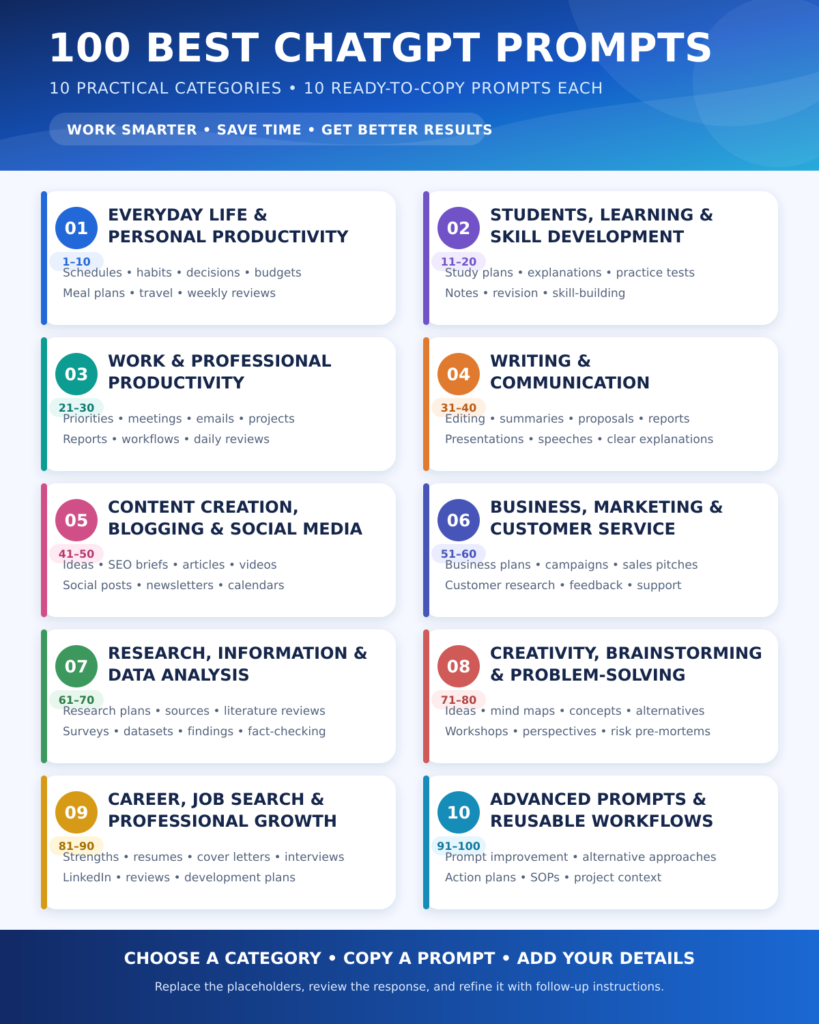
Best ChatGPT Prompts for Everyday Life and Personal Productivity
The following prompts can help you organize your day, make better decisions, build habits, plan meals, manage personal goals, and reduce the time spent on routine tasks.
1. Create a Personalized Daily Schedule
Best For: Organizing work, study, family responsibilities, and personal time.
Ready-to-Copy Prompt:
“Act as a personal productivity coach. Create a realistic daily schedule for me using the following information:
Wake-up time: [TIME]
Sleep time: [TIME]
Working or study hours: [HOURS]
Fixed responsibilities: [RESPONSIBILITIES]
Personal goals: [GOALS]
Available free time: [TIME]
Include focused work periods, short breaks, meals, exercise, and relaxation. Do not make the schedule overly strict. Present it as a table with columns for time, activity, duration, and purpose.”
How to Customize: Add your travel time, family commitments, energy levels, and preferred break duration.
2. Plan and Prioritize a Busy Week
Best For: Managing several tasks without feeling overwhelmed.
Ready-to-Copy Prompt:
“Act as an experienced productivity planner. Organize the following tasks into a practical seven-day plan: [LIST ALL TASKS].
For each task, consider its deadline, importance, estimated duration, and dependency on other tasks. Divide the work across the week without overloading any single day. Identify the three highest-priority tasks and explain why they should be completed first. Present the final plan in a day-wise table.”
How to Customize: Mention deadlines, working hours, and tasks that must be completed on a specific day.
3. Break a Large Goal into Smaller Steps
Best For: Starting a goal that currently feels complicated or overwhelming.
Ready-to-Copy Prompt:
“Act as a goal-setting coach. Help me achieve the following goal: [GOAL].
My current situation is: [BACKGROUND].
My available time is: [TIME PER DAY OR WEEK].
My target date is: [DATE].
My main difficulties are: [CHALLENGES].
Break the goal into milestones, weekly actions, and small daily tasks. Include a simple progress-tracking system and explain what I should do if I fall behind.”
How to Customize: Provide an honest description of your current skills, resources, limitations, and previous attempts.
4. Build a Sustainable New Habit
Best For: Developing habits related to exercise, reading, learning, sleep, or productivity.
Ready-to-Copy Prompt:
“Act as a behavioural habit coach. Help me build the habit of [HABIT].
I can spend [TIME] each day, and the biggest reasons I usually fail are [REASONS]. Create a 30-day habit-building plan that starts with very small actions and increases gradually. Include a habit trigger, daily minimum action, reward system, tracking method, and recovery plan for missed days. Keep the plan practical and sustainable.”
How to Customize: Explain when and where you want to perform the habit and what usually interrupts your routine.
5. Make a Difficult Personal Decision
Best For: Comparing choices logically without asking AI to make the final decision for you.
Ready-to-Copy Prompt:
“Act as a neutral decision-analysis assistant. Help me evaluate this decision: [DESCRIBE THE DECISION].
My available options are: [OPTIONS].
My priorities are: [PRIORITIES].
My concerns are: [CONCERNS].
My limitations are: [LIMITATIONS].
Compare each option using benefits, disadvantages, short-term effects, long-term effects, costs, risks, and reversibility. Identify any missing information I should collect. Present the comparison in a table, but do not make the final decision for me.”
How to Customize: Add emotional, financial, professional, and family factors that may influence the decision.
🚀 AI in Real Life
AI can organize information and reveal trade-offs that are easy to overlook. However, important personal decisions should combine AI-assisted analysis with human judgement, lived experience, and advice from people who understand your circumstances.
6. Create a Weekly Meal Plan
Best For: Saving time while planning balanced meals and grocery shopping.
Ready-to-Copy Prompt:
“Act as a practical meal-planning assistant. Create a seven-day meal plan based on the following details:
Number of people: [NUMBER]
Dietary preference: [PREFERENCE]
Food allergies or restrictions: [RESTRICTIONS]
Available cooking time: [TIME]
Approximate budget: [BUDGET]
Available ingredients: [INGREDIENTS]
Preferred cuisine: [CUISINE]
Include breakfast, lunch, dinner, and one optional snack. Reuse ingredients to reduce waste and provide a categorized grocery list.”
How to Customize: Mention foods you dislike, locally available ingredients, and whether leftovers can be reused.
7. Organize and Declutter a Room
Best For: Creating a manageable cleaning and organization plan.
Ready-to-Copy Prompt:
“Act as a home-organization expert. Create a step-by-step plan to declutter and organize my [ROOM OR SPACE].
The space currently contains: [MAIN ITEMS].
The biggest problems are: [PROBLEMS].
I can spend [TIME] on the task.
My available storage options are: [STORAGE].
Divide the project into short stages. Include categories for keeping, relocating, donating, recycling, and discarding items. Finish with a simple weekly maintenance routine.”
How to Customize: Mention the room’s approximate size and whether other people share the space.
8. Create a Personal Monthly Budget
Best For: Organizing income and expenses for general planning.
Ready-to-Copy Prompt:
“Act as a personal budgeting assistant. Help me organize a monthly budget using these figures:
Monthly income: [INCOME]
Fixed expenses: [LIST]
Variable expenses: [LIST]
Debt payments: [AMOUNT]
Savings goal: [GOAL]
Upcoming major expenses: [EXPENSES]
Categorize my spending, identify areas that may be reduced, and create a realistic monthly allocation. Present the result in a table and include a simple weekly spending-check routine. Do not provide investment or legal advice.”
How to Customize: Use accurate figures and remove personally identifiable financial information before sharing.
9. Plan a Trip or Short Vacation
Best For: Creating a flexible itinerary based on time, budget, and interests.
Ready-to-Copy Prompt:
“Act as a travel-planning assistant. Create a [NUMBER]-day itinerary for [DESTINATION] for [NUMBER] travellers.
Travel dates: [DATES]
Approximate budget: [BUDGET]
Main interests: [INTERESTS]
Mobility or dietary needs: [NEEDS]
Preferred travel pace: [RELAXED/MODERATE/BUSY]
Starting location: [LOCATION]
Create a day-wise itinerary with logical travel routes, approximate activity duration, meal breaks, and backup options. Clearly identify information that must be verified before booking.”
How to Customize: Add confirmed accommodation, transport details, opening hours, and places you definitely want to visit.
10. Conduct a Weekly Personal Review
Best For: Reflecting on progress and preparing for the next week.
Ready-to-Copy Prompt:
“Act as a reflective productivity coach. Guide me through a weekly review covering work, learning, health, relationships, finances, and personal well-being.
Ask me one question at a time about:
- Important accomplishments
- Unfinished tasks
- Difficulties and distractions
- Lessons learned
- Habits maintained or missed
- Priorities for next week
After I answer, summarize the patterns you notice and create three realistic priorities with specific next actions.”
How to Customize: Remove any life area you do not want to review and add project-specific questions when necessary.
✅ Pro Tip
Personal productivity prompts work best when you provide realistic information. If you exaggerate your available time or hide important limitations, ChatGPT may create a plan that looks impressive but is difficult to follow.
Best ChatGPT Prompts for Students, Learning, and Skill Development
These prompts can help students understand difficult concepts, organize study material, prepare for examinations, practise active recall, improve weak areas, and learn new skills more systematically.
11. Create a Personalized Study Plan
Best For: Organizing study time across multiple subjects, chapters, or examinations.
Ready-to-Copy Prompt:
“Act as an experienced academic planner. Create a realistic study plan using the following information:
Subjects or topics: [SUBJECTS]
Examination date: [DATE]
Available study time: [TIME PER DAY]
Current preparation level: [BEGINNER/INTERMEDIATE/ADVANCED]
Strong areas: [AREAS]
Weak areas: [AREAS]
Other responsibilities: [RESPONSIBILITIES]
Distribute the topics according to difficulty, importance, and available time. Include revision sessions, practice questions, short breaks, and weekly progress checks. Present the plan as a day-wise table and keep the workload manageable.”
How to Customize: Mention days when you have less time, subjects carrying more marks, and any chapters you have already completed.
12. Understand a Difficult Concept
Best For: Learning a topic that feels confusing or too technical.
Ready-to-Copy Prompt:
“Act as a patient teacher with expertise in [SUBJECT]. Explain the following concept: [CONCEPT].
Begin with a simple explanation for a complete beginner. Then explain it at an intermediate level using correct terminology. Include:
- One everyday-life analogy
- One practical example
- The most important terms
- A step-by-step explanation
- Three common misunderstandings
- Five questions to check my understanding
Do not assume that I already understand the related concepts. If prior knowledge is necessary, explain it first.”
How to Customize: Mention your class level, subject background, preferred language, and the specific part you find difficult.
13. Convert Notes into a Structured Study Guide
Best For: Organizing rough classroom notes, textbook points, or lecture material.
Ready-to-Copy Prompt:
“Act as an academic study assistant. Convert the following notes into a clear and well-structured study guide: [PASTE NOTES].
Organize the material using:
- Main headings and subheadings
- Key definitions
- Important facts and dates
- People, theories, or formulas
- Examples
- Comparisons
- Cause-and-effect relationships
- A short final summary
Preserve all important information from my notes. Clearly mark any statement that appears incomplete, unclear, or potentially inaccurate instead of silently changing it.”
How to Customize: Ask for a table, timeline, flowchart outline, glossary, or examination-focused version if required.
14. Create an Active-Recall Quiz
Best For: Testing knowledge without repeatedly rereading the same material.
Ready-to-Copy Prompt:
“Act as a teacher and active-recall coach. Create a quiz from the following study material: [PASTE MATERIAL].
Include:
- Five multiple-choice questions
- Five short-answer questions
- Three application-based questions
- Two questions that connect different concepts
- One challenging question
Ask me one question at a time and wait for my answer. After each response, tell me whether it is correct, explain the answer briefly, and identify the concept I need to revise. At the end, provide my score and a list of weak areas.”
How to Customize: Specify the difficulty level, total number of questions, marking scheme, and whether negative marking should be used.
15. Build a Spaced-Repetition Revision Schedule
Best For: Remembering information over a longer period.
Ready-to-Copy Prompt:
“Act as a learning and memory coach. Create a spaced-repetition schedule for the following topics: [LIST TOPICS].
My examination or target date is: [DATE].
I can revise for: [TIME] per day.
My current familiarity with each topic is: [LEVELS].
Schedule the first learning session and later reviews at suitable intervals. Give difficult or unfamiliar topics more revision time. Include quick recall tests and a method for rescheduling topics that I fail to remember. Present the plan as a table with columns for date, topic, revision type, estimated time, and completion status.”
How to Customize: Add the number of chapters, important formulas, vocabulary lists, historical dates, or other facts that require repeated revision.
🎓 Student Tip
Do not ask ChatGPT only to shorten your study material. Real learning improves when you retrieve information from memory, explain ideas in your own words, solve problems, and review mistakes. Use AI to support these activities rather than replace them.
16. Improve a Weak Subject or Topic
Best For: Identifying knowledge gaps and creating a focused improvement plan.
Ready-to-Copy Prompt:
“Act as a supportive tutor. I want to improve in [SUBJECT OR TOPIC].
My current level is: [LEVEL].
The areas I find difficult are: [AREAS].
My recent scores or performance are: [DETAILS].
I can study for: [TIME] per day.
My target is: [TARGET].
First, ask me up to five diagnostic questions to identify the cause of my difficulty. Then create a four-week improvement plan covering foundational concepts, guided practice, independent exercises, revision, and weekly assessment. Include measurable indicators that will show whether I am improving.”
How to Customize: Include examples of questions you answered incorrectly and describe whether the difficulty involves understanding, memory, speed, or confidence.
17. Summarize a Chapter Without Losing Important Details
Best For: Creating concise revision material from a long chapter or article.
Ready-to-Copy Prompt:
“Act as an academic summarization assistant. Summarize the following chapter or material: [PASTE TEXT].
Create the summary in three layers:
- A short overview of approximately 100 words
- A detailed section-wise summary
- A final list of essential facts for revision
Preserve important names, dates, definitions, arguments, formulas, examples, and conclusions. Distinguish between the author’s main ideas and supporting details. Do not add information that is not present in the original material.”
How to Customize: Specify a word limit, class level, examination type, or whether you need the summary in paragraphs, bullet points, or a table.
18. Create an Essay or Assignment Outline
Best For: Planning an original, well-organized academic response before writing.
Ready-to-Copy Prompt:
“Act as an academic writing coach. Help me create a detailed outline for the following essay or assignment topic: [TOPIC].
Academic level: [LEVEL]
Required length: [WORD COUNT]
Main instructions: [INSTRUCTIONS]
Required citation style: [STYLE]
My initial ideas: [IDEAS]
Suggest a clear thesis or central argument, introduction structure, main sections, supporting points, possible counterarguments, evidence I should research, and a conclusion structure. Do not write the complete submission for me. Clearly separate verified information from ideas that require further research.”
How to Customize: Add the marking rubric, required sources, teacher’s instructions, and arguments you want to include.
19. Practise a New Language Through Conversation
Best For: Improving vocabulary, grammar, comprehension, and speaking confidence.
Ready-to-Copy Prompt:
“Act as a friendly [TARGET LANGUAGE] conversation tutor. My current level is [LEVEL], and I want to practise a conversation about [TOPIC].
Use vocabulary appropriate for my level and ask me one question at a time. After each response:
- Correct important grammar or vocabulary mistakes
- Provide a more natural version of my sentence
- Explain the correction briefly
- Continue the conversation
Do not interrupt for every minor mistake. At the end, list five useful words or phrases from the conversation and give me a short practice task.”
How to Customize: Specify whether you want formal language, everyday conversation, professional communication, pronunciation guidance, or explanations in your native language.
20. Prepare for an Examination Strategically
Best For: Planning revision when the examination date is approaching.
Ready-to-Copy Prompt:
“Act as an examination-preparation strategist. Help me prepare for [EXAMINATION] using the following information:
Examination date: [DATE]
Subjects or units: [LIST]
Syllabus completed: [DETAILS]
Remaining syllabus: [DETAILS]
Strong topics: [TOPICS]
Weak topics: [TOPICS]
Available study hours: [HOURS]
Question format: [FORMAT]
Create a practical preparation plan that prioritizes high-value and weak topics. Include concept revision, active recall, practice questions, mock tests, error analysis, and final-day preparation. Also explain what I should stop doing if there is not enough time to cover everything.”
How to Customize: Add the marks distribution, previous-year question patterns, examination duration, and your target score.
✅ Pro Tip
ChatGPT can explain, organize, question, and provide feedback, but its academic answers may occasionally contain errors. Verify important facts, formulas, quotations, citations, and dates using textbooks, teachers, official syllabi, or trusted academic sources.
Best ChatGPT Prompts for Work and Professional Productivity
The following prompts can help professionals manage workloads, organize meetings, improve communication, solve workplace problems, and complete important tasks more efficiently.
21. Prioritize Your Daily Work Tasks
Best For: Deciding what to work on first when several tasks require attention.
Ready-to-Copy Prompt:
“Act as an experienced productivity manager. Help me prioritize the following work tasks: [LIST ALL TASKS].
For each task, consider:
- Deadline
- Importance
- Expected impact
- Estimated time
- Dependencies
- Consequences of delay
Classify every task as urgent and important, important but not urgent, urgent but less important, or low priority. Create a practical order of completion and identify the three tasks I should focus on first. Present the result in a table with columns for task, priority, reason, estimated time, and next action.”
How to Customize: Include deadlines, meetings, working hours, and any tasks that require approval or input from another person.
22. Plan a Focused Work Session
Best For: Completing an important task without being distracted or overwhelmed.
Ready-to-Copy Prompt:
“Act as a deep-work coach. Create a focused work session for the following task: [TASK].
Available time: [TIME]
Current progress: [PROGRESS]
Expected result: [DESIRED OUTPUT]
Likely distractions: [DISTRACTIONS]
My energy level: [LOW/MEDIUM/HIGH]
Divide the work into clear stages with realistic time blocks, short breaks, and measurable outcomes. Tell me what to prepare before starting, what to avoid during the session, and how to review the completed work at the end.”
How to Customize: Mention whether you work better with 25-minute, 45-minute, or 90-minute focus periods.
23. Create a Professional Meeting Agenda
Best For: Keeping meetings organized, focused, and useful.
Ready-to-Copy Prompt:
“Act as a professional meeting facilitator. Create a clear agenda for the following meeting:
Meeting topic: [TOPIC]
Main objective: [OBJECTIVE]
Participants: [PARTICIPANTS]
Available duration: [TIME]
Important discussion points: [POINTS]
Decisions required: [DECISIONS]
Background information: [CONTEXT]
Create a timed agenda that includes an opening, discussion points, decision-making, action-item assignment, and closing summary. Also list any documents or information participants should review before the meeting.”
How to Customize: Add the names or roles of people responsible for presenting particular topics.
24. Turn Meeting Notes into Action Items
Best For: Converting unorganized meeting notes into clear responsibilities and deadlines.
Ready-to-Copy Prompt:
“Act as a project coordination assistant. Review the following meeting notes and convert them into an organized summary: [PASTE MEETING NOTES].
Create the following sections:
- Main topics discussed
- Decisions made
- Action items
- Person responsible for each action
- Deadline or expected completion date
- Unresolved questions
- Items requiring follow-up
Present the action items in a table. Do not invent missing names, deadlines, or decisions. Clearly mark any information that needs confirmation.”
How to Customize: Add the project name, meeting date, participant list, and preferred format for sharing the summary.
25. Draft a Clear Professional Email
Best For: Writing workplace emails that are concise, polite, and easy to understand.
Ready-to-Copy Prompt:
“Act as a professional communication expert. Write an email using the following information:
Recipient: [NAME OR ROLE]
Purpose: [PURPOSE]
Important details: [DETAILS]
Required action: [ACTION]
Deadline: [DATE, IF APPLICABLE]
Desired tone: [FORMAL/FRIENDLY/PERSUASIVE/DIRECT]
Relationship with recipient: [RELATIONSHIP]
Create a clear subject line and a concise email. State the main purpose early, organize the details logically, and finish with a polite call to action. Avoid unnecessary jargon and do not make the message sound robotic.”
How to Customize: Mention whether the email is a request, reminder, follow-up, apology, update, or response to an earlier message.
26. Create a Practical Project Plan
Best For: Organizing a new workplace project from beginning to completion.
Ready-to-Copy Prompt:
“Act as an experienced project manager. Create a practical project plan using the following details:
Project name: [NAME]
Main objective: [OBJECTIVE]
Expected deliverables: [DELIVERABLES]
Start date: [DATE]
Final deadline: [DATE]
Team members or roles: [TEAM]
Available resources: [RESOURCES]
Known limitations: [LIMITATIONS]
Possible risks: [RISKS]
Divide the project into phases, milestones, and individual tasks. Identify task dependencies, responsible roles, estimated completion times, possible risks, and review points. Present the main plan in a table and include a simple method for tracking progress.”
How to Customize: Add the available budget, approval process, software tools, client requirements, and reporting frequency.
27. Analyze a Workplace Problem
Best For: Understanding the possible causes of a recurring professional problem.
Ready-to-Copy Prompt:
“Act as a neutral workplace problem-solving consultant. Analyze the following problem: [DESCRIBE THE PROBLEM].
When it started: [DATE OR PERIOD]
People or departments affected: [DETAILS]
Known evidence: [FACTS]
Possible causes: [POSSIBLE CAUSES]
Solutions already attempted: [ATTEMPTS]
Important limitations: [LIMITATIONS]
Separate confirmed facts from assumptions. Identify possible root causes, missing information, and the likely effects of leaving the problem unresolved. Suggest several practical solutions and compare their benefits, risks, costs, and difficulty. Do not blame individuals without evidence.”
How to Customize: Include examples, dates, relevant performance data, and feedback from the people affected by the problem.
28. Improve a Repetitive Work Process
Best For: Saving time and reducing errors in tasks that are performed regularly.
Ready-to-Copy Prompt:
“Act as a workflow optimization specialist. Help me improve the following repetitive work process: [DESCRIBE THE PROCESS].
Current steps: [LIST STEPS]
How often it is performed: [FREQUENCY]
Average time required: [TIME]
People involved: [PEOPLE OR ROLES]
Tools currently used: [TOOLS]
Common delays or errors: [PROBLEMS]
Rules that cannot be changed: [RESTRICTIONS]
Identify unnecessary steps, repeated work, bottlenecks, and opportunities for templates, checklists, delegation, or automation. Create an improved workflow and explain how much time or effort each proposed change may save. Include human review points for important decisions.”
How to Customize: Paste a real example of the current workflow and mention any software or approval systems that must remain in use.
29. Prepare a Professional Progress Report
Best For: Reporting achievements, delays, challenges, and next steps clearly.
Ready-to-Copy Prompt:
“Act as a professional report-writing assistant. Create a progress report using the following information:
Project or department: [NAME]
Reporting period: [PERIOD]
Main objectives: [OBJECTIVES]
Completed work: [COMPLETED TASKS]
Work currently in progress: [ONGOING TASKS]
Results or performance figures: [DATA]
Delays or challenges: [CHALLENGES]
Support or decisions required: [REQUIREMENTS]
Next planned actions: [NEXT STEPS]
Organize the report into an executive summary, key achievements, current status, challenges, next steps, and support required. Use a professional and factual tone. Do not invent results, figures, deadlines, or explanations that I have not provided.”
How to Customize: Specify the required length and whether the report is intended for a manager, client, team, or senior leadership.
30. Conduct an End-of-Day Work Review
Best For: Closing the workday with clarity and preparing for the following day.
Ready-to-Copy Prompt:
“Act as a reflective work coach. Guide me through an end-of-day review. Ask me one question at a time about:
- Tasks completed
- Tasks left unfinished
- Unexpected problems
- Time-consuming distractions
- Important decisions
- Lessons learned
- Messages or follow-ups still required
- Priorities for tomorrow
After I answer, summarize my progress, identify any patterns, and create a realistic plan for tomorrow containing no more than three major priorities. Finish with a short shutdown checklist so I can end the workday without worrying about forgotten tasks.”
How to Customize: Add questions related to your daily targets, client work, team responsibilities, or ongoing projects.
✅ Pro Tip
Work-related prompts produce better results when you provide real deadlines, constraints, responsibilities, and expected outcomes. However, remove confidential business information, passwords, private employee records, and sensitive client data before entering workplace details into ChatGPT.
Best ChatGPT Prompts for Writing and Communication
These prompts can help you plan, write, revise, simplify, and present information more clearly. They are useful for students, professionals, bloggers, business owners, and anyone who regularly communicates through written content.
31. Improve a Rough Draft
Best For: Turning an unfinished or poorly organized draft into clear, polished content.
Ready-to-Copy Prompt:
“Act as an experienced editor. Improve the following draft without changing its original meaning: [PASTE DRAFT].
Target audience: [AUDIENCE]
Purpose: [PURPOSE]
Preferred tone: [TONE]
Approximate length: [LENGTH]
Improve the structure, clarity, grammar, sentence flow, transitions, and readability. Remove unnecessary repetition and confusing language. Preserve important facts, examples, and the writer’s natural voice. After rewriting, briefly list the major improvements you made.”
How to Customize: Specify whether you want light editing, substantial rewriting, or only grammar and punctuation corrections.
32. Rewrite Text for a Specific Tone
Best For: Adapting the same message for different audiences or situations.
Ready-to-Copy Prompt:
“Act as a communication specialist. Rewrite the following text in a [FORMAL/FRIENDLY/CONFIDENT/PERSUASIVE/EMPATHETIC/CONVERSATIONAL] tone: [PASTE TEXT].
The intended audience is: [AUDIENCE].
The purpose of the message is: [PURPOSE].
Keep the original meaning and all essential facts. Adjust the vocabulary, sentence length, level of formality, and emotional tone for the intended reader. Avoid exaggerated claims, artificial expressions, and unnecessary jargon.”
How to Customize: Ask ChatGPT to produce two or three tone variations so you can compare them before choosing one.
33. Check Grammar, Clarity, and Readability
Best For: Proofreading important writing before publishing, submitting, or sending it.
Ready-to-Copy Prompt:
“Act as a professional proofreader. Review the following text: [PASTE TEXT].
Check for:
- Grammar and spelling errors
- Incorrect punctuation
- Awkward sentences
- Unclear references
- Unnecessary repetition
- Inconsistent terminology
- Problems with tone or readability
First, provide a corrected version. Then create a short table showing the original issue, the correction, and the reason for the change. Do not change facts or rewrite sentences that are already clear.”
How to Customize: Mention whether the text should follow American English, British English, or another language convention.
34. Summarize a Long Text
Best For: Extracting the most important information from articles, reports, notes, or documents.
Ready-to-Copy Prompt:
“Act as an expert summarization assistant. Summarize the following text: [PASTE TEXT].
Create:
- A short overview of approximately [NUMBER] words
- A list of the main points
- Important facts, figures, dates, and names
- Major arguments or conclusions
- Questions or uncertainties that remain unanswered
Use only the information provided in the text. Do not add outside facts or assumptions. Clearly distinguish between the author’s statements and your own observations about the structure of the text.”
How to Customize: Request a beginner-friendly summary, executive summary, study notes, or one-paragraph version according to your purpose.
35. Create a Detailed Writing Outline
Best For: Organizing ideas before writing an article, report, essay, guide, or book chapter.
Ready-to-Copy Prompt:
“Act as an experienced content strategist. Create a detailed outline for the following topic: [TOPIC].
Content type: [ARTICLE/ESSAY/REPORT/GUIDE/CHAPTER]
Target audience: [AUDIENCE]
Main purpose: [PURPOSE]
Approximate length: [WORD COUNT]
Important points to include: [POINTS]
Desired tone: [TONE]
Create a logical structure with one main title, major sections, subsections, and brief notes explaining what each part should cover. Arrange the ideas in a natural sequence and identify any areas that may require research, examples, statistics, or expert sources.”
How to Customize: Provide keywords, required headings, assignment instructions, or previously published content that should be linked or referenced.
36. Explain a Complex Topic in Simple Language
Best For: Making technical, academic, scientific, or professional information easier to understand.
Ready-to-Copy Prompt:
“Act as a patient subject expert and educator. Explain the following topic in simple language: [TOPIC].
The intended reader is: [AGE, GRADE LEVEL, OR KNOWLEDGE LEVEL].
Begin with a one-sentence definition. Then explain the topic step by step using familiar examples, comparisons, and practical situations. Define technical terms when they first appear. Finish with a short recap and three questions the reader can use to check their understanding.
Do not oversimplify important facts or use an analogy that creates a misleading explanation.”
How to Customize: Ask for explanations at multiple levels, such as beginner, intermediate, and advanced.
37. Write a Persuasive Request or Proposal
Best For: Presenting an idea and encouraging a person or organization to consider it.
Ready-to-Copy Prompt:
“Act as a persuasive business writer. Draft a professional request or proposal using the following details:
Proposal or request: [DESCRIBE IT]
Recipient: [PERSON OR ORGANIZATION]
Problem or need: [PROBLEM]
Proposed solution: [SOLUTION]
Main benefits: [BENEFITS]
Evidence or supporting information: [EVIDENCE]
Possible objections: [OBJECTIONS]
Requested next action: [ACTION]
Create a strong but respectful draft. Explain the problem clearly, present the solution, support it with available evidence, address likely concerns, and end with a specific call to action. Do not invent statistics, testimonials, costs, or guarantees.”
How to Customize: Mention the required format, budget, deadline, relationship with the recipient, and desired length.
38. Convert Notes into a Structured Document
Best For: Transforming scattered ideas or bullet points into a readable document.
Ready-to-Copy Prompt:
“Act as a professional document writer. Convert the following notes into a well-structured [ARTICLE/REPORT/MEMO/GUIDE/STATEMENT]: [PASTE NOTES].
Intended audience: [AUDIENCE]
Purpose: [PURPOSE]
Preferred tone: [TONE]
Approximate length: [LENGTH]
Organize related ideas together, add suitable headings and transitions, and convert incomplete points into clear sentences. Preserve every important fact from the notes. If essential information is missing or uncertain, mark it clearly instead of inventing details.”
How to Customize: State whether ChatGPT may change the sequence of your notes or must preserve their original order.
39. Create Presentation Content
Best For: Converting a topic or document into organized presentation slides.
Ready-to-Copy Prompt:
“Act as a presentation content specialist. Create a [NUMBER]-slide presentation about [TOPIC].
Audience: [AUDIENCE]
Presentation objective: [OBJECTIVE]
Available speaking time: [TIME]
Important information to include: [INFORMATION]
Preferred style: [EDUCATIONAL/PROFESSIONAL/PERSUASIVE]
For each slide, provide:
- Slide title
- Three to five concise points
- Suggested visual or chart
- Brief speaker notes
Create a logical opening, main explanation, practical examples, conclusion, and final call to action or discussion question. Keep slide text concise and do not invent supporting data.”
How to Customize: Add brand guidelines, required statistics, preferred colours, or the presentation platform you plan to use.
40. Prepare a Speech or Talking Points
Best For: Preparing for presentations, ceremonies, meetings, interviews, or public speaking.
Ready-to-Copy Prompt:
“Act as an experienced speechwriter. Prepare a speech about [TOPIC] using the following details:
Occasion: [OCCASION]
Audience: [AUDIENCE]
Speaking time: [TIME]
Main message: [MESSAGE]
Important points or examples: [POINTS]
Preferred tone: [INSPIRING/FORMAL/FRIENDLY/EDUCATIONAL]
Create an engaging opening, a logically organized body, smooth transitions, and a memorable conclusion. Use natural spoken language rather than complicated written sentences. Also provide a separate list of short talking points that I can use instead of reading the complete speech.”
How to Customize: Add personal experiences, quotations, names to acknowledge, and words or topics that should be avoided.
✅ Pro Tip
Do not ask ChatGPT to “make the writing better” without explaining what better means. Specify the audience, purpose, tone, length, format, and level of detail. Clear instructions help ChatGPT improve your writing while preserving your original meaning and voice.
Best ChatGPT Prompts for Content Creation, Blogging, and Social Media
These prompts can help bloggers, marketers, educators, businesses, and creators generate ideas, plan content, write useful material, and repurpose existing work for different platforms.
41. Generate Relevant Content Ideas
Best For: Finding useful content topics for a blog, website, newsletter, YouTube channel, or social media account.
Ready-to-Copy Prompt:
“Act as an experienced content strategist. Generate [NUMBER] content ideas for my [BLOG/WEBSITE/YOUTUBE CHANNEL/NEWSLETTER/SOCIAL MEDIA ACCOUNT].
My niche: [NICHE]
Target audience: [AUDIENCE]
Audience problems: [PROBLEMS]
Main content goals: [GOALS]
Topics already covered: [TOPICS]
Preferred content formats: [FORMATS]
Group the ideas into beginner, intermediate, and advanced topics. For each idea, provide a working title, the main question it answers, the recommended format, and the value it offers to the audience. Avoid repeating the topics I have already covered.”
How to Customize: Add seasonal events, products, services, content categories, or keywords that should be included.
42. Create an SEO Content Brief
Best For: Planning a search-friendly article before beginning the writing process.
Ready-to-Copy Prompt:
“Act as an SEO content strategist. Create a detailed content brief for an article about [TOPIC].
Primary keyword: [KEYWORD]
Related keywords: [KEYWORDS]
Target audience: [AUDIENCE]
Search intent: [INFORMATIONAL/COMMERCIAL/TRANSACTIONAL/NAVIGATIONAL]
Approximate word count: [WORD COUNT]
Website niche: [NICHE]
Competing pages or notes: [DETAILS]
Include a recommended title, URL slug, meta description, H1, H2 and H3 structure, questions to answer, suggested examples, internal-link opportunities, reliable source types, and FAQ ideas. Do not invent search volume, keyword difficulty, rankings, or competitor data.”
How to Customize: Paste verified keyword research or competitor headings when you want a more evidence-based brief.
43. Write an Engaging Blog Introduction
Best For: Creating an opening that clearly explains why an article is worth reading.
Ready-to-Copy Prompt:
“Act as an experienced blog writer. Write an engaging introduction for an article titled [TITLE].
Target audience: [AUDIENCE]
Main problem: [PROBLEM]
Primary keyword: [KEYWORD]
Article’s main benefit: [BENEFIT]
Preferred tone: [TONE]
Approximate length: [LENGTH]
Begin with a relevant problem, question, observation, or practical situation. Explain what the reader will learn and why it matters. Use the primary keyword naturally near the beginning. Avoid exaggerated claims, unnecessary background information, generic statements, and phrases such as ‘In today’s fast-paced world.’”
How to Customize: Provide the article outline so the introduction accurately reflects the material that follows.
44. Draft a Complete Blog Article
Best For: Producing a structured first draft that can be reviewed and improved by a human editor.
Ready-to-Copy Prompt:
“Act as a knowledgeable human-style blog writer. Create a detailed article about [TOPIC].
Working title: [TITLE]
Target audience: [AUDIENCE]
Primary keyword: [KEYWORD]
Related keywords: [KEYWORDS]
Search intent: [INTENT]
Approximate length: [WORD COUNT]
Required sections: [SECTIONS]
Internal links to include: [LINKS OR ANCHOR TEXTS]
Preferred tone: [TONE]
Use one H1 followed by logically arranged H2 and H3 headings. Explain each point clearly, include practical examples, and use short paragraphs for readability. Place keywords naturally without repetition. Do not invent facts, quotations, research, statistics, personal experiences, or product features. Mark any statement that requires current verification.”
How to Customize: Provide research notes, official sources, brand guidelines, and examples of your preferred writing style.
45. Repurpose One Piece of Content
Best For: Converting an existing article, video, podcast, or presentation into content for several platforms.
Ready-to-Copy Prompt:
“Act as a content repurposing specialist. Convert the following content into multiple platform-specific formats: [PASTE CONTENT OR TRANSCRIPT].
Target audience: [AUDIENCE]
Main message: [MESSAGE]
Brand tone: [TONE]
Platforms: [PLATFORMS]
Create:
- A short LinkedIn post
- An Instagram or Facebook caption
- A short thread or series of posts
- A newsletter summary
- A 60-second video script
- Five key takeaway points
Adapt the structure and length for each platform instead of copying the same text everywhere. Preserve the original facts and do not add unsupported claims.”
How to Customize: Remove formats you do not need and add platform-specific limits, hashtags, calls to action, or publishing goals.
46. Create a Social Media Content Calendar
Best For: Planning consistent social media content in advance.
Ready-to-Copy Prompt:
“Act as a social media content planner. Create a [NUMBER]-day content calendar for my [BUSINESS/BRAND/PROJECT/PROFILE].
Industry or niche: [NICHE]
Target audience: [AUDIENCE]
Main goals: [GOALS]
Platforms: [PLATFORMS]
Posting frequency: [FREQUENCY]
Content categories: [CATEGORIES]
Important dates or campaigns: [DATES]
Present the calendar in a table with columns for date, platform, topic, format, opening hook, main message, call to action, and required visual. Balance educational, informative, engaging, promotional, and community-focused content.”
How to Customize: Add product launch dates, festivals, events, offers, brand colours, and content formats you can realistically produce.
47. Write a Platform-Specific Social Media Post
Best For: Creating posts suited to the audience and style of a particular social platform.
Ready-to-Copy Prompt:
“Act as a social media copywriter. Write a post for [PLATFORM] about [TOPIC].
Target audience: [AUDIENCE]
Main objective: [OBJECTIVE]
Key message: [MESSAGE]
Desired tone: [TONE]
Call to action: [ACTION]
Maximum length: [LENGTH]
Words or claims to avoid: [DETAILS]
Create a strong opening, concise main content, and a natural call to action. Follow the communication style of the selected platform without using clickbait. Provide three alternative opening hooks and suggest relevant hashtags only if they add genuine value.”
How to Customize: Mention whether the post will accompany an image, video, carousel, link, announcement, or customer story.
48. Create a YouTube Video Script
Best For: Planning educational, explanatory, review, tutorial, or storytelling videos.
Ready-to-Copy Prompt:
“Act as an experienced YouTube scriptwriter. Create a [NUMBER]-minute video script about [TOPIC].
Target viewers: [AUDIENCE]
Video objective: [OBJECTIVE]
Main points: [POINTS]
Preferred style: [EDUCATIONAL/CONVERSATIONAL/STORY-BASED/PROFESSIONAL]
Call to action: [ACTION]
Include:
- An attention-grabbing but honest opening
- A brief introduction
- Logically arranged sections
- Practical examples
- Smooth transitions
- Suggestions for on-screen text or visuals
- A clear conclusion and call to action
Use natural spoken language. Do not add unverified statistics, fake personal experiences, or misleading promises.”
How to Customize: Add the presenter’s personality, channel style, recording location, and whether the video will show a person, screen recording, slides, or animation.
49. Write a Useful Email Newsletter
Best For: Sharing updates, insights, educational content, or offers with subscribers.
Ready-to-Copy Prompt:
“Act as an email newsletter writer. Create a newsletter using the following information:
Main topic: [TOPIC]
Target subscribers: [AUDIENCE]
Purpose: [PURPOSE]
Important updates or ideas: [DETAILS]
Offer or resource: [OFFER]
Preferred tone: [TONE]
Call to action: [ACTION]
Provide three subject-line options and two preview-text options. Write a clear opening, useful main content, and a concise call to action. Keep the newsletter easy to scan with short sections and suitable headings. Avoid spam-like language, misleading urgency, and exaggerated promises.”
How to Customize: Add the sender’s name, brand style, newsletter frequency, previous issue topic, and links that must be included.
50. Build a Monthly Editorial Calendar
Best For: Coordinating blog posts, videos, newsletters, and social media around common goals.
Ready-to-Copy Prompt:
“Act as a senior editorial planner. Create a one-month editorial calendar for my [WEBSITE/BRAND/CHANNEL].
Primary niche: [NICHE]
Target audience: [AUDIENCE]
Monthly objective: [OBJECTIVE]
Main content categories: [CATEGORIES]
Publishing capacity: [NUMBER OF ITEMS]
Important dates: [DATES]
Existing content to update or promote: [CONTENT]
Organize the calendar around connected topic clusters. For each content item, provide a working title, target audience need, format, platform, primary keyword or theme, publication date, internal-link opportunity, and promotion plan. Keep the workload realistic and identify which content can be repurposed.”
How to Customize: Include your team size, approval process, available budget, preferred publishing days, and production time for each content format.
✅ Pro Tip
ChatGPT can accelerate content creation, but speed should not replace accuracy or originality. Review every draft, verify current information, add first-hand experience, and adapt the language to your real audience before publishing.
Best ChatGPT Prompts for Content Creation, Blogging, and Social Media
These prompts can help bloggers, marketers, educators, businesses, and creators generate ideas, plan content, write useful material, and repurpose existing work for different platforms.
41. Generate Relevant Content Ideas
Best For: Finding useful content topics for a blog, website, newsletter, YouTube channel, or social media account.
Ready-to-Copy Prompt:
“Act as an experienced content strategist. Generate [NUMBER] content ideas for my [BLOG/WEBSITE/YOUTUBE CHANNEL/NEWSLETTER/SOCIAL MEDIA ACCOUNT].
My niche: [NICHE]
Target audience: [AUDIENCE]
Audience problems: [PROBLEMS]
Main content goals: [GOALS]
Topics already covered: [TOPICS]
Preferred content formats: [FORMATS]
Group the ideas into beginner, intermediate, and advanced topics. For each idea, provide a working title, the main question it answers, the recommended format, and the value it offers to the audience. Avoid repeating the topics I have already covered.”
How to Customize: Add seasonal events, products, services, content categories, or keywords that should be included.
42. Create an SEO Content Brief
Best For: Planning a search-friendly article before beginning the writing process.
Ready-to-Copy Prompt:
“Act as an SEO content strategist. Create a detailed content brief for an article about [TOPIC].
Primary keyword: [KEYWORD]
Related keywords: [KEYWORDS]
Target audience: [AUDIENCE]
Search intent: [INFORMATIONAL/COMMERCIAL/TRANSACTIONAL/NAVIGATIONAL]
Approximate word count: [WORD COUNT]
Website niche: [NICHE]
Competing pages or notes: [DETAILS]
Include a recommended title, URL slug, meta description, H1, H2 and H3 structure, questions to answer, suggested examples, internal-link opportunities, reliable source types, and FAQ ideas. Do not invent search volume, keyword difficulty, rankings, or competitor data.”
How to Customize: Paste verified keyword research or competitor headings when you want a more evidence-based brief.
43. Write an Engaging Blog Introduction
Best For: Creating an opening that clearly explains why an article is worth reading.
Ready-to-Copy Prompt:
“Act as an experienced blog writer. Write an engaging introduction for an article titled [TITLE].
Target audience: [AUDIENCE]
Main problem: [PROBLEM]
Primary keyword: [KEYWORD]
Article’s main benefit: [BENEFIT]
Preferred tone: [TONE]
Approximate length: [LENGTH]
Begin with a relevant problem, question, observation, or practical situation. Explain what the reader will learn and why it matters. Use the primary keyword naturally near the beginning. Avoid exaggerated claims, unnecessary background information, generic statements, and phrases such as ‘In today’s fast-paced world.’”
How to Customize: Provide the article outline so the introduction accurately reflects the material that follows.
44. Draft a Complete Blog Article
Best For: Producing a structured first draft that can be reviewed and improved by a human editor.
Ready-to-Copy Prompt:
“Act as a knowledgeable human-style blog writer. Create a detailed article about [TOPIC].
Working title: [TITLE]
Target audience: [AUDIENCE]
Primary keyword: [KEYWORD]
Related keywords: [KEYWORDS]
Search intent: [INTENT]
Approximate length: [WORD COUNT]
Required sections: [SECTIONS]
Internal links to include: [LINKS OR ANCHOR TEXTS]
Preferred tone: [TONE]
Use one H1 followed by logically arranged H2 and H3 headings. Explain each point clearly, include practical examples, and use short paragraphs for readability. Place keywords naturally without repetition. Do not invent facts, quotations, research, statistics, personal experiences, or product features. Mark any statement that requires current verification.”
How to Customize: Provide research notes, official sources, brand guidelines, and examples of your preferred writing style.
45. Repurpose One Piece of Content
Best For: Converting an existing article, video, podcast, or presentation into content for several platforms.
Ready-to-Copy Prompt:
“Act as a content repurposing specialist. Convert the following content into multiple platform-specific formats: [PASTE CONTENT OR TRANSCRIPT].
Target audience: [AUDIENCE]
Main message: [MESSAGE]
Brand tone: [TONE]
Platforms: [PLATFORMS]
Create:
- A short LinkedIn post
- An Instagram or Facebook caption
- A short thread or series of posts
- A newsletter summary
- A 60-second video script
- Five key takeaway points
Adapt the structure and length for each platform instead of copying the same text everywhere. Preserve the original facts and do not add unsupported claims.”
How to Customize: Remove formats you do not need and add platform-specific limits, hashtags, calls to action, or publishing goals.
46. Create a Social Media Content Calendar
Best For: Planning consistent social media content in advance.
Ready-to-Copy Prompt:
“Act as a social media content planner. Create a [NUMBER]-day content calendar for my [BUSINESS/BRAND/PROJECT/PROFILE].
Industry or niche: [NICHE]
Target audience: [AUDIENCE]
Main goals: [GOALS]
Platforms: [PLATFORMS]
Posting frequency: [FREQUENCY]
Content categories: [CATEGORIES]
Important dates or campaigns: [DATES]
Present the calendar in a table with columns for date, platform, topic, format, opening hook, main message, call to action, and required visual. Balance educational, informative, engaging, promotional, and community-focused content.”
How to Customize: Add product launch dates, festivals, events, offers, brand colours, and content formats you can realistically produce.
47. Write a Platform-Specific Social Media Post
Best For: Creating posts suited to the audience and style of a particular social platform.
Ready-to-Copy Prompt:
“Act as a social media copywriter. Write a post for [PLATFORM] about [TOPIC].
Target audience: [AUDIENCE]
Main objective: [OBJECTIVE]
Key message: [MESSAGE]
Desired tone: [TONE]
Call to action: [ACTION]
Maximum length: [LENGTH]
Words or claims to avoid: [DETAILS]
Create a strong opening, concise main content, and a natural call to action. Follow the communication style of the selected platform without using clickbait. Provide three alternative opening hooks and suggest relevant hashtags only if they add genuine value.”
How to Customize: Mention whether the post will accompany an image, video, carousel, link, announcement, or customer story.
48. Create a YouTube Video Script
Best For: Planning educational, explanatory, review, tutorial, or storytelling videos.
Ready-to-Copy Prompt:
“Act as an experienced YouTube scriptwriter. Create a [NUMBER]-minute video script about [TOPIC].
Target viewers: [AUDIENCE]
Video objective: [OBJECTIVE]
Main points: [POINTS]
Preferred style: [EDUCATIONAL/CONVERSATIONAL/STORY-BASED/PROFESSIONAL]
Call to action: [ACTION]
Include:
- An attention-grabbing but honest opening
- A brief introduction
- Logically arranged sections
- Practical examples
- Smooth transitions
- Suggestions for on-screen text or visuals
- A clear conclusion and call to action
Use natural spoken language. Do not add unverified statistics, fake personal experiences, or misleading promises.”
How to Customize: Add the presenter’s personality, channel style, recording location, and whether the video will show a person, screen recording, slides, or animation.
49. Write a Useful Email Newsletter
Best For: Sharing updates, insights, educational content, or offers with subscribers.
Ready-to-Copy Prompt:
“Act as an email newsletter writer. Create a newsletter using the following information:
Main topic: [TOPIC]
Target subscribers: [AUDIENCE]
Purpose: [PURPOSE]
Important updates or ideas: [DETAILS]
Offer or resource: [OFFER]
Preferred tone: [TONE]
Call to action: [ACTION]
Provide three subject-line options and two preview-text options. Write a clear opening, useful main content, and a concise call to action. Keep the newsletter easy to scan with short sections and suitable headings. Avoid spam-like language, misleading urgency, and exaggerated promises.”
How to Customize: Add the sender’s name, brand style, newsletter frequency, previous issue topic, and links that must be included.
50. Build a Monthly Editorial Calendar
Best For: Coordinating blog posts, videos, newsletters, and social media around common goals.
Ready-to-Copy Prompt:
“Act as a senior editorial planner. Create a one-month editorial calendar for my [WEBSITE/BRAND/CHANNEL].
Primary niche: [NICHE]
Target audience: [AUDIENCE]
Monthly objective: [OBJECTIVE]
Main content categories: [CATEGORIES]
Publishing capacity: [NUMBER OF ITEMS]
Important dates: [DATES]
Existing content to update or promote: [CONTENT]
Organize the calendar around connected topic clusters. For each content item, provide a working title, target audience need, format, platform, primary keyword or theme, publication date, internal-link opportunity, and promotion plan. Keep the workload realistic and identify which content can be repurposed.”
How to Customize: Include your team size, approval process, available budget, preferred publishing days, and production time for each content format.
✅ Pro Tip
ChatGPT can accelerate content creation, but speed should not replace accuracy or originality. Review every draft, verify current information, add first-hand experience, and adapt the language to your real audience before publishing.
Best ChatGPT Prompts for Research, Information Analysis, and Data Understanding
These prompts can help students, teachers, researchers, writers, and professionals plan research, evaluate sources, analyze information, and understand data. AI-generated research should always be checked against reliable original sources.
61. Create a Research Plan
Best For: Organizing a research project before collecting information.
Ready-to-Copy Prompt:
“Act as an experienced research-methodology advisor. Create a practical research plan for the following topic: [TOPIC].
Research objective: [OBJECTIVE]
Target population or subject: [POPULATION]
Available time: [TIME]
Available resources: [RESOURCES]
Required research method: [METHOD, IF KNOWN]
Expected output: [REPORT/PAPER/PRESENTATION/PROJECT]
Important limitations: [LIMITATIONS]
Include the research problem, objectives, possible research questions, recommended methodology, data sources, sampling approach, data-collection steps, ethical considerations, analysis method, timeline, and expected limitations. Clearly identify any part that requires expert or institutional approval.”
How to Customize: Add the academic level, subject area, geographical scope, required citation style, and institutional guidelines.
62. Develop Strong Research Questions
Best For: Turning a broad topic into focused and answerable research questions.
Ready-to-Copy Prompt:
“Act as an academic research advisor. Help me develop research questions for the following topic: [TOPIC].
Research purpose: [PURPOSE]
Subject or discipline: [DISCIPLINE]
Target group or setting: [GROUP OR SETTING]
Geographical scope: [LOCATION]
Time period: [PERIOD]
Available data: [DATA]
Known limitations: [LIMITATIONS]
Generate one main research question and [NUMBER] supporting questions. Ensure that each question is clear, focused, researchable, ethically appropriate, and realistic within the available time and resources. Explain why each question is useful and identify the type of evidence required to answer it.”
How to Customize: Mention whether the study will be qualitative, quantitative, mixed-method, historical, comparative, or exploratory.
63. Summarize a Research Paper
Best For: Understanding the main purpose, method, findings, and limitations of an academic paper.
Ready-to-Copy Prompt:
“Act as a critical academic reading assistant. Analyze the following research paper or extracted text: [PASTE TEXT].
Create a structured summary covering:
- Research problem
- Main objective or hypothesis
- Research methodology
- Sample or data source
- Major findings
- Authors’ conclusions
- Limitations mentioned by the authors
- Practical or theoretical implications
- Questions left unanswered
Use only the provided material. Do not invent missing information. Distinguish clearly between the authors’ claims and your interpretation of the paper.”
How to Customize: Ask for a beginner-friendly explanation, section-wise notes, critical review, or presentation-ready summary.
64. Compare Multiple Sources
Best For: Identifying agreements, disagreements, and gaps across articles, reports, or studies.
Ready-to-Copy Prompt:
“Act as a neutral research analyst. Compare the following sources: [PASTE TEXT OR NOTES FROM EACH SOURCE].
For each source, identify:
- Main argument
- Evidence used
- Research method
- Important findings
- Limitations
- Possible bias or conflict of interest
- Publication date and relevance
Create a comparison table showing where the sources agree, disagree, or address different aspects of the topic. Identify unanswered questions and areas requiring additional evidence. Do not treat all sources as equally reliable without examining their origin and methodology.”
How to Customize: Include source titles, authors, publication dates, links, and the specific issue you want to compare.
65. Verify a Claim Systematically
Best For: Planning how to check whether a statement is accurate, misleading, outdated, or unsupported.
Ready-to-Copy Prompt:
“Act as a careful fact-checking assistant. Help me verify the following claim: [CLAIM].
Known source of the claim: [SOURCE]
Publication date: [DATE]
Relevant location or time period: [CONTEXT]
Available supporting material: [MATERIAL]
Break the claim into verifiable components. Explain what evidence would confirm or contradict each component. Recommend the types of primary and authoritative sources I should check. Identify ambiguous wording, missing context, possible statistical manipulation, and information that may have changed over time. Do not declare the claim true or false unless sufficient evidence is available.”
How to Customize: Paste the full surrounding paragraph, not only an isolated sentence, so the claim can be evaluated in context.
66. Create a Literature Review Structure
Best For: Organizing existing research around themes, methods, findings, and gaps.
Ready-to-Copy Prompt:
“Act as an academic literature-review advisor. Create a literature review structure for the following research topic: [TOPIC].
Research question: [QUESTION]
Academic discipline: [DISCIPLINE]
Time period covered: [PERIOD]
Geographical scope: [SCOPE]
Key studies or notes already collected: [STUDIES]
Required length: [WORD COUNT]
Organize the literature into logical themes instead of listing one study after another. Suggest sections for major theories, research methods, areas of agreement, conflicting findings, limitations, and research gaps. Explain what type of evidence should be discussed in each section. Do not invent studies, authors, quotations, or citations.”
How to Customize: Provide complete references or research notes so ChatGPT can help arrange real sources accurately.
67. Analyze Survey Responses
Best For: Finding patterns in customer, employee, student, or research survey data.
Ready-to-Copy Prompt:
“Act as a survey-data analyst. Analyze the following anonymized survey responses: [PASTE DATA].
Survey objective: [OBJECTIVE]
Question types: [TYPES]
Number of respondents: [NUMBER]
Groups to compare: [GROUPS]
Important limitations: [LIMITATIONS]
Calculate or summarize response distributions, common patterns, notable differences, and recurring themes in open-ended answers. Separate direct findings from interpretations. Identify missing data, small sample sizes, biased questions, or other limitations that may affect the conclusions. Present the findings in tables and suggest suitable charts where useful.”
How to Customize: Remove names, email addresses, phone numbers, and other personally identifiable information before sharing survey data.
68. Understand a Spreadsheet or Dataset
Best For: Exploring structured data and identifying useful questions before detailed analysis.
Ready-to-Copy Prompt:
“Act as a data-analysis assistant. Examine the following dataset or sample rows: [PASTE DATA].
Column descriptions: [DESCRIPTIONS]
Main objective: [OBJECTIVE]
Important metrics: [METRICS]
Time period: [PERIOD]
Known data-quality issues: [ISSUES]
Explain what each column represents, identify missing values, duplicates, inconsistent formats, unusual values, and possible relationships between variables. Recommend suitable calculations, comparisons, filters, pivot tables, and charts. Do not assume that correlation proves causation or invent values that are not present.”
How to Customize: Mention whether you are using Excel, Google Sheets, CSV, statistical software, or another analysis tool.
69. Create Interview Questions for Research
Best For: Preparing structured or semi-structured interviews for academic or professional research.
Ready-to-Copy Prompt:
“Act as a qualitative research specialist. Create an interview guide for the following study:
Research topic: [TOPIC]
Research objective: [OBJECTIVE]
Participants: [PARTICIPANTS]
Interview duration: [TIME]
Important themes: [THEMES]
Sensitive areas: [AREAS]
Ethical limitations: [LIMITATIONS]
Create an introduction, consent reminder, warm-up questions, main open-ended questions, neutral follow-up prompts, and a closing question. Avoid leading, judgmental, double-barrelled, or unnecessarily intrusive questions. Arrange the questions in a natural sequence.”
How to Customize: Add the participants’ knowledge level, cultural context, interview format, and any questions required by the research institution.
70. Synthesize Research Notes into Findings
Best For: Converting notes from several sources into an organized explanation.
Ready-to-Copy Prompt:
“Act as a research synthesis assistant. Organize the following research notes into a coherent analysis: [PASTE NOTES].
Main research question: [QUESTION]
Intended output: [REPORT/ARTICLE/PAPER/PRESENTATION]
Target audience: [AUDIENCE]
Required themes: [THEMES]
Preferred length: [LENGTH]
Group related evidence under suitable themes. Identify patterns, agreements, contradictions, gaps, and limitations. Connect every major finding to the relevant source information provided in my notes. Clearly separate evidence, interpretation, and unanswered questions. Do not create citations, quotations, or conclusions that are not supported by the supplied material.”
How to Customize: Label every note with its real source before pasting so that evidence can be traced accurately.
🧠 Research Insight
ChatGPT can help organize research, but it may occasionally produce incorrect facts, invented references, or oversimplified interpretations. Verify names, dates, quotations, statistics, and citations through original research papers, official databases, government publications, or other authoritative sources.
Best ChatGPT Prompts for Creativity, Brainstorming, and Problem-Solving
These prompts can help you explore new possibilities, develop original ideas, examine problems from different perspectives, and improve concepts before investing significant time or resources.
71. Brainstorm New Ideas
Best For: Generating a wide range of possibilities for a project, event, product, lesson, article, or personal goal.
Ready-to-Copy Prompt:
“Act as a creative brainstorming facilitator. Generate [NUMBER] ideas for the following objective: [OBJECTIVE].
Target audience: [AUDIENCE]
Available resources: [RESOURCES]
Budget: [BUDGET]
Time available: [TIME]
Important limitations: [LIMITATIONS]
Ideas already considered: [IDEAS]
Begin with practical ideas, then include several unusual but realistic possibilities. Group the ideas into categories and briefly explain the value, difficulty, and resources required for each one. Avoid repeating the ideas I have already considered.”
How to Customize: Mention whether you want safe, low-cost, innovative, experimental, or highly ambitious ideas.
72. Solve a Problem Step by Step
Best For: Breaking a complicated problem into smaller and more manageable parts.
Ready-to-Copy Prompt:
“Act as a structured problem-solving coach. Help me analyze the following problem: [DESCRIBE THE PROBLEM].
Desired outcome: [OUTCOME]
People affected: [PEOPLE]
Confirmed facts: [FACTS]
Possible causes: [CAUSES]
Previous attempts: [ATTEMPTS]
Available resources: [RESOURCES]
Limitations: [LIMITATIONS]
Break the problem into smaller components. Separate symptoms from possible root causes, identify missing information, and suggest several solutions. Compare the solutions by expected impact, cost, difficulty, risk, and reversibility. Finish with the safest practical next step for testing the most promising option.”
How to Customize: Add dates, examples, measurements, and feedback from people who understand the problem.
73. Generate Alternative Approaches
Best For: Finding new options when the current plan is ineffective or unavailable.
Ready-to-Copy Prompt:
“Act as an adaptive strategy advisor. My current approach to [GOAL OR TASK] is: [CURRENT APPROACH].
The problem with this approach is: [PROBLEM].
The result I need is: [RESULT].
My available time and resources are: [RESOURCES].
The restrictions I must follow are: [RESTRICTIONS].
Generate at least [NUMBER] alternative approaches. Include simple, low-cost, collaborative, technology-assisted, and unconventional options where appropriate. For each approach, explain its benefits, disadvantages, requirements, risks, and the situation in which it would work best.”
How to Customize: Mention which parts of the current approach must remain unchanged and which parts can be completely redesigned.
74. Create a Mind Map for Any Topic
Best For: Visually organizing ideas, categories, and relationships around a central subject.
Ready-to-Copy Prompt:
“Act as a knowledge-organization specialist. Create a detailed text-based mind map for the following topic: [TOPIC].
Purpose: [STUDY/PLANNING/WRITING/BRAINSTORMING]
Knowledge level: [BEGINNER/INTERMEDIATE/ADVANCED]
Important areas to include: [AREAS]
Areas to exclude: [EXCLUSIONS]
Place the main topic at the centre and organize the information into major branches, sub-branches, examples, questions, and related concepts. Keep the hierarchy logical and avoid placing unrelated ideas in the same branch. After the mind map, identify the three most important connections between branches.”
How to Customize: Ask for the result as an outline, Mermaid mind map, presentation structure, or printable study chart.
75. Generate Names and Taglines
Best For: Naming a business, product, website, project, book, event, course, or campaign.
Ready-to-Copy Prompt:
“Act as a creative naming strategist. Generate [NUMBER] original names for my [BUSINESS/PRODUCT/PROJECT/BOOK/EVENT].
Purpose: [PURPOSE]
Target audience: [AUDIENCE]
Main themes: [THEMES]
Preferred style: [MODERN/PROFESSIONAL/CREATIVE/TRADITIONAL/PREMIUM]
Language: [LANGUAGE]
Words to include: [WORDS]
Words to avoid: [WORDS]
Desired length: [LENGTH]
Group the names by style and explain the idea behind each one. Create one short tagline for every shortlisted name. Do not claim that a name, domain, trademark, or social media handle is available unless it has been independently checked.”
How to Customize: Add cultural, geographical, pronunciation, spelling, and domain-extension preferences.
76. Develop a Creative Concept
Best For: Creating the central idea for a campaign, book cover, poster, video, event, or visual project.
Ready-to-Copy Prompt:
“Act as a creative director. Develop [NUMBER] distinct concepts for the following project: [PROJECT].
Main objective: [OBJECTIVE]
Target audience: [AUDIENCE]
Key message: [MESSAGE]
Required elements: [ELEMENTS]
Preferred mood: [MOOD]
Colour or style preferences: [PREFERENCES]
Format or dimensions: [FORMAT]
Restrictions: [RESTRICTIONS]
For each concept, provide a title, central idea, visual direction, emotional effect, suggested colours, typography style, composition, and explanation of how it communicates the main message. Make the concepts meaningfully different rather than minor variations.”
How to Customize: Include examples of designs you like, brand guidelines, printing requirements, and elements that must not appear.
77. Improve an Existing Idea
Best For: Strengthening a concept without losing its original purpose.
Ready-to-Copy Prompt:
“Act as an innovation consultant. Review the following idea: [DESCRIBE THE IDEA].
Original purpose: [PURPOSE]
Target users: [USERS]
Current strengths: [STRENGTHS]
Known weaknesses: [WEAKNESSES]
Feedback received: [FEEDBACK]
Available resources: [RESOURCES]
Elements that must remain unchanged: [ELEMENTS]
Identify what is already effective, what is unclear, and what could be simplified or strengthened. Suggest improvements in usefulness, accessibility, cost, presentation, and user experience. Rank the recommendations by expected impact and difficulty. Preserve the central purpose of the original idea.”
How to Customize: Add examples, sketches, drafts, customer comments, or results from earlier versions.
78. Examine an Idea from Different Perspectives
Best For: Identifying opportunities and concerns that may be missed from a single viewpoint.
Ready-to-Copy Prompt:
“Act as a multi-perspective thinking facilitator. Analyze the following idea or decision: [IDEA OR DECISION].
Examine it from the perspectives of:
- The intended user
- A beginner
- An experienced professional
- A financial decision-maker
- A critic or sceptic
- A person responsible for implementation
- Someone affected by possible risks
For each perspective, identify likely benefits, questions, objections, expectations, and suggested improvements. Separate reasonable concerns from unsupported assumptions. Finish with the issues that should be investigated before moving forward.”
How to Customize: Replace the listed perspectives with specific customers, departments, community groups, or stakeholders connected to your project.
79. Plan a Productive Brainstorming Session
Best For: Helping a team generate and evaluate ideas without allowing the discussion to become unfocused.
Ready-to-Copy Prompt:
“Act as an experienced workshop facilitator. Design a [TIME]-minute brainstorming session for [NUMBER] participants.
Main challenge: [CHALLENGE]
Desired outcome: [OUTCOME]
Participant roles: [ROLES]
Meeting format: [ONLINE/OFFLINE/HYBRID]
Available tools: [TOOLS]
Important limitations: [LIMITATIONS]
Create a timed agenda containing a short introduction, individual idea generation, group discussion, idea grouping, evaluation, voting, and next-step assignment. Include clear facilitator instructions, participation rules, evaluation criteria, and a method for ensuring quieter participants can contribute.”
How to Customize: Mention whether participants already understand the problem and whether the session should prioritize quantity, quality, feasibility, or originality.
80. Conduct a Project Pre-Mortem
Best For: Identifying possible reasons a plan could fail before implementation begins.
Ready-to-Copy Prompt:
“Act as a risk-planning facilitator. Imagine that the following project has failed: [DESCRIBE THE PROJECT].
Project objective: [OBJECTIVE]
Timeline: [TIMELINE]
Available budget and resources: [RESOURCES]
People involved: [PEOPLE]
Known risks: [RISKS]
Important dependencies: [DEPENDENCIES]
List realistic reasons the project may have failed. Group them into planning, people, budget, technology, communication, timing, quality, and external risks. Estimate the likelihood and potential impact of each risk. Then recommend preventive actions, warning signs, responsible roles, and backup plans. Do not assume that every possible risk is equally likely.”
How to Customize: Include lessons from previous projects, fixed deadlines, approval requirements, and factors outside your control.
✅ Pro Tip
During brainstorming, ask ChatGPT for variety before asking it to choose the “best” idea. Early evaluation can eliminate unusual possibilities too quickly. Generate broadly, define clear criteria, and then compare the strongest options using human judgement.
Best ChatGPT Prompts for Career Development, Job Search, and Professional Growth
These prompts can help job seekers, employees, freelancers, and professionals identify strengths, explore career options, improve application materials, prepare for interviews, and plan long-term development.
81. Identify Your Professional Strengths
Best For: Understanding the skills, experience, and qualities you can present to employers or clients.
Ready-to-Copy Prompt:
“Act as a career-development coach. Help me identify my professional strengths using the following information:
Education: [EDUCATION]
Work experience: [EXPERIENCE]
Technical skills: [SKILLS]
Responsibilities handled: [RESPONSIBILITIES]
Achievements: [ACHIEVEMENTS]
Positive feedback received: [FEEDBACK]
Tasks I perform confidently: [TASKS]
Areas I want to improve: [AREAS]
Group my strengths into technical skills, transferable skills, communication abilities, leadership qualities, and personal work habits. Connect each strength to evidence from my experience. Identify any claims that need stronger examples or measurable proof.”
How to Customize: Include volunteer work, freelance projects, certifications, hobbies, and responsibilities outside formal employment.
82. Explore Suitable Career Options
Best For: Finding career paths that match your interests, skills, experience, and limitations.
Ready-to-Copy Prompt:
“Act as a neutral career exploration advisor. Suggest career options based on the following profile:
Education: [EDUCATION]
Work experience: [EXPERIENCE]
Skills: [SKILLS]
Interests: [INTERESTS]
Preferred work environment: [ENVIRONMENT]
Location or remote-work preference: [PREFERENCE]
Income expectations: [EXPECTATIONS]
Personal limitations: [LIMITATIONS]
Time available for additional learning: [TIME]
Suggest several realistic career paths, including closely related roles and transferable options. For each path, explain the typical responsibilities, relevant existing skills, major skill gaps, possible entry route, and questions I should investigate. Do not guarantee employment or income.”
How to Customize: Add industries you prefer, jobs you do not want, language abilities, mobility requirements, and long-term career goals.
83. Create a Targeted Resume
Best For: Adapting qualifications and experience to a particular job opportunity.
Ready-to-Copy Prompt:
“Act as a professional resume writer. Create a targeted resume using the information below.
Job description: [PASTE JOB DESCRIPTION]
Education: [EDUCATION]
Work experience: [EXPERIENCE]
Skills: [SKILLS]
Achievements: [ACHIEVEMENTS]
Certifications: [CERTIFICATIONS]
Projects: [PROJECTS]
Preferred resume length: [LENGTH]
Identify the most relevant qualifications from the job description and present my genuine experience accordingly. Use concise bullet points with strong action verbs and measurable results where real figures are available. Include a professional summary, skills, experience, education, and relevant additional sections. Do not invent employment history, qualifications, responsibilities, or achievements.”
How to Customize: Remove personal details that are not required and specify the country or industry conventions the resume should follow.
84. Improve Resume Bullet Points
Best For: Rewriting responsibilities as clear, achievement-focused statements.
Ready-to-Copy Prompt:
“Act as an experienced resume editor. Improve the following resume bullet points: [PASTE BULLET POINTS].
Target role: [ROLE]
Industry: [INDUSTRY]
Relevant skills: [SKILLS]
Actual results or figures: [RESULTS]
Rewrite each bullet using a clear action, task, method, and outcome where the provided information supports it. Remove weak or repetitive wording and highlight transferable skills. Keep every statement truthful and concise. If a bullet needs measurable evidence, ask me for the missing information instead of creating a number.”
How to Customize: Mention whether you want the bullets optimized for a particular job description or kept general for several applications.
85. Write a Customized Cover Letter
Best For: Explaining why your real experience makes you suitable for a particular role.
Ready-to-Copy Prompt:
“Act as a professional cover-letter writer. Draft a customized cover letter using the following information:
Job title: [TITLE]
Organization: [ORGANIZATION]
Job description: [PASTE DESCRIPTION]
My relevant experience: [EXPERIENCE]
Relevant skills: [SKILLS]
Important achievements: [ACHIEVEMENTS]
Reason for applying: [REASON]
Preferred tone: [TONE]
Write a concise letter that connects my genuine experience to the role’s main requirements. Explain the value I may bring and show informed interest in the opportunity. Avoid generic praise, repeated resume content, unsupported claims, and invented information about the organization.”
How to Customize: Add the hiring manager’s verified name, a referral, career transition explanation, or a specific organizational project that interests you.
86. Prepare for a Job Interview
Best For: Practising answers to likely interview questions for a specific role.
Ready-to-Copy Prompt:
“Act as an experienced interview coach. Help me prepare for the following job interview:
Job title: [TITLE]
Job description: [PASTE DESCRIPTION]
Organization or industry: [DETAILS]
My experience: [EXPERIENCE]
My strengths: [STRENGTHS]
Areas of concern: [CONCERNS]
Generate likely general, technical, behavioural, and situational interview questions. For each question, explain what the interviewer may be assessing and provide a framework for building an honest answer. Suggest relevant examples from the experience I have provided, but do not invent stories or achievements.”
How to Customize: Mention the interview format, number of rounds, experience level, and whether a technical test or presentation is expected.
87. Conduct a Mock Interview
Best For: Practising real-time responses and receiving structured feedback.
Ready-to-Copy Prompt:
“Act as an interviewer hiring for the position of [JOB TITLE]. Use this job description: [PASTE DESCRIPTION].
My professional background is: [BACKGROUND].
Conduct a realistic mock interview by asking me one question at a time. Do not provide the ideal answer before I respond. After each answer, evaluate its relevance, clarity, evidence, structure, and confidence. Ask an appropriate follow-up question when necessary. At the end, summarize my strengths, weak areas, and the three improvements that would have the greatest impact.”
How to Customize: Ask for a friendly, standard, challenging, technical, behavioural, or senior-level interview style.
88. Improve a LinkedIn Profile
Best For: Presenting skills and experience clearly to recruiters, professional contacts, and potential clients.
Ready-to-Copy Prompt:
“Act as a LinkedIn profile strategist. Improve my profile using the following information:
Current headline: [HEADLINE]
Current About section: [ABOUT SECTION]
Current role: [ROLE]
Previous experience: [EXPERIENCE]
Main skills: [SKILLS]
Achievements: [ACHIEVEMENTS]
Target opportunities: [OPPORTUNITIES]
Preferred tone: [TONE]
Create several headline options and rewrite the About section in a professional, natural voice. Recommend which skills, projects, services, and achievements should be highlighted. Use relevant keywords naturally without keyword stuffing. Do not invent qualifications, job titles, clients, results, or responsibilities.”
How to Customize: Add the industries, job titles, services, or types of professional connections you want to attract.
89. Prepare for a Performance Review
Best For: Organizing achievements, challenges, feedback, and future goals before meeting a manager.
Ready-to-Copy Prompt:
“Act as a professional performance-review coach. Help me prepare for my review using the following details:
Role and responsibilities: [DETAILS]
Review period: [PERIOD]
Main achievements: [ACHIEVEMENTS]
Performance data: [DATA]
Challenges faced: [CHALLENGES]
Additional responsibilities: [RESPONSIBILITIES]
Feedback received: [FEEDBACK]
Skills developed: [SKILLS]
Future goals: [GOALS]
Organize this information into a concise self-assessment. Connect achievements to team or organizational goals, explain challenges without making excuses, and suggest realistic development objectives. Also create talking points and questions I can discuss with my manager.”
How to Customize: Include the organization’s performance criteria, previous review goals, and specific support or training you want to request.
90. Create a Professional Development Plan
Best For: Building the skills and experience needed for career growth.
Ready-to-Copy Prompt:
“Act as a career-development planner. Create a [NUMBER]-month professional development plan for me.
Current role: [ROLE]
Target role or goal: [GOAL]
Current skills: [SKILLS]
Skill gaps: [GAPS]
Available learning time: [TIME]
Available budget: [BUDGET]
Preferred learning methods: [METHODS]
Workplace opportunities: [OPPORTUNITIES]
Divide the plan into monthly milestones, weekly learning activities, practical projects, feedback points, and measurable indicators of progress. Prioritize the skills with the greatest relevance to my goal. Include low-cost learning and practice options, but do not invent courses, certifications, or job-market requirements.”
How to Customize: Add a target promotion date, required certification, mentor availability, or real projects where new skills can be practiced.
✅ Pro Tip
ChatGPT can improve how you present your experience, but it should never create experience you do not have. Truthful applications supported by specific examples are more credible and easier to defend during interviews and background checks.
Advanced Prompts for Better ChatGPT Results and Reusable Workflows
These final prompts can improve almost any interaction with ChatGPT. They help you clarify vague requests, control output format, evaluate responses, create repeatable processes, and maintain continuity during long projects.
91. Improve a Weak or Vague Prompt
Best For: Turning a short or unclear request into a detailed prompt that produces a more useful response.
Ready-to-Copy Prompt:
“Act as an expert prompt editor. Improve the following prompt: [PASTE ORIGINAL PROMPT].
My actual objective is: [OBJECTIVE].
The intended audience is: [AUDIENCE].
The desired output is: [OUTPUT].
Important requirements are: [REQUIREMENTS].
Things to avoid are: [EXCLUSIONS].
Rewrite the prompt so it contains a clear role, objective, context, constraints, required information, and output format. Preserve my original intention. After rewriting it, briefly explain which important details were added and why they may improve the result.”
How to Customize: Ask for beginner, professional, concise, creative, research-focused, or highly structured versions of the same prompt.
92. Ask Clarifying Questions Before Answering
Best For: Preventing ChatGPT from making unnecessary assumptions when important information is missing.
Ready-to-Copy Prompt:
“I need help with the following task: [DESCRIBE THE TASK].
Before creating the final answer, identify the information you need to complete the task accurately. Ask me one concise question at a time, beginning with the question that will have the greatest effect on the result.
Do not begin the final work until the essential questions have been answered. Avoid asking for information that is not relevant to the task. After gathering enough context, briefly summarize my requirements and produce the requested output.”
How to Customize: Set a maximum number of questions when you want to complete the process quickly.
93. Request a Specific Output Format
Best For: Receiving information in a format that can be used immediately.
Ready-to-Copy Prompt:
“Complete the following task: [TASK].
Present the result in this exact format: [TABLE/CHECKLIST/TIMELINE/OUTLINE/TEMPLATE/JSON/STEP-BY-STEP GUIDE].
Required sections or columns: [SECTIONS]
Desired length: [LENGTH]
Level of detail: [LEVEL]
Target audience: [AUDIENCE]
Tone: [TONE]
Information to exclude: [EXCLUSIONS]
Follow the requested structure consistently. If any required information is unavailable, mark it as ‘Information needed’ rather than inventing an answer.”
How to Customize: Provide a small example of your preferred format when layout and consistency are especially important.
94. Generate Multiple Approaches to a Task
Best For: Comparing different ways to complete a project before choosing one.
Ready-to-Copy Prompt:
“Act as a strategy advisor. Suggest [NUMBER] meaningfully different approaches to the following task: [TASK].
Desired outcome: [OUTCOME]
Available time: [TIME]
Available budget: [BUDGET]
Skills and resources: [RESOURCES]
Important limitations: [LIMITATIONS]
Main priorities: [PRIORITIES]
Include a simple approach, a low-cost approach, a fast approach, and an advanced approach where appropriate. For each option, explain the required steps, benefits, disadvantages, risks, and resources. Finish with a comparison table, but do not choose an approach without considering my stated priorities.”
How to Customize: Replace the suggested approach types with categories relevant to your situation.
95. Critique and Improve a ChatGPT Response
Best For: Refining an answer that is incomplete, generic, unclear, or inaccurate.
Ready-to-Copy Prompt:
“Act as a critical editor. Review the following response: [PASTE RESPONSE].
Original request: [PASTE ORIGINAL REQUEST]
Target audience: [AUDIENCE]
Desired result: [RESULT]
Evaluation criteria: [ACCURACY/CLARITY/DEPTH/STRUCTURE/TONE/USEFULNESS]
Identify:
- What the response does well
- What is missing
- Unclear or repetitive sections
- Unsupported statements
- Instructions that were not followed
- Specific ways to improve it
Then create a revised version that addresses these issues. Preserve any accurate and useful content from the original response.”
How to Customize: Add a scoring scale or checklist when the output must meet formal quality requirements.
96. Challenge Assumptions and Find Blind Spots
Best For: Testing whether a plan, opinion, or conclusion depends on weak assumptions.
Ready-to-Copy Prompt:
“Act as a constructive critical-thinking partner. Examine the following plan, idea, or conclusion: [PASTE CONTENT].
My objective: [OBJECTIVE]
Available evidence: [EVIDENCE]
Known limitations: [LIMITATIONS]
Important stakeholders: [STAKEHOLDERS]
Identify hidden assumptions, missing evidence, possible biases, overlooked risks, alternative explanations, and people who may be affected differently. For each issue, explain why it matters and what information could confirm or challenge it. Be critical but practical, and do not oppose the idea merely for the sake of disagreement.”
How to Customize: Ask ChatGPT to examine the content from financial, ethical, technical, customer, or implementation perspectives.
97. Turn an Objective into an Action Plan
Best For: Converting a broad goal into specific and manageable actions.
Ready-to-Copy Prompt:
“Act as an implementation planner. Convert the following objective into a practical action plan: [OBJECTIVE].
Current situation: [SITUATION]
Target date: [DATE]
Available time: [TIME]
Available resources: [RESOURCES]
People involved: [PEOPLE]
Main challenges: [CHALLENGES]
Success criteria: [CRITERIA]
Divide the objective into phases, milestones, tasks, responsible roles, deadlines, and review points. Identify dependencies and possible obstacles. Present the plan in a table and provide the first three actions that should be completed.”
How to Customize: Add a weekly time limit, budget, reporting frequency, and tasks that cannot begin until approval is received.
98. Create a Repeatable Workflow or SOP
Best For: Standardizing a task that must be completed regularly.
Ready-to-Copy Prompt:
“Act as a process-documentation specialist. Create a standard operating procedure for the following recurring task: [TASK].
Purpose: [PURPOSE]
Person responsible: [ROLE]
Frequency: [FREQUENCY]
Tools required: [TOOLS]
Current process: [STEPS]
Quality requirements: [REQUIREMENTS]
Common errors: [ERRORS]
Approval requirements: [APPROVALS]
Create sections for scope, responsibilities, preparation, step-by-step procedure, quality checks, exception handling, approval, record keeping, and completion criteria. Use clear numbered instructions and finish with a concise checklist.”
How to Customize: Include screenshots, templates, file-naming rules, security requirements, and escalation procedures used by your organization.
99. Create a Project Context Brief
Best For: Maintaining consistency when a long project continues across multiple ChatGPT conversations.
Ready-to-Copy Prompt:
“Act as a project documentation assistant. Create a concise context brief from the following project information and conversation notes: [PASTE INFORMATION].
Include:
- Project name and purpose
- Target audience
- Work completed
- Current status
- Confirmed decisions
- Style and formatting rules
- Important names, dates, and figures
- Resources or links
- Unresolved questions
- Restrictions and things to avoid
- Exact next step
Separate confirmed information from suggestions. Do not remove details that may affect future decisions. Format the result so I can paste it into a new ChatGPT conversation and continue the project without unnecessary repetition.”
How to Customize: Ask for a short handover note, detailed project record, editorial brief, or technical specification.
100. Use a Universal Master Prompt
Best For: Creating a detailed instruction for almost any complex task.
Ready-to-Copy Prompt:
“Act as [EXPERT ROLE].
Your task is to: [CLEARLY DESCRIBE THE TASK].
Context:
[PROVIDE BACKGROUND INFORMATION]
Target audience:
[DESCRIBE THE AUDIENCE]
Desired outcome:
[EXPLAIN THE FINAL RESULT]
Requirements:
- [REQUIREMENT 1]
- [REQUIREMENT 2]
- [REQUIREMENT 3]
Available information or resources:
[INFORMATION]
Limitations and things to avoid:
- [LIMITATION 1]
- [LIMITATION 2]
- [EXCLUSION]
Required output format:
[FORMAT]
Preferred tone and level of detail:
[TONE AND DETAIL]
Before answering, identify any essential missing information. If the available details are sufficient, complete the task directly. Clearly mark assumptions and information that requires verification. Review the final response against every requirement before presenting it.”
How to Customize: Save this structure as a reusable template and replace the bracketed fields whenever you begin a new task.
✅ Pro Tip
A longer prompt is not automatically a better prompt. Include details that influence the result, such as purpose, audience, context, limitations, and format. Remove unnecessary instructions that do not help ChatGPT understand or complete the task.
How to Use These ChatGPT Prompts Effectively
The 100 best ChatGPT prompts in this guide are reusable templates. You do not need to copy every prompt exactly as written. Replace the bracketed placeholders with accurate information, remove instructions that do not apply, and add details that may influence the result.
If you are still learning about ChatGPT’s main features and practical uses, begin with our ChatGPT Complete Guide before experimenting with more advanced prompts.
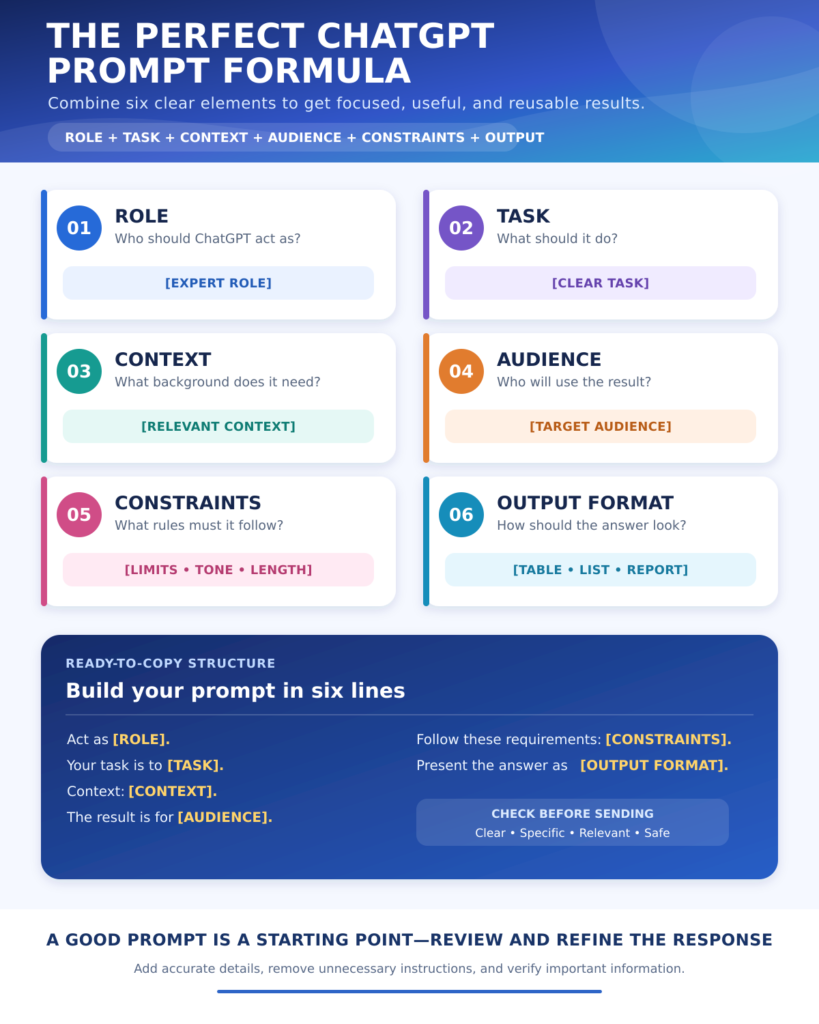
Replace Every Important Placeholder
Placeholders such as [TOPIC], [AUDIENCE], [GOAL], and [TIME] show where you should add your information. Leaving these placeholders unchanged will usually produce a generic answer.
For example, instead of writing:
“Create a study plan for [SUBJECT].”
Use specific information:
“Create a four-week study plan for undergraduate political science. I can study for 90 minutes each evening, and my examination is on August 30.”
Specific details help ChatGPT understand your actual situation and create a more realistic response.
Clearly Describe the Task
Begin by telling ChatGPT exactly what you want it to do. Use action words such as create, explain, compare, summarize, analyze, rewrite, organize, or evaluate.
According to OpenAI’s official prompt engineering best practices for ChatGPT, prompts generally work better when they are clear, specific, and supported by enough context.
Compare these two requests:
Weak prompt: “Help me with my business.”
Improved prompt: “Analyze my home-based book-design business and create a 30-day plan to attract academic authors through LinkedIn and email outreach.”
The second prompt identifies the business, objective, audience, marketing channels, and required output.
Provide Relevant Context
Context explains the background of your request. It may include your current situation, experience level, available resources, previous attempts, limitations, or intended audience.
Useful context can include:
- Who will use the final output
- Why the task is important
- What has already been completed
- Which tools or resources are available
- How much time or money is available
- What restrictions must be followed
- What problems occurred during previous attempts
The OpenAI Academy prompting guide recommends outlining the task, supplying helpful context, and describing the ideal output. These three elements can improve the relevance and usability of a response.
Define the Intended Audience
The same subject may need to be explained differently to a child, university student, customer, manager, technical expert, or general reader.
Tell ChatGPT who will read or use the content. For example:
“Explain machine learning to a 12-year-old student using familiar everyday examples.”
“Explain machine learning to business managers who want to automate customer service.”
“Explain machine learning to computer science students with technical terminology and practical examples.”
Defining the audience helps ChatGPT select suitable vocabulary, examples, depth, and tone.
Specify the Output Format
Do not assume that ChatGPT knows how you want the answer presented. Ask for the format that will be most useful for your task.
You can request:
- A table
- A checklist
- A numbered guide
- A weekly schedule
- A comparison chart
- An article outline
- A professional email
- A presentation structure
- A report
- A reusable template
- A list of action items
You can also define headings, columns, word count, number of examples, or the order in which information should appear.
Use Follow-Up Prompts to Improve the Answer
Your first prompt does not need to produce the final result. Treat ChatGPT as a collaborative assistant and improve the response through follow-up instructions.
Useful follow-up prompts include:
- “Make the explanation easier for a beginner.”
- “Add two practical examples.”
- “Remove repeated information.”
- “Present the result in a table.”
- “Make the tone more professional.”
- “Identify unsupported claims.”
- “Ask me questions before revising it.”
- “Create a shorter version without removing essential details.”
Prompting is usually an iterative process. Review the first response, identify what is missing, and provide a focused correction instead of starting the entire task again.
To understand prompt structure, refinement methods, and advanced techniques in greater depth, read our AI Prompt Engineering Guide.
Provide Examples of the Result You Want
When style, structure, or consistency matters, provide a short example of your preferred output. ChatGPT can examine the pattern and create new content using a similar structure.
For example:
“Use the following product description only as a structural example. Create a new description for my product without copying its wording.”
Examples are especially useful for:
- Article formatting
- Email tone
- Resume bullet points
- Product descriptions
- Reports
- Social media posts
- Lesson plans
- Data-entry formats
Make it clear whether ChatGPT should follow the example’s structure, tone, length, or formatting.
Select Prompts According to Your Goal
You do not need to use all 100 prompts. Choose the section that matches your immediate objective.
Professionals who want to reduce repetitive work can combine these prompts with the platforms listed in our Best AI Productivity Tools in 2026 guide.
Writers, bloggers, editors, and content creators can explore additional platforms through our Best AI Writing Tools in 2026 guide.
Students can combine the study and research prompts with the learning platforms included in Best Free AI Tools for Students in 2026.
Choosing the right prompt and the right tool is often more effective than forcing one platform to handle every type of task.
Save Repeated Preferences with Custom Instructions
If you repeatedly ask ChatGPT to follow the same tone, language, formatting style, or working preferences, you may add them to Custom Instructions.
OpenAI’s official ChatGPT Custom Instructions guide explains how users can provide preferences that ChatGPT should consider across future conversations.
Useful repeated instructions might include:
- Preferred language
- Desired writing tone
- Level of technical detail
- Common output format
- Professional background
- Accessibility requirements
- Words or styles to avoid
Do not place passwords, confidential business information, private financial records, or sensitive personal data in Custom Instructions.
Verify Important Information
ChatGPT can occasionally produce incorrect, incomplete, outdated, or invented information. Always verify high-impact claims before using them in academic, medical, legal, financial, professional, or publicly published work.
Pay particular attention to:
- Names and dates
- Statistics
- Quotations
- Academic references
- Product features
- Prices
- Laws and regulations
- Medical information
- Financial claims
- Current news
- Website links
Whenever accuracy matters, ask ChatGPT to identify statements requiring verification and check them using primary or authoritative sources.
Protect Personal and Confidential Information
Do not paste unnecessary private or confidential information into a prompt.
Remove or anonymize:
- Passwords and security codes
- Bank and payment information
- Government identification numbers
- Private medical records
- Student or employee records
- Customer contact details
- Confidential contracts
- Unpublished business data
- Sensitive workplace conversations
ChatGPT usually needs relevant context, but it rarely needs a person’s complete identity. Replace private names and numbers with neutral labels whenever possible.
✅ Pro Tip
A useful ChatGPT prompt normally contains five essential elements: the task, relevant context, intended audience, important constraints, and required output format. Start with these elements, review the response, and refine the prompt only where necessary.
Common Mistakes to Avoid When Using ChatGPT Prompts
Even a powerful prompt may produce a disappointing result when the instructions are unclear, incomplete, or unrealistic. Avoiding the following mistakes can make your conversations with ChatGPT more accurate, useful, and efficient.
Writing an Extremely Vague Prompt
A short prompt such as “Write an article,” “Create a plan,” or “Help me study” does not provide enough direction.
ChatGPT may respond, but the answer will probably be generic because it does not know the topic, audience, goal, length, or required format.
A better request would be:
“Create a seven-day revision plan for a first-year college student preparing for a political science examination. Include two 45-minute study sessions per day and one daily self-assessment activity.”
Providing Too Much Irrelevant Information
More context is useful only when it affects the result. Adding a long personal history or unrelated details can distract from the main task.
Before submitting a prompt, ask:
- Does this information influence the answer?
- Does ChatGPT need this detail to complete the task?
- Can I explain it more concisely?
- Am I sharing private information unnecessarily?
Keep relevant facts and remove background that does not change the required output.
Combining Too Many Unrelated Tasks
ChatGPT can follow multi-step instructions, but combining several unrelated objectives may produce an unbalanced response.
For example:
“Write an article, create a logo, analyze my competitors, prepare a budget, plan a social media campaign, and tell me how to improve my website.”
Divide such a request into stages:
- Define the project objective.
- Complete the research.
- Prepare the written content.
- Create the visual plan.
- Develop the promotion strategy.
- Review the complete project.
This staged approach makes it easier to examine and improve each result.
Giving Contradictory Instructions
A prompt may request a detailed answer and then limit it to 100 words. It may ask for beginner-friendly language while also requiring unexplained technical terminology.
Before sending a complex prompt, check whether any instructions conflict.
If two requirements compete, clearly state which one has priority:
“Keep the explanation under 500 words. Accuracy and completeness are more important than including several examples.”
Expecting ChatGPT to Know Missing Details
ChatGPT cannot reliably know your private goals, unpublished work, available budget, local conditions, or personal preferences unless you provide them.
It may attempt to fill gaps with assumptions. Some assumptions may appear reasonable but still be incorrect.
Ask ChatGPT to:
- Identify essential missing information
- Ask clarification questions
- Label assumptions clearly
- Mark details requiring confirmation
- Avoid inventing unavailable data
This is especially important for business, research, academic, and professional tasks.
Treating Every Response as a Verified Fact
A confident answer is not necessarily a correct answer. ChatGPT may produce incorrect dates, fabricated citations, outdated product information, or misleading explanations.
Do not use an AI response as the only source for important claims.
Verify information through:
- Official websites
- Original research papers
- Government publications
- Institutional databases
- Product documentation
- Qualified professionals
- Other authoritative primary sources
Verification is essential when the result affects health, finance, legal rights, education, employment, or public information.
Accepting the First Response Without Revision
The first answer should often be treated as a starting point rather than a finished product.
Review it for:
- Missing information
- Unclear explanations
- Repetition
- Weak examples
- Incorrect assumptions
- Unsuitable tone
- Formatting problems
- Unsupported claims
Use follow-up prompts to correct specific weaknesses. A focused instruction such as “Add a practical example to the third section” is more useful than simply saying “Make it better.”
Asking ChatGPT to Make Important Decisions for You
ChatGPT can compare options, organize evidence, reveal trade-offs, and suggest questions. However, it does not fully understand your lived experience, responsibilities, values, or the real-world consequences of a decision.
Use it to support your thinking rather than transferring complete responsibility to it.
For important decisions:
- Collect accurate information.
- Compare available options.
- Consult qualified people when necessary.
- Consider short-term and long-term consequences.
- Make the final decision using human judgement.
Publishing AI-Generated Content Without Human Editing
Unedited AI content may contain generic expressions, repetition, factual errors, weak examples, and language that does not match your real voice.
Before publishing AI-assisted content:
- Verify every important fact
- Replace generic examples with useful ones
- Add genuine experience or expertise
- Improve transitions and sentence flow
- Remove repetition
- Check originality
- Confirm that the content serves the reader
- Follow platform and publication policies
AI can accelerate drafting, but human review gives the content credibility, accuracy, and purpose.
Sharing Sensitive or Confidential Information
A prompt should not contain more personal or confidential information than the task requires.
Avoid sharing:
- Passwords
- Banking details
- Identification numbers
- Confidential business strategies
- Private customer information
- Student or employee records
- Medical documents containing identifiable information
- Unpublished contracts or legal documents
- Sensitive workplace conversations
Use placeholders, remove identifying details, or summarize the relevant facts whenever possible.
Assuming the Same Prompt Will Always Produce the Same Answer
AI-generated responses can vary even when the prompt remains unchanged. A prompt that worked well once may produce a slightly different result later.
When consistency matters:
- Define the output structure precisely
- Provide a model example
- Set clear evaluation criteria
- State the required terminology
- Save the final prompt
- Review every new response
- Maintain a human approval step
A reusable prompt can improve consistency, but it cannot eliminate all variation.
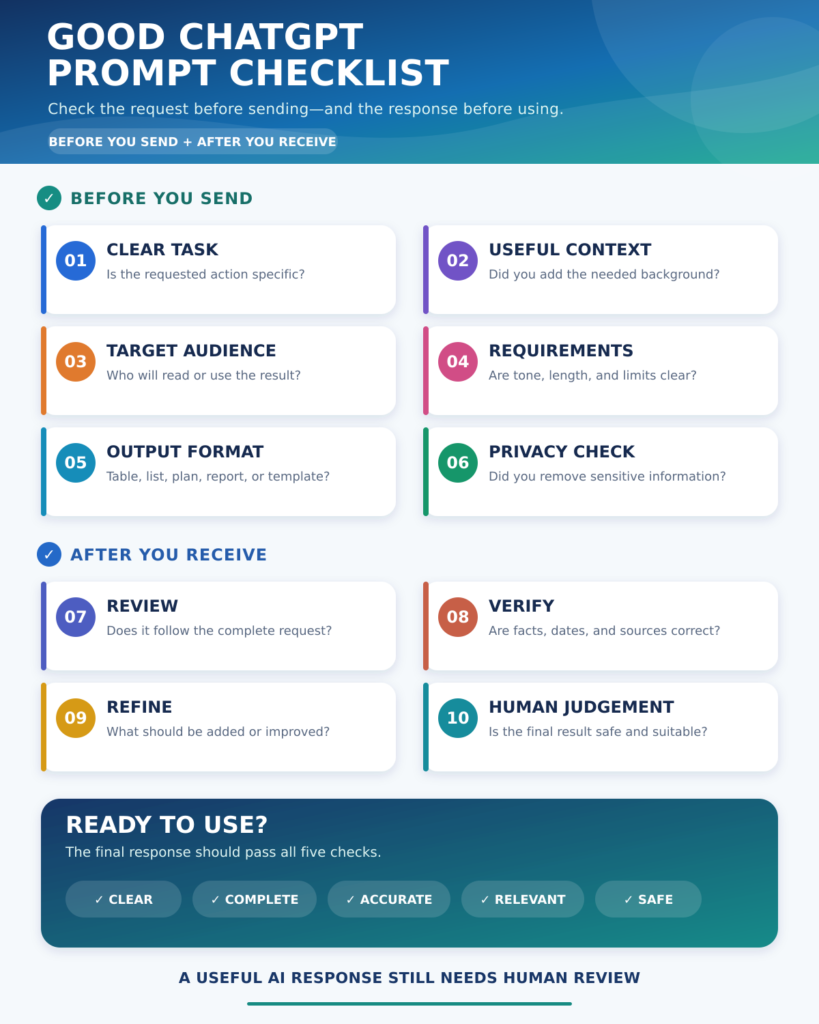
🔍 Quick Summary
The most common prompting mistakes are vague instructions, missing context, conflicting requirements, excessive trust, and insufficient review. Clear prompts improve the starting point, while verification and human judgement improve the final result.
Benefits of Using Ready-to-Copy ChatGPT Prompts
Ready-to-copy prompts provide a reliable starting point when you know what you want to achieve but are unsure how to explain the task to ChatGPT. The 100 best ChatGPT prompts in this guide can be adapted for personal, academic, professional, creative, and business tasks.
Save Time When Starting a Task
Beginning with a blank input box can be difficult. You may understand the task but spend several minutes deciding how to describe it.
A ready-made prompt already provides:
- A suitable expert role
- A clear task
- Space for relevant context
- Important limitations
- A preferred output format
- Instructions for avoiding unsupported information
You only need to replace the placeholders and remove instructions that do not apply.
Receive More Structured Responses
An unstructured request often produces an unstructured answer. The prompts in this guide tell ChatGPT whether the result should be presented as a table, checklist, timeline, plan, report, comparison, or step-by-step explanation.
Structured responses are usually easier to:
- Read
- Review
- Edit
- Share
- Convert into action
- Compare with other information
- Reuse in future projects
The right format can make an answer significantly more practical.
Reduce Unnecessary Revisions
Vague instructions may require several follow-up messages before ChatGPT understands the intended result. A complete prompt communicates the main requirements at the beginning.
It may specify:
- The intended reader
- The purpose of the task
- The desired tone
- The required length
- Available resources
- Deadlines
- Restrictions
- Information that must not be invented
This does not guarantee a perfect first response, but it can reduce avoidable misunderstandings and revisions.
Improve the Quality of AI Responses
ChatGPT can provide more relevant assistance when it understands the task, context, and expected outcome.
For example, “Create a lesson plan” could refer to any subject, age group, teaching period, or learning objective.
A detailed prompt can identify:
- The subject
- Grade level
- Topic
- Lesson duration
- Learning objectives
- Available classroom resources
- Student needs
- Assessment method
These details allow ChatGPT to create an answer that is more closely connected to the real requirement.
Create Consistent Workflows
Reusable prompts can support recurring tasks such as:
- Writing reports
- Planning lessons
- Preparing meeting agendas
- Summarizing notes
- Reviewing weekly progress
- Creating social media calendars
- Responding to customer questions
- Analyzing survey responses
- Preparing project updates
Save the prompts that work well and update them as your needs change. A small collection of tested prompts can become a useful personal or professional toolkit.
Learn How Better Prompts Are Structured
Using ready-to-copy templates can also improve your own prompting skills.
As you use these examples, you will notice that effective prompts commonly include:
- A role
- A clear task
- Relevant context
- The intended audience
- Requirements and limitations
- A specific output format
- Instructions for handling missing information
Over time, you may no longer need a complete template for every task because you will naturally include these elements in your own requests.
Adapt One Prompt for Several Purposes
Most prompts in this guide are flexible. A planning prompt can be adapted for study, work, business, health, content, or personal goals.
For example, the action-plan prompt can be used to:
- Prepare for an examination
- Launch a website
- Learn a new skill
- Complete a workplace project
- Organize an event
- Develop a content strategy
- Improve a business process
The basic prompt structure remains the same while the context, requirements, and output change.
Support Better Human Decision-Making
A useful prompt does not have to ask ChatGPT for a final answer. It can ask the AI to organize information, identify missing evidence, compare options, reveal possible risks, and suggest questions.
This approach keeps the user in control.
ChatGPT is most valuable when it supports human thinking rather than replacing human responsibility, experience, and judgement.
Who Can Use These ChatGPT Prompts?
These prompts are designed for beginners as well as experienced users. They do not require programming, technical knowledge, or previous prompt-engineering experience.
Students
Students can use the prompts to create study plans, understand difficult topics, summarize notes, practise questions, organize research, and prepare presentations.
They should still complete their own learning, verify academic information, and follow their institution’s rules for AI use.
Teachers and Educators
Teachers can adapt the prompts for lesson planning, classroom activities, assessments, simplified explanations, educational materials, and student feedback.
AI-generated educational material should be checked for accuracy, age appropriateness, inclusiveness, and alignment with the real curriculum.
Professionals and Employees
Professionals can use the prompts to prioritize tasks, prepare agendas, summarize meetings, write reports, improve processes, and plan projects.
Confidential workplace, employee, and customer information should be removed before using it in a prompt.
Writers, Bloggers, and Content Creators
Creators can use ChatGPT to brainstorm topics, develop outlines, improve drafts, repurpose existing material, create content calendars, and prepare video scripts.
The final content should include human experience, original insight, accurate research, and careful editing.
Entrepreneurs and Small Businesses
Business users can evaluate ideas, define target customers, plan campaigns, write product descriptions, prepare sales pitches, and create customer surveys.
Important decisions should be supported by actual customer research, financial information, market evidence, and professional advice where necessary.
Researchers
Researchers can use the prompts to structure research questions, organize literature, compare sources, analyze anonymized survey responses, and synthesize notes.
ChatGPT should not be trusted to generate accurate citations or replace original academic sources.
Freelancers
Freelancers can adapt the prompts for client communication, project planning, proposals, content creation, workflow documentation, and professional development.
Every output should be reviewed to ensure it matches the client’s real requirements and confidentiality rules.
Job Seekers
Job seekers can use the prompts to explore career options, improve resumes, create cover letters, practise interviews, and identify relevant skills.
ChatGPT should help present genuine experience more clearly, not create qualifications or achievements that do not exist.
🔍 Quick Summary
Ready-to-copy ChatGPT prompts save time, improve structure, reduce unnecessary revisions, and help users communicate tasks more clearly. Their greatest value comes from customization—replace the placeholders, add accurate context, review the response, and apply human judgement before using the result.
Final Thoughts: Use the Best ChatGPT Prompts to Work Smarter
ChatGPT can assist with planning, learning, writing, research, business, creativity, career development, and everyday problem-solving. However, the quality of its response depends significantly on how clearly you communicate your task.
The 100 best ChatGPT prompts in this guide are designed to give you a practical starting point. Each prompt contains a defined role, clear objective, relevant placeholders, useful limitations, and an expected output format. You can copy a prompt, replace the bracketed information, and adapt it according to your real situation.
You do not need to use all 100 prompts at once. Begin with the section that matches your immediate goal. A student may start with learning and research prompts, while a professional may prefer task management, meeting, or report-writing prompts. Business owners can use customer research and marketing prompts, while creators may find the writing, blogging, and brainstorming sections more useful.
The best ChatGPT prompts are not necessarily the longest or most complicated. They are the prompts that clearly explain:
- What ChatGPT should do
- Why the task matters
- Who will use the result
- Which information should be considered
- What limitations must be followed
- How the final answer should be presented
Remember that a prompt is rarely permanent. You can improve it whenever your goal, audience, workflow, or available information changes. Review the first response, identify what is missing, and use follow-up instructions to refine it. This conversational process is often more effective than repeatedly starting again with a completely new prompt.
You should also treat every AI-generated response as a draft, recommendation, or starting point rather than unquestionable truth. Verify important facts, quotations, statistics, dates, references, prices, laws, product features, and current information through reliable sources. Academic, medical, legal, financial, and professional decisions require additional care and, where appropriate, advice from qualified people.
Protect privacy when using any of these prompts. Remove unnecessary names, contact details, passwords, financial records, medical information, confidential workplace data, and other sensitive material. In most situations, neutral placeholders can provide enough context without revealing a person’s identity.
Used responsibly, these best ChatGPT prompts can reduce time spent on repetitive work, help organize complicated information, improve communication, and make difficult projects easier to begin. They cannot replace your experience, creativity, values, or judgement, but they can support each of them.
🎯 Final Thought
The real power of ChatGPT does not come from finding one magical prompt. It comes from learning how to define your goal, provide useful context, evaluate the response, and improve it through conversation. Choose one prompt from this collection, customize it with accurate information, and use the result as the beginning of better work—not the end of human thinking.
What is a ChatGPT prompt?
A ChatGPT prompt is a question, instruction, goal, image, file, or other input given to ChatGPT to generate a response. A clear prompt explains the task, provides relevant context, identifies the intended audience, and describes the desired output.
What are the best ChatGPT prompts?
The best ChatGPT prompts clearly define the task, context, audience, limitations, and required format. Useful examples include prompts for planning schedules, writing emails, studying, summarizing documents, creating content, analyzing information, preparing for interviews, and solving workplace problems.
How do I write a good ChatGPT prompt?
To write a good ChatGPT prompt, state what you want the AI to do, provide necessary background, define the intended audience, add important requirements, and specify the output format. Review the first response and use focused follow-up instructions to improve it.
What information should I include in a ChatGPT prompt?
Include the task, purpose, relevant context, target audience, available resources, limitations, preferred tone, and desired output format. You may also provide examples, deadlines, word limits, or evaluation criteria when they affect the result.
Do longer ChatGPT prompts give better results?
Longer prompts do not automatically produce better results. A prompt should contain enough relevant information to explain the task without unnecessary details or conflicting instructions. A short, specific prompt can be more effective than a long and confusing one.
How can I get more accurate answers from ChatGPT?
Provide accurate context, ask a specific question, define the required format, and tell ChatGPT to identify assumptions or missing information. For important topics, request sources and independently verify names, dates, statistics, quotations, and current information through authoritative sources.
Can ChatGPT prompts improve productivity at work?
Yes. ChatGPT prompts can help professionals prioritize tasks, prepare meeting agendas, summarize notes, draft emails, create reports, plan projects, and document repeatable workflows. Every response should still be reviewed for accuracy, confidentiality, and suitability for the workplace.
What are the best ChatGPT prompts for students?
The best ChatGPT prompts for students include requests for study plans, simple explanations, practice questions, revision schedules, research outlines, flashcards, and feedback on writing. Students should use ChatGPT to support genuine learning and follow their institution’s academic-integrity rules.
Can ChatGPT prompts help improve writing?
Yes. ChatGPT prompts can help generate outlines, improve grammar, adjust tone, simplify complicated text, summarize documents, and identify unclear sentences. Writers should verify facts, preserve their own voice, and edit AI-generated content before publishing or submitting it.
Can I save and reuse ChatGPT prompts?
Yes. Prompts can be saved as templates and reused for recurring tasks such as reports, lesson plans, meeting summaries, content calendars, and customer responses. Update the placeholders, context, deadlines, and requirements each time so the response matches the current task.
Why does ChatGPT give different answers to the same prompt?
ChatGPT can generate different responses because AI output is not completely deterministic. Model updates and conversation context may also influence the result. Clear instructions, examples, fixed terminology, evaluation criteria, and a defined output structure can improve consistency.
Is it safe to share personal information in ChatGPT prompts?
Avoid sharing unnecessary personal or confidential information in ChatGPT prompts. Remove passwords, banking details, identification numbers, private medical records, customer information, employee records, and confidential business data. Use anonymous labels or placeholders whenever possible.
Are ChatGPT prompts free to use?
The ready-to-copy prompts in this guide can be copied and customized for personal or professional tasks. ChatGPT also offers different access plans, and available models, features, tools, and usage limits may vary by plan and change over time.
Can ChatGPT provide current and up-to-date information?
ChatGPT may access current information when appropriate search or connected tools are available, but this depends on the selected features and task. Always verify time-sensitive details such as news, prices, laws, schedules, software features, and product information using current authoritative sources.
What should I do if ChatGPT gives an incorrect answer?
Identify the incorrect statement, provide reliable information or additional context, and ask ChatGPT to revise the response. For important claims, verify the answer independently instead of relying only on another AI-generated response. You can also request assumptions, uncertainties, and sources requiring confirmation.