
Introduction
Claude can do much more than answer simple questions. With the right instructions, it can help you organize your work, understand difficult subjects, improve your writing, analyse documents, generate ideas, solve coding problems and complete many time-consuming tasks.
However, the quality of Claude’s response depends heavily on the quality of the prompt you provide. A short or unclear instruction may produce a general answer, while a detailed and well-structured prompt can produce a focused, practical and useful result.
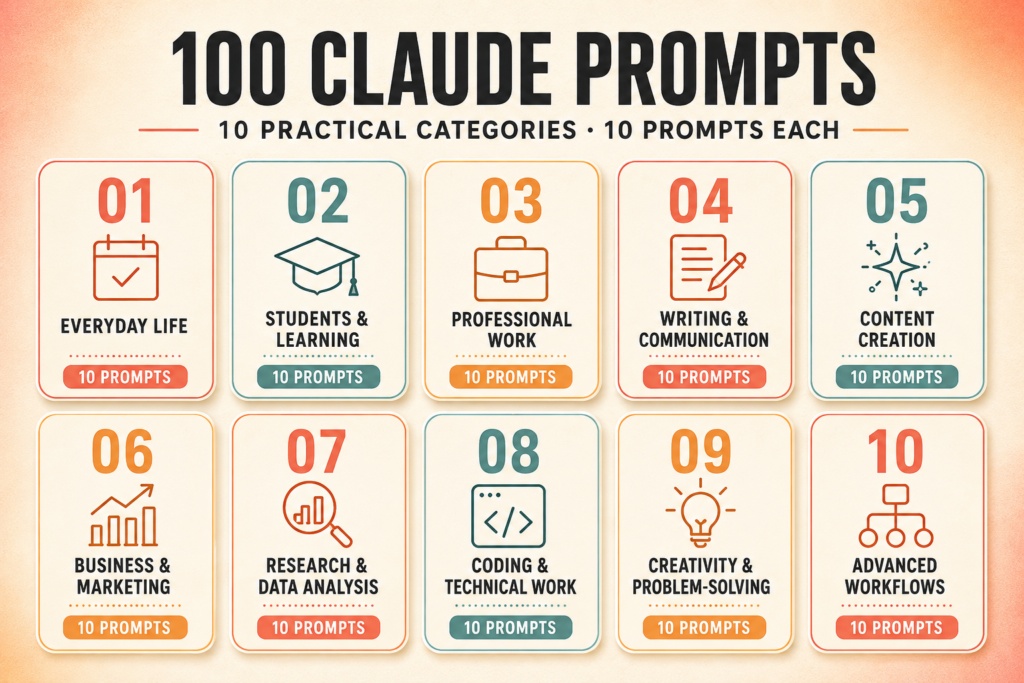
That is why this collection of the 100 best Claude prompts has been created. It includes ready-to-copy prompts for work, study, writing, coding, research, content creation, business, marketing, creativity and everyday productivity.
You do not need to be a prompt engineer to use these prompts. Simply choose a suitable prompt, replace the information inside square brackets with your own details and paste it into Claude. You can also modify the instructions according to your purpose, audience or preferred output format.
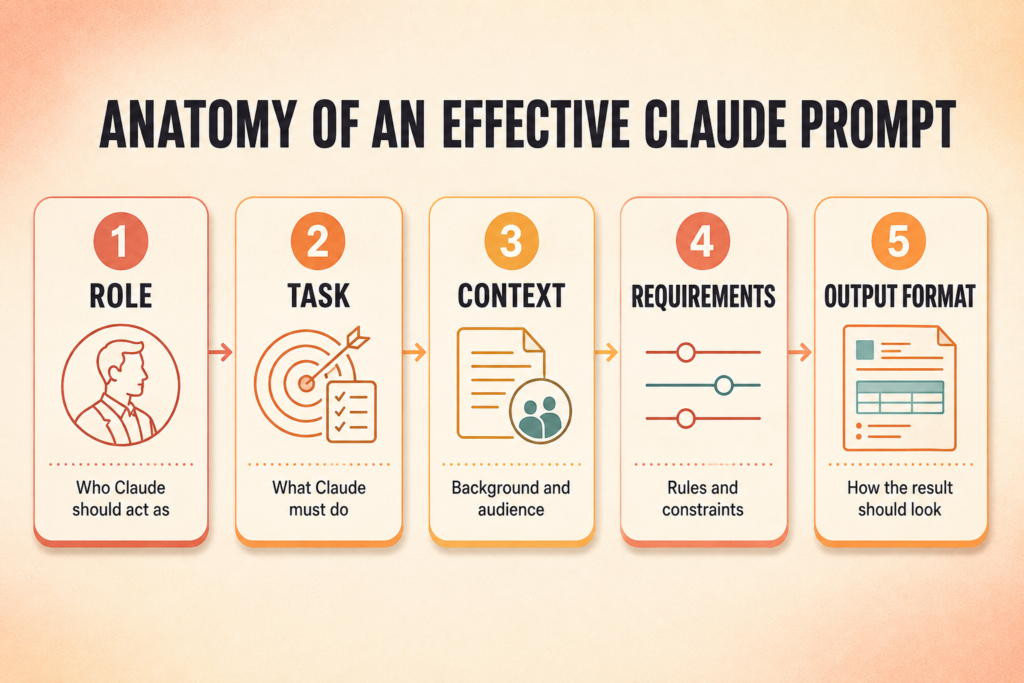
Unlike short one-line commands, most prompts in this guide provide Claude with a clear role, task, context, requirements and expected output. This additional information helps Claude understand what you need and reduces the chances of receiving a vague or incomplete response.
Whether you are a student preparing for an examination, a teacher creating learning material, a professional writing a report, a blogger planning content, a researcher analysing information or a developer working with code, you will find practical prompts for your needs.
The prompts are reusable. You can save your favourite ones, adjust the placeholders and use them again for similar tasks. Over time, they can become part of your regular workflow and help you complete routine work more efficiently.
What Are Claude Prompts?
Claude AI prompts are the instructions, questions, examples or background information that you give to Claude to receive a specific response. A prompt may be as simple as asking Claude to explain a concept, or it may contain detailed instructions for completing a complex task.
For example, a basic prompt may say:
“Write an article about digital marketing.”
This tells Claude what subject to write about, but it does not explain the intended audience, article length, writing style, purpose or structure. As a result, the answer may be too broad.
A more effective prompt would say:
“Act as an experienced digital marketing writer. Create a 1,500-word beginner-friendly article explaining digital marketing to small business owners. Use simple English, short paragraphs, practical examples and clear H2 and H3 headings. Include an introduction, major marketing channels, benefits, common mistakes and a conclusion.”
The second prompt gives Claude a role, audience, topic, length, writing style and output structure. Therefore, it is more likely to generate a useful and relevant response.
Simple Definition
A Claude prompt is an instruction that tells Claude what you want it to do, why you need it and how the final response should be presented.
Claude prompts can be used for many different tasks, including:
- Writing and editing content
- Summarising long documents
- Explaining difficult subjects
- Creating study plans and notes
- Drafting professional emails
- Analysing research material
- Generating and reviewing code
- Developing business strategies
- Brainstorming creative ideas
- Comparing different options
- Organising projects and workflows
- Improving existing documents
The prompt does not always need to be long. A simple task may require only one or two clear sentences. A complex task generally needs more context, instructions and output requirements.
Why Use Claude-Specific Prompts?
Most general AI prompts can work with Claude, but prompts designed with Claude’s strengths in mind can produce more useful results.
Claude is especially helpful when a task involves detailed instructions, long documents, careful writing, structured analysis or multiple stages. It can examine the information you provide, identify important points and present the result in a requested format.
Claude-specific prompts can be particularly useful for the following purposes.
Working With Long Documents
You can provide Claude with reports, articles, notes or other documents and ask it to summarise, compare or analyse them. A good prompt explains what Claude should look for and how the findings should be presented.
Improving Writing
Claude can help rewrite content while preserving its original meaning. You can specify the audience, tone, reading level, length and purpose of the revised text.
Following Detailed Instructions
Complex tasks often contain several requirements. Organising these requirements into clear steps helps Claude follow them more consistently.
Producing Structured Outputs
You can ask Claude to present information as paragraphs, tables, checklists, reports, lesson plans, outlines or step-by-step instructions. Specifying the format prevents the response from becoming disorganised.
Analysing Different Viewpoints
Claude can compare arguments, identify assumptions, examine strengths and weaknesses and help you consider alternative perspectives. This can be useful for research, decision-making and problem-solving.
Coding and Technical Work
Claude can explain code, identify possible errors, review programming logic, create documentation and suggest improvements. The best coding prompts include the programming language, purpose, existing code, error details and expected behaviour.
How to Use These 100 Claude Prompts
Every prompt in this guide follows a practical and reusable format. You can use them through the following process.
1. Select the Right Prompt
Begin by choosing a prompt that closely matches your task. For example, use a study-planning prompt for examination preparation instead of trying to modify a general productivity prompt.
2. Replace the Bracketed Information
The prompts contain editable placeholders inside square brackets, such as:
- [TOPIC]
- [AUDIENCE]
- [GOAL]
- [WORD COUNT]
- [WRITING STYLE]
- [PROGRAMMING LANGUAGE]
- [DEADLINE]
- [PASTE YOUR TEXT]
Replace these placeholders with your actual information before submitting the prompt.
For example:
[TOPIC] = Artificial Intelligence in Education
[AUDIENCE] = College students
[WORD COUNT] = 1,200 words
[WRITING STYLE] = Simple academic English
The more accurate your information is, the more relevant Claude’s response is likely to be.
3. Provide Necessary Context
Do not assume that Claude already knows the background of your task. Explain why you need the response, who will use it and what result you expect.
If you want Claude to improve an email, mention the recipient and purpose. If you want it to analyse data, explain what the data represents. If you want it to write an article, describe the target reader and search intent.
4. Attach or Paste the Source Material
When the task depends on a document, article, dataset, code sample or set of notes, provide that material along with the prompt.
Clearly separate your source material from the instructions. You can use labels or XML tags such as:
<instructions>
Write the exact task instructions here.
</instructions>

<source_material>
Paste the document, notes, data or code here.
</source_material>
This structure helps Claude distinguish between what it must do and what it must analyse.
5. Review the First Response
Treat Claude’s first answer as a starting point. Check facts, calculations, names, dates, references and technical details before using the content.
If the answer is not satisfactory, explain what needs improvement. Instead of writing “Make it better,” provide a specific follow-up instruction such as:
“Rewrite the introduction in simpler English, reduce it to 150 words and add one practical example for college students.”
6. Continue With Follow-Up Prompts
You do not need to include every instruction in the first message. After receiving the initial response, you can ask Claude to expand, shorten, reorganise or refine it.
Useful follow-up instructions include:
- “Make the explanation easier for a beginner.”
- “Convert this information into a comparison table.”
- “Add three practical examples.”
- “Remove repeated information.”
- “Rewrite this in a professional but friendly tone.”
- “Check whether every requirement has been followed.”
- “Explain the technical terms in simple language.”
What Makes an Effective Claude Prompt?
An effective Claude prompt usually contains several important elements. You may not need every element for every task, but including the relevant ones improves clarity.
Role
Tell Claude what kind of expert or assistant it should act as.
Example:
Act as an experienced academic writing editor.
A role helps establish the expected level of knowledge, tone and approach.
Task
State exactly what Claude must do.
Example:
Review the following research abstract and improve its clarity, grammar and academic tone.
Avoid vague instructions such as “Check this” or “Make this good.”
Context
Explain the background and purpose of the task.
Example:
The abstract will be submitted to a multidisciplinary academic journal and should be understandable to readers from different fields.
Context helps Claude make more suitable decisions.
Input
Provide the text, data, code, notes or information Claude must use.
Example:
<input>
[PASTE THE RESEARCH ABSTRACT HERE]
</input>
Requirements and Constraints
Mention any rules Claude must follow, such as word count, tone, audience, format or information that must not be changed.
Example:
Keep the abstract between 200 and 250 words. Preserve all original findings and do not add unsupported claims.
Output Format
Explain how the final response should be presented.
Example:
Provide the revised abstract first. After that, list the five most important changes in a table.
Quality Check
For tasks where accuracy matters, ask Claude to review the response against clear requirements.
Example:
Before completing the response, verify that the revised abstract remains within the word limit and that no original research findings have been removed.
Examples
If you need a particular style or format, provide one or more examples. Examples can help Claude understand exactly what the final result should look like.
When several examples are included, they can be organised like this:
<examples>
<example>
[EXAMPLE 1]
</example>

<example>
[EXAMPLE 2]
</example>
</examples>
Examples are especially useful for maintaining a consistent writing style, classification method or output structure.
A Reusable Claude Prompt Framework
The following framework can be adapted for many different tasks:
Act as a [ROLE OR TYPE OF EXPERT].

Your task is to [CLEARLY DESCRIBE THE TASK].

<context>
Explain the background, purpose and intended audience.
</context>

<input>
Paste the text, information, data or code here.
</input>

<requirements>
1. Add the first requirement.
2. Add the second requirement.
3. Mention the tone, length and important constraints.
4. State anything that must be included or preserved.
</requirements>

<output_format>
Explain exactly how the response should be organised and presented.
</output_format>

Before completing the task, check the response against all the requirements and correct any missing or inconsistent information.
This framework is not compulsory for every Claude prompt. For simple questions, a clear one-line instruction may be sufficient. Use detailed structures when the task involves several inputs, rules or expected outputs.
The following sections contain 100 best Claude prompts organised into ten practical categories. Each prompt includes its ideal use, a ready-to-copy template and brief customization guidance.
Best Claude Prompts for Everyday Life and Personal Productivity
Claude can help you organise daily responsibilities, set realistic priorities, make thoughtful decisions and reduce the mental effort involved in planning. The following best Claude prompts turn unclear thoughts, unfinished tasks and personal goals into structured action plans.
Replace the information inside square brackets with your own details. You can also paste schedules, task lists or personal notes wherever required.
1. Turn Fixed Commitments Into a Realistic Daily Plan
Best For: Creating a balanced daily schedule around work, study, family responsibilities and personal time.
Ready-to-Copy Prompt:
Act as a practical personal productivity planner. Create a realistic daily schedule for me using the following information:

Wake-up time: [TIME]
Preferred bedtime: [TIME]
Fixed commitments: [LIST WORK HOURS, CLASSES, APPOINTMENTS OR FAMILY RESPONSIBILITIES]
Tasks I need to complete: [TASK LIST]
Top priority for the day: [MOST IMPORTANT TASK]
Travel time: [TIME]
Preferred meal times: [TIMES]
Preferred exercise or relaxation time: [TIME]
My most productive hours: [TIME PERIOD]
Other limitations: [DETAILS]

Please:

1. Place all fixed commitments in the schedule first.
2. Select no more than three major priorities for the day.
3. Schedule difficult work during my most productive hours.
4. Add short breaks, meals, travel time and realistic buffers.
5. Avoid filling every available minute.
6. Identify any tasks that should be postponed, shortened or delegated.
7. Include a 30-minute recovery plan in case the schedule falls behind.

Present the final plan as a table with columns for Time, Activity, Duration, Purpose and Flexibility. After the table, explain briefly why the schedule is realistic.
How to Customize: Add your actual working hours, travel time and energy pattern. If you have several unfinished tasks, mention their deadlines and estimated duration.
2. Convert a Brain Dump Into an Actionable Task System
Best For: Organising a long, confusing or unstructured list of thoughts, reminders and unfinished tasks.
Ready-to-Copy Prompt:
Act as an experienced organisation and productivity assistant. I will provide a brain dump containing tasks, reminders, concerns, ideas and unfinished work.

<brain_dump>
[PASTE EVERYTHING ON YOUR MIND HERE]
</brain_dump>

Organise this information without removing anything important or inventing missing details.

Complete the following steps:

1. Separate actionable tasks from ideas, information, concerns and reminders.
2. Group related items into clear categories.
3. Identify tasks that are urgent, important, both urgent and important, or suitable for later.
4. Convert vague items into clear next actions.
5. Identify deadlines, dependencies and tasks that require information from someone else.
6. Mark tasks that can be completed in less than 10 minutes.
7. Point out duplicate or conflicting items.
8. Select the five most important next actions.
9. Create a simple plan for completing those five actions.

Present the result under these headings:

- Immediate Actions
- Important but Not Urgent
- Quick Tasks
- Waiting for Someone
- Ideas and Future Tasks
- Information or Reference Notes
- Concerns Requiring Clarification
- Recommended Next Five Actions

Do not assign an exact deadline unless I have provided enough information. Clearly label any assumption you make.
How to Customize: Paste your list exactly as it exists, even if it is disorganised. You can include personal, professional and household tasks together because Claude will separate them.
3. Plan and Prioritise a Busy Week
Best For: Balancing work, study, deadlines, appointments and personal responsibilities across seven days.
Ready-to-Copy Prompt:
Act as a weekly planning coach. Create a practical seven-day plan based on my available time, deadlines, energy levels and responsibilities.

My week begins on: [DAY AND DATE]
Available hours each day: [DETAILS]
Fixed commitments: [LIST]
Tasks and estimated durations: [LIST]
Important deadlines: [LIST]
Personal responsibilities: [LIST]
Preferred rest or family time: [DETAILS]
My high-energy days or hours: [DETAILS]
Tasks I have been avoiding: [LIST]
Unexpected issue that may affect the week: [DETAILS]

Please:

1. Arrange tasks according to importance, deadline, effort and dependency.
2. Schedule demanding tasks during high-energy periods.
3. Divide large tasks into smaller sessions.
4. Keep at least 15–20% of the available time unscheduled.
5. Avoid placing too many difficult tasks on the same day.
6. Include one catch-up period before the end of the week.
7. Identify tasks that may need to be postponed, simplified or delegated.
8. Create a reduced version of the plan in case I lose one full working day.

Present the main plan as a table with columns for Day, Time, Task, Duration and Priority. Then provide:

- Three main goals for the week
- Tasks that can be postponed
- The catch-up plan
- The reduced emergency plan
How to Customize: Mention the approximate duration of each task. If you do not know the duration, ask Claude to estimate it and clearly mark the estimate.
4. Break a Large Personal Goal Into a 30-Day Plan
Best For: Starting a goal that feels too large, unclear or difficult to manage.
Ready-to-Copy Prompt:
Act as a realistic goal-planning coach. Help me turn the following personal goal into a practical 30-day action plan.

Goal: [DESCRIBE THE GOAL]
Why this goal matters to me: [REASON]
Current position: [WHAT I HAVE ALREADY DONE]
Desired result after 30 days: [EXPECTED OUTCOME]
Time available each day or week: [TIME]
Resources already available: [DETAILS]
Skills or knowledge I may need: [DETAILS]
Main obstacles: [LIST]
Fixed deadline, if any: [DATE]
Activities I do not want to include: [LIMITATIONS]

Create a plan that is challenging but achievable.

Please include:

1. A clear definition of what success after 30 days will look like.
2. Four weekly milestones.
3. Small actions for each day or work session.
4. A minimum version of the plan for busy days.
5. Likely obstacles and practical ways to handle them.
6. A simple progress-tracking method.
7. Review points at the end of Days 7, 14, 21 and 30.
8. A recovery plan if I miss several days.
9. Activities that may look productive but do not directly support the goal.

Present the plan week by week. Finish with a checklist that I can reuse during each weekly review.
How to Customize: Define a measurable result, such as completing five chapters, exercising for a specific number of days or finishing one stage of a project.
5. Compare Options and Make a Difficult Personal Decision
Best For: Evaluating several choices without being controlled by emotion, pressure or incomplete information.
Ready-to-Copy Prompt:
Act as a neutral decision-analysis assistant. Help me compare the following options carefully.

Decision I need to make: [DECISION]
Option 1: [DETAILS]
Option 2: [DETAILS]
Additional options: [DETAILS]
My main goal: [GOAL]
My must-have requirements: [LIST]
My preferences: [LIST]
My limitations: [BUDGET, TIME, LOCATION OR OTHER CONSTRAINTS]
My main concerns: [LIST]
Decision deadline: [DATE]
Information I am uncertain about: [DETAILS]

Complete the following analysis:

1. Identify the most important decision criteria.
2. Separate must-have requirements from preferences.
3. Compare each option using the same criteria.
4. Explain short-term and long-term advantages and disadvantages.
5. Identify hidden costs, risks and trade-offs.
6. Point out where information is missing.
7. Distinguish facts from assumptions.
8. Explain which option best supports my stated goal and why.
9. Suggest what additional information I should collect before deciding.
10. Provide a simple method for testing the preferred option before making a final commitment, where possible.

Present the comparison in a table. Do not automatically agree with my preferred option. Challenge weak assumptions respectfully and give a balanced recommendation.
How to Customize: Add the importance of each criterion on a scale of 1–5 if you want Claude to create a weighted comparison.
6. Build a Sustainable Habit Without an Overly Strict Routine
Best For: Developing a new habit that remains manageable during busy or low-energy days.
Ready-to-Copy Prompt:
Act as a practical habit-design coach. Help me build a sustainable system for the following habit.

Habit I want to develop: [HABIT]
Reason for developing it: [REASON]
Current routine: [DETAILS]
Time I can normally give: [TIME]
Best possible time and place: [DETAILS]
Previous attempts: [WHAT HAPPENED]
Main obstacles: [LIST]
People or resources that can support me: [DETAILS]
How I would like to track progress: [METHOD]
Things I want to avoid: [LIMITATIONS]

Design a flexible habit system that includes:

1. A clear and realistic habit definition.
2. A simple trigger that connects the habit to an existing routine.
3. A normal version for regular days.
4. A minimum version that takes five minutes or less.
5. A slightly more advanced version for high-energy days.
6. Environmental changes that can make the habit easier.
7. A tracking method that does not require complicated tools.
8. A weekly review question.
9. A plan for handling missed days without abandoning the habit.
10. Clear signs that the habit should be adjusted.

Create a four-week progression plan. Keep the routine flexible and avoid relying only on motivation.
How to Customize: Mention your previous attempts honestly. Claude can create a more realistic plan when it knows why earlier routines failed.
7. Analyse How I Spend My Time and Energy
Best For: Finding time-wasting patterns, energy drains and opportunities to improve a daily or weekly routine.
Ready-to-Copy Prompt:
Act as a time and energy analyst. Review my activity log and help me understand how I am using my time.

My main responsibilities: [DETAILS]
My current goals: [LIST]
My usual high-energy periods: [TIMES, IF KNOWN]
My usual low-energy periods: [TIMES, IF KNOWN]

<activity_log>
[PASTE A DAILY OR SEVEN-DAY LOG OF ACTIVITIES, TIMES AND ENERGY LEVELS]
</activity_log>

Analyse the log and:

1. Calculate or estimate how much time is spent on major activity categories.
2. Identify repeated interruptions and avoidable delays.
3. Find periods where my energy and task difficulty do not match.
4. Identify tasks that take longer than expected.
5. Separate necessary work from low-value activity.
6. Point out opportunities to combine, shorten, automate or delegate tasks.
7. Identify useful rest periods and do not treat all breaks as wasted time.
8. Suggest two or three changes likely to create the greatest improvement.
9. Create a revised weekly pattern based on the evidence in the log.
10. Mention any conclusion that cannot be made because the information is incomplete.

Present the findings in a table followed by a short analysis and a revised routine. Base your conclusions only on the information provided.
How to Customize: Record activities for at least three normal days. Add an energy score from 1–5 beside each important activity for deeper analysis.
8. Plan a Complex Personal Project From Beginning to End
Best For: Managing projects such as organising an event, preparing a publication, moving house, completing a course or launching a personal website.
Ready-to-Copy Prompt:
Act as an experienced project planner. Help me organise the following personal project from beginning to completion.

Project: [PROJECT NAME AND DESCRIPTION]
Main objective: [OBJECTIVE]
Final deadline: [DATE]
Expected result: [DELIVERABLE]
Work already completed: [DETAILS]
People involved: [NAMES OR ROLES]
Available time: [DETAILS]
Available budget: [AMOUNT OR RANGE]
Resources available: [LIST]
Known limitations: [LIST]
Main concerns: [LIST]

Create a practical project plan containing:

1. A clear project scope.
2. Tasks that are included and tasks that are outside the scope.
3. Major phases and milestones.
4. Detailed tasks under each phase.
5. Task dependencies and the correct sequence.
6. People or resources required for each important task.
7. Estimated time and cost where sufficient information is available.
8. Possible risks and preventive actions.
9. Review points before major decisions.
10. A final quality-check and completion checklist.

Present the project plan as a table with columns for Phase, Task, Owner, Dependency, Target Date and Status. After the table, list the five actions I should take first.

Do not invent exact costs or completion dates when the available information is insufficient. Clearly label all estimates and assumptions.
How to Customize: Add as many existing notes as possible. If other people are involved, specify what each person can approve or complete.
9. Prepare for an Important or Difficult Conversation
Best For: Planning a respectful conversation about a disagreement, request, boundary, concern or important personal matter.
Ready-to-Copy Prompt:
Act as a respectful communication coach. Help me prepare for an important conversation without using manipulation, pressure or aggressive language.

Person I need to speak with: [RELATIONSHIP OR ROLE]
Situation: [EXPLAIN WHAT HAPPENED]
My main goal: [GOAL]
Facts I know: [LIST]
My interpretation or feelings: [DETAILS]
What the other person may be concerned about: [DETAILS]
What I need to request or explain: [DETAILS]
My boundaries or non-negotiable points: [LIST]
Preferred tone: [CALM, PROFESSIONAL, FRIENDLY OR FIRM]
Possible areas of disagreement: [LIST]

Please create:

1. A calm opening statement.
2. A short and factual explanation of the issue.
3. Three important points I should communicate.
4. Open-ended questions that encourage the other person to respond.
5. Respectful wording for my request or boundary.
6. Phrases to avoid because they may sound accusatory.
7. Possible responses from the other person and constructive replies.
8. A method for pausing the conversation if it becomes unproductive.
9. A reasonable compromise, if one is possible.
10. A short follow-up message summarising any agreement.

Keep the language natural and realistic. Do not assume that my interpretation is completely correct. Identify any point where I may need more information before the conversation.
How to Customize: Explain the relationship and desired outcome. For a workplace conversation, request a professional version; for a family matter, request a warmer and more personal tone.
10. Conduct a Weekly Review and Reset
Best For: Reviewing the previous week, learning from problems and entering the next week with clear priorities.
Ready-to-Copy Prompt:
Act as a thoughtful weekly review coach. Analyse the information below and help me close the current week and prepare for the next one.

Main goals from this week: [LIST]
Tasks completed: [LIST]
Tasks left incomplete: [LIST]
Positive results or wins: [LIST]
Problems or delays: [LIST]
Unexpected events: [LIST]
Important lessons: [LIST]
Energy and stress levels: [DETAILS]
Commitments already fixed for next week: [LIST]
Deadlines approaching: [LIST]
New tasks or concerns: [LIST]

Create a weekly review containing:

1. The most meaningful progress made this week.
2. Goals or tasks that were not completed and the likely reasons.
3. Tasks that should be carried forward, changed, delegated or removed.
4. Repeated problems that need a system-level solution.
5. One habit or process that worked well and should continue.
6. The three most important priorities for next week.
7. A realistic first action for each priority.
8. A simple seven-day plan around my fixed commitments.
9. One deliberate rest or recovery period.
10. One practical change that could make next week better.

Separate your response into Review of This Week, Lessons Learned, Decisions About Unfinished Tasks and Plan for Next Week. Be constructive but honest, and do not treat every unfinished task as a failure.
How to Customize: Add measurable results wherever possible. You can reuse this prompt every week and compare Claude’s observations over time.
Best Claude Prompts for Students and Learning
These Claude prompts help students understand difficult topics, prepare notes, practise questions and improve their study methods. Students can also explore our Best Free AI Tools for Students in 2026 guide. Anthropic also provides information about its official Claude for Education initiative for higher education.
11. Understand a Difficult Topic in Simple Language
Best For: Learning a complex concept through clear explanations and examples.
Ready-to-Copy Prompt:
Act as a patient subject teacher. Explain the following topic to a [CLASS LEVEL OR KNOWLEDGE LEVEL] student:

Topic: [TOPIC]
Subject: [SUBJECT]
What I already understand: [DETAILS]
What confuses me: [DETAILS]

Start with a simple definition, explain the main idea step by step and give two practical examples. Define difficult terms in easy language. Finish with a short summary and five questions to check my understanding. Do not assume knowledge beyond the level I provided.
How to Customize: Mention your class, course or present knowledge level so that the explanation is neither too basic nor too advanced.
12. Create a Personalised Study Plan
Best For: Planning study sessions around subjects, examinations and available time.
Ready-to-Copy Prompt:
Act as a realistic study planner. Create a study plan using this information:

Subjects or topics: [LIST]
Exam dates: [DATES]
Strong areas: [LIST]
Weak areas: [LIST]
Daily study time: [TIME]
Fixed commitments: [DETAILS]
Preferred break length: [TIME]

Give more time to difficult and high-priority topics. Include revision, practice questions, short breaks and one catch-up session each week. Present the plan as a table with Day, Time, Subject, Task and Duration. Keep the workload achievable and explain which topics should be studied first.
How to Customize: Include the syllabus and marks distribution if available for more accurate prioritisation.
13. Convert a Chapter Into Clear Study Notes
Best For: Creating organised notes from a textbook chapter, lecture or reading material.
Ready-to-Copy Prompt:
Act as an academic note-making assistant. Convert the following material into clear study notes:

<study_material>
[PASTE THE CHAPTER, LECTURE NOTES OR TEXT]
</study_material>

Use headings, short explanations and relevant bullet points. Include key terms, definitions, names, dates, formulas and examples found in the source. Add a brief chapter summary and five revision questions. Do not add unsupported information, and clearly mark any part of the source that appears unclear or incomplete.
How to Customize: State whether you need short revision notes, detailed notes or examination-oriented notes.
14. Generate Practice Questions From Study Material
Best For: Testing knowledge after completing a chapter or topic.
Ready-to-Copy Prompt:
Act as an assessment designer. Create practice questions from the study material below:

<study_material>
[PASTE THE MATERIAL]
</study_material>

Create:

- 10 multiple-choice questions with four options
- 5 short-answer questions
- 3 long-answer questions
- 2 application-based questions

Cover easy, moderate and difficult levels. Provide the answer key after all questions, not immediately after each question. Base every question only on the supplied material and avoid ambiguous wording.
How to Customize: Change the number and type of questions according to your examination pattern.
15. Prepare a Quick Examination Revision Guide
Best For: Revising important material shortly before an examination.
Ready-to-Copy Prompt:
Act as an examination revision coach. Prepare a concise revision guide for:

Subject: [SUBJECT]
Topics: [LIST]
Exam level: [LEVEL]
Time remaining: [TIME]
Question pattern: [DETAILS]
Weak areas: [LIST]

Identify the most important concepts, definitions, formulas, dates or arguments. Create a priority-based revision sequence, a final-day checklist and ten rapid-recall questions. Focus on understanding and recall instead of adding unnecessary detail. Do not claim to know the exact examination questions.
How to Customize: Add previous question papers or the official syllabus when available.
16. Learn Through a Socratic Tutor
Best For: Developing understanding through guided questions instead of receiving an immediate answer.
Ready-to-Copy Prompt:
Act as a Socratic tutor for [SUBJECT]. Help me understand [TOPIC] by asking one question at a time.

My current level: [LEVEL]
What I already know: [DETAILS]

Do not provide the complete explanation immediately. Ask a suitable question, wait for my answer and then give brief feedback. If my answer is incorrect, provide a hint before explaining it. Gradually increase the difficulty. At the end, summarise what I understood and identify what I should revise.
How to Customize: Use this prompt in an interactive conversation and answer each question before moving forward.
17. Improve an Assignment Without Replacing My Work
Best For: Receiving feedback while maintaining academic honesty and personal authorship.
Ready-to-Copy Prompt:
Act as an academic writing tutor. Review my assignment without writing a replacement submission for me.

Assignment question: [QUESTION]
Assessment requirements: [DETAILS]

<my_draft>
[PASTE YOUR DRAFT]
</my_draft>

Evaluate the draft for relevance, structure, clarity, evidence, grammar and logical flow. Identify strengths and specific areas for improvement. Point out unsupported claims and missing information. Provide revision suggestions section by section, but preserve my original argument and writing ownership. Do not invent sources, quotations or references.
How to Customize: Include the marking rubric so Claude can connect its feedback to the actual assessment criteria.
18. Compare Two Concepts, Theories or Events
Best For: Understanding similarities, differences and relationships between two subjects.
Ready-to-Copy Prompt:
Act as a subject expert and compare the following:

Item 1: [CONCEPT, THEORY, EVENT OR PERSON]
Item 2: [CONCEPT, THEORY, EVENT OR PERSON]
Subject and level: [DETAILS]
Purpose: [EXAM, ASSIGNMENT OR GENERAL LEARNING]

Begin with a brief explanation of each item. Compare their meaning, background, major features, similarities, differences, strengths and limitations. Present the main comparison in a table. Finish with a short conclusion and five points that are useful for examination revision.
How to Customize: Add specific comparison criteria if your syllabus requires particular points.
19. Create a Classroom Presentation Outline
Best For: Planning an organised and engaging academic presentation.
Ready-to-Copy Prompt:
Act as an academic presentation planner. Create a presentation outline using these details:

Topic: [TOPIC]
Audience: [AUDIENCE]
Presentation length: [MINUTES]
Required number of slides: [NUMBER]
Main purpose: [INFORM, EXPLAIN OR PERSUADE]
Required points: [LIST]

For each slide, provide a title, key points, suggested visual and short speaker note. Include an opening, logical sequence, practical example and conclusion. Keep slide text brief and avoid unsupported statistics or quotations. Finish with three likely audience questions and suggested answers.
How to Customize: Mention whether the presentation will be formal, classroom-based or suitable for a seminar.
20. Analyse Mistakes in a Test or Practice Exercise
Best For: Discovering why answers were wrong and improving future performance.
Ready-to-Copy Prompt:
Act as a learning-diagnostic tutor. Analyse my answers and help me learn from my mistakes.

Subject: [SUBJECT]
Questions and my answers: [PASTE THEM]
Correct answers, if available: [PASTE THEM]

For each incorrect answer, explain the likely misunderstanding, provide the correct concept and give one similar practice question. Group repeated mistakes into categories such as knowledge gap, careless error, misunderstood question or weak method. Finish with the three areas I should revise first and a short improvement plan.
How to Customize: Include your reasoning for each answer whenever possible because it helps Claude identify the actual source of the mistake.
Best Claude Prompts for Professional Work
These prompts can help professionals organise workloads, manage meetings, prepare reports and document important processes. For additional workplace tools, explore our Best AI Productivity Tools in 2026 guide.
21. Organise a Busy Workday
Best For: Prioritising office tasks, meetings and deadlines.
Ready-to-Copy Prompt:
Act as a workplace productivity assistant. Organise my workday using:

Working hours: [TIME]
Meetings: [LIST]
Tasks and deadlines: [LIST]
Top priorities: [LIST]
Expected interruptions: [DETAILS]

Arrange tasks by urgency, impact and required concentration. Include preparation time, breaks and a buffer for unexpected work. Present the schedule as a table with Time, Task, Priority and Expected Result. Identify anything that should be postponed or delegated.
How to Customize: Add estimated task durations and your most productive working hours.
22. Create a Focused Meeting Agenda
Best For: Planning meetings with a clear purpose and time limit.
Ready-to-Copy Prompt:
Act as a professional meeting facilitator. Create an agenda using:

Meeting purpose: [PURPOSE]
Participants and roles: [LIST]
Available time: [MINUTES]
Topics to discuss: [LIST]
Decisions required: [LIST]
Background information: [DETAILS]

Arrange topics in logical order and assign time to each item. Include the meeting objective, preparation required, discussion points, decisions, action-item review and closing summary. Remove topics that do not support the main purpose.
How to Customize: Mention whether the meeting is for planning, review, problem-solving or decision-making.
23. Convert Meeting Notes Into Action Items
Best For: Turning rough notes or transcripts into an organised follow-up record.
Ready-to-Copy Prompt:
Act as a meeting documentation assistant. Analyse these notes:

<meeting_notes>
[PASTE NOTES OR TRANSCRIPT]
</meeting_notes>

Create a concise summary covering major discussions, decisions, unresolved questions and risks. List every action item in a table with Task, Owner, Deadline and Status. Do not assign an owner or deadline unless stated in the notes; mark missing information as “To Be Confirmed.”
How to Customize: Add the meeting date, title and participant list for a complete record.
24. Build a Practical Project Plan
Best For: Organising a workplace project into phases, tasks and deadlines.
Ready-to-Copy Prompt:
Act as a project manager. Create a practical plan for:

Project: [DESCRIPTION]
Objective: [GOAL]
Deadline: [DATE]
Team members: [ROLES]
Resources: [LIST]
Known limitations: [DETAILS]

Define the scope, phases, milestones, tasks, dependencies and responsibilities. Present them in a table with Task, Owner, Start Date, Deadline and Dependency. Include major risks, review points and the first five actions required. Clearly label assumptions.
How to Customize: Include budget, approval requirements and completed work when relevant.
25. Write a Clear Project Status Report
Best For: Reporting progress to a manager, client or project team.
Ready-to-Copy Prompt:
Act as a professional project reporting assistant. Prepare a status report from:

Project: [NAME]
Reporting period: [DATES]
Completed work: [LIST]
Current work: [LIST]
Delays or problems: [LIST]
Upcoming tasks: [LIST]
Decisions or support required: [DETAILS]

Use the headings Executive Summary, Completed Work, Current Status, Risks, Next Steps and Support Required. Keep the tone factual and concise. Do not hide delays or invent progress.
How to Customize: State whether the report is for senior management, a client or an internal team.
26. Create a Standard Operating Procedure
Best For: Documenting a repeated office process clearly.
Ready-to-Copy Prompt:
Act as a process documentation specialist. Create a Standard Operating Procedure for:

Process: [PROCESS NAME]
Purpose: [PURPOSE]
Person responsible: [ROLE]
Starting condition: [DETAILS]
Steps currently followed: [LIST]
Tools or documents required: [LIST]
Common errors: [LIST]

Include Purpose, Scope, Responsibilities, Required Resources, Step-by-Step Procedure, Quality Checks, Common Problems and Completion Criteria. Use numbered steps and keep each instruction specific and actionable.
How to Customize: Paste existing rough instructions so Claude can organise them without changing the actual process.
27. Prioritise an Overloaded Worklist
Best For: Deciding what to do when several tasks appear equally important.
Ready-to-Copy Prompt:
Act as a workload-prioritisation advisor. Analyse these tasks:

<worklist>
[PASTE TASKS, DEADLINES AND ESTIMATED DURATIONS]
</worklist>

Rank them using deadline, business impact, dependency, effort and risk. Group them into Do Now, Schedule, Delegate, Clarify and Postpone. Explain the five highest priorities briefly and create a realistic three-day action plan. Do not treat every task as urgent.
How to Customize: Add the consequences of delay and the people affected by each task.
28. Prepare a Decision Memo
Best For: Presenting a workplace recommendation supported by clear reasoning.
Ready-to-Copy Prompt:
Act as a business analysis assistant. Prepare a concise decision memo about:

Decision: [DECISION]
Options: [LIST]
Objective: [GOAL]
Available evidence: [DETAILS]
Constraints: [LIST]
Risks: [LIST]
Decision-maker: [ROLE]

Use the headings Issue, Background, Options, Evaluation, Recommendation, Risks and Next Steps. Separate facts from assumptions and identify missing information. Recommend the strongest option, but explain its trade-offs honestly.
How to Customize: Add evaluation criteria such as cost, speed, quality, compliance or customer impact.
29. Draft a Professional Self-Appraisal
Best For: Preparing an honest performance review or annual appraisal.
Ready-to-Copy Prompt:
Act as a professional career-writing assistant. Draft a self-appraisal from:

Role: [JOB TITLE]
Main responsibilities: [LIST]
Achievements: [LIST]
Measurable results: [DETAILS]
Challenges handled: [LIST]
New skills: [LIST]
Areas for improvement: [LIST]
Future goals: [LIST]

Write a balanced appraisal covering contributions, evidence, learning, improvement areas and next-period goals. Use confident but factual language. Do not exaggerate achievements or invent measurements.
How to Customize: Include exact figures, completed projects and positive feedback wherever available.
30. Create a Complete Work Handover Document
Best For: Transferring responsibilities during leave, role change or project completion.
Ready-to-Copy Prompt:
Act as an operations handover specialist. Create a handover document using:

Role or project: [DETAILS]
Ongoing tasks: [LIST]
Important deadlines: [DATES]
Key contacts and roles: [LIST]
Files or systems used: [LIST]
Pending approvals: [LIST]
Known problems: [LIST]
Emergency priorities: [DETAILS]

Organise the document into Current Status, Responsibilities, Pending Work, Deadlines, Contacts, File Locations, Risks and Immediate Next Steps. Mark missing information clearly and avoid including passwords or confidential credentials.
How to Customize: Add the expected handover period and the experience level of the person receiving the work.
Best Claude Prompts for Writing and Communication
Claude can draft, revise and organise different types of written communication. You can compare other options in our Best AI Writing Tools in 2026 guide. Anthropic’s official Prompting Best Practices also recommends clear instructions, relevant context and a specific output format.
31. Draft a Professional Email
Best For: Writing clear emails for colleagues, clients or institutions.
Ready-to-Copy Prompt:
Act as a professional email writer. Draft an email using:

Recipient and relationship: [DETAILS]
Purpose: [PURPOSE]
Key information: [LIST]
Action required: [ACTION]
Deadline, if any: [DATE]
Tone: [FORMAL, FRIENDLY OR FIRM]

Write a clear subject line and concise email. State the purpose early, organise details logically and end with a polite call to action. Do not invent names, dates or commitments.
How to Customize: Mention the desired length and whether the recipient already knows the background.
32. Rewrite Text in the Right Tone
Best For: Making a message more professional, friendly, confident or polite.
Ready-to-Copy Prompt:
Act as an expert communication editor. Rewrite the text below in a [DESIRED TONE] tone for [AUDIENCE].

<original_text>
[PASTE TEXT]
</original_text>

Preserve the original meaning and all factual details. Improve clarity, flow and word choice without adding new claims. Provide the revised version first, followed by a brief note explaining the major tone changes.
How to Customize: Choose a specific tone such as professional, warm, diplomatic, confident or firm but respectful.
33. Proofread Without Changing the Meaning
Best For: Correcting grammar, spelling and punctuation while preserving the original message.
Ready-to-Copy Prompt:
Act as a careful proofreader. Review the following text:

<text>
[PASTE TEXT]
</text>

Correct grammar, spelling, punctuation, capitalization and obvious typing errors. Preserve the meaning, facts, names and writing style. Do not rewrite sentences unless correction is necessary. Provide the corrected text first and then list any sentence that remains unclear.
How to Customize: Specify British, American or Indian English when spelling conventions matter.
34. Summarise a Long Document Accurately
Best For: Extracting important information from reports, articles or lengthy notes.
Ready-to-Copy Prompt:
Act as a document summarisation specialist. Summarise the following material for [AUDIENCE]:

<document>
[PASTE DOCUMENT]
</document>

Include the main purpose, key arguments, important evidence, conclusions and recommended actions. Preserve essential names, dates and figures. Separate facts from opinions and mention any contradiction or missing information. Keep the summary within [WORD COUNT] words.
How to Customize: Request an executive summary, academic summary or simple-language summary as needed.
35. Create a Persuasive Proposal
Best For: Presenting an idea, service, project or request convincingly.
Ready-to-Copy Prompt:
Act as a persuasive business writer. Draft a proposal using:

Proposal: [IDEA OR PROJECT]
Audience: [DECISION-MAKER]
Problem: [PROBLEM]
Suggested solution: [SOLUTION]
Benefits: [LIST]
Cost or resources: [DETAILS]
Evidence available: [DETAILS]
Required decision: [ACTION]

Use the headings Executive Summary, Problem, Proposed Solution, Benefits, Implementation, Cost, Risks and Next Step. Keep claims realistic and do not invent evidence.
How to Customize: Add the recipient’s main concerns so the proposal can address them directly.
36. Turn Rough Notes Into a Coherent Document
Best For: Converting scattered ideas into organised written content.
Ready-to-Copy Prompt:
Act as a document editor. Convert my rough notes into a clear [DOCUMENT TYPE].

<notes>
[PASTE NOTES]
</notes>

Audience: [AUDIENCE]
Purpose: [PURPOSE]
Tone: [TONE]
Target length: [LENGTH]

Arrange the information logically, add suitable headings and remove repetition. Preserve every important point and mark unclear or incomplete information instead of guessing.
How to Customize: Specify whether you need a report, letter, article, statement or explanatory document.
37. Respond to a Complaint Professionally
Best For: Preparing a calm response to a customer, colleague or service complaint.
Ready-to-Copy Prompt:
Act as a professional complaint-response writer. Draft a response based on:

Complaint received: [PASTE COMPLAINT]
Verified facts: [LIST]
What can be offered: [SOLUTION]
What cannot be promised: [LIMITATIONS]
Desired tone: [TONE]

Acknowledge the concern, explain the verified position clearly and provide the next step. Show empathy without accepting responsibility for unverified claims. Avoid defensive language and unsupported promises.
How to Customize: Include the organisation’s policy or approved solution when available.
38. Adapt Content for a Different Audience
Best For: Rewriting the same information for beginners, experts, students or customers.
Ready-to-Copy Prompt:
Act as an audience-focused editor. Adapt the following content for [TARGET AUDIENCE]:

<content>
[PASTE CONTENT]
</content>

Purpose: [PURPOSE]
Expected knowledge level: [LEVEL]
Desired tone: [TONE]
Target length: [LENGTH]

Adjust vocabulary, examples and explanation depth while preserving the core meaning. Explain unfamiliar terms and remove information that is unnecessary for this audience.
How to Customize: Describe the audience’s age, profession, knowledge and reason for reading.
39. Maintain a Consistent Style Across a Document
Best For: Making multi-author or separately written sections feel unified.
Ready-to-Copy Prompt:
Act as a style-consistency editor. Review this document:

<document>
[PASTE DOCUMENT]
</document>

Preferred style: [DESCRIBE STYLE]
Audience: [AUDIENCE]

Standardise tone, terminology, headings, capitalization, tense and formatting. Remove unnecessary repetition while preserving facts and individual arguments. Provide the revised document and a short style guide that can be used for future sections.
How to Customize: Paste a model paragraph if you want the entire document to follow a particular style.
40. Make Writing Clearer and More Concise
Best For: Reducing wordiness without losing important information.
Ready-to-Copy Prompt:
Act as a concise-writing editor. Improve the following text:

<text>
[PASTE TEXT]
</text>

Remove repetition, filler words, unnecessary qualifiers and overly long sentences. Preserve all essential facts, examples and instructions. Keep the tone [TONE] and reduce the length by approximately [PERCENTAGE]%. Provide the revised text and identify any content removed because it repeated another point.
How to Customize: Choose a realistic reduction, such as 15–30%, to avoid losing necessary detail.
Best Claude Prompts for Content Creation
These prompts help creators plan, produce and improve useful content for blogs, videos, newsletters and social media. For a wider selection of creator-focused platforms, read our Best AI Tools for Content Creators in 2026 guide.
41. Build a Practical Content Strategy
Best For: Creating a focused content plan around a clear audience and goal.
Ready-to-Copy Prompt:
Act as a content strategist. Create a strategy using:

Topic or niche: [NICHE]
Target audience: [AUDIENCE]
Main goal: [TRAFFIC, LEADS, SALES OR AUTHORITY]
Platforms: [LIST]
Publishing capacity: [FREQUENCY]
Existing content: [DETAILS]

Define three to five content pillars, audience needs, suitable formats, publishing frequency and performance measures. Provide a 30-day action plan. Keep recommendations realistic for my available time and resources.
How to Customize: Add your strongest platform and current audience size for a more practical strategy.
42. Generate Useful Content Ideas
Best For: Finding fresh ideas based on audience problems and search intent.
Ready-to-Copy Prompt:
Act as a creative content researcher. Generate 25 content ideas for:

Niche: [NICHE]
Audience: [AUDIENCE]
Main problems: [LIST]
Platform: [BLOG, YOUTUBE, LINKEDIN OR OTHER]
Goal: [GOAL]

Group ideas by beginner, intermediate and advanced level. For each idea, provide a title, content format, audience benefit and suggested angle. Avoid repeating the same idea with slightly different wording.
How to Customize: Paste previously published titles so Claude can avoid duplication.
43. Create an SEO Content Brief
Best For: Planning an article before drafting it.
Ready-to-Copy Prompt:
Act as an SEO content planner. Create a content brief for:

Primary keyword: [KEYWORD]
Secondary keywords: [LIST]
Search intent: [INTENT]
Audience: [AUDIENCE]
Target length: [WORDS]
Business goal: [GOAL]

Include the recommended title, reader questions, H2–H3 outline, key topics, comparison opportunities, FAQ ideas and call to action. Use keywords naturally and do not invent search volume, ranking difficulty or competitor data.
How to Customize: Provide competitor headings or search results if you want evidence-based content-gap analysis.
44. Create a Detailed Blog Post Outline
Best For: Organising a long article into a logical structure.
Ready-to-Copy Prompt:
Act as an experienced blog editor. Create a detailed outline for:

Topic: [TOPIC]
Focus keyword: [KEYWORD]
Audience: [AUDIENCE]
Search intent: [INTENT]
Target length: [WORDS]

Use one H1 and a clear H2–H3 hierarchy. Cover the topic completely without repeating sections. For every heading, explain what should be included. Add suitable places for examples, tables, internal links, official sources and FAQs.
How to Customize: Include the website’s existing related articles to improve internal-link planning.
45. Generate Strong Headlines and Hooks
Best For: Improving attention without using misleading clickbait.
Ready-to-Copy Prompt:
Act as a headline and hook writer. Create content openings for:

Topic: [TOPIC]
Audience: [AUDIENCE]
Platform: [PLATFORM]
Main benefit: [BENEFIT]
Tone: [TONE]

Generate 15 headlines and 10 opening hooks. Use a mix of direct, curiosity-based, problem-focused and benefit-focused approaches. Keep every option accurate and avoid exaggerated promises. Highlight the five strongest choices with brief reasons.
How to Customize: Add the platform’s title-length limit when required.
46. Write a YouTube Video Script
Best For: Creating a clear and engaging educational or informational video.
Ready-to-Copy Prompt:
Act as a YouTube scriptwriter. Create a [VIDEO LENGTH]-minute script about [TOPIC] for [AUDIENCE].

Include:

- A strong but truthful opening hook
- A brief introduction
- Clearly organised main sections
- Practical examples
- Natural transitions
- Visual or B-roll suggestions
- A concise conclusion and call to action

Use a conversational tone and avoid unnecessary repetition. Clearly mark any fact that requires verification.
How to Customize: Mention the channel style, speaking speed and desired viewer action.
47. Create a Social Media Content Calendar
Best For: Planning consistent posts across one or more platforms.
Ready-to-Copy Prompt:
Act as a social media content planner. Create a [NUMBER]-day calendar for:

Brand or creator: [DETAILS]
Audience: [AUDIENCE]
Platforms: [LIST]
Content pillars: [LIST]
Goal: [GOAL]
Posting frequency: [FREQUENCY]

Present the plan as a table with Date, Platform, Topic, Format, Hook and Call to Action. Balance educational, engaging and promotional posts. Avoid publishing the same wording on every platform.
How to Customize: Add important dates, campaigns and content you already have available.
48. Repurpose One Content Piece Into Multiple Formats
Best For: Getting more value from an existing article, video or podcast.
Ready-to-Copy Prompt:
Act as a content repurposing specialist. Transform the following source into platform-specific content:

<source_content>
[PASTE CONTENT]
</source_content>

Create:

- One LinkedIn post
- One short social caption
- One email newsletter
- Five short-video ideas
- One carousel outline
- Five key quotations or takeaways

Preserve the source meaning, adapt the tone for each format and do not add unsupported facts.
How to Customize: Replace the listed formats with the platforms you actually use.
49. Draft an Engaging Email Newsletter
Best For: Turning useful information into a concise subscriber email.
Ready-to-Copy Prompt:
Act as an email newsletter writer. Draft a newsletter using:

Topic: [TOPIC]
Audience: [AUDIENCE]
Main message: [MESSAGE]
Supporting points: [LIST]
Desired action: [ACTION]
Tone: [TONE]

Provide three subject lines, preview text and the complete email. Use a clear opening, short paragraphs, useful information and one focused call to action. Avoid exaggerated urgency and spam-like wording.
How to Customize: Mention whether the email is educational, promotional, announcement-based or a weekly update.
50. Audit and Improve Existing Content
Best For: Updating an article or script that is unclear, outdated or poorly organised.
Ready-to-Copy Prompt:
Act as a senior content editor. Audit this content:

<content>
[PASTE CONTENT]
</content>

Audience: [AUDIENCE]
Goal: [GOAL]
Focus keyword, if relevant: [KEYWORD]

Review clarity, structure, usefulness, repetition, unsupported claims, outdated details and search intent. List the highest-priority improvements first. Then provide a revised outline and rewrite only the sections that require major improvement. Do not change accurate content unnecessarily.
How to Customize: Add performance data such as rankings, engagement or audience feedback when available.
Best Claude Prompts for Business and Marketing
These prompts help business owners and marketers evaluate ideas, understand customers and build practical campaigns. You can explore additional platforms in our Best AI Tools for Marketing in 2026 guide.
51. Evaluate a Business Idea
Best For: Identifying the potential, weaknesses and risks of a new idea.
Ready-to-Copy Prompt:
Act as a critical business advisor. Evaluate this idea:

Business idea: [IDEA]
Target market: [MARKET]
Customer problem: [PROBLEM]
Proposed solution: [SOLUTION]
Revenue model: [MODEL]
Available resources: [DETAILS]

Analyse demand assumptions, customer value, competition, costs, risks and operational challenges. Separate known facts from assumptions. Recommend low-cost tests I can run before investing heavily. Do not invent market statistics.
How to Customize: Add actual customer feedback, competitor information and estimated costs when available.
52. Create an Evidence-Based Customer Persona
Best For: Understanding the needs and behaviour of a target customer.
Ready-to-Copy Prompt:
Act as a customer research analyst. Create a practical customer persona from:

Product or service: [DETAILS]
Existing customer data: [PASTE DATA]
Customer feedback: [PASTE FEEDBACK]
Target location: [LOCATION]
Known problems: [LIST]

Describe goals, pain points, buying concerns, decision factors, preferred channels and useful messages. Clearly distinguish evidence from assumptions. Do not invent precise age, income or behaviour without supporting data.
How to Customize: Use real survey responses, reviews or sales conversations for greater accuracy.
53. Conduct a SWOT Analysis
Best For: Reviewing a business, product, campaign or project.
Ready-to-Copy Prompt:
Act as a strategic business analyst. Conduct a SWOT analysis for:

Business or project: [DETAILS]
Objective: [GOAL]
Market situation: [DETAILS]
Resources and capabilities: [LIST]
Known competitors: [LIST]
Current challenges: [LIST]

Create a table covering Strengths, Weaknesses, Opportunities and Threats. Explain why each point belongs in its category. Finish with five actions that use strengths, reduce weaknesses and address major risks.
How to Customize: Add recent business results and customer feedback to reduce generic conclusions.
54. Compare Business Competitors
Best For: Finding meaningful differences between competing businesses or products.
Ready-to-Copy Prompt:
Act as a competitive analysis consultant. Compare:

My business or product: [DETAILS]
Competitors: [LIST]
Available competitor information: [PASTE INFORMATION]
Target customers: [AUDIENCE]
Comparison criteria: [PRICE, FEATURES, SERVICE OR OTHER]

Create a comparison table, identify market gaps and explain possible differentiation opportunities. Use only the information supplied and clearly mark missing data. Do not present assumptions as verified facts.
How to Customize: Provide current competitor websites, pricing pages or customer reviews when research access is available.
55. Build a Marketing Campaign
Best For: Planning a focused campaign around one business objective.
Ready-to-Copy Prompt:
Act as a marketing campaign strategist. Create a campaign using:

Product or service: [DETAILS]
Audience: [AUDIENCE]
Objective: [GOAL]
Main offer: [OFFER]
Budget: [AMOUNT]
Duration: [TIME]
Channels available: [LIST]

Define the core message, channel strategy, content ideas, campaign stages, call to action and performance indicators. Present a weekly execution plan. Keep recommendations within the stated budget and resources.
How to Customize: Add previous campaign results and any legal or brand restrictions.
56. Develop a Clear Value Proposition
Best For: Explaining why customers should choose a product or service.
Ready-to-Copy Prompt:
Act as a brand positioning specialist. Develop a value proposition for:

Product or service: [DETAILS]
Target customer: [AUDIENCE]
Main problem: [PROBLEM]
Key benefit: [BENEFIT]
Alternatives: [LIST]
Evidence or proof: [DETAILS]
Brand tone: [TONE]

Create one primary value proposition, three supporting messages and five short variations. Keep every claim specific, believable and relevant to the customer’s actual need.
How to Customize: Include verified results, guarantees or differentiators rather than general words such as “best” or “high quality.”
57. Map the Customer Journey
Best For: Understanding customer needs from awareness to repeat purchase.
Ready-to-Copy Prompt:
Act as a customer-experience strategist. Map the journey for:

Customer: [AUDIENCE]
Product or service: [DETAILS]
Buying process: [DETAILS]
Current touchpoints: [LIST]
Known customer concerns: [LIST]

Create stages for Awareness, Consideration, Decision, Purchase, Onboarding and Retention. For each stage, list the customer’s goal, questions, barriers, useful content and business action. Identify the three most important gaps.
How to Customize: Add actual customer complaints and drop-off points if known.
58. Write a High-Converting Landing Page
Best For: Creating persuasive website copy for one offer.
Ready-to-Copy Prompt:
Act as a conversion copywriter. Draft a landing page for:

Offer: [PRODUCT OR SERVICE]
Audience: [AUDIENCE]
Problem solved: [PROBLEM]
Main benefits: [LIST]
Evidence: [TESTIMONIALS, RESULTS OR DETAILS]
Price or action: [DETAILS]
Brand tone: [TONE]

Include a headline, supporting statement, benefits, how it works, proof, objections, FAQ and call to action. Avoid exaggerated claims, false urgency and invented testimonials.
How to Customize: Add verified customer language and evidence to make the copy more credible.
59. Analyse Customer Feedback
Best For: Finding repeated problems and improvement opportunities in reviews or surveys.
Ready-to-Copy Prompt:
Act as a customer feedback analyst. Analyse:

<feedback>
[PASTE REVIEWS, SURVEY ANSWERS OR SUPPORT COMMENTS]
</feedback>

Group feedback into themes, positive points, complaints, requests and urgent issues. Estimate frequency only from the supplied data. Include representative short excerpts, possible causes and recommended actions. Separate common patterns from isolated comments.
How to Customize: Remove personal or confidential customer information before pasting the feedback.
60. Design a 30-Day Growth Experiment
Best For: Testing one growth idea without committing excessive resources.
Ready-to-Copy Prompt:
Act as a growth experiment planner. Design a 30-day test for:

Business: [DETAILS]
Growth objective: [GOAL]
Proposed idea: [IDEA]
Target audience: [AUDIENCE]
Budget and resources: [DETAILS]
Current baseline: [DATA]

Define the hypothesis, action steps, timeline, measurement method, success threshold and stopping conditions. Include possible risks and explain what to do if results are positive, negative or inconclusive.
How to Customize: Use a measurable objective such as leads, enquiries, conversions or customer retention.
Best Claude Prompts for Research and Data Analysis
These prompts help researchers organise questions, examine sources and interpret supplied data. For more research platforms, read our Best AI Research Tools in 2026 guide. Anthropic’s official guidance on reducing hallucinations recommends grounding important claims in sources and direct evidence.
61. Develop a Clear Research Question
Best For: Turning a broad topic into a focused research question.
Ready-to-Copy Prompt:
Act as a research-methodology advisor. Help me refine:

Broad topic: [TOPIC]
Academic field: [FIELD]
Target population or context: [DETAILS]
Main problem: [PROBLEM]
Available time and resources: [DETAILS]

Suggest five focused research questions. For each, explain its purpose, scope, possible variables, required evidence and practical limitations. Recommend the most feasible question without inventing research gaps.
How to Customize: Add your course level and preferred research method.
62. Create a Literature Review Matrix
Best For: Organising findings from several papers or sources.
Ready-to-Copy Prompt:
Act as an academic research assistant. Analyse the supplied sources:

<sources>
[PASTE PAPERS, ABSTRACTS OR NOTES]
</sources>

Create a matrix with Author and Year, Research Question, Method, Sample, Main Findings, Limitations and Relevance. Then identify common themes, disagreements and genuine gaps visible in these sources. Do not add studies that were not supplied.
How to Customize: Include complete citations so authors and years remain accurate.
63. Compare Multiple Sources Critically
Best For: Examining agreement, disagreement and evidence quality.
Ready-to-Copy Prompt:
Act as a critical source analyst. Compare these sources:

<sources>
[PASTE SOURCE MATERIAL]
</sources>

For each source, identify its central claim, evidence, method, assumptions and limitations. Create a comparison table and explain where sources agree or conflict. Distinguish strong evidence from opinion and avoid deciding which source is correct without sufficient support.
How to Customize: Add specific comparison criteria required by your research.
64. Extract Evidence and Quotations
Best For: Finding source-supported material for analysis or review.
Ready-to-Copy Prompt:
Act as an evidence-extraction assistant. Review this document:

<document>
[PASTE DOCUMENT]
</document>

Research focus: [QUESTION OR THEME]

Extract the most relevant claims, findings, figures and short quotations. For each item, include its location or page number when available and explain its relevance. Quote exactly, use ellipses clearly and do not create missing page numbers or wording.
How to Customize: Ask for evidence supporting and challenging a particular argument.
65. Verify Claims Against Supplied Sources
Best For: Checking whether statements are supported by available evidence.
Ready-to-Copy Prompt:
Act as a fact-checking assistant. Compare these claims with the supplied sources:

<claims>
[PASTE CLAIMS]
</claims>

<sources>
[PASTE SOURCES]
</sources>

Classify each claim as Supported, Partially Supported, Contradicted or Not Verifiable. Provide the supporting quotation and source location. Explain any qualification required. Do not use outside knowledge unless I explicitly request and provide research access.
How to Customize: Number every claim and source to make the verification table easier to follow.
66. Design a Research Survey
Best For: Creating clear and unbiased questionnaire items.
Ready-to-Copy Prompt:
Act as a survey-design specialist. Create a questionnaire for:

Research objective: [OBJECTIVE]
Target participants: [POPULATION]
Key variables or themes: [LIST]
Survey length: [NUMBER OF QUESTIONS]
Response format: [DETAILS]

Include suitable demographic, multiple-choice, rating-scale and open-ended questions. Avoid leading, double-barrelled and unclear wording. Group questions logically and explain which objective each section measures.
How to Customize: Request ethical consent wording appropriate to your institution and location.
67. Analyse Qualitative Responses
Best For: Identifying themes in interviews, comments or open-ended surveys.
Ready-to-Copy Prompt:
Act as a qualitative data analyst. Analyse:

<responses>
[PASTE ANONYMISED RESPONSES]
</responses>

Identify recurring themes, subthemes, contrasting views and unusual cases. Create a coding table with Theme, Description, Frequency and Representative Excerpt. Base frequency only on the supplied responses and avoid making claims about a larger population.
How to Customize: Remove personal identifiers and state the analysis method if one is required.
68. Analyse a Table or Dataset
Best For: Summarising patterns in structured data.
Ready-to-Copy Prompt:
Act as a careful data analyst. Review this dataset:

<data>
[PASTE TABLE OR DATA]
</data>

Objective: [QUESTION]
Column meanings: [DETAILS]

Check for missing values, duplicates and inconsistent entries. Calculate appropriate summaries, identify patterns and note possible outliers. Explain findings in simple language and separate observed results from interpretation. Do not estimate values that are absent.
How to Customize: Specify the calculations, groups or variables you want compared.
69. Interpret Statistical Results
Best For: Explaining statistical output in understandable language.
Ready-to-Copy Prompt:
Act as a statistics tutor. Explain these results:

<results>
[PASTE OUTPUT]
</results>

Research question: [QUESTION]
Method used: [METHOD]
Variables: [DETAILS]

Explain what each important value means, whether the method appears suitable and what conclusion the results support. Identify limitations and avoid claiming causation from correlation. Do not recalculate missing values without the required data.
How to Customize: Include sample size, measurement scale and significance level.
70. Create a Research Report Structure
Best For: Organising research findings into a logical report.
Ready-to-Copy Prompt:
Act as an academic report planner. Create a structure for:

Research topic: [TOPIC]
Research question: [QUESTION]
Method: [METHOD]
Main findings: [SUMMARY]
Required style or format: [DETAILS]
Target length: [WORDS]

Develop an H2–H3 outline covering Introduction, Literature Review, Methodology, Results, Discussion, Limitations and Conclusion. Assign an approximate word count to each section and explain what evidence belongs there.
How to Customize: Add your university or journal guidelines before generating the outline.
Best Claude Prompts for Coding and Technical Work
Claude can explain code, identify bugs, suggest improvements and create technical documentation. To understand how better structure improves AI instructions, read our AI Prompt Engineering Guide.
71. Explain Unfamiliar Code
Best For: Understanding code written by someone else.
Ready-to-Copy Prompt:
Act as a patient [PROGRAMMING LANGUAGE] instructor. Explain this code:

<code>
[PASTE CODE]
</code>

Describe its purpose, inputs, outputs and execution flow. Explain important functions, variables and dependencies in simple language. Identify any assumptions or unclear sections. Do not modify the code unless I request changes.
How to Customize: Mention your programming level and the specific part you find confusing.
72. Diagnose and Fix a Coding Error
Best For: Finding the cause of an error or unexpected behaviour.
Ready-to-Copy Prompt:
Act as a debugging specialist.

Language and version: [DETAILS]
Expected behaviour: [DETAILS]
Actual behaviour: [DETAILS]
Error message: [PASTE ERROR]

<code>
[PASTE RELEVANT CODE]
</code>

Identify the likely root cause, explain it clearly and provide the smallest safe correction. Show the changed code and suggest a test to confirm the fix. Do not rewrite unrelated sections.
How to Customize: Include complete error messages and steps required to reproduce the problem.
73. Conduct a Code Review
Best For: Improving correctness, readability and maintainability.
Ready-to-Copy Prompt:
Act as a senior code reviewer. Review:

<code>
[PASTE CODE]
</code>

Purpose: [PURPOSE]
Environment: [DETAILS]

Check correctness, readability, duplication, performance, error handling and security risks. Rank findings as Critical, Important or Optional. Explain each issue and provide focused improvements. Do not recommend unnecessary abstractions or changes outside the stated purpose.
How to Customize: Add project standards or framework conventions that the review should follow.
74. Generate a Function From Requirements
Best For: Creating a focused piece of code with clear behaviour.
Ready-to-Copy Prompt:
Act as an experienced [LANGUAGE] developer. Write a function that:

Purpose: [PURPOSE]
Inputs: [DETAILS]
Expected output: [DETAILS]
Rules and constraints: [LIST]
Edge cases: [LIST]
Environment or version: [DETAILS]

Provide clean code, a short explanation and example usage. Handle only realistic boundary cases and do not add unrelated features or dependencies.
How to Customize: Provide sample inputs and expected outputs to reduce ambiguity.
75. Refactor Code Without Changing Behaviour
Best For: Improving existing code while preserving its output.
Ready-to-Copy Prompt:
Act as a refactoring specialist. Improve this code:

<code>
[PASTE CODE]
</code>

Goals: [READABILITY, PERFORMANCE OR MAINTAINABILITY]
Constraints: [LIST]

Preserve existing behaviour and public interfaces. Remove duplication, improve naming and simplify complex logic only where useful. Show the revised code, summarise each change and mention any risk requiring tests.
How to Customize: Include existing tests and parts of the code that must remain unchanged.
76. Create Useful Test Cases
Best For: Testing normal behaviour, boundaries and common failures.
Ready-to-Copy Prompt:
Act as a software testing engineer. Create tests for:

<code_or_requirements>
[PASTE CODE OR REQUIREMENTS]
</code_or_requirements>

Language and test framework: [DETAILS]

Cover normal cases, boundary values, invalid inputs and known failure conditions. For each test, state the input, expected result and purpose. Do not create tests for behaviour not required by the specification.
How to Customize: Add known bugs and production scenarios that must never fail.
77. Write Technical Documentation
Best For: Creating clear documentation for code, tools or APIs.
Ready-to-Copy Prompt:
Act as a technical documentation writer. Document:

<technical_material>
[PASTE CODE OR DETAILS]
</technical_material>

Audience: [AUDIENCE]
Purpose: [PURPOSE]

Include an overview, requirements, installation, configuration, usage examples, inputs, outputs, common errors and limitations. Use accurate terminology and mark missing information instead of inventing commands or features.
How to Customize: Specify whether the document is for end users, developers or system administrators.
78. Build and Check an SQL Query
Best For: Writing a database query from a clear requirement.
Ready-to-Copy Prompt:
Act as a database developer.

Database system: [MYSQL, SQL SERVER, POSTGRESQL OR OTHER]
Schema: [PASTE TABLES AND COLUMNS]
Required result: [DETAILS]
Filters and sorting: [DETAILS]

Write the SQL query and explain each major part. Check joins, grouping, null handling and duplicate rows. Use only the tables and columns provided. Include a safer parameterised version where user input is involved.
How to Customize: Add sample records and the expected result table.
79. Plan an API Integration
Best For: Connecting an application to an external service.
Ready-to-Copy Prompt:
Act as a software integration architect. Plan this API integration:

Application: [DETAILS]
API: [DETAILS OR DOCUMENTATION]
Required operations: [LIST]
Language and framework: [DETAILS]
Authentication method: [DETAILS]
Constraints: [LIST]

Outline the data flow, endpoints, authentication, validation, error handling, rate limits, logging and testing. Identify missing documentation. Do not invent endpoints or credentials.
How to Customize: Paste the relevant official API documentation and sample responses.
80. Create a Frontend Component
Best For: Building a focused user-interface element.
Ready-to-Copy Prompt:
Act as a frontend developer. Create a [COMPONENT] using [LANGUAGE OR FRAMEWORK].

Purpose: [PURPOSE]
Required content: [DETAILS]
Interactions: [LIST]
Visual style: [DETAILS]
Responsive requirements: [DETAILS]
Accessibility requirements: [DETAILS]

Provide complete component code and brief setup instructions. Use semantic markup, keyboard accessibility and responsive styling. Keep the implementation focused and avoid unnecessary libraries.
How to Customize: Add the existing design system, colours and component conventions.
Best Claude Prompts for Creativity and Problem-Solving
These prompts help generate original ideas, examine problems from different angles and turn early concepts into practical solutions.
81. Generate Diverse Ideas
Best For: Brainstorming without receiving many near-duplicate suggestions.
Ready-to-Copy Prompt:
Act as a creative brainstorming facilitator. Generate 20 ideas for:

Challenge or goal: [DETAILS]
Audience: [AUDIENCE]
Limitations: [BUDGET, TIME OR RESOURCES]
Ideas already considered: [LIST]

Group ideas into Practical, Unconventional, Low-Cost and Long-Term categories. Explain the value of each idea in one sentence. Avoid repeating the same basic concept with different wording.
How to Customize: Add approaches that you dislike or have already tried.
82. Solve a Problem Using First Principles
Best For: Examining a problem without relying on habitual assumptions.
Ready-to-Copy Prompt:
Act as a first-principles problem-solving advisor. Analyse:

Problem: [PROBLEM]
Desired outcome: [OUTCOME]
Current approach: [DETAILS]
Constraints: [LIST]
Known facts: [LIST]
Assumptions: [LIST]

Separate confirmed facts from assumptions. Break the problem into essential parts, identify the root issue and develop three possible solutions. Compare their effort, risk and likely impact, then recommend the most practical next step.
How to Customize: Include evidence showing why the current solution is not working.
83. Challenge My Assumptions
Best For: Finding weaknesses in an idea before making a major decision.
Ready-to-Copy Prompt:
Act as a constructive critical-thinking partner. Review:

Idea or belief: [DETAILS]
Evidence supporting it: [LIST]
Decision connected to it: [DETAILS]
My main concerns: [LIST]

Identify hidden assumptions, weak evidence, alternative explanations and possible biases. Present the strongest argument against my position, followed by the strongest defence. Suggest what evidence would help reach a better conclusion.
How to Customize: Ask Claude to be gentle, neutral or strongly critical according to the situation.
84. Create Future Scenarios
Best For: Preparing for uncertainty in a project, career or business decision.
Ready-to-Copy Prompt:
Act as a scenario-planning advisor. Develop future scenarios for:

Situation: [DETAILS]
Time period: [PERIOD]
Main uncertainties: [LIST]
Goal: [GOAL]
Resources and limitations: [DETAILS]

Create Best-Case, Expected and Difficult scenarios. For each, explain possible causes, early warning signs, likely effects and suitable actions. Finish with steps that would remain useful across all three scenarios.
How to Customize: Add realistic external factors such as budget changes, demand or deadlines.
85. Develop a Short Story Concept
Best For: Creating an original foundation for fiction.
Ready-to-Copy Prompt:
Act as a creative fiction planner. Develop a story concept using:

Genre: [GENRE]
Setting: [SETTING]
Main character: [DETAILS]
Central conflict: [CONFLICT]
Theme: [THEME]
Target audience: [AUDIENCE]
Preferred tone: [TONE]

Create a logline, character motivation, major turning points, climax and possible ending. Avoid familiar clichés unless they are intentionally changed. Keep the concept original and internally consistent.
How to Customize: Mention books or styles you enjoy as general inspiration, without requesting imitation of a living author.
86. Generate a Brand or Project Name
Best For: Finding memorable names for a business, website, event or project.
Ready-to-Copy Prompt:
Act as a naming strategist. Generate names for:

Project or business: [DETAILS]
Audience: [AUDIENCE]
Main qualities: [LIST]
Preferred language or style: [DETAILS]
Words to include or avoid: [LIST]
Desired name length: [DETAILS]

Create 25 names across descriptive, modern, creative and premium styles. Explain the meaning of each shortlisted name. Do not claim that domain or trademark availability has been verified.
How to Customize: Request a separate availability check before selecting a final name.
87. Create a Creative Design Brief
Best For: Turning an idea into clear instructions for a designer.
Ready-to-Copy Prompt:
Act as a creative director. Prepare a design brief for:

Project: [PROJECT]
Purpose: [PURPOSE]
Audience: [AUDIENCE]
Format and dimensions: [DETAILS]
Required text or elements: [LIST]
Preferred colours or style: [DETAILS]
Elements to avoid: [LIST]

Include the concept, mood, visual hierarchy, colour direction, typography approach, imagery and deliverables. Keep instructions specific while allowing room for creative judgement.
How to Customize: Add reference images and explain what you like about each one.
88. Explain an Idea Through Analogies
Best For: Making an abstract or technical idea easier to understand.
Ready-to-Copy Prompt:
Act as an expert explainer. Create five analogies for:

Concept: [CONCEPT]
Audience: [AUDIENCE]
Knowledge level: [LEVEL]
Context: [CLASSROOM, ARTICLE OR PRESENTATION]

Use familiar situations and explain what each part of the analogy represents. Mention where each analogy becomes inaccurate or incomplete. Recommend the clearest option for the stated audience.
How to Customize: Choose analogies from daily life, nature, sports, machines or another familiar area.
89. Overcome a Creative Block
Best For: Restarting progress when an idea or draft feels stuck.
Ready-to-Copy Prompt:
Act as a supportive creative coach. Help me continue:

Project: [DETAILS]
Current progress: [DETAILS]
Where I am stuck: [PROBLEM]
Desired result: [GOAL]
Constraints: [LIST]

Identify the likely type of block, such as unclear direction, perfectionism or too many options. Suggest three small exercises and one 15-minute action I can take immediately. Do not replace the entire project unless necessary.
How to Customize: Paste the unfinished draft so suggestions can address the actual problem.
90. Evaluate and Improve an Early Idea
Best For: Developing a promising concept before investing more time.
Ready-to-Copy Prompt:
Act as an idea-development advisor. Evaluate:

Idea: [IDEA]
Problem it addresses: [PROBLEM]
Intended audience: [AUDIENCE]
Expected benefit: [BENEFIT]
Available resources: [DETAILS]
Known concerns: [LIST]

Assess clarity, originality, usefulness, feasibility and risks. Identify the strongest element and the weakest assumption. Suggest three improvements and design one small test that can provide useful feedback quickly.
How to Customize: Add feedback already received so Claude can determine whether problems are repeated or isolated.
Advanced Claude Prompts and Reusable Workflows
These advanced prompts use structured context, multiple stages and clear evaluation criteria. They are useful for tasks that require more control than a simple one-line instruction.
91. Turn a Basic Request Into a Better Prompt
Best For: Improving an unclear prompt before using it.
Ready-to-Copy Prompt:
Act as a prompt-design specialist. Improve this basic request:

<basic_request>
[PASTE REQUEST]
</basic_request>

Ask only for information that would materially improve the result. Then create a ready-to-use prompt containing Role, Task, Context, Input, Requirements, Constraints and Output Format. Keep it detailed but remove unnecessary instructions.
How to Customize: Add the AI tool, audience and desired result if already known.
92. Create a Reusable XML Prompt Template
Best For: Repeating the same type of task with different inputs.
Ready-to-Copy Prompt:
Act as a workflow designer. Create a reusable XML prompt for:

Recurring task: [TASK]
Purpose: [PURPOSE]
Variable inputs: [LIST]
Fixed rules: [LIST]
Expected output: [FORMAT]
Quality requirements: [LIST]

Use clear tags such as <context>, <input>, <requirements> and <output_format>. Place editable values inside [BRACKETS]. Include brief instructions explaining how to reuse the template.
How to Customize: Separate instructions that never change from information that changes each time.
93. Analyse a Long Document With Evidence
Best For: Reviewing reports, policies, research papers or contracts.
Ready-to-Copy Prompt:
Act as a careful document analyst.

<document>
[PASTE OR ATTACH DOCUMENT]
</document>

Objective: [QUESTION]
Focus areas: [LIST]

First identify relevant sections and supporting quotations. Then provide findings, contradictions, missing information and practical implications. Cite page numbers or section names when available. Use only the document and mark anything that cannot be verified.
How to Customize: Specify whether you need a summary, risk review, comparison or evidence extraction.
94. Compare Several Documents
Best For: Finding differences, conflicts and shared information across files.
Ready-to-Copy Prompt:
Act as a multi-document comparison analyst.

<documents>
<document_1>[CONTENT]</document_1>
<document_2>[CONTENT]</document_2>
<document_3>[CONTENT]</document_3>
</documents>

Comparison objective: [OBJECTIVE]
Criteria: [LIST]

Create a source-by-source comparison table. Identify agreements, conflicts, unique information and missing evidence. Cite the relevant document and location for every major conclusion.
How to Customize: Add titles, dates and authors inside each document tag.
95. Run a Structured Research Workflow
Best For: Completing a research task in controlled stages.
Ready-to-Copy Prompt:
Act as a research workflow manager.

Research question: [QUESTION]
Scope: [SCOPE]
Available sources: [LIST OR ATTACHMENTS]
Success criteria: [LIST]

Work in stages: define subquestions, examine sources, record evidence, compare findings and produce a conclusion. Maintain a table of Claims, Evidence, Source and Confidence. Identify uncertainty and request missing information rather than inventing it.
How to Customize: Require approval after each stage when you want to review progress before continuing.
96. Draft, Review and Improve Content in Stages
Best For: Producing higher-quality content through planned revision.
Ready-to-Copy Prompt:
Act as a writer and editor. Complete this task in three stages:

Content type: [TYPE]
Topic: [TOPIC]
Audience: [AUDIENCE]
Requirements: [LIST]
Target length: [WORDS]

Stage 1: Create the draft.
Stage 2: Review it against clarity, accuracy, structure, usefulness and requirements.
Stage 3: Revise only the weaknesses found.

Provide the final version followed by a short quality-check summary.
How to Customize: Add an editorial checklist or sample style for more consistent results.
97. Process Multiple Items Consistently
Best For: Summarising, classifying or editing several similar entries.
Ready-to-Copy Prompt:
Act as a batch-processing assistant.

Task to perform: [TASK]
Rules: [LIST]
Output fields: [LIST]

<items>
[PASTE NUMBERED ITEMS]
</items>

Apply the same rules to every item. Preserve item numbers, do not merge entries and mark missing information as “Not Provided.” Present the result in a consistent table and report any item that cannot be processed reliably.
How to Customize: Include one correctly completed example when the required format is unusual.
98. Evaluate Options With a Custom Scoring Rubric
Best For: Comparing tools, proposals, candidates or project ideas consistently.
Ready-to-Copy Prompt:
Act as an impartial evaluation assistant.

Options: [LIST]
Criteria and weights: [LIST]
Evidence: [PASTE INFORMATION]
Minimum requirements: [LIST]

Score each option using only the supplied evidence. Explain every score briefly, identify missing information and reject any option that fails a minimum requirement. Present the weighted results in a table and provide a balanced recommendation.
How to Customize: Ensure all criterion weights add up to 100%.
99. Check an Output Against Exact Requirements
Best For: Finding omissions before using or publishing AI-generated work.
Ready-to-Copy Prompt:
Act as a strict quality reviewer.

<requirements>
[PASTE REQUIREMENTS OR RUBRIC]
</requirements>

<output>
[PASTE OUTPUT TO REVIEW]
</output>

Check every requirement separately. Mark it as Met, Partially Met or Not Met and quote supporting evidence. List factual, structural and formatting problems. Then provide only the corrections required, without rewriting acceptable parts.
How to Customize: Add word limits, required headings and prohibited content to the checklist.
100. Build a Personal Claude Workflow Assistant
Best For: Creating reusable instructions for a regular type of work.
Ready-to-Copy Prompt:
Act as my [ROLE] workflow assistant.

<context>
My work: [DETAILS]
My audience or users: [DETAILS]
My recurring tasks: [LIST]
My preferred style: [DETAILS]
My tools and limitations: [LIST]
</context>

<working_rules>
1. Follow my stated priorities and formats.
2. Ask for clarification only when missing information would materially change the result.
3. Separate facts, assumptions and recommendations.
4. Do not invent names, figures, sources or completed actions.
5. Keep responses [CONCISE OR DETAILED].
6. Before finishing, check the result against my requirements.
</working_rules>

For each new task, first identify the objective, required input and expected deliverable. Then complete the work in the most suitable format and provide a brief final check.
How to Customize: Save the prompt and update its context whenever your work, audience or preferences change.
Common Mistakes to Avoid When Using Claude Prompts
Even well-designed prompts may produce weak results when important information is missing. Avoiding the following mistakes can improve the accuracy and usefulness of Claude’s responses.
Giving Vague Instructions
A prompt such as “Write about marketing” does not define the audience, purpose, length or format. State exactly what you want Claude to produce.
Providing Too Little Context
Claude may not know your background, priorities or limitations. Include the information that would materially affect the answer.
Adding Conflicting Requirements
A prompt may ask for a detailed explanation while also requiring an extremely short response. Review your instructions and remove requirements that conflict with each other.
Forgetting the Output Format
Specify whether you need paragraphs, a table, checklist, report, code or step-by-step plan. A clear format makes the response easier to use.
Expecting a Perfect First Response
Complex work often requires refinement. Use follow-up instructions to correct, expand or reorganise the first answer.
Trusting Every Claim Without Verification
Claude can produce incorrect or outdated information. Verify important names, dates, figures, quotations, references, calculations and technical details before using them.
Sharing Sensitive Information
Do not paste passwords, financial details, confidential records, private customer data or personally identifiable information unless you are authorised to process it safely.
Using Claude Responsibly
Claude should support human judgement rather than replace it. Review every important output and take responsibility for how it is used.
Students should follow their institution’s academic-integrity rules. Claude can explain concepts, provide feedback and create practice material, but submitted work should reflect the student’s own understanding.
For medical, legal, financial or other high-stakes matters, use Claude only for general information and preparation. Decisions should be checked with an appropriately qualified professional.
Writers and creators should also verify originality, sources and permissions. Do not use Claude to imitate a living creator’s distinctive style or reproduce copyrighted material without permission.
Conclusion
The 100 best Claude prompts in this guide cover everyday productivity, study, professional work, writing, content creation, business, research, coding and creative problem-solving. Each prompt can be copied, customised and reused for a different task.
You do not need to use every prompt. Start with the one that matches your current goal, replace the bracketed information and review Claude’s first response carefully. If necessary, refine the result through clear follow-up instructions.
The most effective prompt is not always the longest. It is the one that gives Claude the right task, useful context, necessary constraints and a clear output format.
Final Thought
Claude becomes more useful when you treat prompting as a collaborative process. Give clear instructions, review the response and improve it until it meets your actual requirements.
Frequently Asked Questions About the Best Claude Prompts
What are the best Claude prompts?
The best Claude prompts clearly define the task, context, audience, requirements and output format. They can be used for writing, study, research, coding, business, productivity and many other practical tasks.
How do I write an effective prompt for Claude?
Write a clear instruction, provide relevant context and specify the result you need. Include the audience, tone, length, limitations and output format whenever they affect the task.
Can I copy and reuse these Claude prompts?
Yes. You can copy these prompts, replace the information inside square brackets and reuse them for similar tasks. Save your most useful prompts and update their context whenever your requirements change.
Are Claude prompts different from ChatGPT prompts?
Many general prompts work with both tools, but Claude prompts can be structured around detailed instructions, long documents, careful analysis and XML tags. Results may still vary according to the model and information provided.
How can students use Claude prompts?
Students can use Claude prompts to understand difficult topics, create study plans, prepare notes, generate practice questions and review mistakes. They should follow their institution’s academic-integrity rules.
Can Claude help with writing and editing?
Yes. Claude can draft, rewrite, proofread, summarise and organise written content. For better results, specify the audience, purpose, tone, required length and information that must remain unchanged.
Can Claude generate and review code?
Claude can explain code, identify possible bugs, generate functions, suggest refactoring and create tests or documentation. Developers should review and test all generated code before using it in production.
Should I use XML tags in Claude prompts?
XML tags are helpful when a prompt contains separate instructions, context, documents, examples or output requirements. Simple tasks may not need them, but they can make complex prompts easier for Claude to interpret.
Can Claude analyse long documents?
Claude can summarise, compare and extract information from long documents within the limits of the selected model and plan. Ask it to cite sections, page numbers or quotations so important findings can be checked.
How can I reduce incorrect answers from Claude?
Provide reliable source material, request citations and allow Claude to state when information is uncertain. Always verify important facts, figures, references, calculations and professional advice before using the response.