
Artificial intelligence assistants have rapidly evolved from simple question-answering tools into powerful platforms capable of researching topics, writing code, analyzing documents, generating media, and accessing real-time information. Grok AI has emerged as one of the most distinctive names in this competitive field.
Developed by xAI, Grok combines conversational intelligence with real-time access to information from the web and X. It can answer questions, explain complex concepts, assist with writing, analyze uploaded files, generate images and videos, write code, and conduct detailed research. Its close connection with X gives it a different information environment from many traditional AI assistants.
This Grok AI Complete Guide explains what Grok is, how it works, who created it, how its models have evolved, and what you can do with it. You will also learn about Grok’s major features, pricing plans, advantages, limitations, privacy concerns, practical use cases, and how it compares with ChatGPT, Gemini, Claude, and Perplexity.
Whether you are a student, teacher, researcher, content creator, programmer, business professional, or casual AI user, this guide will help you decide whether Grok is the right AI assistant for your needs.
What Is Grok AI?
Grok AI is a generative artificial intelligence assistant developed by xAI. It can understand natural-language instructions and generate human-like responses in text, code, images, audio, and video-related workflows.
Users can interact with Grok through conversational prompts. For example, they can ask it to:
- Explain difficult topics in simple language
- Search for current information
- Summarize news and online discussions
- Write articles, emails, scripts, and social media posts
- Analyze PDFs, images, spreadsheets, and code files
- Generate and edit images
- Create short AI-generated videos
- Solve mathematical and logical problems
- Assist with programming and debugging
- Conduct multi-step research
- Hold natural voice conversations
Unlike an ordinary search engine that primarily displays a list of webpages, Grok attempts to understand the user’s intention, collect relevant information, and present a direct answer. When its search tools are enabled, it can retrieve current information from both the wider web and public content available on X.
According to the official Grok website, Grok is designed for chatting, searching, reasoning, coding, and creating media within a single AI experience. It is accessible through the web, dedicated mobile applications, and X.
Simple Definition: Grok is an AI assistant created by xAI that can answer questions, search the web and X, generate content, analyze files, write code, and create images or videos.
What Does the Word “Grok” Mean?
The word “grok” was originally coined by American science-fiction writer Robert A. Heinlein in his 1961 novel Stranger in a Strange Land. In the novel, it is a Martian word that suggests understanding something so deeply that the observer becomes mentally or emotionally connected with it.
In modern technology culture, “to grok” generally means to understand a subject completely and intuitively rather than merely knowing a few facts about it.
This meaning fits the purpose of an artificial intelligence assistant. Instead of simply matching keywords, Grok is intended to interpret context, identify the user’s actual goal, and respond in a way that demonstrates deeper understanding.
The name also reflects the personality that xAI originally gave the assistant: curious, witty, direct, and sometimes unconventional.
Who Created Grok AI?
Grok was created by xAI, an artificial intelligence company founded by Elon Musk in 2023. The company was established to develop advanced AI systems focused on scientific discovery, reasoning, truth-seeking, and understanding the nature of the universe.
Although Elon Musk is the most publicly recognized figure associated with xAI, Grok is not the work of one person. It has been developed by a team of AI researchers, engineers, data specialists, infrastructure experts, product designers, and safety professionals.
Members of the early xAI team had experience at organizations such as DeepMind, OpenAI, Google Research, Microsoft Research, Tesla, and the University of Toronto. Their collective expertise covered machine learning, large language models, reinforcement learning, mathematics, distributed computing, and AI infrastructure.
Grok’s development also became closely connected with X, formerly known as Twitter. This relationship enabled Grok to become available directly within the X platform and use X Search as one of its tools for finding recent public information.
Why Was Grok AI Developed?
Grok was developed during a period of intense competition among generative AI companies. ChatGPT had popularized conversational AI, while Google, Anthropic, Microsoft, and other companies were introducing increasingly capable AI systems.
xAI sought to create an assistant with several distinguishing characteristics.
1. Real-Time Information Access
Many early AI chatbots depended primarily on information contained in their training data. This meant that they could not reliably answer questions about events occurring after their knowledge cutoff.
Grok was designed with access to search tools that could retrieve recent information from the web and X. This made it particularly useful for trending topics, breaking news, public reactions, technology announcements, and rapidly changing events.
However, real-time access does not automatically guarantee accuracy. Search results, social media posts, and breaking reports may contain incomplete or false information. Users should still examine Grok’s citations and verify important claims through primary sources.
2. A Distinctive Conversational Personality
Grok was initially promoted as an assistant with wit, humour, and a rebellious personality. Instead of always responding in a highly formal tone, it could produce more informal and entertaining answers when appropriate.
Its personality was partly inspired by The Hitchhiker’s Guide to the Galaxy and fictional intelligent assistants such as JARVIS from the Iron Man stories.
Over time, Grok expanded beyond this personality-driven identity. It developed into a general-purpose AI system for research, reasoning, coding, media generation, document analysis, and professional work.
3. Truth-Seeking and Reasoning
xAI has repeatedly described Grok as a truth-seeking assistant. The broader objective is to build AI models that can evaluate information, reason through difficult questions, and provide useful answers while acknowledging uncertainty.
In practice, no current AI model can guarantee truth. Grok may still misunderstand questions, repeat inaccurate information, misinterpret sources, or generate fabricated details. “Truth-seeking” should therefore be understood as a design objective rather than proof that every response is correct.
4. Integration with X
Grok’s connection with X provides access to public conversations, trends, commentary, and developing events. It can help users understand what people are discussing and compare different viewpoints surrounding a topic.
This capability is especially useful for journalists, researchers, marketers, creators, and social media professionals. At the same time, information from X can include rumours, manipulation, satire, and personal opinions, making source verification essential.
5. Development of Multimodal AI
Grok gradually evolved beyond text-based conversation. Its ecosystem now includes image understanding, file analysis, voice interaction, image generation, video generation, coding tools, web search, and X Search.
This development reflects the wider movement from individual-purpose AI tools toward multimodal assistants that can work with many types of information within one interface.
History and Evolution of Grok AI
Grok has evolved quickly since its initial introduction. Understanding this development helps explain how it transformed from a personality-focused chatbot into a broad AI platform.
Formation of xAI
Elon Musk announced the formation of xAI in July 2023. The company stated that its overall goal was to understand the true nature of the universe.
The launch came during rapid worldwide investment in generative AI. Large technology companies and emerging startups were competing to develop more advanced large language models, AI assistants, coding systems, and multimodal tools.
xAI began building both the AI models and the enormous computing infrastructure required to train them. Large language models require substantial numbers of specialized processors, carefully prepared datasets, advanced training techniques, and extensive experimentation.
Grok 1
Grok was first announced in November 2023. The original model, Grok 1, was trained within a relatively short development period and introduced as an early demonstration of xAI’s capabilities.
Grok 1 could answer questions, generate text, assist with basic reasoning, and interact in a more humorous tone than many competing assistants. Its integration with X was one of its most recognizable features.
At this stage, Grok was primarily available to users through paid X subscription tiers. Its capabilities were promising, but it remained behind more mature competitors in several areas.
Grok 1.5
Grok 1.5 brought improvements in reasoning, mathematics, and coding. It also introduced a much larger context window, allowing the model to process longer conversations and documents.
A context window represents the amount of information an AI model can consider within a single interaction. A larger context window can help the model work with lengthy reports, codebases, research material, and multi-stage conversations without losing important earlier details.
Grok 1.5V
Grok 1.5V added visual understanding. The “V” represented vision, meaning the model could process both text and images.
Users could upload photographs, diagrams, screenshots, charts, documents, and other visual material. Grok could then describe the content, answer questions about it, or extract useful information.
This was an important step because modern AI assistants increasingly need to understand more than written prompts.
Grok 2
Grok 2 represented a substantial improvement in language understanding, reasoning, coding, and visual tasks. It also strengthened Grok’s ability to work with information from X.
During the Grok 2 generation, image generation became a more prominent part of the platform. Users could create images by describing a subject, scene, style, lighting arrangement, or visual composition.
The ability to combine text generation, search, and visual creation made Grok more useful for content creators, marketers, designers, and social media users.
Grok 3
Grok 3 was developed using significantly expanded computing infrastructure. It improved reasoning, mathematical problem-solving, scientific analysis, coding, and research-related performance.
This generation introduced or strengthened modes designed for deeper thinking and extensive search. Rather than responding immediately to every complicated prompt, Grok could devote additional computational effort to analyzing the problem.
Grok 3 helped position the platform as a serious competitor in areas such as:
- Advanced reasoning
- Mathematics and science
- Programming
- Web research
- Information synthesis
- Complex question answering
Grok 4 Series
The Grok 4 generation expanded the system’s reasoning and tool-using capabilities. Different model variants were designed to balance intelligence, speed, context capacity, and cost.
Grok increasingly became capable of completing multi-step tasks rather than merely producing a single text response. It could search for information, inspect sources, execute code, reason over findings, and organize the result.
This movement toward tool-using and agentic AI reflects a major change in the industry. Advanced AI systems are gradually evolving from passive chatbots into assistants that can plan and execute connected actions.
Grok 4.5
Grok 4.5 is the current flagship model described in xAI’s official documentation. It is designed for coding, agentic tasks, scientific and technical reasoning, and professional knowledge work.
The model supports configurable reasoning, allowing developers or systems to choose how much computational effort should be devoted to a request. It can also use tools such as web search, X Search, function calling, and code execution.
The official xAI model documentation provides current model specifications, context limits, supported capabilities, and API pricing. Because model availability and costs can change, users and developers should check this page before making subscription or API decisions.
Grok 4.5 demonstrates how far the platform has progressed—from a conversational assistant with a humorous personality to a multimodal AI ecosystem capable of research, creation, coding, and complex workflow automation.
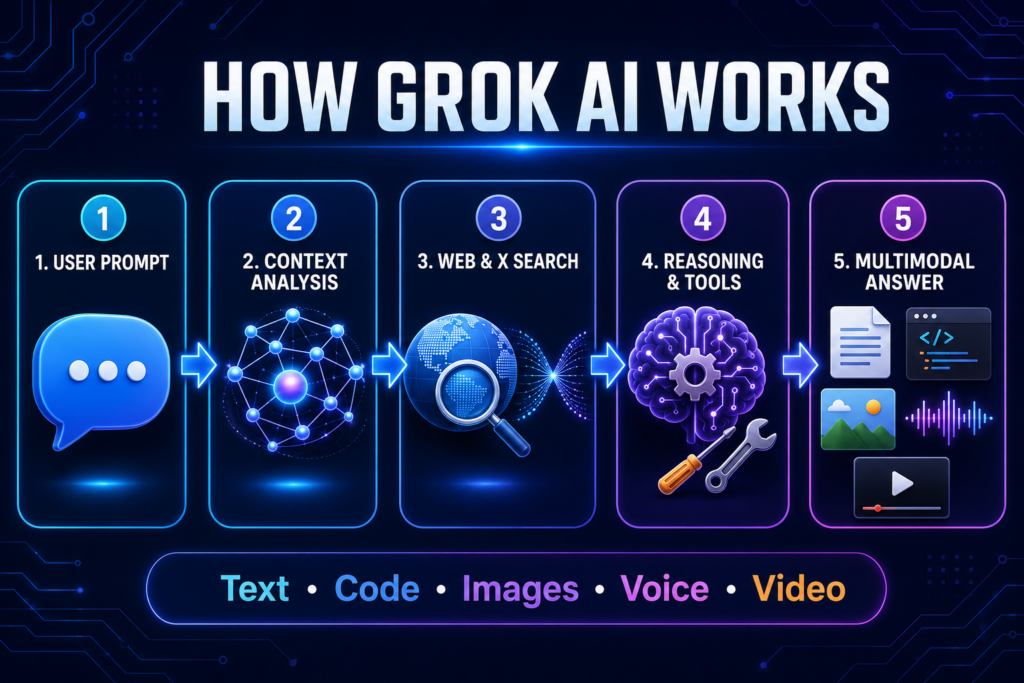
How Does Grok AI Work?
Grok AI works through large language models trained on extensive collections of text, code, scientific material, and other forms of data. These models learn patterns in language and use those patterns to predict and generate an appropriate response to a user’s prompt.
When you enter a question, Grok does not simply retrieve a prewritten answer from a database. It analyzes the words, context, instructions, and likely intention behind your request. It then generates a response one token at a time. A token may represent a whole word, part of a word, punctuation mark, or other unit of information.
Grok’s operation can be understood through four major components:
1. Large Language Model
At the centre of Grok is a large language model capable of understanding and generating natural language. It can summarize information, explain concepts, translate text, brainstorm ideas, write different forms of content, and hold context-aware conversations.
The model has learned relationships between words, ideas, programming concepts, facts, and reasoning patterns. However, it does not understand the world in exactly the same way a human does. Its answers are generated through mathematical patterns and learned representations.
2. Reasoning System
For difficult questions, Grok can devote additional processing to reasoning. This is useful for mathematics, science, coding, planning, logical problems, and questions that require several connected steps.
Configurable reasoning allows the system to balance speed and depth. A simple request may need a quick response, while a complex programming or research problem may benefit from deeper analysis.
Reasoning improves performance, but it does not make Grok infallible. The model may still begin with an incorrect assumption or produce a confident-looking but inaccurate conclusion.
3. Search Tools
Grok can use Web Search and X Search when current information is required. These tools help it find recent webpages, news, public posts, discussions, and other online information.
After finding relevant sources, Grok can extract useful points and combine them into a conversational answer. This process is particularly helpful for:
- Breaking news
- Live events
- Market developments
- Technology announcements
- Product updates
- Public reactions
- Current trends
- Recently published research
Users should open the cited sources before relying on Grok for important medical, legal, financial, academic, or political information.
4. External Tools and Code Execution
Advanced Grok models can interact with tools instead of relying entirely on text generation. Depending on the product and plan, these tools may include search, code execution, file analysis, image generation, video generation, and function calling.
Tool use allows Grok to perform more practical tasks. For example, it may write and execute code to analyze data rather than attempting to calculate everything through language prediction alone.
Where Can You Access Grok AI?
Grok is available through several platforms, making it accessible to both everyday users and developers.
Grok.com
The main standalone web experience is available at Grok.com. Users can open it in a modern browser and access chat, search, file uploads, voice, and creative features according to their account and usage limits.
The web version is useful for longer conversations, document analysis, research, writing, and work that benefits from a larger screen.
Grok on X
Grok is integrated into X, allowing users to access the assistant without leaving the social platform. This version is particularly convenient for exploring posts, trends, current events, and public conversations.
Availability, limits, and advanced features may vary according to the user’s location and X subscription level.
Grok Mobile Apps
Dedicated Grok applications are available for compatible Android and iOS devices. The mobile experience is suitable for quick questions, voice conversations, image creation, camera-based analysis, and assistance while travelling.
Conversations and settings can remain synchronized when the user signs into the same account across supported platforms.
xAI API
Developers can access Grok models through the xAI API. An API, or application programming interface, enables software applications to communicate with an AI model programmatically.
Businesses and developers can use the API to build Grok-powered chatbots, coding tools, research systems, automation workflows, customer-facing applications, and internal assistants.
Major Features of Grok AI
Grok has developed into a multimodal AI platform rather than remaining a text-only chatbot. Its most important features include the following.
Conversational Question Answering
Users can ask questions in everyday language and continue the discussion through follow-up prompts. Grok considers the conversation’s previous context, allowing users to refine an answer without repeating every instruction.
It can explain the same subject at different levels. For example, a user may first request a beginner-friendly explanation and then ask for a more technical version with examples.
Real-Time Web Search
Grok can search the web for information that may not exist in its training data. It can find recent articles, official announcements, technical documents, and other online material.
This is one of Grok’s most valuable features because AI training data always has a cutoff date. Search helps bridge the gap between what the underlying model learned during training and what is happening now.
The quality of the final answer still depends on the quality of the sources selected. Users should prefer official documents, research papers, government websites, and reputable publications over unsupported posts.
X Search
X Search gives Grok access to public information and conversations appearing on X. It can help identify trending discussions, public sentiment, eyewitness accounts, expert commentary, and developing stories.
This feature can benefit journalists, researchers, social media managers, and marketers. However, popularity is not the same as accuracy. Viral posts may be misleading, edited, taken out of context, or entirely false.
Deep Research
For complex questions, Grok can conduct a broader investigation rather than providing an immediate short answer. It may search multiple sources, compare information, examine competing claims, and organize the findings into a structured response.
Deep research can be useful for:
- Preparing background reports
- Studying a new industry
- Comparing products or services
- Exploring academic topics
- Investigating market trends
- Reviewing current technology
- Collecting sources for an article
The result should be treated as a research starting point. Users must still read important original sources and check whether the citations genuinely support the claims made.
Multi-Agent Research
Grok’s multi-agent capability can divide a complicated task among multiple AI agents working in parallel. Each agent may examine a different part of the problem before the system combines their findings into one response.
For example, when researching a new business market, separate agents could examine customer demand, competitors, pricing, risks, and recent industry developments.
This approach can make complex research faster and more comprehensive. It is most useful when a question contains several independent sub-problems that can be investigated simultaneously.
Writing and Editing
Grok can help create and improve many types of written content, including:
- Blog posts
- Emails
- Social media captions
- Video scripts
- Product descriptions
- Reports
- Outlines
- Advertisements
- Stories
- Summaries
- Presentations
Users can specify the desired tone, audience, length, structure, and purpose. They can also paste an existing draft and ask Grok to improve clarity, grammar, flow, or readability.
AI-generated writing should always be reviewed by a human. Without editing, it may contain repetition, generic expressions, factual errors, or a tone that does not match the intended audience.
File Upload and Analysis
Grok can analyze uploaded files such as PDFs, images, spreadsheets, documents, code, and audio files, depending on the available interface and plan.
Users may ask it to:
- Summarize a long PDF
- Extract important points
- Compare two documents
- Explain a chart
- Find information within a report
- Analyze spreadsheet data
- Review source code
- Transcribe or summarize audio
- Answer questions based on uploaded material
The official Grok user guide confirms support for uploading PDFs, images, spreadsheets, code, audio, and other files for analysis. This is the third recommended outbound link for the article.
Users should avoid uploading confidential, copyrighted, financial, medical, or personally identifiable information unless they understand the applicable privacy policies and account controls.
Image Understanding
Grok can examine uploaded images and respond to questions about their visible content. It may describe a scene, identify objects, interpret a screenshot, extract text, explain a diagram, or evaluate a visual layout.
Possible applications include understanding educational diagrams, troubleshooting software through screenshots, reading photographed documents, and receiving feedback on designs.
Image analysis can fail when the picture is blurred, incomplete, highly technical, or visually ambiguous. Important information should therefore be checked manually.
Natural Voice Conversations
Voice Mode allows users to speak with Grok instead of typing every prompt. This makes the assistant easier to use while travelling, practising a language, brainstorming ideas, or completing hands-free tasks.
A natural voice interface can also make AI more accessible to users who find typing difficult. Nevertheless, background noise, accents, unclear speech, and specialized terminology may affect transcription accuracy.
Grok Imagine: Image and Video Generation
Grok Imagine is the creative media-generation component of Grok. It allows users to create images and videos through natural-language prompts within the Grok ecosystem.
A user can describe the subject, background, visual style, colour palette, camera angle, lighting, mood, and composition they want. Grok then interprets these instructions and produces a corresponding visual.
For example, a user might enter:
“Create a realistic image of a futuristic Indian classroom where students are learning with holographic AI assistants, using warm natural lighting.”
Detailed prompts usually produce more controlled results than extremely short requests. Users can continue the conversation to modify colours, objects, expressions, backgrounds, or visual styles.
AI Image Generation
Grok can generate images for purposes such as:
- Blog illustrations
- Social media posts
- Concept art
- Posters and advertisements
- Product ideas
- Educational visuals
- Story scenes
- Thumbnails
- Creative experimentation
Users should inspect generated images carefully. AI systems may produce incorrect text, distorted objects, unusual anatomy, inconsistent details, or misleading representations of real people.
💡 Did You Know?
Grok is no longer limited to answering questions. Its multimodal ecosystem can work with text, code, documents, images, voice, and video, making it considerably broader than the original Grok chatbot introduced in 2023.
AI Video Generation
Grok Imagine can also transform prompts or visual ideas into short AI-generated videos. Users may describe a scene, movement, atmosphere, camera direction, and desired appearance.
This feature can support:
- Short social media clips
- Visual storytelling
- Animated concepts
- Product demonstrations
- Creative advertisements
- Background visuals
- Experimental filmmaking
Video generation remains computationally demanding, and availability or limits may depend on the user’s plan. Generated videos should also be reviewed for visual errors, unwanted content, copyright concerns, and inaccurate representations.
Grok for Coding and Grok Build
Coding has become one of Grok’s most important professional capabilities. Grok 4.5 is designed to handle programming, engineering, agentic tasks, and technical knowledge work.
Programmers can use Grok to:
- Generate code from instructions
- Explain unfamiliar code
- Find and fix bugs
- Refactor existing programs
- Write tests
- Create documentation
- Convert code between languages
- Understand repositories
- Suggest algorithms
- Analyze error messages
- Build prototypes
Grok Build extends these capabilities into a more agentic coding environment. Instead of only suggesting code inside a conversation, a coding agent can inspect files, follow instructions, identify related components, and help complete multi-step software tasks.
Developers must still review generated code for security problems, hidden errors, inefficient logic, unsupported packages, and licensing issues. AI-generated code should not be deployed into an important production system without testing.
✅ Pro Tip
When using Grok for coding, provide the programming language, framework, expected input, required output, constraints, and complete error message. A precise technical prompt usually produces a more useful solution than simply writing, “My code does not work.”
Grok Models Explained
The Grok family has included multiple generations and model variants. Some models prioritise advanced reasoning, while others are designed to balance speed, context capacity, and cost.
The current model available to a user may depend on the Grok product, subscription plan, usage allowance, region, and xAI’s latest model updates.
Grok 4.5
Grok 4.5 is xAI’s flagship model for demanding coding, reasoning, engineering, and agentic work. It supports text and image input, configurable reasoning, large-context processing, function calling, web search, X Search, and code execution through supported interfaces.
It is the most important current model to discuss in this Grok AI Complete Guide, but users should remember that AI model names and availability can change quickly.
Faster Model Options
Not every task requires the largest model. Faster or lower-cost variants may be more practical for summarization, classification, quick writing, routine questions, and high-volume API applications.
For developers, model selection should be based on:
- Task complexity
- Required response speed
- Context length
- Input and output costs
- Reasoning requirements
- Tool support
- Expected request volume
A powerful model may perform better on difficult problems, but using it for every simple request can increase cost and response time unnecessarily.
How to Create a Grok Account
The account-creation process is generally straightforward:
- Visit Grok.com or install the official Grok mobile application.
- Select the sign-up or sign-in option.
- Create an account using one of the available methods.
- Complete any required verification.
- Review the available free and paid options.
- Open a new conversation and enter your first prompt.
Users accessing Grok through X can open the Grok section within the X interface. The exact location and available features may vary across devices and subscription plans.
Users should always access Grok through the official website or verified mobile applications. Fake AI websites and applications may attempt to collect login credentials, personal information, or payment details.
How to Use Grok AI: Step-by-Step
This Grok AI Complete Guide would be incomplete without a practical workflow. Beginners can follow these steps to receive better results.
Step 1: Define Your Goal
Decide exactly what you want Grok to accomplish. A clear goal produces a more focused response.
Instead of:
“Tell me about AI.”
Try:
“Explain generative AI to a first-year college student in 300 words, using two everyday examples.”
Step 2: Add Relevant Context
Tell Grok who the content is for, why you need it, and what information it should consider.
For example:
“I teach undergraduate students with limited technical knowledge. Create a 30-minute introductory lesson on artificial intelligence.”
Step 3: Specify the Output Format
Ask for the answer in the form you actually require, such as a table, checklist, lesson plan, email, outline, code block, or step-by-step guide.
Step 4: Set Limits and Conditions
Mention the desired length, tone, language, number of examples, excluded topics, and any required sources.
Clear constraints reduce irrelevant or overly general responses.
Step 5: Review the Answer
Check names, dates, statistics, links, quotations, calculations, and technical instructions. Do not publish or submit important AI-generated content without reviewing it.
Step 6: Improve Through Follow-Up Prompts
You do not need to achieve the perfect answer in one attempt. Ask Grok to shorten, expand, simplify, reorganize, verify, or rewrite specific parts.
🎓 Student Tip
Use Grok to understand concepts, create revision questions, and receive feedback on your own work. Do not submit an unedited AI-generated assignment as your original writing. Learning happens when you examine, question, and improve the answer yourself.
Grok AI Pricing and Plans
Grok is free to start, but free access generally comes with usage limits. Paid plans provide higher limits and access to additional models or capabilities.
The major access options may include:
- Free Grok access
- Paid SuperGrok plans
- Grok access through eligible X subscriptions
- Business or enterprise offerings
- Usage-based xAI API access
Subscription prices, regional availability, taxes, model access, and usage limits can change. Therefore, this Grok AI Complete Guide does not treat a temporary promotional price as permanent.
Before purchasing a plan, users should check:
- Weekly or monthly usage allowance
- Access to advanced models
- Image and video generation limits
- Voice availability
- File-upload limits
- Priority processing
- Country-specific pricing
- Cancellation and refund conditions
Free Grok vs SuperGrok
The free version is suitable for users who want to test Grok, ask occasional questions, perform basic research, or explore its creative features.
SuperGrok is intended for users who need higher limits, more frequent access, advanced models, deeper research, or greater use of image and video generation.
The paid option may be valuable for researchers, programmers, creators, and professionals who use Grok regularly. Casual users should begin with the free version and upgrade only when the free limits interfere with their work.
💼 Business Tip
A paid AI plan is useful only when it saves more time or creates more value than it costs. Businesses should test Grok on real workflows and measure accuracy, time saved, and required human correction before purchasing multiple subscriptions.
Best Uses Covered in This Grok AI Complete Guide
Grok can support many everyday, academic, creative, and professional tasks. The most valuable use depends on the user’s goal and ability to verify the result.
Grok for Students and Teachers
Students can use Grok to simplify concepts, generate practice questions, summarize notes, compare theories, and create study plans. Teachers can use it to prepare lesson outlines, quizzes, examples, classroom activities, and differentiated explanations.
Readers who want to understand the technology behind such tools should also read What Is Artificial Intelligence?
Grok for Researchers
Researchers can use Grok to discover sources, explore unfamiliar topics, summarize documents, compare arguments, and identify questions for further investigation. Its real-time search is helpful when studying recent developments.
Grok should not be treated as an academic source itself. Researchers must read original papers, confirm quotations, and format references through reliable citation tools.
Grok for Content Creators
Grok can generate topic ideas, outlines, headlines, captions, video scripts, image prompts, and content variations. Its access to current discussions on X can also help creators identify emerging interests.
However, publishing raw AI content may produce generic or inaccurate material. Human experience, original examples, editing, and fact-checking remain essential.
Grok for Businesses
Businesses can use Grok for market research, competitor analysis, document summaries, email drafts, brainstorming, customer-response templates, and internal knowledge tasks.
Sensitive business information should not be uploaded without examining the applicable privacy and data-retention controls.
Advantages Highlighted in This Grok AI Complete Guide
The major advantages of Grok include:
- Access to current information through Web Search
- Integration with public conversations on X
- Advanced reasoning and coding support
- Text, image, voice, file, and video capabilities
- A conversational and comparatively informal style
- Dedicated web and mobile applications
- API access for developers
- Multi-agent support for complex research
The combination of real-time search and multimodal creation makes Grok more versatile than a basic chatbot.
Limitations of Grok AI
A balanced Grok AI Complete Guide must also explain where the platform may fail.
Grok can generate incorrect facts, invented references, inaccurate summaries, flawed code, and misleading interpretations. Real-time access does not eliminate these problems because online sources themselves may be unreliable.
Other limitations include:
- Usage limits on free or paid plans
- Rapidly changing models and features
- Variable availability across regions
- Possible bias in selected sources
- Misinformation within social media content
- Privacy concerns when uploading sensitive files
- Inconsistent image or video results
- Dependence on clear prompts and human review
Grok should assist human judgement rather than replace it in high-stakes decisions.
🔍 Quick Summary
Grok is strongest when users need current information, conversational research, coding help, or multimodal creation. Its answers still require source checking, especially when the topic involves health, law, finance, politics, safety, or academic research.
Grok AI Complete Guide: Privacy, Accuracy and Safety
Users should assume that anything entered into an online AI platform may be processed or stored according to its current policies and account settings. Confidential records, passwords, private student data, unpublished research, financial details, and personally identifiable information should not be shared casually.
To use Grok more safely:
- Remove personal details from documents
- Verify important claims through primary sources
- Check generated code before execution
- Review image and video outputs
- Avoid relying on Grok for emergencies
- Examine privacy controls before professional use
- Clearly label AI-generated media when necessary
Grok vs ChatGPT vs Gemini vs Claude vs Perplexity
No AI assistant is best for every user.
Grok is especially useful for real-time information, X-based discussions, conversational research, coding, and media generation. Readers wanting a detailed understanding of OpenAI’s assistant can consult the ChatGPT Complete Guide.
| AI Assistant | Best For | Real-Time Web Search | Major Strength | Important Limitation |
|---|---|---|---|---|
| Grok | Current events, X discussions, coding and multimodal creation | Yes, including Web Search and X Search | Real-time information combined with reasoning, coding, voice, images and video | Information from social media may require careful verification |
| ChatGPT | General-purpose work, writing, research, coding and data analysis | Yes, depending on the selected mode and plan | Broad ecosystem, strong tools and versatile professional workflows | Advanced capabilities and limits vary by subscription |
| Google Gemini | Google ecosystem, research and multimodal tasks | Yes | Integration with Google services and strong multimodal capabilities | The experience may vary across Google products and account types |
| Claude | Long documents, thoughtful writing, coding and analysis | Yes, where supported | Clear long-form responses and strong document handling | Some creative and multimedia features may be less extensive |
| Perplexity | Source-based web research and quick fact discovery | Yes | Citation-focused answers and efficient online research | Less focused on broad creative and productivity workflows |
Gemini may be attractive to users working within Google’s ecosystem. Its broader capabilities are explained in the Google Gemini Complete Guide.
Claude is widely used for writing, document analysis, coding, and thoughtful long-form responses. See the Claude AI Complete Guide for a detailed overview.
Perplexity focuses strongly on answer-engine-style research and source-backed web discovery. Its workflow is discussed in the Perplexity AI Complete Guide.
The right choice depends on the task. Many professionals use more than one assistant and select the platform that performs best for a particular workflow.
Is Grok AI Worth Using?
For users interested in current events, research, coding, creative media, or conversations connected with X, Grok is worth testing. Free access provides a practical way to evaluate its interface and response quality before paying.
A subscription becomes worthwhile when higher limits or advanced features save meaningful time. Users should compare actual results rather than choosing an AI assistant solely because of popularity or benchmark scores.
Future of Grok AI
Grok is likely to become more agentic, multimodal, and deeply connected with digital tools. Future versions may perform longer workflows, improve scientific reasoning, generate more consistent media, and interact with business applications more independently.
This progress will also increase concerns about misinformation, privacy, synthetic media, automation, and responsible human oversight.
Final Thoughts on This Grok AI Complete Guide
Grok has evolved rapidly from an unconventional chatbot into a broad artificial intelligence platform for search, reasoning, writing, coding, voice, file analysis, and visual creation.
Its greatest strengths are current-information access, integration with X, advanced models, and the ability to combine several AI functions within one ecosystem. Its greatest weakness is the same limitation shared by all generative AI systems: a fluent answer can still be wrong.
The best way to use Grok is as an intelligent assistant—not as an unquestionable authority. Give it clear instructions, examine its sources, protect sensitive information, and apply human judgement before using its output.
🎯 Final Thought
The real value of Grok does not come from asking more questions. It comes from asking better questions, verifying the answers, and using AI-generated information responsibly.
What is Grok AI?
Grok AI is a generative artificial intelligence assistant developed by xAI. It can answer questions, search the web and X, analyze files, generate written content, assist with coding, hold voice conversations, and create images and videos.
Who created Grok AI?
Grok AI was created by xAI, an artificial intelligence company founded by Elon Musk in 2023. It is developed by a team of AI researchers, engineers, infrastructure specialists, and product experts.
Is Grok AI free to use?
Yes, Grok is free to start, but free users may have limited access to advanced models and features. Paid SuperGrok plans and eligible X subscriptions generally provide higher usage limits and additional capabilities.
How can I access Grok AI?
You can access Grok through Grok.com, the official Android and iOS applications, or the Grok section within X. Developers can also integrate supported Grok models into applications through the xAI API.
Can Grok AI search the internet in real time?
Yes, Grok can use Web Search and X Search to retrieve current information. This makes it useful for recent news, technology announcements, public discussions, and changing events. Users should still verify important claims through reliable primary sources.
Can Grok AI generate images and videos?
Yes, Grok Imagine can generate images and videos from natural-language prompts. Users can describe the subject, style, lighting, background, movement, and composition they want, although availability and usage limits may depend on their plan.
Is Grok AI good for students?
Grok can help students understand difficult concepts, summarize notes, generate revision questions, create study plans, and receive feedback on their work. Students should verify its answers and avoid submitting unedited AI-generated assignments as original work.
Can Grok AI help with coding?
Yes, Grok can generate, explain, debug, refactor, and document code. It can also suggest algorithms and analyze error messages. Developers should test all generated code and review it for security, performance, and accuracy before deployment.
Is Grok better than ChatGPT, Gemini, Claude, or Perplexity?
Grok is particularly useful for real-time information, X-based discussions, coding, research, and multimodal creation. However, ChatGPT, Gemini, Claude, and Perplexity may perform better for particular workflows. The best choice depends on the user’s requirements.
Is the information provided by Grok AI always accurate?
No. Grok can produce incorrect facts, misleading summaries, fabricated details, or flawed code. This Grok AI Complete Guide recommends checking citations and verifying important medical, legal, financial, political, technical, and academic information through authoritative sources.