
Introduction
Creating professional presentations has always been an important part of education, business, marketing, sales, and corporate communication. Whether you are a student preparing an academic project, a teacher designing a lesson, a consultant presenting recommendations, or a startup founder pitching investors, presentations remain one of the most effective ways to communicate ideas.
However, creating a presentation from scratch can be time-consuming. Researching information, writing content, designing slides, selecting visuals, maintaining consistency, and formatting layouts often require several hours of work.
Artificial intelligence is changing this process dramatically.
Modern AI presentation makers can generate complete presentations from a simple prompt, document, or outline. These tools can automatically create slides, summarize information, generate speaker notes, suggest visuals, improve layouts, and even help structure your story.
Instead of spending hours building presentations manually, users can now create professional-quality slide decks within minutes.
If you are new to artificial intelligence, you may first want to explore What Is Artificial Intelligence? The Complete Beginner’s Guide to AI to understand the technologies powering these modern productivity tools.
In this guide, we will explore the best AI presentation makers in 2026, compare their features, strengths, weaknesses, pricing models, and ideal use cases, helping you choose the right solution for your needs.
What Are AI Presentation Makers?
AI presentation makers are software tools that use artificial intelligence to automate presentation creation and design.
Instead of manually creating every slide, users can simply provide:
- A topic
- A prompt
- A report
- A document
- Meeting notes
- Research material
- A webpage link
The AI then analyzes the information and generates a complete presentation with structured slides, content summaries, visual suggestions, layouts, icons, and graphics.
Many modern AI presentation tools can also:
- Create presentations from prompts
- Convert documents into slide decks
- Generate speaker notes
- Improve storytelling
- Design layouts automatically
- Create visuals and illustrations
- Suggest charts and diagrams
- Translate presentations into multiple languages
These capabilities make AI presentation makers valuable for students, teachers, marketers, consultants, business professionals, researchers, and startups.
Why AI Presentation Makers Are Growing So Fast
The popularity of AI presentation tools has increased significantly because organizations and individuals are under constant pressure to communicate information quickly.
Traditional presentation software gives users complete control, but it also requires substantial effort.
AI reduces this workload by automating repetitive tasks.
Key Advantages of AI Presentation Makers
| Benefit | Description |
|---|---|
| Faster Creation | Generate presentations in minutes |
| Professional Design | Automatically designed layouts |
| Better Productivity | Less manual work |
| Content Assistance | AI-generated summaries and text |
| Collaboration | Easier teamwork |
| Visual Enhancement | Automatic graphics and images |
| Consistency | Uniform slide formatting |
| Accessibility | Useful for beginners and experts |
Many of these productivity improvements are similar to those discussed in our Best AI Productivity Tools in 2026 guide.
How AI Presentation Makers Work
Although different platforms use different technologies, most AI presentation makers follow a similar workflow.
Step 1: User Input
The user enters:
- A topic
- A prompt
- Notes
- A document
- Research material
Example:
“Create a presentation about artificial intelligence in education.”
Step 2: AI Analysis
The AI analyzes the information and identifies:
- Main themes
- Important points
- Logical structure
- Relevant visuals
Step 3: Slide Generation
The system automatically creates:
- Title slide
- Introduction slides
- Content slides
- Summary slides
- Conclusion slides
Step 4: Design Optimization
The AI applies:
- Color schemes
- Layouts
- Fonts
- Icons
- Images
Step 5: User Editing
The user reviews and modifies the presentation as needed.
This process can reduce presentation creation time from several hours to just a few minutes.
Top AI Presentation Makers Compared
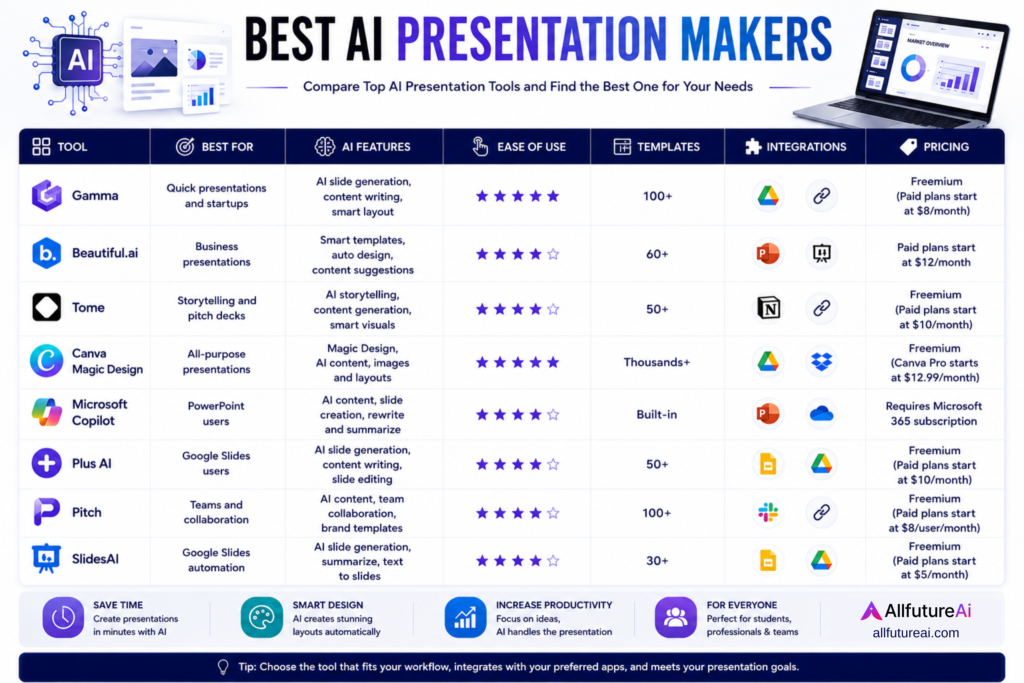
| Tool | Best For | Free Plan | Ease of Use |
|---|---|---|---|
| Gamma | Fast Presentation Creation | Yes | Excellent |
| Beautiful.ai | Business Presentations | Limited | Excellent |
| Tome | Storytelling and Pitch Decks | Yes | Very Good |
| Canva Magic Design | Creative Presentations | Yes | Excellent |
| Microsoft Copilot | PowerPoint Users | No | Excellent |
| Plus AI | Google Slides Users | Trial | Very Good |
| Pitch | Team Collaboration | Yes | Very Good |
| SlidesAI | Quick Slide Generation | Yes | Good |
1. Gamma
Best For: Fast AI-Powered Presentations
Gamma has quickly become one of the most popular AI presentation makers available today.
The platform allows users to generate complete presentations simply by entering a topic or prompt.
Unlike traditional slide software, Gamma focuses on speed, simplicity, and modern design.
Key Features
- Prompt-based presentation generation
- Interactive content blocks
- AI-assisted writing
- Modern layouts
- Collaboration tools
- Sharing and analytics
Pros
- Extremely easy to use
- Fast presentation creation
- Modern visual appearance
- Strong free version
Cons
- Limited advanced customization
- Premium features require paid plans
Best For
- Students
- Teachers
- Professionals
- Startup founders
2. Beautiful.ai
Best For: Business Presentations
Beautiful.ai is designed primarily for business users who want polished, professional presentations.
The platform automatically adjusts layouts and design elements to maintain consistency throughout a presentation.
Key Features
| Feature | Benefit |
|---|---|
| Smart Templates | Faster design |
| Automatic Layouts | Consistent slides |
| Team Collaboration | Shared projects |
| Brand Controls | Company-wide consistency |
| Analytics | Presentation performance insights |
Pros
- Professional appearance
- Excellent business templates
- Strong branding controls
- Time-saving automation
Cons
- Less flexibility than PowerPoint
- Premium pricing
Best For
- Corporate teams
- Consultants
- Sales professionals
- Executives
3. Tome
Best For: Storytelling and Investor Pitch Decks
Tome combines AI presentation generation with storytelling-focused design.
Instead of simply generating slides, Tome helps users create narratives that guide audiences through ideas and concepts.
This makes it especially useful for startups and entrepreneurs.
Key Features
- AI storytelling assistance
- Interactive presentations
- Prompt-based slide creation
- Multimedia integration
- Modern visual design
Pros
- Excellent storytelling
- Strong pitch deck support
- Modern interface
- Easy presentation generation
Cons
- Less suitable for traditional corporate presentations
- Limited advanced customization
Best For
- Entrepreneurs
- Startup founders
- Marketing teams
- Investors
4. Canva Magic Design
Best For: Creative Presentations
Canva is one of the most widely used design platforms in the world.
Its Magic Design feature uses artificial intelligence to generate presentations automatically while providing access to Canva’s extensive template library.
This combination makes Canva one of the most versatile presentation tools available.
Key Features
- AI-generated presentations
- Massive template collection
- Drag-and-drop editing
- AI image generation
- Collaboration tools
- Brand kits
Pros
- Beginner friendly
- Highly customizable
- Large template library
- Excellent visual quality
Cons
- Some AI features require Canva Pro
- Large presentations may become slower
Best For
- Students
- Teachers
- Content creators
- Small businesses
Creative professionals interested in AI-powered design tools can also explore Best AI Tools for Graphic Designers in 2026.
5. Microsoft Copilot for PowerPoint
Best For: Existing PowerPoint Users
Microsoft Copilot integrates directly into PowerPoint and helps users create presentations from prompts, reports, meeting notes, and documents.
For organizations already using Microsoft 365, Copilot can significantly reduce presentation preparation time.
Instead of creating slides manually, users can simply describe what they need, and Copilot generates structured presentations automatically.
Key Features
- Native PowerPoint integration
- AI slide generation
- Document-to-presentation conversion
- AI-generated speaker notes
- Presentation summaries
- Microsoft 365 ecosystem support
Pros
- Familiar PowerPoint environment
- Strong productivity benefits
- Enterprise-level security
- Excellent integration with Microsoft tools
Cons
- Requires Microsoft 365 subscription
- Premium pricing
- Best experience requires existing Microsoft ecosystem
Best For
- Corporate teams
- Office professionals
- Enterprise organizations
- Consultants
6. Plus AI
Best For: Google Slides Users
Plus AI is one of the most popular AI presentation tools for users who work primarily with Google Slides.
Unlike standalone presentation platforms, Plus AI operates directly inside Google Slides, making it easy for users to continue working in a familiar environment.
Key Features
- Google Slides integration
- AI-generated presentations
- Slide rewriting
- Content enhancement
- Presentation summarization
- Team collaboration
Pros
- Works inside Google Slides
- Easy to learn
- Fast presentation generation
- Good collaboration support
Cons
- Fewer templates than Canva
- Limited free usage
Best For
- Students
- Teachers
- Remote teams
- Google Workspace users
7. Pitch
Best For: Team Collaboration
Pitch focuses heavily on collaborative presentation creation.
The platform is designed for modern teams that need multiple people working on presentations simultaneously.
Marketing teams, agencies, startups, and corporate departments often use Pitch because of its collaboration-first approach.
Key Features
- Real-time collaboration
- Team workspaces
- Shared templates
- Presentation analytics
- Brand management tools
Pros
- Excellent team collaboration
- Modern interface
- Strong business features
- Professional templates
Cons
- Smaller AI feature set than some competitors
- Limited free plan capabilities
Best For
- Agencies
- Marketing teams
- Startups
- Business departments
8. SlidesAI
Best For: Quick Slide Generation
SlidesAI focuses on simplicity.
Users simply paste content into the platform, and the AI automatically converts the text into presentation slides.
This makes SlidesAI particularly useful for users who already have content prepared and want to convert it into presentations quickly.
Key Features
- Text-to-presentation conversion
- Google Slides integration
- AI content organization
- Multiple presentation styles
- Fast slide generation
Pros
- Easy to use
- Quick results
- Affordable pricing
- Beginner friendly
Cons
- Limited advanced customization
- Basic design options compared to Canva
Best For
- Students
- Teachers
- Professionals
- Researchers
Researchers using AI for information gathering may also benefit from Best AI Research Tools in 2026.
Free vs Paid AI Presentation Makers
One of the most common questions users ask is whether free AI presentation tools are sufficient.
The answer depends on your requirements.
Free AI Presentation Tools
| Tool | Free Plan Available |
|---|---|
| Gamma | Yes |
| Canva | Yes |
| Tome | Yes |
| Pitch | Yes |
| SlidesAI | Yes |
Advantages of Free Plans
- No upfront cost
- Suitable for beginners
- Good for occasional use
- Useful for students
Limitations
- Usage restrictions
- Limited AI credits
- Fewer templates
- Watermarks in some cases
Benefits of Paid Plans
- More AI generations
- Premium templates
- Team collaboration
- Advanced customization
- Better support
For professionals and businesses creating presentations regularly, paid plans often provide significant value.
AI Presentation Makers for Different Users
Students
Recommended Tools:
- Gamma
- Canva
- Plus AI
Students can create:
- Project presentations
- Seminar presentations
- Research presentations
- Class assignments
Students exploring AI productivity solutions may also find value in Best Free AI Tools for Students in 2026.
Teachers and Educators
Recommended Tools:
- Canva
- Gamma
- Microsoft Copilot
Teachers can create:
- Lesson presentations
- Classroom slides
- Educational resources
- Training materials
Educators interested in AI-powered teaching tools can explore Best AI Tools for Teachers in 2026.
Business Professionals
Recommended Tools:
- Beautiful.ai
- Microsoft Copilot
- Pitch
Business use cases include:
- Sales presentations
- Business reports
- Executive briefings
- Client proposals
Startup Founders
Recommended Tools:
- Tome
- Gamma
- Canva
Startups often need:
- Investor presentations
- Product presentations
- Growth strategy decks
- Team presentations
Many founders also use tools discussed in Best AI Tools for Business Automation in 2026.
Marketing Teams
Recommended Tools:
- Canva
- Pitch
- Beautiful.ai
Marketing presentations often include:
- Campaign reports
- Client proposals
- Marketing strategies
- Performance dashboards
Professionals focused on digital growth may also explore Best AI SEO Tools: The Ultimate Guide for Bloggers, Marketers, and Businesses.
Common Mistakes When Using AI Presentation Makers
Although AI presentation tools can save significant time, users should avoid relying entirely on automation.
Common Mistakes
1. Accepting AI Output Without Review
AI-generated content may occasionally contain errors or outdated information.
Always review slides carefully.
2. Using Too Much Text
Presentations should support communication, not replace it.
Slides overloaded with text reduce audience engagement.
3. Ignoring Visual Consistency
Maintain consistent:
- Fonts
- Colors
- Layouts
- Graphics
4. Overusing Animations
Excessive animations can distract audiences.
Use them only when necessary.
5. Not Customizing Templates
AI-generated presentations should be personalized to match your audience and objectives.
Best Practices for Creating Better AI Presentations
To maximize results:
- Start with a clear objective
- Provide detailed prompts
- Review all AI-generated content
- Add your own expertise
- Use high-quality visuals
- Keep slides concise
- Focus on storytelling
- Maintain visual consistency
The best presentations combine AI efficiency with human creativity.
The Future of AI Presentation Makers
AI presentation technology continues to evolve rapidly.
Future tools are expected to include:
- Voice-controlled presentation generation
- Real-time slide creation
- Personalized audience recommendations
- Advanced storytelling assistance
- Automatic data visualization
- AI-generated video presentations
As artificial intelligence becomes more powerful, creating professional presentations will become even faster and more accessible.
Conclusion
AI presentation makers have transformed the way presentations are created across education, business, marketing, consulting, and professional communication.
Instead of spending hours designing slides manually, users can now generate professional-quality presentations in minutes.
Whether you are a student preparing an assignment, a teacher developing classroom materials, a consultant presenting recommendations, or a startup founder preparing an investor pitch deck, AI presentation makers can significantly improve productivity and presentation quality.
For readers interested in exploring the broader AI ecosystem, our Best AI Tools in 2026: Complete Guide for Beginners provides a comprehensive overview of the most useful AI tools available today.
The right AI presentation maker depends on your goals, preferred workflow, budget, and presentation requirements. By combining AI assistance with human expertise, you can create more engaging, effective, and professional presentations while saving valuable time and effort.
Frequently Asked Questions About AI Presentation Makers
What are AI presentation makers?
AI presentation makers are software tools that use artificial intelligence to create presentations automatically from prompts, documents, notes, or outlines. They can generate slides, layouts, visuals, and content within minutes.
Which is the best AI presentation maker in 2026?
Some of the best AI presentation makers in 2026 include Gamma, Beautiful.ai, Tome, Canva Magic Design, Microsoft Copilot, Plus AI, Pitch, and SlidesAI. The best choice depends on your specific needs and workflow.
Are AI presentation makers free to use?
Many AI presentation makers offer free plans with limited features. Tools like Gamma, Canva, Tome, Pitch, and SlidesAI provide free access, while premium plans unlock advanced AI capabilities and templates.
Can AI create a complete presentation from a prompt?
Yes. Modern AI presentation tools can generate complete presentations from a simple prompt, including slide content, layouts, visuals, and presentation structure.
Are AI presentation makers suitable for students?
Yes. Students can use AI presentation makers to create project presentations, assignments, seminar slides, research presentations, and classroom projects more efficiently.
Which AI presentation tool works best with PowerPoint?
Microsoft Copilot is currently one of the best AI presentation tools for PowerPoint users because it integrates directly into Microsoft PowerPoint and automates slide creation.
Which AI presentation maker is best for Google Slides users?
Plus AI and SlidesAI are excellent options for Google Slides users because they integrate directly with Google Slides and simplify presentation creation.
Can AI presentation makers create investor pitch decks?
Yes. Tools like Tome, Gamma, and Canva can help startups and entrepreneurs create professional investor pitch decks quickly and efficiently.
Do AI presentation makers replace presentation skills?
No. AI can automate slide creation and design, but effective communication, storytelling, and presentation delivery still require human skills.
Are AI-generated presentations editable?
Yes. Most AI presentation makers allow users to edit content, layouts, visuals, colors, fonts, and design elements after generation.
How do AI presentation makers save time?
AI presentation makers automate research summarization, slide creation, content organization, and design formatting, reducing hours of manual work.
Should businesses use AI presentation makers?
Yes. Businesses can use AI presentation makers to create sales presentations, client proposals, reports, training materials, business reviews, and executive presentations more efficiently.